Powershell: Snap and MSIX install of pwsh on Ubuntu does not support Update-Help
Steps to reproduce
Install powershell-preview on Ubuntu 18.04 using snap i.e.
# snap install powershell-preview --classic

From pwsh-preview console enter the following command>

PS /home/donhunt> Update-Help -Force
Expected behavior
PowerShell Modules that have updatable help should refresh to latest content
Actual behavior
Update-Help : Read-only file system
At line:1 char:1
+ Update-Help -Force
+ ~~~~~~~~~~~~~~~~~~
+ CategoryInfo          : NotSpecified: (:) [Update-Help], IOException
+ FullyQualifiedErrorId : System.IO.IOException,Microsoft.PowerShell.Commands.UpdateHelpCommand
Environment data
PS /home/donhunt> $PSVersionTable

Name                           Value
----                           -----
PSVersion                      6.1.0-preview.4
PSEdition                      Core
GitCommitId                    6.1.0-preview.4
OS                             Linux 4.15.0-29-generic #31-Ubuntu SMP Tue Jul 17 15:39:52 UTC 2018
Platform                       Unix
PSCompatibleVersions           {1.0, 2.0, 3.0, 4.0...}
PSRemotingProtocolVersion      2.3
SerializationVersion           1.1.0.1
WSManStackVersion              3.0

donhunt@ubuntu:~$ snap list powershell-preview
Name                Version          Rev  Tracking  Publisher             Notes
powershell-preview  6.1.0-preview.4  6    stable    microsoft-powershell  classic

donhunt@ubuntu:/etc$ cat os-release
NAME="Ubuntu"
VERSION="18.04.1 LTS (Bionic Beaver)"
ID=ubuntu
ID_LIKE=debian
PRETTY_NAME="Ubuntu 18.04.1 LTS"
VERSION_ID="18.04"
HOME_URL="https://www.ubuntu.com/"
SUPPORT_URL="https://help.ubuntu.com/"
BUG_REPORT_URL="https://bugs.launchpad.net/ubuntu/"
PRIVACY_POLICY_URL="https://www.ubuntu.com/legal/terms-and-policies/privacy-policy"
VERSION_CODENAME=bionic
UBUNTU_CODENAME=bionic
 DonPwrShellHunt
All 12 comments
/cc @TravisEz13 Could you please comment the Issue?
 iSazonov
on 6 Aug 2018
iSazonov
on 6 Aug 2018
@adityapatwardhan I thought we changed the default target to be the user?
 TravisEz13
on 7 Aug 2018
TravisEz13
on 7 Aug 2018
I verified update-help -Scope CurrentUser fails as well with the same error
TravisEz13
on 7 Aug 2018
Any updates on this?
```
PS /home/megamorf> $PSVersionTable
Name Value
---- -----
PSVersion 6.2.0-preview.2
PSEdition Core
GitCommitId 6.2.0-preview.2
OS Linux 4.18.16-96.current #1 SMP PREEMPT Sun Oct 21 15:23:25 UTC 2018
Platform Unix
PSCompatibleVersions {1.0, 2.0, 3.0, 4.0...}
PSRemotingProtocolVersion 2.3
SerializationVersion 1.1.0.1
WSManStackVersion 3.0
PS /home/megamorf> Update-Help -Force -Verbose -Scope CurrentUser
Update-Help : Read-only file system
At line:1 char:1
- Update-Help -Force -Verbose -Scope CurrentUser
~~~~~~~~~~- CategoryInfo : NotSpecified: (:) [Update-Help], IOException
- FullyQualifiedErrorId : System.IO.IOException,Microsoft.PowerShell.Commands.UpdateHelpCommand
```
 megamorf
on 17 Nov 2018
megamorf
on 17 Nov 2018
@TravisEz13 & @megamorf
Hum! I've been using just:
Update-Help -force
Without the "-Scope CurrentUser" parameter and is working fine on non-admin session.
Maybe the "-Scope" is not a mandatory parameter.
:)
Never mind!! Only in Windows works OK.
In Ubuntu 18.04, I'm getting the same error too!
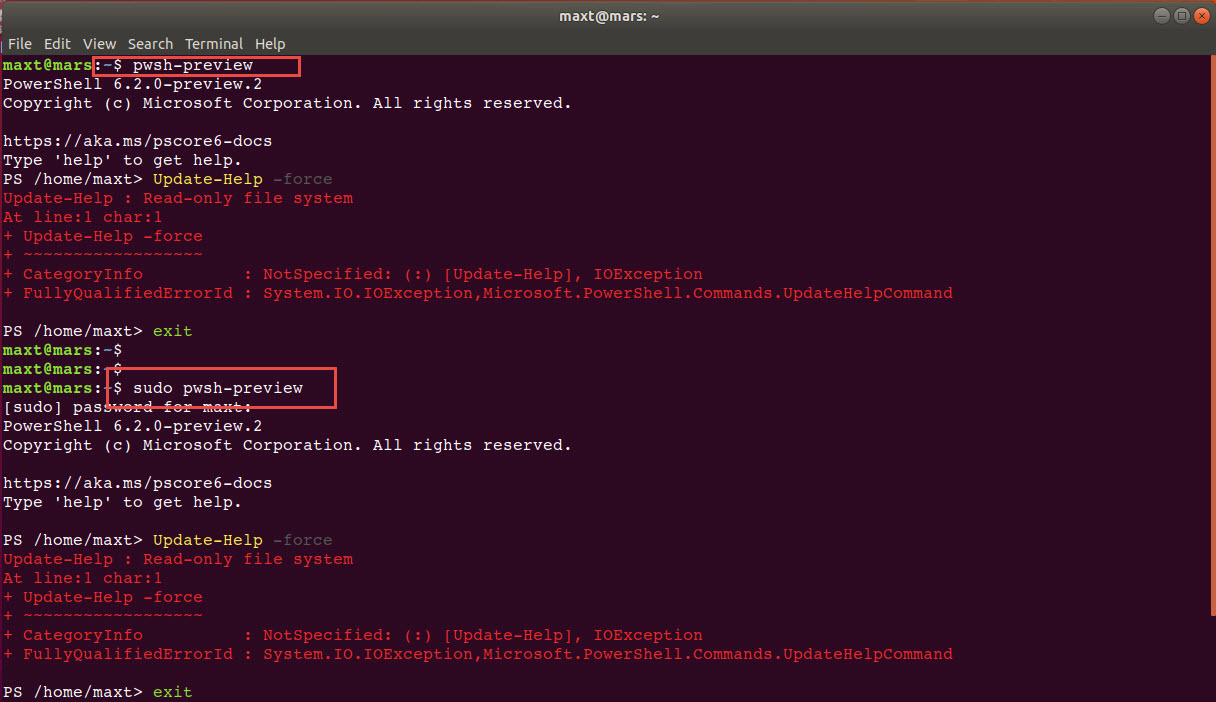
maxt@mars:~$ pwsh-preview
PowerShell 6.2.0-preview.2
Copyright (c) Microsoft Corporation. All rights reserved.

https://aka.ms/pscore6-docs
Type 'help' to get help.

PS /home/maxt> Update-Help -force
Update-Help : Read-only file system
At line:1 char:1
+ Update-Help -force
+ ~~~~~~~~~~~~~~~~~~
+ CategoryInfo          : NotSpecified: (:) [Update-Help], IOException
+ FullyQualifiedErrorId : System.IO.IOException,Microsoft.PowerShell.Commands.UpdateHelpCommand

PS /home/maxt>
 MaximoTrinidad
on 17 Nov 2018
MaximoTrinidad
on 17 Nov 2018
BTW
You can't even use "sudo" to execute "Update-Help".
This is a bug!
:)
MaximoTrinidad
on 17 Nov 2018
Here is the stack trace:
PSMessageDetails      :
Exception             : System.IO.IOException: Read-only file system
                           at Interop.ThrowExceptionForIoErrno(ErrorInfo errorInfo, String path, Boolean isDirectory, Func`2 errorRewriter)
                           at Microsoft.Win32.SafeHandles.SafeFileHandle.Open(String path, OpenFlags flags, Int32 mode)
                           at System.IO.FileStream..ctor(String path, FileMode mode, FileAccess access, FileShare share, Int32 bufferSize, FileOptions options)
                           at System.IO.FileStream..ctor(String path, FileMode mode, FileAccess access, FileShare share)
                           at System.Management.Automation.Configuration.PowerShellConfig.UpdateValueInFile[T](ConfigScope scope, String key, T value, Boolean addValue)
                           at System.Management.Automation.Configuration.PowerShellConfig.WriteValueToFile[T](ConfigScope scope, String key, T value)
                           at System.Management.Automation.Configuration.PowerShellConfig.SetDisablePromptToUpdateHelp(Boolean prompt)
                           at System.Management.Automation.Help.UpdatableHelpSystem.SetDisablePromptToUpdateHelp()
                           at Microsoft.PowerShell.Commands.UpdateHelpCommand.BeginProcessing()
                           at System.Management.Automation.Cmdlet.DoBeginProcessing()
                           at System.Management.Automation.CommandProcessorBase.DoBegin()
TargetObject          :
CategoryInfo          : NotSpecified: (:) [Update-Help], IOException
FullyQualifiedErrorId : System.IO.IOException,Microsoft.PowerShell.Commands.UpdateHelpCommand
ErrorDetails          :
InvocationInfo        : System.Management.Automation.InvocationInfo
ScriptStackTrace      : at <ScriptBlock>, <No file>: line 1
PipelineIterationInfo : {}
The problem is SetDisablePromptToUpdateHelp it always writes to the systemwide setting which are read-only in snap.
TravisEz13
on 19 Nov 2018
This might be a good opportunity and excuse to move updatible help and profiles (which have the same problem) outside of pshome
 TylerLeonhardt
on 4 May 2019
TylerLeonhardt
on 4 May 2019
Snap allows to write to user home.
Also I guess snap allows to make any directory writable (pshome too).
iSazonov
on 4 May 2019
Please continue discussion in https://github.com/PowerShell/PowerShell/issues/9278
 SteveL-MSFT
on 4 May 2019
SteveL-MSFT
on 4 May 2019
The problem here is different than #9278. This cmdlet is writing the the WRONG scope even when the scope is specified. We need to fix this issue.
TravisEz13
on 5 Nov 2019
:tada:This issue was addressed in #10974, which has now been successfully released as v7.0.0-preview.6.:tada:
Handy links:
![msftbot[bot] picture](https://avatars2.githubusercontent.com/in/26612?v=4&s=40) msftbot[bot]
on 21 Nov 2019
msftbot[bot]
on 21 Nov 2019
Related issues
MaximoTrinidad
·
3Comments
 garegin16
·
3Comments
garegin16
·
3Comments
 alx9r
·
3Comments
alx9r
·
3Comments
 JohnLBevan
·
3Comments
JohnLBevan
·
3Comments
 lzybkr
·
3Comments
lzybkr
·
3Comments