Powershell: Export-CliXml - issue with $PSVersionTable xml tag when importing CliXml to psobject .
Ok! Heard me out. While I was playing around with PowerShell Studio to create a form to display results coming from $PSversionTable in PSCore6 psobjects exported to clixml to then import to a psobject in Windows PowerShell.
I found out the Import-CliXml will error out in Windows PowerShell with the following message:
Import-Clixml : SemanticVersion XML tag is not recognized. Line 81, position 8.
At line:1 char:10
+ $psobj = Import-Clixml -Path c:\Temp\pwshobject602.xml;
+          ~~~~~~~~~~~~~~~~~~~~~~~~~~~~~~~~~~~~~~~~~~~~~
    + CategoryInfo          : NotSpecified: (:) [Import-Clixml], XmlException
    + FullyQualifiedErrorId : System.Xml.XmlException,Microsoft.PowerShell.Commands.ImportClixmlCommand
Of course, this is not a Windows PowerShell issue as the workaround below works.
WorkAround
Via code I had to fix the xml tag;
:
 $line.Replace('SemanticVersion', 'Version');
:

After fixing the xml tag then my application works. This only happens with the $PSVersionTable.
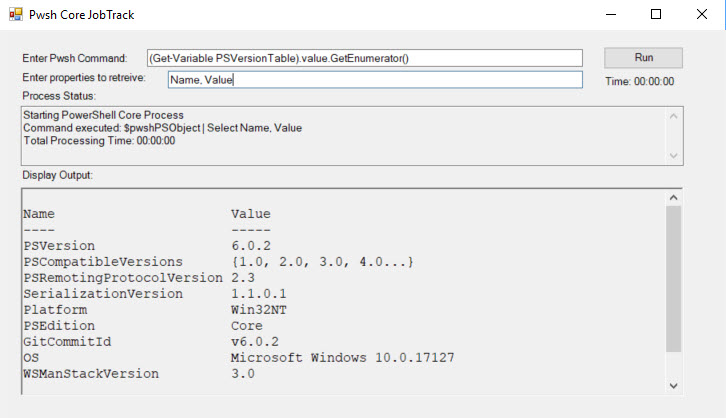
Steps to reproduce
## - Execute in PSCore 6.0.2:
(Get-Variable PSVersionTable).value.GetEnumerator()| Export-Clixml -Path c:\Temp\pwshobject602.xml;

## - Execute in Windows PowerShell:
$psobj = Import-Clixml  -Path c:\Temp\pwshobject602.xml;
Import-Clixml : SemanticVersion XML tag is not recognized. Line 81, position 8.
At line:1 char:10
+ $psobj = Import-Clixml -Path c:\Temp\pwshobject602.xml;
+          ~~~~~~~~~~~~~~~~~~~~~~~~~~~~~~~~~~~~~~~~~~~~~
    + CategoryInfo          : NotSpecified: (:) [Import-Clixml], XmlException
    + FullyQualifiedErrorId : System.Xml.XmlException,Microsoft.PowerShell.Commands.ImportClixmlCommand
Expected behavior
To import the CliXml to a PSobject without any error.
Actual behavior
Error: "Import-Clixml : SemanticVersion XML tag is not recognized. Line 81, position 8."
Environment data
## - PSCore6:
PS [156] > $PSVersionTable

Name                           Value
----                           -----
PSVersion                      6.0.2
PSEdition                      Core
GitCommitId                    v6.0.2
OS                             Microsoft Windows 10.0.17127
Platform                       Win32NT
PSCompatibleVersions           {1.0, 2.0, 3.0, 4.0...}
PSRemotingProtocolVersion      2.3
SerializationVersion           1.1.0.1
WSManStackVersion              3.0
 MaximoTrinidad
All 6 comments
A related discussion came up in the last community call. The Version in PowerShell Core is a System.Management.Automation.SemanticVersion, but that type does not exist on Windows PowerShell.
 markekraus
on 21 Mar 2018
markekraus
on 21 Mar 2018
@markekraus,
Hum! Interesting. Still I don't understand the reason for not leave it with "version" instead for "semanticversion". This way it will keep it consistent with other version.
Anyway, it was just an observation, as replacing the xml tag works as a workaround.
:)
MaximoTrinidad
on 21 Mar 2018
@MaximoTrinidad the workaround only works in the case there isn't a label after the version (like 6.1.0-Preview1). I suppose if it's needed we could add a -PowerShellVersion type parameter to format SemanticVersion to Version and chop off the label if present.
 SteveL-MSFT
on 21 Mar 2018
SteveL-MSFT
on 21 Mar 2018
Thanks @SteveL-MSFT!
MaximoTrinidad
on 21 Mar 2018
SemanticVersion also affects remoting from windows powershell to a powershell core endpoint; related issue: #1819
We should bring SemanticVersion to windows powershell to solve the root problem.
 daxian-dbw
on 28 Mar 2018
daxian-dbw
on 28 Mar 2018
@PowerShell/powershell-committee reviewed this and although a breaking change, we recommend having PSVersion be of type System.Version and add a PSSemanticVersion string to have the SemanticVersion. Because this is a behavioral and breaking change, @JamesWTruher will author a small RFC to cover this.
Update (@iSazonov): See new conclusion in #7016.
SteveL-MSFT
on 26 Apr 2018
Related issues
 rudolfvesely
·
3Comments
rudolfvesely
·
3Comments
 ajensenwaud
·
3Comments
ajensenwaud
·
3Comments
 concentrateddon
·
3Comments
concentrateddon
·
3Comments
 andschwa
·
3Comments
andschwa
·
3Comments
 lzybkr
·
3Comments
lzybkr
·
3Comments
Most helpful comment
SemanticVersionalso affects remoting from windows powershell to a powershell core endpoint; related issue: #1819We should bring
SemanticVersionto windows powershell to solve the root problem.