Powershell: Unable to remove (default) property of registry item
Steps to reproduce
New-Item 'registry::HKEY_CURRENT_USER\test'
Set-ItemProperty 'registry::HKEY_CURRENT_USER\test' -Name '(default)' -Value 'test1'
Remove-ItemProperty 'registry::HKEY_CURRENT_USER\test' -Name '(default)'

Remove-ItemProperty : Property (default) does not exist at path HKEY_CURRENT_USER\test.
At line:1 char:1
+ Remove-ItemProperty 'registry::HKEY_CURRENT_USER\test' -Name '(defaul ...
+ ~~~~~~~~~~~~~~~~~~~~~~~~~~~~~~~~~~~~~~~~~~~~~~~~~~~~~~~~~~~~~~~~~~~~~
+ CategoryInfo          : InvalidArgument: ((default):String) [Remove-ItemProperty], PSArgumentException
+ FullyQualifiedErrorId : System.Management.Automation.PSArgumentException,Microsoft.PowerShell.Commands.RemoveItemPropertyCommand
see more https://github.com/PSAppDeployToolkit/PSAppDeployToolkit/issues/146
Expected behavior
Actual behavior
Environment data
> $PSVersionTable
Name                           Value
----                           -----
PSVersion                      6.0.1
PSEdition                      Core
GitCommitId                    v6.0.1
OS                             Microsoft Windows 10.0.16299
Platform                       Win32NT
PSCompatibleVersions           {1.0, 2.0, 3.0, 4.0...}
PSRemotingProtocolVersion      2.3
SerializationVersion           1.1.0.1
WSManStackVersion              3.0
 ZSkycat
All 6 comments
@ZSkycat Could you please repo with latest PowerShell Core build?
 iSazonov
on 28 Feb 2018
iSazonov
on 28 Feb 2018
@iSazonov 6.0.1 reproduce this bug
ZSkycat
on 1 Mar 2018
Related this, I found very strange behavior.
I add "(default)" property in this registry key.
# set default(no named) property
New-Item 'registry::HKEY_CURRENT_USER\test'
Set-ItemProperty 'registry::HKEY_CURRENT_USER\test' -Name '(default)' -Value 'test1'

# add "(default)" property
$regkey = [Microsoft.Win32.Registry]::CurrentUser.OpenSubKey("test", $true)
$regKey.SetValue('(default)','test2')
$regkey.Close()
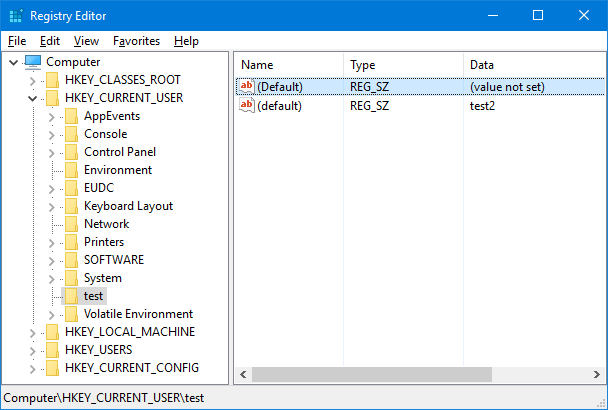
After commands, HKEY_CURRENT_USER\test has 2 properties.
Default(no named): value is "test1""(default)": value is "test2"

In this condition, Remove-ItemProperty -Name '(default)' exits without error and default(no named) property value has deleted.
# no error
Remove-ItemProperty 'registry::HKEY_CURRENT_USER\test' -Name '(default)'
The cause of this behavior is below,
Registry provider changes the property name("(default)" to "") just before deleting value not at validating property name.
 stknohg
on 1 Mar 2018
stknohg
on 1 Mar 2018
I believe it is bug - default value name should be null.
iSazonov
on 1 Mar 2018
@iSazonov
I found a way to get (default). It is an empty string.
New-Item 'registry::HKEY_CURRENT_USER\test' -Value 'i am test'
$a = Get-Item 'registry::HKEY_CURRENT_USER\test'
$a.GetValue('')
but, SetValue is not working
$a.SetValue('', 'i am test1')
# Exception calling "SetValue" with "2" argument(s): "Cannot write to the registry key."
# At line:1 char:1
# + $a.SetValue('', 'i am test1')
# + ~~~~~~~~~~~~~~~~~~~~~~~~~~~~~
# + CategoryInfo          : NotSpecified: (:) [], MethodInvocationException
# + FullyQualifiedErrorId : UnauthorizedAccessException

$a.SetValue('', 'i am test1', [Microsoft.Win32.RegistryValueKind]::String)
# Exception calling "SetValue" with "3" argument(s): "Cannot write to the registry key."
# At line:1 char:1
# + $a.SetValue('', 'i am test1', [Microsoft.Win32.RegistryValueKind]::St ...
# + ~~~~~~~~~~~~~~~~~~~~~~~~~~~~~~~~~~~~~~~~~~~~~~~~~~~~~~~~~~~~~~~~~~~~~
# + CategoryInfo          : NotSpecified: (:) [], MethodInvocationException
# + FullyQualifiedErrorId : UnauthorizedAccessException
and Set-Item can working
Set-Item 'registry::HKEY_CURRENT_USER\test' -Value 'i am test'
I know why it can not work. Because it does not have write permission.
QAQ
I still use Microsoft.Win32.Registry to solve the problem.
ZSkycat
on 3 Mar 2018
@ZSkycat Thanks for your research - feel free to create PR.
iSazonov
on 5 Mar 2018
Related issues
 MaximoTrinidad
·
3Comments
MaximoTrinidad
·
3Comments
 andschwa
·
3Comments
andschwa
·
3Comments
 HumanEquivalentUnit
·
3Comments
HumanEquivalentUnit
·
3Comments
 JohnLBevan
·
3Comments
JohnLBevan
·
3Comments
 aragula12
·
3Comments
aragula12
·
3Comments
Most helpful comment
Related this, I found very strange behavior.
I add
"(default)"property in this registry key.After commands,
HKEY_CURRENT_USER\testhas 2 properties.Default(no named): value is "test1""(default)": value is "test2"In this condition,
Remove-ItemProperty -Name '(default)'exits without error and default(no named) property value has deleted.The cause of this behavior is below,
https://github.com/PowerShell/PowerShell/blob/67c9ae47f81a38ee3fcc1e16b187b79fb9cbe148/src/System.Management.Automation/namespaces/RegistryProvider.cs#L2329-L2333
Registry provider changes the property name(
"(default)"to"") just before deleting value not at validating property name.