Powershell: Consistently document a scalar -InputObject parameter as an implementation detail or make item-by-item processing cmdlets explicitly iterate over collections
Updated based on feedback from @PetSerAl to clarify Category B.
-InputObject <psobject> and -InputObject <object> parameters bind values that are collections _as-is_ to the parameter variable.
Unless the cmdlet explicitly checks for collection-valued input and iterates over it, the collection is processed _as itself, as a single object_.
The core cmdlets that have such a parameter can be categorized as follows:
ConvertTo-Json is the only cmdlet where the parameter is [object]-typed rather than [psobject]-typed - it is unclear to me why.
Register-Object is not covered below, because its -InputObject parameter doesn't actually pipeline-bind.
- Category A: _A few_ cmdlets do make a useful distinction between a collection passed as a whole via
-InputObjectvs. item iteration via the pipeline, notablyGet-Member. - For the _majority_ of cmdlets, processing a collection as a whole is pointless, and these cmdlets currently fall into the two remaining categories:
- Category B: If a collection is passed via
-InputObject, they explicitly iterate over the collection, though potentially differently than with pipeline input.
- For such cmdlets, using the pipeline and using
-InputObjectis effectively equivalent, but only for _flat_ collections.
- For such cmdlets, using the pipeline and using
- Category C: If a collection is passed via
-InputObject, that collection is processed as a single object, which, given the premise, doesn't make sense.
- For such cmdlets, the
-InputObjectparameter _should be documented as not for direct use_, it being a mere implementation detail that facilitates pipeline input.
- The documentation of _some_ of these cmdlets already mentions the pitfall of using
-InputObject, but by no means all.
- The documentation of _some_ of these cmdlets already mentions the pitfall of using
- Alternatively, these cmdlets could be modified to perform explicit iteration, as the cmdlets in the previous category do. While this would technically be a breaking change, it probably falls into Bucket 3: Unlikely Grey Area
- For such cmdlets, the
- Category B: If a collection is passed via
Here's my attempt at mapping the cmdlets that ship with PowerShell to these categories:
Category A: OK: Useful distinction between pipeline input and explicit -InputObject use:
Add-MemberExport-ClixmlGet-MemberTrace-Command
Category B: SOMEWHAT PROBLEMATIC: No effective distinction between pipeline input and explicit
-InputObjectuse for _flat_ collections, but behavior differs with _nested_ ones:Format-CustomFormat-ListFormat-TableFormat-WideOut-HostOut-String
Category C: PROBLEMATIC: Distinction between pipeline input and explicit
-InputObjectuse, with-InputObjectinput performing no enumeration, making it useless:ConvertTo-CsvConvertTo-HtmlConvertTo-XmlExport-CsvForEach-ObjectFormat-HexGet-UniqueGroup-ObjectInvoke-CommandMeasure-CommandMeasure-ObjectSelect-ObjectSelect-StringSort-ObjectStart-JobWhere-Object
Among the Category C cmdlets, the help topics of the following contain misleading information:
ConvertTo-CsvConvertTo-XmlExport-CsvFormat-HexInvoke-CommandMeasure-Command- but see https://github.com/PowerShell/PowerShell-Docs/issues/2140Start-Job
To give a concrete example of the problematic current documentation, the Export-Csv help topic currently states:
-InputObject
Specifies the objects to export as CSV strings. Enter a variable that contains the objects or type a command or expression that gets the objects. You can also pipe objects to Export-CSV.
See #3865 - which @BrucePay rightly closed as by-design - for what happens when you believe the documentation (which I did).
As stated, given how this cmdlet currently works, the documentation _should_ effectively say something like:
-InputObject is an auxiliary parameter that enables pipeline input. Don't use this parameter directly, use the pipeline instead.
Of course, the alternative is to change the behavior to perform explicit iteration, as stated.
Generally, though, when implementing item-by-item-processing cmdlets, -InputObject <psobject> is inherently problematic:
- With _pipeline_ input, it conveniently iterates for you via the
Processblock - But with explicit
-InputObjectuse, you get no useful behavior by default and your choices are:
- Document your parameter along the lines of "Nothing to see here. Use the pipeline instead".
- Explicitly iterate over the variable in your
Processblock (at which point you may as well declare your parameter explicitly as array-valued,-InputObject <psobject[]>).
Here's the full matrix of cmdlets and their behavior from which the categorization above was obtained. The source code is further below, which also contains direct links to the help topics.
Note: True values in column IsSame only indicate equivalence for _flat_ collections.
Cmdlet           IsSame HelpClaimsIsSame ShouldBeSame FailsWithArrayInputObject Comment
------           ------ ---------------- ------------ ------------------------- -------
Add-Member        False             True        False                     False
ConvertTo-Csv     False             True         True                     False
ConvertTo-Html    False            False         True                     False
ConvertTo-Xml     False             True         True                     False
Export-Clixml     False             True        False                     False
Export-Csv        False             True         True                     False
ForEach-Object    False            False         True                     False
Format-Custom      True             True         True                     False
Format-Hex        False             True         True                      True Help merely contains a placeholder for the -InputObject description (as of 2...
Format-List        True             True         True                     False
Format-Table       True             True         True                     False
Format-Wide        True             True         True                     False
Get-Member        False            False        False                     False
Get-Unique        False            False         True                     False
Group-Object      False            False         True                     False
Invoke-Command    False             True         True                     False
Measure-Command   False             True         True                     False
Measure-Object    False            False         True                     False
Out-Default        True             True         True                     False Help just states (as of 26 May 2017): "Accepts input to the cmdlet."
Out-File          False             True         True                     False
Out-Host           True             True         True                     False
Out-Null                                                                  False Output behavior by definition doesn't apply.
Out-String         True             True         True                     False
Select-Object     False            False         True                     False
Select-String     False            False         True                     False
Set-ItemProperty                                                          False Couldn't figure out -InputObject use. -InputObject description uses *singlua...
Sort-Object       False            False         True                     False
Start-Job         False             True         True                     False Hard-coded result (test too complex to model here)
Trace-Command     False             True        False                     False Help states "You can enter a variable that represents the input that the exp...
Where-Object      False            False         True                     False
Test-function source code
function Test-InputObjectParam {

  [CmdletBinding()]
  param()

  set-strictmode -version 1


  $inCollCustObj = [System.Collections.Generic.List[pscustomobject]] ([pscustomobject] @{ foo = 1; bar = 2 }, [pscustomobject] @{ foo = 3; bar = 4 })
  $inCollStr = 'one', 'two', 'three'

  $tempFiles = ($tempFile1 = New-TemporaryFile), ($tempFile2 = New-TemporaryFile)

  # Use this command to scaffold the hashtable of tests below.
  <#
    Get-Command -Type cmdlet -ParameterName inputobject | ? {
      $_.Parameters.InputObject.ParameterType -in [psobject], [object] -and $_.Parameters.InputObject.ParameterSets.Values.ValueFromPipeline
    } | % { "'$($_.Name)' = @{`n  ShouldbeSame = `n}`n" }
  #>

  # !! Those cmdlets that DO unwrap a collection passed to -InputObject
  # !! accept only a *single* collection.
  # !! Something like -InputObject (1, 2), (3,4) still causes different output.

  $tests = [ordered] @{

    'Add-Member' = @{
      ShouldBeSame = $False
      HelpClaimsIsSame = $True
      HelpSourceUrl = 'https://github.com/PowerShell/PowerShell-Docs/blob/staging/reference/6/Microsoft.PowerShell.Utility/Add-Member.md'
      Params = @{ NotePropertyMembers = @{ 'addedProp' = 666 }; PassThru = $True }
      Test = { ($inColl.psobject.Properties).Name -notcontains 'addedProp' }
    }

    'ConvertTo-Csv' = @{
      ShouldBeSame = $True
      HelpClaimsIsSame = $True
      HelpSourceUrl = 'https://github.com/PowerShell/PowerShell-Docs/blob/staging/reference/6/Microsoft.PowerShell.Utility/ConvertTo-Csv.md'
      Params = @{}
    }

    'ConvertTo-Html' = @{
      ShouldBeSame = $True
      HelpClaimsIsSame = $False
      HelpSourceUrl = 'https://github.com/PowerShell/PowerShell-Docs/blob/staging/reference/6/Microsoft.PowerShell.Utility/ConvertTo-Html.md'
      HelpOK = $False
      Params = @{}
    }

    'ConvertTo-Xml' = @{
      ShouldBeSame = $True
      HelpClaimsIsSame = $True
      HelpSourceUrl = 'https://github.com/PowerShell/PowerShell-Docs/blob/staging/reference/6/Microsoft.PowerShell.Utility/ConvertTo-Xml.md'
      Params = @{ As = 'String' }
    }

    'Export-Clixml' = @{
      ShouldBeSame = $False
      HelpClaimsIsSame = $True
      HelpSourceUrl = 'https://github.com/PowerShell/PowerShell-Docs/blob/staging/reference/6/Microsoft.PowerShell.Utility/Export-Clixml.md'
      Params = @{ LiteralPath = $null }
    }

    'Export-Csv' = @{
      ShouldBeSame = $True
      HelpClaimsIsSame = $True
      HelpSourceUrl = 'https://github.com/PowerShell/PowerShell-Docs/blob/staging/reference/6/Microsoft.PowerShell.Utility/Export-Csv.md'
      Params = @{ LiteralPath = $null }
    }

    'ForEach-Object' = @{
      ShouldBeSame = $True
      HelpClaimsIsSame = $False
      HelpSourceUrl = 'https://github.com/PowerShell/PowerShell-Docs/blob/staging/reference/6/Microsoft.PowerShell.Core/ForEach-Object.md'
      Params = @{ Process = { "[$_]" } }
    }

    'Format-Custom' = @{
      ShouldBeSame = $True
      HelpClaimsIsSame = $True
      HelpSourceUrl = 'https://github.com/PowerShell/PowerShell-Docs/blob/staging/reference/6/Microsoft.PowerShell.Utility/Format-Custom.md'
      Params = @{}
    }

    'Format-Hex' = @{
      ShouldBeSame = $True
      HelpClaimsIsSame = $True
      HelpSourceUrl = 'https://github.com/PowerShell/PowerShell-Docs/blob/staging/reference/6/Microsoft.PowerShell.Utility/Format-Hex.md'
      Params = @{}
      UseStrings = $True
      Comment = 'Help merely contains a placeholder for the -InputObject description (as of 26 May 2017): "{{Fill InputObject Description}}."'
    }

    'Format-List' = @{
      ShouldBeSame = $True
      HelpClaimsIsSame = $True
      HelpSourceUrl = 'https://github.com/PowerShell/PowerShell-Docs/blob/staging/reference/6/Microsoft.PowerShell.Utility/Format-List.md'
      Params = @{}
    }

    'Format-Table' = @{
      ShouldBeSame = $True
      HelpClaimsIsSame = $True
      HelpSourceUrl = 'https://github.com/PowerShell/PowerShell-Docs/blob/staging/reference/6/Microsoft.PowerShell.Utility/Format-Table.md'
      Params = @{}
    }

    'Format-Wide' = @{
      ShouldBeSame = $True
      HelpClaimsIsSame = $True
      HelpSourceUrl = 'https://github.com/PowerShell/PowerShell-Docs/blob/staging/reference/6/Microsoft.PowerShell.Utility/Format-Wide.md'
      Params = @{}
    }

    'Get-Member' = @{
      ShouldBeSame = $False #
      HelpClaimsIsSame = $False
      HelpSourceUrl = 'https://github.com/PowerShell/PowerShell-Docs/blob/staging/reference/6/Microsoft.PowerShell.Utility/Get-Member.md'
      Params = @{}
    }

    'Get-Unique' = @{
      ShouldBeSame = $True
      HelpClaimsIsSame = $False
      HelpSourceUrl = 'https://github.com/PowerShell/PowerShell-Docs/blob/staging/reference/6/Microsoft.PowerShell.Utility/Get-Unique.md'
      Params = @{}
    }

    'Group-Object' = @{
      ShouldBeSame = $True
      HelpClaimsIsSame = $False
      HelpSourceUrl = 'https://github.com/PowerShell/PowerShell-Docs/blob/staging/reference/6/Microsoft.PowerShell.Utility/Group-Object.md'
      Params = @{}
      UseStrings = $true
    }

    'Invoke-Command' = @{
      ShouldBeSame = $True
      HelpClaimsIsSame = $True
      HelpSourceUrl = 'https://github.com/PowerShell/PowerShell-Docs/blob/staging/reference/6/Microsoft.PowerShell.Core/Invoke-Command.md'
      Params = @{ ScriptBlock = { $Input | Measure-Object | % Count } }
    }

    'Measure-Command' = @{
      ShouldBeSame = $True
      HelpClaimsIsSame = $True
      HelpSourceUrl = 'https://github.com/PowerShell/PowerShell-Docs/blob/staging/reference/6/Microsoft.PowerShell.Utility/Measure-Command.md'
      Params = @{ Expression = { $_.GetType().Name | Write-Information -InformationVariable res } }
      UseResVariable = $True
    }

    'Measure-Object' = @{
      ShouldBeSame = $True
      HelpClaimsIsSame = $False
      HelpSourceUrl = 'https://github.com/PowerShell/PowerShell-Docs/blob/staging/reference/6/Microsoft.PowerShell.Utility/Measure-Object.md'
      Params = @{}
      Test = { $res1.Count -eq $res2.Count }
    }

    # Note: Output from this cmdlet's test commands won't be suppressed below.
    'Out-Default' = @{
      ShouldBeSame = $True
      HelpClaimsIsSame = $True
      HelpSourceUrl = 'https://github.com/PowerShell/PowerShell-Docs/blob/staging/reference/6/Microsoft.PowerShell.Utility/Out-Default.md'
      Params = @{ OutVariable = 'res' }
      UseResVariable = $True
      Comment = 'Help just states (as of 26 May 2017): "Accepts input to the cmdlet."'
    }

    'Out-File' = @{
      ShouldBeSame = $True
      HelpClaimsIsSame = $True
      HelpSourceUrl = 'https://github.com/PowerShell/PowerShell-Docs/blob/staging/reference/6/Microsoft.PowerShell.Utility/Out-File.md'
      Params = @{ LiteralPath = $null }
    }

    # Note: Output from this cmdlet's test commands won't be suppressed below.
    'Out-Host' = @{
      ShouldBeSame = $True
      HelpClaimsIsSame = $True
      HelpSourceUrl = 'https://github.com/PowerShell/PowerShell-Docs/blob/staging/reference/6/Microsoft.PowerShell.Core/Out-Host.md'
      Params = @{ OutVariable = 'res' }
      UseResVariable = $True
    }

    'Out-Null' = @{
      Skip = $True
      HelpSourceUrl = 'https://github.com/PowerShell/PowerShell-Docs/blob/staging/reference/6/Microsoft.PowerShell.Core/Out-Null.md'
      Comment = 'Output behavior by definition doesn''t apply.'
    }

    'Out-String' = @{
      ShouldBeSame = $True
      HelpClaimsIsSame = $True
      HelpSourceUrl = 'https://github.com/PowerShell/PowerShell-Docs/blob/staging/reference/6/Microsoft.PowerShell.Utility/Out-String.md'
      Params = @{ Stream = $True }
    }

    'Select-Object' = @{
      ShouldBeSame = $True
      HelpClaimsIsSame = $False
      HelpSourceUrl = 'https://github.com/PowerShell/PowerShell-Docs/blob/staging/reference/6/Microsoft.PowerShell.Utility/Select-Object.md'
      Params = @{ Last = 1 }
    }

    'Select-String' = @{
      ShouldBeSame = $True
      HelpClaimsIsSame = $False
      HelpSourceUrl = 'https://github.com/PowerShell/PowerShell-Docs/blob/staging/reference/6/Microsoft.PowerShell.Utility/Select-String.md'
      Params = @{ Pattern = 'n' }
      UseStrings = $true
    }

    'Set-ItemProperty' = @{
      Skip = $True
      HelpSourceUrl = 'https://github.com/PowerShell/PowerShell-Docs/blob/staging/reference/6/Microsoft.PowerShell.Management/Set-ItemProperty.md'
      Comment = 'Couldn''t figure out -InputObject use. -InputObject description uses *singluar* and seems incorrect.'
    }

    'Sort-Object' = @{
      ShouldBeSame = $True
      HelpClaimsIsSame = $False
      HelpSourceUrl = 'https://github.com/PowerShell/PowerShell-Docs/blob/staging/reference/6/Microsoft.PowerShell.Utility/Sort-Object.md'
      Params = @{ Descending = $True }
      UseStrings = $true
    }

    # Manually determined results:
    # $coll = 1, 2
    # Receive-Job -Wait -AutoRemoveJob (Start-Job { $Input | Measure-Object } -Input $coll) # -> 1
    # Receive-Job -Wait -AutoRemoveJob ($coll | Start-Job { $Input | Measure-Object }) # -> 2
    'Start-Job' = @{
      Skip = $True
      ShouldBeSame = $True
      HardcodedIsSame = $False
      HelpClaimsIsSame = $True
      HelpSourceUrl = 'https://github.com/PowerShell/PowerShell-Docs/blob/staging/reference/6/Microsoft.PowerShell.Core/Start-Job.md'
      Params = @{ LiteralPath = $null }
      UseStrings = $True
      Comment = 'Hard-coded result (test too complex to model here)'
    }

    'Trace-Command' = @{
      ShouldBeSame = $False
      HelpClaimsIsSame = $True
      HelpSourceUrl = 'https://github.com/PowerShell/PowerShell-Docs/blob/staging/reference/6/Microsoft.PowerShell.Utility/Trace-Command.md'
      Params = @{ Name = 'type*'; Expression = { $Input | Measure-Object | % Count } }
      Comment = 'Help states "You can enter a variable that represents the input that the expression accepts, or pass an object through the pipeline."'
    }

    'Where-Object' = @{
      ShouldBeSame = $True
      HelpClaimsIsSame = $False
      HelpSourceUrl = 'https://github.com/PowerShell/PowerShell-Docs/blob/staging/reference/6/Microsoft.PowerShell.Core/Where-Object.md'
      Params = @{ FilterScript = { 'one' -eq $_ } }
      UseStrings = $True
    }

  }


  foreach ($cmdlet in $tests.keys) {
    $test = $tests[$cmdlet]
    $htParams = $test.Params
    if (-not $test.Skip) {
      $usesOutFiles = $htParams.ContainsKey('LiteralPath')
      $inColl = if ($test.UseStrings) { $inCollStr } else { $inCollCustObj }
      if ($usesOutFiles) { $htParams.LiteralPath = $tempFile1 }
      $res1 = & $cmdlet -InputObject $inColl @htParams -EA SilentlyContinue -EV err
      if ($test.UseResVariable) { $res1 = $res }
      if ($usesOutFiles) { $htParams.LiteralPath = $tempFile2 }
      $res2 = $inColl | & $cmdlet @htParams
      if ($test.UseResVariable) { $res2 = $res }
    }
    [pscustomobject] @{
      Cmdlet = $cmdlet
      IsSame = if ($test.Skip) {
                $test.HardcodedIsSame
              } elseif ($err -or $null -eq $res1) {
                $False
              } elseif ($test.Test) {
                & $test.Test $res1, $res1
              } else {
                if ($usesOutFiles) {
                    (Get-Content -Raw $tempFile1) -eq (Get-Content -Raw $tempFile2)
                } else {
                  (Compare-Object -SyncWindow 0 $res1 $res2).Count -eq 0
                }
              }
      HelpClaimsIsSame = $test.HelpClaimsIsSame
      ShouldBeSame = $test.ShouldBeSame
      FailsWithArrayInputObject = $err.Count -gt 0
      Comment = $test.Comment
      HelpSourceUrl = $test.HelpSourceUrl
    }
    if ($test.Skip) {
      Write-Verbose "SKIPPED: =============== $cmdlet"
    } elseif ($usesOutFiles) {
      Write-Verbose "*1: -InputObject* =============== $cmdlet"
      Write-Verbose (Get-Content -Raw $tempFile1)
      Write-Verbose "*2: Pipeline*     =============== $cmdlet"
      Write-Verbose (Get-Content -Raw $tempFile2)
    } else {
      Write-Verbose "*1: -InputObject* ================ $cmdlet"
      Write-Verbose ($res1 | Out-String)
      Write-Verbose "*2: Pipeline*     ================ $cmdlet"
      Write-Verbose ($res2 | Out-String)
    }
  }

  Remove-Item -ea Ignore $tempFiles

}

' --- Those where pipeline input and -InputObject use are equivalent:'
Test-InputObjectParam | ? { $_.IsSame -and $_.ShouldBeSame } | % cmdlet


' --- Those where the distinction between pipeline input and -InputObject makes sense:'
Test-InputObjectParam | ? { $False -eq $_.ShouldBeSame -and $false -eq $_.IsSame } | % cmdlet


' --- Those where there is a distinction between pipeline input and -InputObject, but it makes no sense:'
Test-InputObjectParam | ? { $_.ShouldBeSame -and $false -eq $_.IsSame } | % cmdlet

' --- Those where there is a distinction between pipeline input and -InputObject, but it makes no sense, and the help topics don''t clarify that:'
Test-InputObjectParam | ? { $_.ShouldBeSame -and $false -eq $_.IsSame -and $_.HelpClaimsIsSame } | % cmdlet
Environment data
PowerShell Core v6.0.0-beta.3 on macOS 10.12.5
PowerShell Core v6.0.0-beta.3 on Ubuntu 16.04.1 LTS
PowerShell Core v6.0.0-beta.3 on Microsoft Windows 10 Pro (64-bit; v10.0.14393)
Windows PowerShell v5.1.15063.413 on Microsoft Windows 10 Pro (64-bit; v10.0.15063)
 mklement0
All 15 comments
Category B is actually empty (try $a = 1,(2,(3,4)) as test object). If cmdlet itself iterate over collection, then difference would be in how many levels are iterated, unless you are making collection flat.
 PetSerAl
on 18 Jul 2017
PetSerAl
on 18 Jul 2017
Thanks, @PetSerAl.
I can see how with _nested_ collections the behavior differs:
> Format-List -InputObject 1, (2, (3, 4))
1

Length         : 2
LongLength     : 2
Rank           : 1
SyncRoot       : {2, 3 4}
IsReadOnly     : False
IsFixedSize    : True
IsSynchronized : False
Count          : 2
vs:
> 1, (2, (3, 4)) | Format-List
1
2


Length         : 2
LongLength     : 2
Rank           : 1
SyncRoot       : {3, 4}
IsReadOnly     : False
IsFixedSize    : True
IsSynchronized : False
Count          : 2
So is it fair to summarize Category B as comprising cmdlets that exhibit equivalent behavior only with _flat_ collections?
mklement0
on 18 Jul 2017
@mklement0 Yes, I think, you can possible phrase it like that.
PetSerAl
on 18 Jul 2017
Thanks, @PetSerAl - I've updated the original post.
mklement0
on 18 Jul 2017
@mklement0 in terms of the implementation differences with cmdlets or advanced functions that attempt to account for both input methods, I believe there is an ExpectingInput value that can be used to determine if the cmdlet is being used in a pipeline capacity, which might help to properly mirror the implementations, rather than blindly iterating over whatever happens to be stored in InputObject at the time.
 vexx32
on 9 Jan 2019
vexx32
on 9 Jan 2019
Good tip, @vexx32.
Were you thinking along the following lines?
function foo {
    [CmdletBinding()]
    param(
        [Parameter(ValueFromPipeline)]
        [object] $Param1  # declare as scalar
    )

    process {
      if ($MyInvocation.ExpectingInput) { # pipeline input, already enumerated
        "[$Param1]"
      } else { # argument input, enumerate explicitly
        foreach ($o in $Param1) { "[$o]" }
      }
    }

}
foo 1, (2, 3) and 1, (2, 3) | foo then both result in:
[1]
[2 3]
However, foreach isn't truly equivalent to pipeline enumeration, notably with $null as input: $null | foo vs. foo $null.
What is needed to robustly emulate pipeline enumeration without involving a (costly) additional pipeline? Or is special-casing $null with foreach the best we can do?
mklement0
on 9 Jan 2019
🤔
I think you can snip that last disparity fairly easily:
foreach ($o in @($Param1)) { "[$o]" }
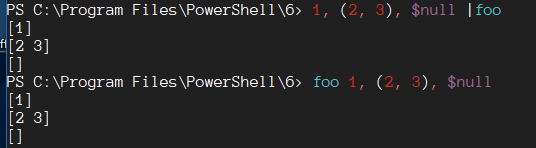
vexx32
on 9 Jan 2019
Cool, thanks.
Can we conclude that the best way to implement an item-by-item processing cmdlet that also supports collections as arguments via -InputObject is to use the above approach, based on a _scalar_ -InputObject declaration ([object] $Param)?
(Using [object[]] $Param1 would work too, but needlessly creates an array for each pipeline input object.)
mklement0
on 9 Jan 2019
Pretty much, I would think, yeah. With that in mind, any cmdlet or function that should mirror the pipeline logic with its direct input parameters should look like this in PS from your example:
if ($MyInvocation.ExpectingInput) {
    $Param1 # do things with or output $Param1
}
else {
     foreach ( $o in @($Param1) ) {
        $o # do things with or output $o
    }
}
Similarly in C# cmdlets we can cast to (Array) on direct input before enumerating for a similar effect, I think. As you say, we probably don't want to force all pipeline items to be wrapped in an array if we can avoid it.
EDIT: Also, with PSObject-typed parameter, the pattern for C# would need to look something like this:
object inputItems = null;
if (MyInvocation.ExpectingInput)
{
    inputItems = InputObject.BaseObject;
}
else
{
    inputItems = new List<object>();
    foreach (object item in (Array)InputObject.BaseObject)
    {
        inputItems.Add(item);
    }
}
// do things with inputItems and output or something
WriteObject(inputItems, true);
This would be necessary since an array of any length will still be stored inside a singular PSObject.
Not 100% sure how to get at ExpectingInput from a cmdlet, but I think it might be in SessionState somewhere? It's been a while since I had to look for it on the C# side...
vexx32
on 9 Jan 2019
@mklement0
Using
[object[]] $Param1would work too, but needlessly creates an array for each pipeline input object.
Casting something to array does not necessary wrap it into single element array. And pipeline does not restricted to scalars only. How are you planning to distinguish 1..3 | foo from 1..3 | % { ,,$_ } | foo or from 1..3 | % { ,[System.Collections.Generic.List[object]]::new((,$_)) } | foo? In all three cases foo will see $Param1 as array with single integer, if foo declare it as [object[]] $Param1.
PetSerAl
on 12 Jan 2019
It isn't required to declare the array as [object[]]; [object] is capable of wrapping an array object. 😄
vexx32
on 12 Jan 2019
Good point, @PetSerAl - I was too narrowly focused on flat input collections.
Do you agree that the [object]-based approach summarized by @vexx32 above is the best approach, given the current capabilities?
Longer-term, I wonder if we could introduce something like [Parameter(ValueFromPipeline, EnumerateArgument)] to move equal treatment of pipeline input and collection arguments into the plumbing (arguably, that should have been the default all along). However, presumably that would forfeit the performance benefit that comes from needing only a _single_ invocation of the process block.
mklement0
on 13 Jan 2019
@mklement0
I am fine with current behavior. I think it should not be changed. IIRC, from v1 it is been explicitly stated in documentation, that $Object | Get-Member is different from Get-Member -InputObject $Object. When I explicitly use -InputObject parameter, it is always because I want behavior, that is different from what pipeline input does. I see no good reason why someone should generally expect that Command-Name -InputObject $Object is the same as $Object | Command-Name.
PetSerAl
on 13 Jan 2019
@PetSerAl: While for Get-Member specifically (category A) it makes perfect sense for the behavior to differ, for the vast majority of cmdlets it does not, and - as argued in the initial post of this issue - if the current behavior is retained, the virtually useless-as-a-direct-argument-recipient -InputObject parameter for those cmdlets (category C) should be documented as an _implementation detail_ (along the lines of "this parameter is just here to facilitate pipeline input - do not use it directly").
That's certainly one way to go, and it would make this discussion moot.
As shown above, however, there is precedent for item-by-item processing cmdlets that perform their own enumeration (though, as you've demonstrated, the behavior is only identical to input via the pipeline for non-nested collections) - category B.
We can either live with these existing anomalies - and discourage explicit -InputObject use going forward except for category-A-like cmdlets - or make it easier to create cmdlets that (fully) allow interchangeable use of the pipeline and direct arguments.
One reason to do the latter is the very paradigm of declaring pipeline support: you start with declaring a _parameter_ that may _also_ be bound via the pipeline.
A pragmatic reason to allow it is that (for collections already in memory) direct-argument use is faster than pipeline use; e.g., the direct-argument variant of the following two commands is about 3 times faster on my laptop:
Measure-Command { 1..1e5 | Out-String }  # pipeline
Measure-Command { Out-String -InputObject (1..1e5) }  # direct argument
Any syntactic sugar we introduce should then offer similar performance benefits, but I'm unclear on whether that's feasible.
mklement0
on 13 Jan 2019
As I mention here, it might make sense to simply have -InputObject parameters be designated purely for pipeline use. In such a case, perhaps it would make the most sense to separate pipeline from regular use via parameter sets in most cases, potentially even declaring an entire parameter set as only usable for the pipeline?
vexx32
on 14 Jan 2019
Related issues
 abock
·
3Comments
abock
·
3Comments
 lzybkr
·
3Comments
lzybkr
·
3Comments
 andschwa
·
3Comments
andschwa
·
3Comments
 aragula12
·
3Comments
aragula12
·
3Comments
 manofspirit
·
3Comments
manofspirit
·
3Comments