Powershell: New-PSSession still fails with a NullReferenceException on macOS
I believe this is related to #942, which is closed. Someone claimed this works from Ubuntu. Is this not supported on macOS, or is this a bug?
Steps to reproduce
$Session = New-PSSession -ConfigurationName Microsoft.Exchange -ConnectionUri https://ps.compliance.protection.outlook.com/powershell-liveid/ -Credential $UserCredential -Authentication Basic -AllowRedirection
Expected behavior
Session would be initiated
Actual behavior
Unhandled Exception: System.NullReferenceException: Object reference not set to an instance of an object.
   at System.Management.Automation.Remoting.PrioritySendDataCollection.Clear()
   at System.Management.Automation.Remoting.Client.BaseClientTransportManager.CloseAsync()
   at System.Management.Automation.Remoting.Client.WSManClientSessionTransportManager.CloseAsync()
   at System.Management.Automation.Remoting.Client.BaseClientTransportManager.Finalize()
Abort trap: 6
Environment data
> $PSVersionTable

Name                           Value
----                           -----
PSVersion                      6.0.0-beta
PSEdition                      Core
BuildVersion                   3.0.0.0
CLRVersion
GitCommitId                    v6.0.0-beta.2
OS                             Darwin 17.0.0 Darwin Kernel Version 17.0.0: Mon May 29 20:35:...
Platform                       Unix
PSCompatibleVersions           {1.0, 2.0, 3.0, 4.0...}
PSRemotingProtocolVersion      2.3
SerializationVersion           1.1.0.1
WSManStackVersion              3.0
 tthoma24
All 54 comments
3476 may also be related, same issue on CentOS, and another reporter on macOS.
tthoma24
on 17 Jun 2017
I'm not sure what's meant when asked for a "simpler repro," but I was able to reproduce my issue again in a VM running 10.12.6 and the beta 4 release of PowerShell.
tthoma24
on 1 Aug 2017
I've got this issue on macOS 10.12.6 and 10.13 with 6.0.0-rc
This is installing PowerShell via the macOS Installer Package. Apparently you can install it via Homebrew as well however the way that Homebrew opens up the permissions on some of the system binary directories (like /usr/local/bin) to make it group read/write is a security risk so I can't use it to test.
PowerShell v6.0.0-rc
Copyright (c) Microsoft Corporation. All rights reserved.

https://aka.ms/pscore6-docs
Type 'help' to get help.

PS /Users/kai> $PSVersionTable

Name                           Value
----                           -----
PSVersion                      6.0.0-rc
PSEdition                      Core
GitCommitId                    v6.0.0-rc
OS                             Darwin 16.7.0 Darwin Kernel Version 16.7.0: T...
Platform                       Unix
PSCompatibleVersions           {1.0, 2.0, 3.0, 4.0...}
PSRemotingProtocolVersion      2.3
SerializationVersion           1.1.0.1
WSManStackVersion              3.0


PS /Users/kai> $UserCredential = Get-Credential

PowerShell credential request
Enter your credentials.
User: [email protected]
Password for user [email protected]: ********

PS /Users/kai> $Session = New-PSSession -ConfigurationName Microsoft.Exchange -ConnectionUri https://outlook.office365.com/powershell-liveid -Credential $UserCredential -Authentication Basic -AllowRedirection

An error has occurred that was not properly handled. Additional information is shown below. The PowerShell process will exit.

Unhandled Exception: System.NullReferenceException: Object reference not set to an instance of an object.
   at System.Management.Automation.Remoting.PrioritySendDataCollection.Clear()
   at System.Management.Automation.Remoting.Client.BaseClientTransportManager.CloseAsync()
   at System.Management.Automation.Remoting.Client.WSManClientSessionTransportManager.CloseAsync()
   at System.Management.Automation.Remoting.Client.BaseClientTransportManager.Finalize()
Abort trap: 6
 kai-h
on 23 Nov 2017
kai-h
on 23 Nov 2017
@SteveL-MSFT Related Issue #3476 was labeled as GA. Should we fix current Issue before GA too?
 iSazonov
on 23 Nov 2017
iSazonov
on 23 Nov 2017
@dantraMSFT can you confirm with latest psl-omi-provider this works on macOS?
 SteveL-MSFT
on 23 Nov 2017
SteveL-MSFT
on 23 Nov 2017
@kai-h Are you able to consistently repro the NullReferenceException? I'm not able to repro it.
 dantraMSFT
on 28 Nov 2017
dantraMSFT
on 28 Nov 2017
I can consistently reproduce this on two separate Macs. One with macOS 10.12 and one with 10.13.
It happens every single time - as in I have never been able to establish a New-PSSession on either of the two Macs I use.
I don't have a Linux workstation to test with the latest psl-omi-provider - I only have Ubuntu on Windows 10 available without creating a new VM for testing purposes.
kai-h
on 28 Nov 2017
My environment is a pretty standard macOS installation with 10.12 or 10.13 and PowerShell 6.0.0-rc installed via the macOS Installer Package (.pkg) from the GitHub Releases page.
I haven't built it from source or installed via Homebrew.
Searching for more info on this error, in one thread (that I now can't find) someone reported that it was failing for them when they installed from the .pkg but when they installed from Homebrew it worked.
kai-h
on 28 Nov 2017
Thanks, @kai-h, let me checkout out the pkg page.
dantraMSFT
on 28 Nov 2017
@kai-h, unfortunately, I'm still not able to repro it. Would you change the file size and date stamps of libmi.dylib and libpsrpclient.dylib?
cd $pshome
ls -l lib*
dantraMSFT
on 29 Nov 2017
PowerShell v6.0.0-rc
Copyright (c) Microsoft Corporation. All rights reserved.

https://aka.ms/pscore6-docs
Type 'help' to get help.

PS /Users/kai> cd $pshome
PS /usr/local/microsoft/powershell/6.0.0-rc> ls -l lib*
-rw-r--r--  1 root  wheel  2571480 31 Oct 17:27 libclrjit.dylib
-rw-r--r--  1 root  wheel  6894904 31 Oct 17:27 libcoreclr.dylib
-rw-r--r--  1 root  wheel   883740 31 Oct 17:27 libdbgshim.dylib
-rw-r--r--  1 root  wheel   869664 31 Oct 17:27 libhostfxr.dylib
-rw-r--r--  1 root  wheel  1006336 31 Oct 17:27 libhostpolicy.dylib
-rw-r--r--  1 root  wheel   843792 14 Nov 11:37 libmi.dylib
-rw-r--r--  1 root  wheel  3081760 31 Oct 17:27 libmscordaccore.dylib
-rw-r--r--  1 root  wheel  2021168 31 Oct 17:27 libmscordbi.dylib
-rw-r--r--  1 root  wheel    20568  4 Nov 09:08 libpsl-native.dylib
-rw-r--r--  1 root  wheel   224784 15 Nov 07:39 libpsrpclient.dylib
-rw-r--r--  1 root  wheel   553360 31 Oct 17:27 libsos.dylib
PS /usr/local/microsoft/powershell/6.0.0-rc>
@kai-h, Would you be willing to build a debug version and replace system.management.automation or let me send you one? The NullReferenceException implies some other problem but I can't tell from the call stack where the exception is being thrown.
dantraMSFT
on 29 Nov 2017
Sure thing, happy to help. I don't know how to build it (but I can probably work it out) or if you have a debug version you can send me, I'll install and run it.
kai-h
on 29 Nov 2017
I'll get you a build tomorrow morning. I want to see if there is any additional instrumentation that should be there.
dantraMSFT
on 29 Nov 2017
Great, thanks. I really appreciate the attention that MSFT are giving to powershell on alternative platforms.
kai-h
on 29 Nov 2017
@kai-h What's the best way to get this binary to you?
dantraMSFT
on 29 Nov 2017
You can Dropbox or OneDrive it to me, or email it to kai at automatica dot com dot au
Thanks.
I've just commented in #5561 that I have been able to reproduce the issue with a clean install of macOS 10.12.6 and a clean install of PowerShell 6.0.0-rc and nothing else on the system.
kai-h
on 29 Nov 2017
@kai-h: Try these. Place the PDB file in the same directory and repro the issue. The only purpose of this is to get the exact line number in the call to Clear().
https://www.dropbox.com/sh/rq8ct7xlnchs3hx/AAATnwMeMD4SD_Vwm4W1srboa?dl=0
dantraMSFT
on 29 Nov 2017
Thank you for this. On my main Mac, I'm getting inconsistent results. The results below are on my main Mac. I will also run the debug build on the other Mac I set up this morning for testing.
The command I'm using to trigger it is:
$Session = New-PSSession -ConfigurationName Microsoft.Exchange -ConnectionUri https://outlook.office365.com/powershell-liveid -Credential $UserCredential -Authentication Basic -AllowRedirection
The first time it runs, I get an error. The second time it runs I get an unhandled exception:
[kai@blackmac ~]$ pwsh
PowerShell v6.0.0-rc
Copyright (c) Microsoft Corporation. All rights reserved.

https://aka.ms/pscore6-docs
Type 'help' to get help.

PS /Users/kai> $Session = New-PSSession -ConfigurationName Microsoft.Exchange -ConnectionUri https://outlook.office365.com/powershell-liveid -Credential $UserCredential -Authentication Basic -AllowRedirection

PowerShell credential request
Enter your credentials.
User: [email protected]
Password for user [email protected]: ********

New-PSSession : This parameter set requires WSMan, and no supported WSMan client library was found. WSMan is either not installed or unavailable for this system.
At line:1 char:12
+ $Session = New-PSSession -ConfigurationName Microsoft.Exchange -Conne ...
+            ~~~~~~~~~~~~~~~~~~~~~~~~~~~~~~~~~~~~~~~~~~~~~~~~~~~~~~~~~~
+ CategoryInfo          : ResourceUnavailable: (:) [New-PSSession], PSRemotingTransportException
+ FullyQualifiedErrorId : System.Management.Automation.Remoting.PSRemotingDataStructureException,Microsoft.PowerShell.Commands.NewPSSessionCommand

PS /Users/kai> $Session = New-PSSession -ConfigurationName Microsoft.Exchange -ConnectionUri https://outlook.office365.com/powershell-liveid -Credential $UserCredential -Authentication Basic -AllowRedirection

PowerShell credential request
Enter your credentials.
User: [email protected]
Password for user [email protected]: ********


An error has occurred that was not properly handled. Additional information is shown below. The PowerShell process will exit.

Unhandled Exception: System.NullReferenceException: Object reference not set to an instance of an object.
   at System.Management.Automation.Remoting.PrioritySendDataCollection.Clear() in /PowerShell/src/System.Management.Automation/engine/remoting/fanin/PriorityCollection.cs:line 158
   at System.Management.Automation.Remoting.Client.BaseClientTransportManager.CloseAsync() in /PowerShell/src/System.Management.Automation/engine/remoting/fanin/BaseTransportManager.cs:line 949
   at System.Management.Automation.Remoting.Client.WSManClientSessionTransportManager.CloseAsync() in /PowerShell/src/System.Management.Automation/engine/remoting/fanin/WSManTransportManager.cs:line 1219
   at System.Management.Automation.Remoting.Client.BaseClientTransportManager.Finalize() in /PowerShell/src/System.Management.Automation/engine/remoting/fanin/BaseTransportManager.cs:line 998
Abort trap: 6
Here are the results from the Mac with a clean install of macOS 10.12.6 and PowerShell 6.0.0-rc
Last login: Thu Nov 30 08:48:11 on ttys000
Administrators-Mac-mini:~ admin$ pwsh
PowerShell v6.0.0-rc
Copyright (c) Microsoft Corporation. All rights reserved.

https://aka.ms/pscore6-docs
Type 'help' to get help.

PS /Users/admin> $Session = New-PSSession -ConfigurationName Microsoft.Exchange -ConnectionUri https://outlook.office365.com/powershell-liveid/ -Credential $UserCredential -Authentication Basic -AllowRedirection

PowerShell credential request
Enter your credentials.
User: [email protected]
Password for user [email protected]: ********


An error has occurred that was not properly handled. Additional information is shown below. The PowerShell process will exit.

Unhandled Exception: System.NullReferenceException: Object reference not set to an instance of an object.
   at System.Management.Automation.Remoting.PrioritySendDataCollection.Clear() in /PowerShell/src/System.Management.Automation/engine/remoting/fanin/PriorityCollection.cs:line 158
   at System.Management.Automation.Remoting.Client.BaseClientTransportManager.CloseAsync() in /PowerShell/src/System.Management.Automation/engine/remoting/fanin/BaseTransportManager.cs:line 949
   at System.Management.Automation.Remoting.Client.WSManClientSessionTransportManager.CloseAsync() in /PowerShell/src/System.Management.Automation/engine/remoting/fanin/WSManTransportManager.cs:line 1219
   at System.Management.Automation.Remoting.Client.BaseClientTransportManager.Finalize() in /PowerShell/src/System.Management.Automation/engine/remoting/fanin/BaseTransportManager.cs:line 998
Abort trap: 6
Administrators-Mac-mini:~ admin$
@kai-h: Thanks, I'll send you another binary that handles this case and see where it takes us.
dantraMSFT
on 29 Nov 2017
@kai-h: I updated the binaries. This is intended only to guard against the NullReferenceException to see where it takes us. I'm looking at refactoring the finalizer next but that will take a little longer.
Thanks for your help and patience.
dantraMSFT
on 30 Nov 2017
re: updated binaries - do I use the same Dropbox link as above, or do you have a new link? When I download from the link above, the binaries are dated ~12 hours ago.
kai-h
on 30 Nov 2017
Yes, it's the same link.
dantraMSFT
on 30 Nov 2017
This is what I'm getting on my laptop with 10.13.1 - note that this is not the same system I was testing on this morning. I'm out of the office at the moment and won't be back for ~6 hours so can't test on my main Mac.
PowerShell v6.0.0-rc
Copyright (c) Microsoft Corporation. All rights reserved.

https://aka.ms/pscore6-docs
Type 'help' to get help.

PS /Users/kai> $Session = New-PSSession -ConfigurationName Microsoft.Exchange -ConnectionUri https://outlook.office365.com/powershell-liveid -Credential $UserCredential -Authentication Basic -AllowRedirection

PowerShell credential request
Enter your credentials.
User: [email protected]
Password for user [email protected]: ********

New-PSSession : This parameter set requires WSMan, and no supported WSMan client library was found. WSMan is either not installed or unavailable for this system.
At line:1 char:12
+ $Session = New-PSSession -ConfigurationName Microsoft.Exchange -Conne ...
+            ~~~~~~~~~~~~~~~~~~~~~~~~~~~~~~~~~~~~~~~~~~~~~~~~~~~~~~~~~~
+ CategoryInfo          : ResourceUnavailable: (:) [New-PSSession], PSRemotingTransportException
+ FullyQualifiedErrorId : System.Management.Automation.Remoting.PSRemotingDataStructureException,Microsoft.PowerShell.Commands.NewPSSessionCommand

PS /Users/kai> $PSVersionTable

Name                           Value
----                           -----
PSVersion                      6.0.0-rc
PSEdition                      Core
GitCommitId                    v6.0.0-rc
OS                             Darwin 17.2.0 Darwin Kernel Version 17.2.0: F...
Platform                       Unix
PSCompatibleVersions           {1.0, 2.0, 3.0, 4.0...}
PSRemotingProtocolVersion      2.3
SerializationVersion           1.1.0.1
WSManStackVersion              3.0
Can I assume you are using the binary I sent you?
And libpsrpclient is this one?
-rw-r--r-- 1 root wheel 224784 15 Nov 07:39 libpsrpclient.dylib
dantraMSFT
on 30 Nov 2017
Yes, this is with the supplied binary:
PS /Users/kai> cd $pshome
PS /usr/local/microsoft/powershell/6.0.0-rc> ls -al libpsrpclient.dylib
-rw-r--r--  1 root  wheel  224784 15 Nov 07:39 libpsrpclient.dylib
@kai-h I'm going to need to do a little research. I'll try to get back with something tomorrow. When you get a minute, would you perform the same sequence twice to see what the second pass reports? I believe that's what you did in the other thread, right?
dantraMSFT
on 30 Nov 2017
Thanks for this @dantraMSFT - I ran it three or four times (as it failed the second time on my other Mac) and it came up with the same error each time. When I get back to my office, I will test it again on the fresh Mac I've set up for this purpose.
Just to confirm, here are the results on my laptop. Previously I have got different results depending on if there's a slash on the end if the ConnectionUri so I've tried it both ways below.
[kai@hobbes ~]$ pwsh
PowerShell v6.0.0-rc
Copyright (c) Microsoft Corporation. All rights reserved.

https://aka.ms/pscore6-docs
Type 'help' to get help.

PS /Users/kai> $Session = New-PSSession -ConfigurationName Microsoft.Exchange -ConnectionUri https://outlook.office365.com/powershell-liveid -Credential $UserCredential -Authentication Basic -AllowRedirection

PowerShell credential request
Enter your credentials.
User: [email protected]
Password for user [email protected]: *********

New-PSSession : This parameter set requires WSMan, and no supported WSMan client library was found. WSMan is either not installed or unavailable for this system.
At line:1 char:12
+ $Session = New-PSSession -ConfigurationName Microsoft.Exchange -Conne ...
+            ~~~~~~~~~~~~~~~~~~~~~~~~~~~~~~~~~~~~~~~~~~~~~~~~~~~~~~~~~~
+ CategoryInfo          : ResourceUnavailable: (:) [New-PSSession], PSRemotingTransportException
+ FullyQualifiedErrorId : System.Management.Automation.Remoting.PSRemotingDataStructureException,Microsoft.PowerShell.Commands.NewPSSessionCommand

PS /Users/kai> $Session = New-PSSession -ConfigurationName Microsoft.Exchange -ConnectionUri https://outlook.office365.com/powershell-liveid -Credential $UserCredential -Authentication Basic -AllowRedirection

PowerShell credential request
Enter your credentials.
User: [email protected]
Password for user [email protected]: ********

New-PSSession : This parameter set requires WSMan, and no supported WSMan client library was found. WSMan is either not installed or unavailable for this system.
At line:1 char:12
+ $Session = New-PSSession -ConfigurationName Microsoft.Exchange -Conne ...
+            ~~~~~~~~~~~~~~~~~~~~~~~~~~~~~~~~~~~~~~~~~~~~~~~~~~~~~~~~~~
+ CategoryInfo          : ResourceUnavailable: (:) [New-PSSession], PSRemotingTransportException
+ FullyQualifiedErrorId : System.Management.Automation.Remoting.PSRemotingDataStructureException,Microsoft.PowerShell.Commands.NewPSSessionCommand

PS /Users/kai> $Session = New-PSSession -ConfigurationName Microsoft.Exchange -ConnectionUri https://outlook.office365.com/powershell-liveid -Credential $UserCredential -Authentication Basic -AllowRedirection

PowerShell credential request
Enter your credentials.
User: [email protected]
Password for user [email protected]: ********

New-PSSession : This parameter set requires WSMan, and no supported WSMan client library was found. WSMan is either not installed or unavailable for this system.
At line:1 char:12
+ $Session = New-PSSession -ConfigurationName Microsoft.Exchange -Conne ...
+            ~~~~~~~~~~~~~~~~~~~~~~~~~~~~~~~~~~~~~~~~~~~~~~~~~~~~~~~~~~
+ CategoryInfo          : ResourceUnavailable: (:) [New-PSSession], PSRemotingTransportException
+ FullyQualifiedErrorId : System.Management.Automation.Remoting.PSRemotingDataStructureException,Microsoft.PowerShell.Commands.NewPSSessionCommand

PS /Users/kai> $Session = New-PSSession -ConfigurationName Microsoft.Exchange -ConnectionUri https://outlook.office365.com/powershell-liveid/ -Credential $UserCredential -Authentication Basic -AllowRedirection
PowerShell credential request
Enter your credentials.
User: [email protected]
Password for user [email protected]: ********

New-PSSession : This parameter set requires WSMan, and no supported WSMan client library was found. WSMan is either not installed or unavailable for this system.
At line:1 char:12
+ $Session = New-PSSession -ConfigurationName Microsoft.Exchange -Conne ...
+            ~~~~~~~~~~~~~~~~~~~~~~~~~~~~~~~~~~~~~~~~~~~~~~~~~~~~~~~~~~
+ CategoryInfo          : ResourceUnavailable: (:) [New-PSSession], PSRemotingTransportException
+ FullyQualifiedErrorId : System.Management.Automation.Remoting.PSRemotingDataStructureException,Microsoft.PowerShell.Commands.NewPSSessionCommand

PS /Users/kai> $Session = New-PSSession -ConfigurationName Microsoft.Exchange -ConnectionUri https://outlook.office365.com/powershell-liveid/ -Credential $UserCredential -Authentication Basic -AllowRedirection

PowerShell credential request
Enter your credentials.
User: [email protected]
Password for user [email protected]: ********

New-PSSession : This parameter set requires WSMan, and no supported WSMan client library was found. WSMan is either not installed or unavailable for this system.
At line:1 char:12
+ $Session = New-PSSession -ConfigurationName Microsoft.Exchange -Conne ...
+            ~~~~~~~~~~~~~~~~~~~~~~~~~~~~~~~~~~~~~~~~~~~~~~~~~~~~~~~~~~
+ CategoryInfo          : ResourceUnavailable: (:) [New-PSSession], PSRemotingTransportException
+ FullyQualifiedErrorId : System.Management.Automation.Remoting.PSRemotingDataStructureException,Microsoft.PowerShell.Commands.NewPSSessionCommand

PS /Users/kai> exit
[kai@hobbes ~]$
I'd like to suggest using Steve's suggestion of setting DYLD_LIBRARY_PATH. There are two problems here, failure to load the binary and the NullReferenceException. the private has a workaround around for the exception. I'd like to know if the path solves the load issue. tomorrow is fine.
export DYLD_LIBRARY_PATH=/usr/local/microsoft/powershell/6.0.0-rc:${DYLD_LIBRARY_PATH}
pwsh
$Session = New-PSSession -ConfigurationName Microsoft.Exchange -ConnectionUri https://outlook.office365.com/powershell-liveid/ -Credential $UserCredential -Authentication Basic -AllowRedirection
Thanks,
Dan.
dantraMSFT
on 30 Nov 2017
Using the new binaries from the Dropbox link (and I noticed there was a new .txt file that looked to really be a .exe format) gives me the WSMan missing error. I've ran the New-PSSession command three times in a row, and got the same error each time.
This is on the Mac I set up with clean macOS 10.12.6 and PowerShell 6.0.0-rc
Administrators-Mac-mini:~ admin$ export DYLD_LIBRARY_PATH=/usr/local/microsoft/powershell/6.0.0-rc:${DYLD_LIBRARY_PATH}
Administrators-Mac-mini:~ admin$ pwsh
PowerShell v6.0.0-rc
Copyright (c) Microsoft Corporation. All rights reserved.

https://aka.ms/pscore6-docs
Type 'help' to get help.

PS /Users/admin> $Session = New-PSSession -ConfigurationName Microsoft.Exchange -ConnectionUri https://outlook.office365.com/powershell-liveid/ -Credential $UserCredential -Authentication Basic -AllowRedirection

PowerShell credential request
Enter your credentials.
User: [email protected]
Password for user [email protected]: ********

New-PSSession : This parameter set requires WSMan, and no supported WSMan client library was found. WSMan is either not installed or unavailable for this system.
At line:1 char:12
+ $Session = New-PSSession -ConfigurationName Microsoft.Exchange -Conne ...
+            ~~~~~~~~~~~~~~~~~~~~~~~~~~~~~~~~~~~~~~~~~~~~~~~~~~~~~~~~~~
+ CategoryInfo          : ResourceUnavailable: (:) [New-PSSession], PSRemotingTransportException
+ FullyQualifiedErrorId : System.Management.Automation.Remoting.PSRemotingDataStructureException,Microsoft.PowerShell.Commands.NewPSSessionCommand

PS /Users/admin>
Just to confirm that it's not something else that's changed on this system, I deleted /usr/local/microsoft and reinstalled PowerShell 6.0.0-rc.
I then re-ran the commands above and could replicate my original result:
This is with the standard distribution, not using the debug binaries.
Administrators-Mac-mini:~ admin$ export DYLD_LIBRARY_PATH=/usr/local/microsoft/powershell/6.0.0-rc:${DYLD_LIBRARY_PATH}
Administrators-Mac-mini:~ admin$ pwsh
PowerShell v6.0.0-rc
Copyright (c) Microsoft Corporation. All rights reserved.

https://aka.ms/pscore6-docs
Type 'help' to get help.

PS /Users/admin> $Session = New-PSSession -ConfigurationName Microsoft.Exchange -ConnectionUri https://outlook.office365.com/powershell-liveid/ -Credential $UserCredential -Authentication Basic -AllowRedirection

PowerShell credential request
Enter your credentials.
User: [email protected]
Password for user [email protected]: ********


An error has occurred that was not properly handled. Additional information is shown below. The PowerShell process will exit.

Unhandled Exception: System.NullReferenceException: Object reference not set to an instance of an object.
   at System.Management.Automation.Remoting.PrioritySendDataCollection.Clear()
   at System.Management.Automation.Remoting.Client.BaseClientTransportManager.CloseAsync()
   at System.Management.Automation.Remoting.Client.WSManClientSessionTransportManager.CloseAsync()
   at System.Management.Automation.Remoting.Client.BaseClientTransportManager.Finalize()
Abort trap: 6
Administrators-Mac-mini:~ admin$
Here is a full set of steps showing the unhandled exception with the binaries in the original .pkg installer and then with the missing WSMan library after replacing with the new binaries downloaded from dropbox
Administrators-Mac-mini:~ admin$ export DYLD_LIBRARY_PATH=/usr/local/microsoft/powershell/6.0.0-rc:${DYLD_LIBRARY_PATH}
Administrators-Mac-mini:~ admin$ pwsh
PowerShell v6.0.0-rc
Copyright (c) Microsoft Corporation. All rights reserved.

https://aka.ms/pscore6-docs
Type 'help' to get help.

PS /Users/admin> $Session = New-PSSession -ConfigurationName Microsoft.Exchange -ConnectionUri https://outlook.office365.com/powershell-liveid/ -Credential $UserCredential -Authentication Basic -AllowRedirection

PowerShell credential request
Enter your credentials.
User: [email protected]
Password for user [email protected]: ********


An error has occurred that was not properly handled. Additional information is shown below. The PowerShell process will exit.

Unhandled Exception: System.NullReferenceException: Object reference not set to an instance of an object.
   at System.Management.Automation.Remoting.PrioritySendDataCollection.Clear()
   at System.Management.Automation.Remoting.Client.BaseClientTransportManager.CloseAsync()
   at System.Management.Automation.Remoting.Client.WSManClientSessionTransportManager.CloseAsync()
   at System.Management.Automation.Remoting.Client.BaseClientTransportManager.Finalize()
Abort trap: 6
Administrators-Mac-mini:~ admin$ echo $DYLD_LIBRARY_PATH
/usr/local/microsoft/powershell/6.0.0-rc:
Administrators-Mac-mini:~ admin$ sudo cp ~/Downloads/SMA4MacOSDebug/* /usr/local/microsoft/powershell/6.0.0-rc/
Administrators-Mac-mini:~ admin$ ls -al /usr/local/microsoft/powershell/6.0.0-rc/System.Management.Automation.*
-rw-r--r--@ 1 root  wheel  7247360  1 Dec 08:07 /usr/local/microsoft/powershell/6.0.0-rc/System.Management.Automation.dll
-rw-------  1 root  wheel  2880420  1 Dec 08:07 /usr/local/microsoft/powershell/6.0.0-rc/System.Management.Automation.pdb
-rw-------  1 root  wheel  7247360  1 Dec 08:07 /usr/local/microsoft/powershell/6.0.0-rc/System.Management.Automation.txt
-rw-r--r--  1 root  wheel  7549764 18 Nov 12:29 /usr/local/microsoft/powershell/6.0.0-rc/System.Management.Automation.xml
Administrators-Mac-mini:~ admin$ pwsh
PowerShell v6.0.0-rc
Copyright (c) Microsoft Corporation. All rights reserved.

https://aka.ms/pscore6-docs
Type 'help' to get help.

PS /Users/admin> $Session = New-PSSession -ConfigurationName Microsoft.Exchange -ConnectionUri https://outlook.office365.com/powershell-liveid/ -Credential $UserCredential -Authentication Basic -AllowRedirection

PowerShell credential request
Enter your credentials.
User: [email protected]
Password for user [email protected]: ********

New-PSSession : This parameter set requires WSMan, and no supported WSMan client library was found. WSMan is either not installed or unavailable for this system.
At line:1 char:12
+ $Session = New-PSSession -ConfigurationName Microsoft.Exchange -Conne ...
+            ~~~~~~~~~~~~~~~~~~~~~~~~~~~~~~~~~~~~~~~~~~~~~~~~~~~~~~~~~~
+ CategoryInfo          : ResourceUnavailable: (:) [New-PSSession], PSRemotingTransportException
+ FullyQualifiedErrorId : System.Management.Automation.Remoting.PSRemotingDataStructureException,Microsoft.PowerShell.Commands.NewPSSessionCommand

PS /Users/admin> $Session = New-PSSession -ConfigurationName Microsoft.Exchange -ConnectionUri https://outlook.office365.com/powershell-liveid/ -Credential $UserCredential -Authentication Basic -AllowRedirection

PowerShell credential request
Enter your credentials.
User: [email protected]
Password for user [email protected]: ********

New-PSSession : This parameter set requires WSMan, and no supported WSMan client library was found. WSMan is either not installed or unavailable for this system.
At line:1 char:12
+ $Session = New-PSSession -ConfigurationName Microsoft.Exchange -Conne ...
+            ~~~~~~~~~~~~~~~~~~~~~~~~~~~~~~~~~~~~~~~~~~~~~~~~~~~~~~~~~~
+ CategoryInfo          : ResourceUnavailable: (:) [New-PSSession], PSRemotingTransportException
+ FullyQualifiedErrorId : System.Management.Automation.Remoting.PSRemotingDataStructureException,Microsoft.PowerShell.Commands.NewPSSessionCommand

PS /Users/admin>
I can set up a TeamViewer connection to this Mac if you want - this is my lab/testing machine and there's nothing important or sensitive on it.
kai-h
on 30 Nov 2017
if you grabbed the binary with this timestamp (11/30/2017 10:59), the change is in logging, not error output.
Run Console
Select the device node
enter pwsh in search
Then repro.
The point of the change is to log the underlying DLLNotFoundException to see if it provides something more precise. Depending on what's logged, I'll add additional exploratory collection.
I suspect this 'may' be in the coreclr but will need to collect data to prove/disprove it.
dantraMSFT
on 30 Nov 2017
In the .zip I downloaded from Dropbox, the .dll file has a timestamp of 29 November at 11:27 pm (GMT+11), the .pdb file has a timestamp of 30 November at 6:59 pm, as does the .txt file
The .txt file seems to be a .dll that's been renamed - should I rename it to .dll and replace the other one?
Here are the three files I got in the .zip
-rw-------@ 1 admin  staff  7247360 29 Nov 23:27 System.Management.Automation.dll
-rw-------@ 1 admin  staff  2880420 30 Nov 18:59 System.Management.Automation.pdb
-rw-------@ 1 admin  staff  7247360 30 Nov 18:59 System.Management.Automation.txt
Here's the output I got in the Console app:
default 08:50:38.214680 +1100   pwsh    (v6.0.0-rc:1:10) [Perftrack_ConsoleStartupStart:PowershellConsoleStartup.WinStart.Informational] PowerShell console is starting up
default 08:50:39.589383 +1100   pwsh    (v6.0.0-rc:1:10) [Perftrack_ConsoleStartupStop:PowershellConsoleStartup.WinStop.Informational] PowerShell console is ready for user input
default 08:50:47.944249 +1100   pwsh    (v6.0.0-rc:A:10) [Activity] {3cb558e2-5fb5-4071-852d-f558dfd26912}
default 08:50:47.951699 +1100   pwsh    (v6.0.0-rc:A:10) [Activity] {3b96cea1-ca37-4a58-9e72-1adda0039606}
Hi @kai-h , it doesn't look like you had the latest binary. I've updated them and gotten rid of the .txt file.
dantraMSFT
on 1 Dec 2017
Here's the output from PowerShell with the new binaries
Administrators-Mac-mini:~ admin$ ls -al /usr/local/microsoft/powershell/6.0.0-rc/System.Management.Automation.*
-rw-r--r--@ 1 root  wheel  7247360  1 Dec 10:28 /usr/local/microsoft/powershell/6.0.0-rc/System.Management.Automation.dll
-rw-r--r--@ 1 root  wheel  2880420  1 Dec 10:28 /usr/local/microsoft/powershell/6.0.0-rc/System.Management.Automation.pdb
-rw-r--r--  1 root  wheel  7549764 18 Nov 12:29 /usr/local/microsoft/powershell/6.0.0-rc/System.Management.Automation.xml
Administrators-Mac-mini:~ admin$ pwsh
PowerShell v6.0.0-rc
Copyright (c) Microsoft Corporation. All rights reserved.

https://aka.ms/pscore6-docs
Type 'help' to get help.

PS /Users/admin> $Session = New-PSSession -ConfigurationName Microsoft.Exchange -ConnectionUri https://outlook.office365.com/powershell-liveid/ -Credential $UserCredential -Authentication Basic -AllowRedirection

PowerShell credential request
Enter your credentials.
User: [email protected]
Password for user [email protected]: ********

New-PSSession : This parameter set requires WSMan, and no supported WSMan client library was found. WSMan is either not installed or unavailable for this system.
At line:1 char:12
+ $Session = New-PSSession -ConfigurationName Microsoft.Exchange -Conne ...
+            ~~~~~~~~~~~~~~~~~~~~~~~~~~~~~~~~~~~~~~~~~~~~~~~~~~~~~~~~~~
+ CategoryInfo          : ResourceUnavailable: (:) [New-PSSession], PSRemotingTransportException
+ FullyQualifiedErrorId : System.Management.Automation.Remoting.PSRemotingDataStructureException,Microsoft.PowerShell.Commands.NewPSSessionCommand

PS /Users/admin> $Session = New-PSSession -ConfigurationName Microsoft.Exchange -ConnectionUri https://outlook.office365.com/powershell-liveid/ -Credential $UserCredential -Authentication Basic -AllowRedirection

PowerShell credential request
Enter your credentials.
User: [email protected]
Password for user [email protected]: ********

New-PSSession : This parameter set requires WSMan, and no supported WSMan client library was found. WSMan is either not installed or unavailable for this system.
At line:1 char:12
+ $Session = New-PSSession -ConfigurationName Microsoft.Exchange -Conne ...
+            ~~~~~~~~~~~~~~~~~~~~~~~~~~~~~~~~~~~~~~~~~~~~~~~~~~~~~~~~~~
+ CategoryInfo          : ResourceUnavailable: (:) [New-PSSession], PSRemotingTransportException
+ FullyQualifiedErrorId : System.Management.Automation.Remoting.PSRemotingDataStructureException,Microsoft.PowerShell.Commands.NewPSSessionCommand

PS /Users/admin>
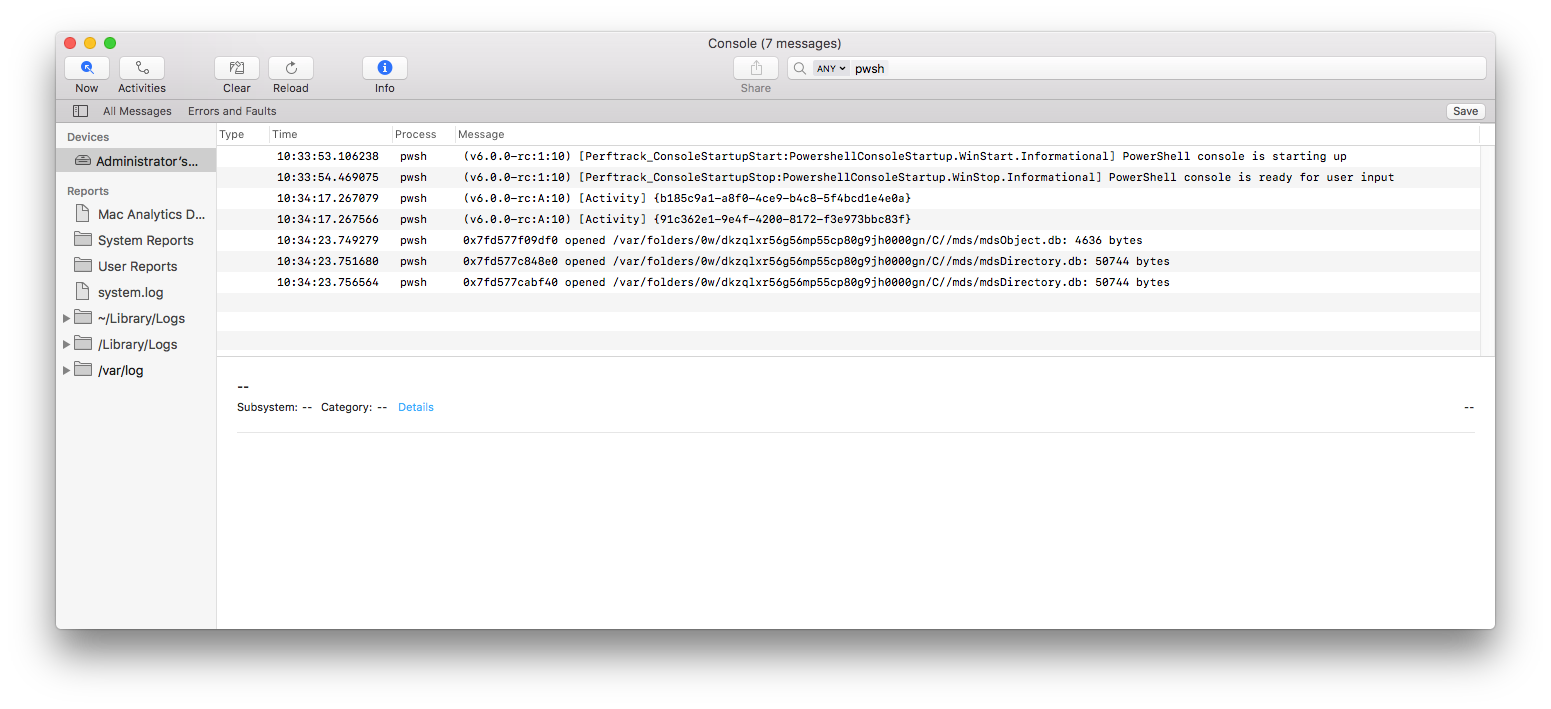
Here is the output from the Console app - there doesn't seem to be much useful information there. Just to confirm, I'm launching Console app, going to the search field in the top-right corner and typing pwsh. The search field then reads [ ANY v ] pwsh
default 10:33:53.106238 +1100   pwsh    (v6.0.0-rc:1:10) [Perftrack_ConsoleStartupStart:PowershellConsoleStartup.WinStart.Informational] PowerShell console is starting up
default 10:33:54.469075 +1100   pwsh    (v6.0.0-rc:1:10) [Perftrack_ConsoleStartupStop:PowershellConsoleStartup.WinStop.Informational] PowerShell console is ready for user input
default 10:34:17.267079 +1100   pwsh    (v6.0.0-rc:A:10) [Activity] {b185c9a1-a8f0-4ce9-b4c8-5f4bcd1e4e0a}
default 10:34:17.267566 +1100   pwsh    (v6.0.0-rc:A:10) [Activity] {91c362e1-9e4f-4200-8172-f3e973bbc83f}
default 10:34:23.749279 +1100   pwsh    0x7fd577f09df0 opened /var/folders/0w/dkzqlxr56g56mp55cp80g9jh0000gn/C//mds/mdsObject.db: 4636 bytes
default 10:34:23.751680 +1100   pwsh    0x7fd577c848e0 opened /var/folders/0w/dkzqlxr56g56mp55cp80g9jh0000gn/C//mds/mdsDirectory.db: 50744 bytes
default 10:34:23.756564 +1100   pwsh    0x7fd577cabf40 opened /var/folders/0w/dkzqlxr56g56mp55cp80g9jh0000gn/C//mds/mdsDirectory.db: 50744 bytes
kai-h
on 1 Dec 2017
@kai-h: My best guess at this point, is you're missing a dependency; most likely a dependency libmi needs.
Run otool -L against libmi.dylib in the $PSHOME directory and verify the dependencies exist.
The two key dependencies are openssl 1.0.0 and libpam 3.0.0.
I did place a new debug binary on dropbox yesterday evening that should produce a log event with the details of the DLLNotFound exception.
dantraMSFT
on 1 Dec 2017
Apologies for not getting back to you sooner with the results. I think we're getting somewhere.
Here are the otool results - I'm missing some openssl libraries:
/usr/local/opt/openssl/lib/libcrypto.1.0.0.dylib
/usr/local/opt/openssl/lib/libssl.1.0.0.dylib
/usr/local/opt is not used by a default install of macOS. Third-party package managers (like MacPorts) will often use this as a base directory to install ports.
Administrators-Mac-mini:6.0.0-rc admin$ otool -L libmi.dylib
libmi.dylib:
    @rpath/libmi.dylib (compatibility version 0.0.0, current version 0.0.0)
    /usr/lib/libSystem.B.dylib (compatibility version 1.0.0, current version 1238.60.2)
    /usr/lib/libpam.2.dylib (compatibility version 3.0.0, current version 3.0.0)
    /usr/local/opt/openssl/lib/libssl.1.0.0.dylib (compatibility version 1.0.0, current version 1.0.0)
    /usr/local/opt/openssl/lib/libcrypto.1.0.0.dylib (compatibility version 1.0.0, current version 1.0.0)
    /usr/lib/libz.1.dylib (compatibility version 1.0.0, current version 1.2.8)
Administrators-Mac-mini:6.0.0-rc admin$ ls -al /usr/lib/libSystem.B.dylib /usr/lib/libpam.2.dylib /usr/local/opt/openssl/lib/libssl.1.0.0.dylib /usr/local/opt/openssl/lib/libcrypto.1.0.0.dylib /usr/lib/libz.1.dylib
ls: /usr/local/opt/openssl/lib/libcrypto.1.0.0.dylib: No such file or directory
ls: /usr/local/opt/openssl/lib/libssl.1.0.0.dylib: No such file or directory
-rwxr-xr-x  1 root  wheel   60848 15 Jul 14:28 /usr/lib/libSystem.B.dylib
-rwxr-xr-x  1 root  wheel   80944 15 Jul 14:28 /usr/lib/libpam.2.dylib
-rwxr-xr-x  1 root  wheel  177824 15 Jul 14:27 /usr/lib/libz.1.dylib
Administrators-Mac-mini:6.0.0-rc admin$
re: the additional logging - here are the results from Console.app for pwsh when running New-PSSession
default 22:42:03.819271 +1100   pwsh    (v6.0.0-rc:9:10) [Activity] {fea85396-1987-4184-8426-6ad299343660}
default 22:42:03.826683 +1100   pwsh    (v6.0.0-rc:9:10) [Activity] {4918362a-1786-4d43-84a6-162bc3105466}
error   22:42:03.934752 +1100   pwsh    (v6.0.0-rc:9:10) [TransportError:None.Open.Error] Runspace Id: WSManAPIDataCommon.ctor Pipeline Id: WSManInitialize. WSMan reported an error with error code: -2146233052. %n Error message: Unable to load DLL 'libpsrpclient': The specified module or one of its dependencies could not be found.
 (Exception from HRESULT: 0x8007007E) %n StackTrace:    at System.Management.Automation.Remoting.Client.WSManNativeApi.WSManInitialize(Int32 flags, IntPtr& wsManAPIHandle)
   at System.Management.Automation.Remoting.Client.WSManClientSessionTransportManager.WSManAPIDataCommon..ctor() in /PowerShell/src/System.Management.Automation/engine/remoting/fanin/WSManTransportManager.cs:line 2603
Maybe related problem #5590
iSazonov
on 4 Dec 2017
@kai-h can you try using brew to install OpenSSL? That should be the path brew adds the package.
 markekraus
on 4 Dec 2017
markekraus
on 4 Dec 2017
We're making a bit of progress here. I generally use MacPorts for installing ports, not Homebrew as I consider Homebrew to be more of a security risk, and is not in keeping of long-standing Unix conventions.
My main issue with Homebrew is it changing permissions on system directories and that the project maintainers explicitly state that they DO NOT support using it with sudo.
==> The following existing directories will be made group writable:
/usr/local/bin
/usr/local/share
/usr/local/share/man
/usr/local/share/man/man1
==> The following existing directories will have their owner set to admin:
/usr/local/bin
/usr/local/share
/usr/local/share/man
/usr/local/share/man/man1
==> The following existing directories will have their group set to admin:
/usr/local/bin
/usr/local/share
/usr/local/share/man
/usr/local/share/man/man1
MacPorts installs it's ports in /opt/local and it keeps those directories owned by root which helps prevent anything malicious from dumping extraneous stuff in there (unless it's root already in which case you're already pwned)
That rant aside, here are my results running New-PSSession once I'd installed OpenSSL via Homebrew:
Showing the libraries required according to otool are there:
Administrators-Mac-mini:~ admin$ ls -al /usr/lib/libSystem.B.dylib /usr/lib/libpam.2.dylib /usr/local/opt/openssl/lib/libssl.1.0.0.dylib /usr/local/opt/openssl/lib/libcrypto.1.0.0.dylib /usr/lib/libz.1.dylib
-rwxr-xr-x  1 root   wheel    60848 15 Jul 14:28 /usr/lib/libSystem.B.dylib
-rwxr-xr-x  1 root   wheel    80944 15 Jul 14:28 /usr/lib/libpam.2.dylib
-rwxr-xr-x  1 root   wheel   177824 15 Jul 14:27 /usr/lib/libz.1.dylib
-r--r--r--  1 admin  admin  1991920  5 Dec 08:54 /usr/local/opt/openssl/lib/libcrypto.1.0.0.dylib
-r--r--r--  1 admin  admin   385168  5 Dec 08:54 /usr/local/opt/openssl/lib/libssl.1.0.0.dylib
I was able to successfully create a new session with New-PSSession. When I ran Import-PSSession however it displayed the text-based progress bar as it imported modules and then it seemed to hang and didn't return to the command prompt:
Administrators-Mac-mini:~ admin$ pwsh
PowerShell v6.0.0-rc
Copyright (c) Microsoft Corporation. All rights reserved.

https://aka.ms/pscore6-docs
Type 'help' to get help.

PS /Users/admin>   $PSVersionTable

Name                           Value
----                           -----
PSVersion                      6.0.0-rc
PSEdition                      Core
GitCommitId                    v6.0.0-rc
OS                             Darwin 16.7.0 Darwin Kernel Version 16.7.0: Thu Jun 15 17:36:27 PDT 2017; root:xnu-3789.70.16~2/RELEASE_X86_64
Platform                       Unix
PSCompatibleVersions           {1.0, 2.0, 3.0, 4.0...}
PSRemotingProtocolVersion      2.3
SerializationVersion           1.1.0.1
WSManStackVersion              3.0

PS /Users/admin> $Session = New-PSSession -ConfigurationName Microsoft.Exchange -ConnectionUri https://outlook.office365.com/powershell-liveid/ -Credential $UserCredential -Authentication Basic -AllowRedirection

PowerShell credential request
Enter your credentials.
User: [email protected]
Password for user [email protected]: ************

PS /Users/admin> Import-PSSession $Session
After the Import-PSSession it didn't return.
kai-h
on 4 Dec 2017
@kai-h good to know on homebrew... i am very very new to macOS and only use it to work in this project 😄 .
The key to macports would be whether or not it would add the libraries to /usr/local/opt/openssl/lib/. if not, would it be possible to link /usr/local/opt/openssl/lib/ fo the lib folder it does install (ln-s or something). If that's possible, than the package manager is somewhat irrelevant other than one being easier to use than the other for this scenario.
as a test, can you just try this:
$Session = New-PSSession -ConfigurationName Microsoft.Exchange -ConnectionUri https://outlook.office365.com/powershell-liveid/ -Credential $UserCredential -Authentication Basic -AllowRedirection

Invoke-Command -Session $Session -ScriptBlock { get-mailbox -ResultSize 1 }
@kai-h: There's a bug in workaround I gave you. I'll give you another drop shortly to see if it resolves the problem of if there's something else going on.
dantraMSFT
on 5 Dec 2017
@markekraus - That command works in that when I give it my Office 365 credentials it displays lots of information about my user account and mailbox (I won't copy and paste it here) however it never returns to the command prompt. Even Ctrl+C doesn't kill it, the only solution appears to be to close the Terminal window.
kai-h
on 5 Dec 2017
@markekraus - re symlinking to /usr/local/opt/openssl/lib
MacPorts installs the OpenSSL libraries in /opt/local/lib - I could try symlinking this to /usr/local/opt/openssl/lib for testing purposes, however there are likely to be other libraries in here other than the OpenSSL libraries if the end user has installed more packages with MacPorts.
kai-h
on 5 Dec 2017
@kai-h: The updated binary and pdb file is on dropbox.
dantraMSFT
on 5 Dec 2017
Thank you for the new binaries. I have installed them and now I don't get an error when I invoke New-PSSession and the following command runs and returns to the command prompt.
e.g. If I then run Import-PSSession $PSSession, it imports the modules and returns me to the command prompt as expected.
I haven't tried executing any further remote commands against Office 365 yet, except for the Invoke-Command listed above, which seems to behave as it should
Invoke-Command -Session $Session -ScriptBlock { get-mailbox -ResultSize 1 }
This seems to give me a heap of information about my mailbox.
Again, thank you for the huge amount of work that must have gone in to supporting PowerShell on non-Windows platforms, and for the attention you have given to this particular issue.
I would like to see the dependance on Homebrew installed OpenSSL libraries eliminated for the reasons mentioned above. I will test the workaround of symlinking the libraries from MacPorts (which does play nicely with sudo and doesn't change the ownership of system directories).
For the final release version, is it likely that PowerShell will ship with all the required dependancies, or will it rely on these libraries to be installed via 3rd party package managers?
kai-h
on 6 Dec 2017
@kai-h Go ahead and file an issue MacPorts/Homebrew. Please include enough detail so a MacOS neophyte like myself can understand it. :)
Thanks again for all of your help tracking this down.
dantraMSFT
on 6 Dec 2017
@dantraMSFT - I will do. Thanks.
kai-h
on 6 Dec 2017
I have logged issue #5634 regarding this.
kai-h
on 6 Dec 2017
Related issues
 mklement0
·
3Comments
mklement0
·
3Comments
 manofspirit
·
3Comments
SteveL-MSFT
·
3Comments
manofspirit
·
3Comments
SteveL-MSFT
·
3Comments
 Michal-Ziemba
·
3Comments
Michal-Ziemba
·
3Comments
 aragula12
·
3Comments
aragula12
·
3Comments
Most helpful comment
Great, thanks. I really appreciate the attention that MSFT are giving to powershell on alternative platforms.