Powerline: Segment to show locks keyboard status (suggestion)
Hi.
Really great work done. I have setup Powerline in i3wm.

Since my laptop don't have a led to show the lock keyboard status, I miss a segment to show the locks keyboard status in the bar (caps lock, num lock).
Something similar to this in py3status
I can't help with code, since I'm not a developer, just a simple user!
Greetings.
 victorhck
All 11 comments
Done: kbd.py


However, some caveats:
- The segment is essentially just a wrapper around
xset -q, meaning that this segments only works whenever that works. Especially it will not work whenever you're outside of X; it should be possible to fix this to some extend. - Currently, the segment updates with the default refresh interval of the bar; an update is especially not triggered by a change of a lock status. Hence, it is somewhat useless in
vimor a shell; I don't see how to fix this. (Using a ThreadedSegment instead will not help: Even if the segment updates, changes are not rendered) - Sadly, this repository is somewhat inactive in regards to merging pull requests (and hence I am somewhat reluctant in opening one), so for the foreseeable future you will have to save the above file locally and then include it from that location in your config file.
 PH111P
on 21 Sep 2019
PH111P
on 21 Sep 2019
Thanks a lot for your code!!
Can't find where the segments are! Where do I have to create the kbd.py file?
victorhck
on 23 Sep 2019
The segments are at powerline_root/powerline/segments/, where powerline_root is usually something like /usr/lib/python3.7/site-packages/. Note that directly adding files to this directory is a hot fix at best and may break with powerline updates, so use this at your own risk.
A slightly better solution would be to create a (dummy) package for the file by creating a new subdirectory of /usr/lib/python3.7/site-packages/ and adding kbd.py and an empty file named __init__.py:
/usr/lib/python3.7/site-packages/<your_package_name>
├── kbd.py
└── __init__.py
Note that in your config files, you then also need to point to <your_package_name>:
"function": "<your_package_name>.kbd.lock_status".
(Note that the paths above assume you use python 3.7; if you use a different version, the paths change accordingly.)
PH111P
on 23 Sep 2019
mmm didn't work :(
I create a file called kbd.py in /usr/lib/python3.7/site-packages/powerline/segments/common
And in my config added:
        {
            "function": "powerline.segments.common.kbd.lock_status"
        },
But nothing happen... (yep running python 3.7) Maybe I made something wrong?
victorhck
on 24 Sep 2019
What you did looks correct... Please try the following:
- Does
xset -qwork in a terminal? (If not, you may need to install a package likexorg-xsetor similar) - Try to run the binding (that uses the segment) directly from your terminal; for the lemonbar binding this should be something like
$PYTHON_SITE_PATH/powerline/bindings/lemonbar/powerline-lemonbar.pyand check whether it reports any errors. (Alternatively, configure powerline to use a log file and check that log file for any errors; consult the docs for the details, especially the log_file paragraph.)
PH111P
on 25 Sep 2019
xset -q seems to work properly. When I run the command I get:
Keyboard Control:
  auto repeat:  on    key click percent:  0    LED mask:  00000002
  XKB indicators:
    00: Caps Lock:   off    01: Num Lock:    on     02: Scroll Lock: off
    03: Compose:     off    04: Kana:        off    05: Sleep:       off
    06: Suspend:     off    07: Mute:        off    08: Misc:        off
    09: Mail:        off    10: Charging:    off    11: Shift Lock:  off
    12: Group 2:     off    13: Mouse Keys:  off
  auto repeat delay:  660    repeat rate:  25
  auto repeating keys:  00ffffffdffffbbf
                        fadfffefffedffff
                        9fffffffffffffff
                        fff7ffffffffffff
  bell percent:  50    bell pitch:  400    bell duration:  100
Pointer Control:
  acceleration:  2/1    threshold:  4
Screen Saver:
  prefer blanking:  yes    allow exposures:  yes
  timeout:  600    cycle:  600
Colors:
  default colormap:  0x22    BlackPixel:  0x0    WhitePixel:  0xffffff
Font Path:
  /usr/share/fonts/misc:unscaled,/usr/share/fonts/Type1/,/usr/share/fonts/100dpi:unscaled,/usr/share/fonts/75dpi:unscaled,/usr/share/fonts/ghostscript/,/usr/share/fonts/cyrillic:unscaled,/usr/share/fonts/truetype/,built-ins
DPMS (Energy Star):
  Standby: 600    Suspend: 600    Off: 600
  DPMS is Enabled
  Monitor is On
Font cache:
  Server does not have the FontCache Extension
And maybe this can be useful to you:
2019-09-27 18:27:43,224:ERROR:wm:lock_status:Failed to set highlight group: 'Highlighting groups not found in colorscheme: keyboard:caps_lock_on, keyboard:caps_lock_off, keyboard'
Traceback (most recent call last):
  File "/usr/lib/python3.7/site-packages/powerline/segment.py", line 151, in set_segment_highlighting
    segment.get('gradient_level')
  File "/usr/lib/python3.7/site-packages/powerline/colorscheme.py", line 105, in get_highlighting
    raise KeyError('Highlighting groups not found in colorscheme: ' + ', '.join(groups))
KeyError: 'Highlighting groups not found in colorscheme: keyboard:caps_lock_on, keyboard:caps_lock_off, keyboard'
Seems to be an issue with my colorscheme...
victorhck
on 27 Sep 2019
Ah of course, I forgot to mention that you need to define at least the highlight group keyboard in your color scheme; this seems to be the issue.
(Optionally, you may also define separate colors for the various different different lock states; e.g. keyboard:caps_lock_on, keyboard:caps_lock_off etc)
PH111P
on 27 Sep 2019
My colorscheme is in:
~/.config/powerline/colorschemes/shell/default.json
In that file I have added something like:
"keyboard": { "fg": "white", "bg": "darkestpurple", "attrs": [] },
but doesn't works... don't know if is that file the right one to add the highlight group...
(and thanks a lot for your support)
victorhck
on 27 Sep 2019
I got it!!! :)
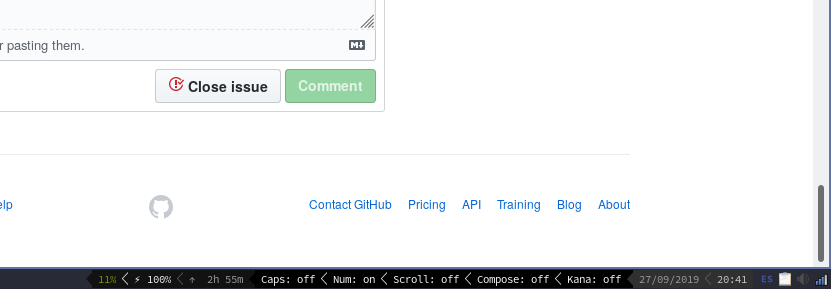
Now I have to configure to show only caps and num locks...
THANKS a lot for your support, your code (and your patience) :)
victorhck
on 27 Sep 2019
Nice!
For the configuration, set the argument locks to {'Caps Lock': 'Caps', 'Num Lock': 'Num'}; only keys present in that dictionary will be shown. You can also replace the on/off with something more fancy with the status_dict argument.
PH111P
on 27 Sep 2019
 victorhck
on 30 Sep 2019
victorhck
on 30 Sep 2019
Related issues
 catskul
·
11Comments
catskul
·
11Comments
 LefterisJP
·
15Comments
LefterisJP
·
15Comments
 nfarrar
·
11Comments
nfarrar
·
11Comments
 suoto
·
31Comments
suoto
·
31Comments
 frol
·
44Comments
frol
·
44Comments
Most helpful comment
I used nerd fonts
"Caps lock" is off, and "Num lock" is on