Powerlevel9k: Github Icon not showing but instead "git" is displayed.
On the left side it displays "git" instead of the logo/icon and I've tried modifying the zshrc file many times and doing trial and error tests but nothing seems to be happening. One time it changed the entire theme and I had to delete the whole zshrc file and start over. I have looked for solutions and have tried to display the icon for the past few hours. I still don't understand what the issue may be.

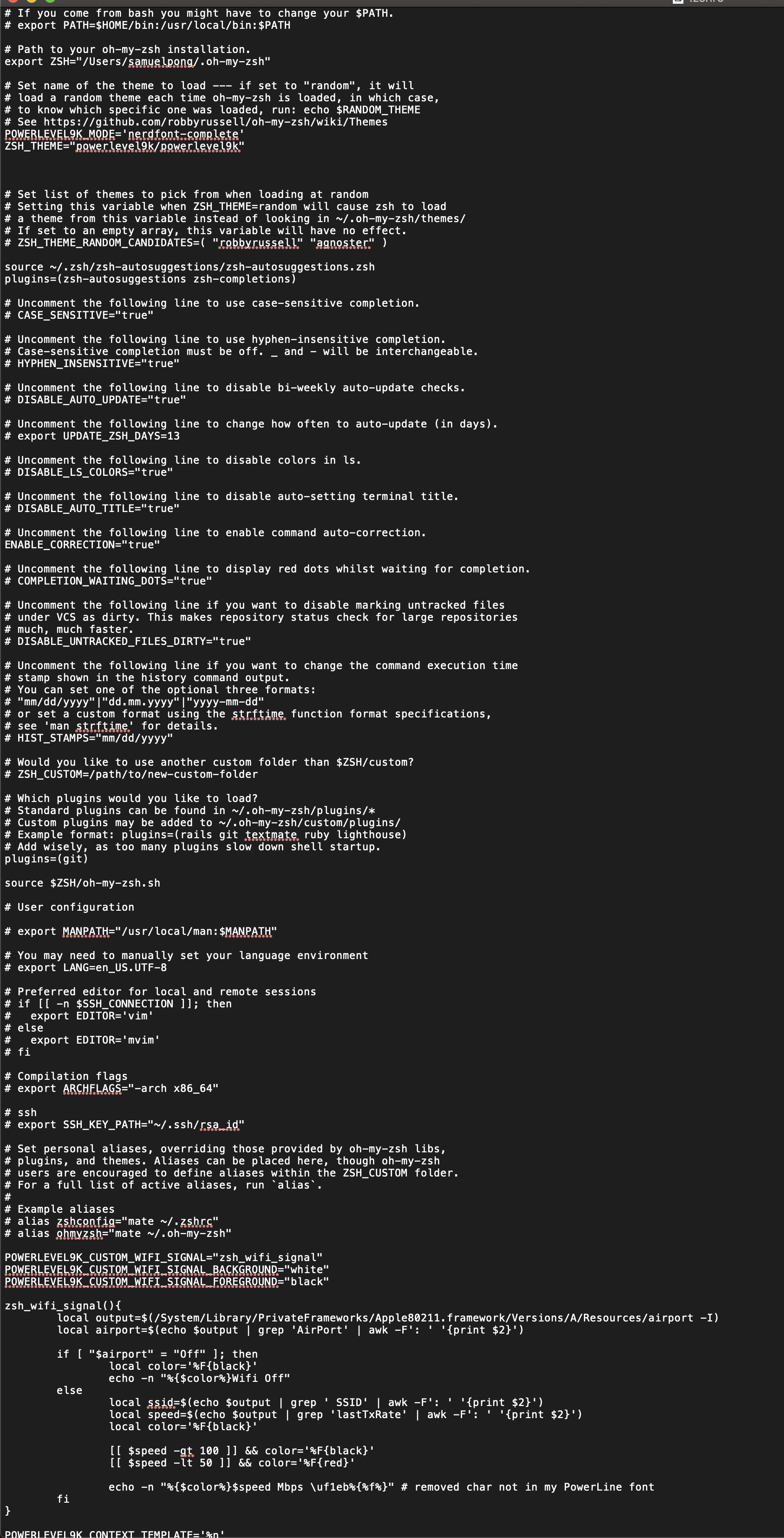
zshrc file

Environment Information
This information will help us understand your configuration.
mac os 10.14.2 majove
- What version of ZSH are you using? zsh 5.7.1 (x86_64-apple-darwin18.2.0)
- Do you use a ZSH framework? Oh-My-ZSH
- How did you install P9k ? cloning the repo
- What version of P9k are you using?
- Which terminal emulator do you use? iterm2
- Which font do you use?
hack regular nerd font complete - Which font configuration mode are you using? You can check this with (
echo $POWERLEVEL9K_MODE).
nerdfont-complete - If this is an icon problem, does the output of
$ get_icon_nameslook correct?
Yes , I can see the icon i want but when pasting it to the .zshrc file nothing changes.
Here's what you see when you get icon names..

I'm interested in POWERLEVEL9K_VCS_GIT_GITHUB_ICON instead of it saying "git".
Thank you for your help! I really appreciate it.
 ghost
ghost
All 11 comments
Can you do a git ls-remote --get-url? Does the output include the word "github"?
 Syphdias
on 19 Feb 2019
Syphdias
on 19 Feb 2019
Can you do a
git ls-remote --get-url? Does the output include the word "github"?
It gives me this error :

ghost
on 20 Feb 2019
Your error actually is intended. P9k displays the git icon if you don’t have a remote repo set or if the remote repo isn’t hosted at Github, Bitbucket or Gitlab.
Your screenshot shows that you don’t have a remote repo set, so p9k just shows “git” instead
 iilonmasc
on 20 Feb 2019
iilonmasc
on 20 Feb 2019
I have tried setting it to the icon itself but when i paste it into the zshrc file it turns into a box with a question mark in it. I've also tried setting it to true thinking that it would display but that also did nothing.
ghost
on 20 Feb 2019
@spongbot It works the other way around. Instead of setting POWERLEVEL9K_VCS_GIT_GITHUB_ICON, you need to set POWERLEVEL9K_VCS_GIT_ICON. This is because P9K detects the remote of your repo (as @Syphdias pointed out) and sets the icon depending on that detected remote. Gitlab icon for Gitlab, Github icon for Github and so on.. In your case, you have no remote, so P9K falls back to the default git icon.
Long story short:
POWERLEVEL9K_VCS_GIT_ICON=$'\uF113 '
 dritter
on 20 Feb 2019
dritter
on 20 Feb 2019
@dritter Thanks, I wasn't sure what to put after that but it shows up now. Do you know how to get rid of the + ! and ? symbols. I'm not sure what they're representing as this is a copy paste from a theme that was part of the "show off your config" page.
ghost
on 20 Feb 2019
That are informational icons that indicate:
!: You have modified tracked files that are not staged in your repo.
+: You have modified tracked files that are staged in your repo.
?: You have untracked files in your repo.
If you get rid of them, you could just set the according icon to blank.
POWERLEVEL9K_VCS_UNSTAGED_ICON=""
POWERLEVEL9K_VCS_STAGED_ICON=""
POWERLEVEL9K_VCS_UNTRACKED_ICON=""
okay thank you so much! Issues resolved. @dritter
ghost
on 20 Feb 2019
@dritter do you by any chance know why when i open iterm2 it takes a few seconds to load the prompt and it also takes the very same seconds every after command I input?
There is this slight lag. Could it be something in the .zshrc file that's causing it?
ghost
on 22 Feb 2019
ghost
on 22 Feb 2019
@spongbot I see you have a lot of segments configured. Generally speaking, the more segment, the more time does the prompt need to render. Some of these segments do a lot of computational work to show the desired informations. Try to remove segments you don't need one by one and see if that helps.
Of course this is not a real solution. We are still working on getting async segments on the road.
dritter
on 22 Feb 2019
Related issues
 Who23
·
4Comments
Who23
·
4Comments
 agungsetiawan
·
6Comments
agungsetiawan
·
6Comments
 shibumi
·
5Comments
shibumi
·
5Comments
 OATOMO
·
4Comments
OATOMO
·
4Comments
 natemccurdy
·
5Comments
natemccurdy
·
5Comments
Most helpful comment
@spongbot It works the other way around. Instead of setting
POWERLEVEL9K_VCS_GIT_GITHUB_ICON, you need to setPOWERLEVEL9K_VCS_GIT_ICON. This is because P9K detects the remote of your repo (as @Syphdias pointed out) and sets the icon depending on that detected remote. Gitlab icon for Gitlab, Github icon for Github and so on.. In your case, you have no remote, so P9K falls back to the default git icon.Long story short:
POWERLEVEL9K_VCS_GIT_ICON=$'\uF113 '