Powerlevel9k: get_icon_names no any valid icons.
Hi,
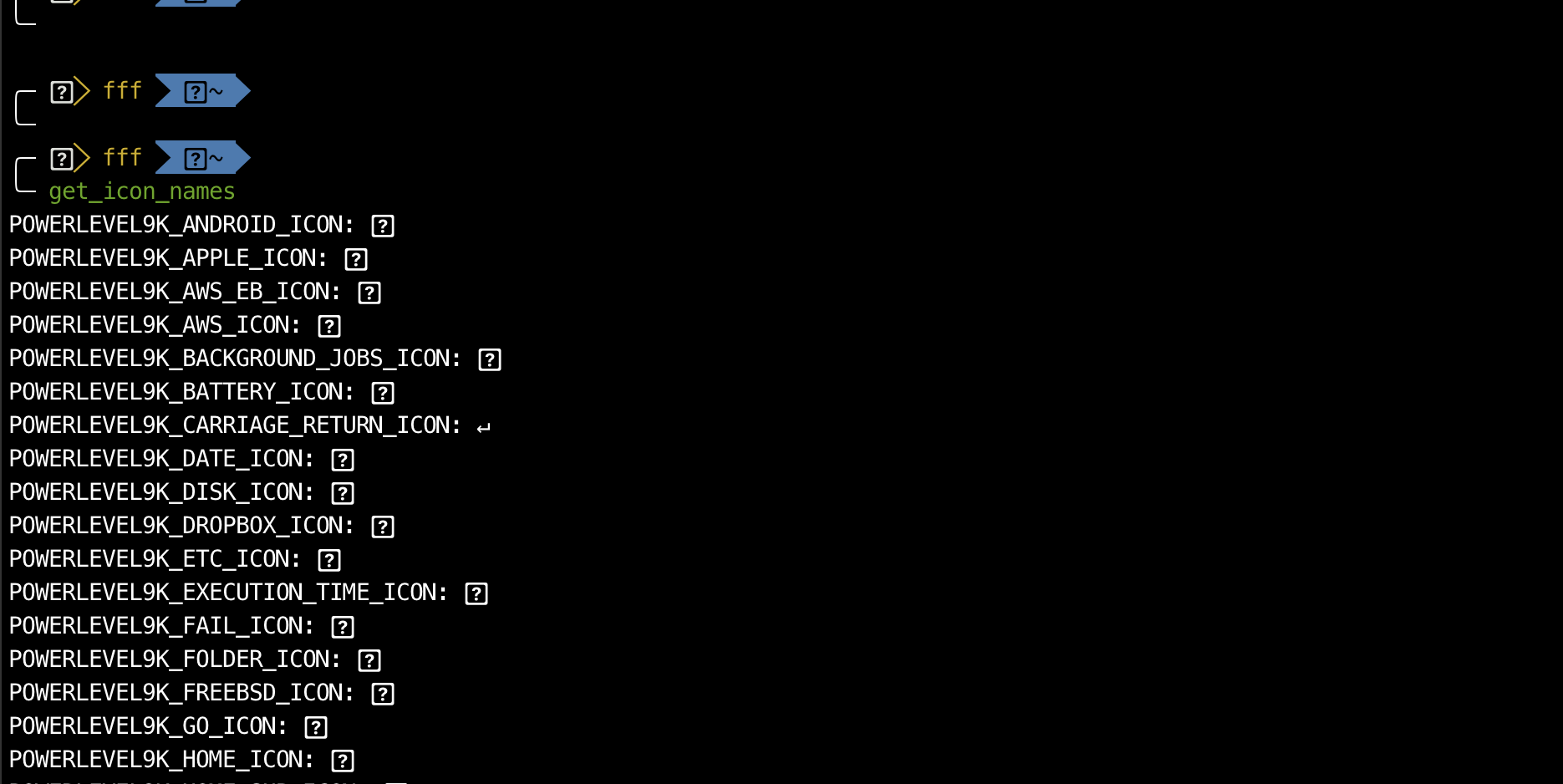
After installed zsh, oh-my-zsh, pwerlevel9k and nerd-font, my iterm2 is weird and get_icon_names output many question mark icon.
screenshot below:
MacOS
zsh 5.6.2
0h-my-zsh
iterm2
nerdfont-complete
 hackerwin7
All 4 comments
Hi, have you set POWERLEVEL9K_MODE='nerdfont-complete' in your .zshrc? Also did you change your font in iTerm?
 iilonmasc
on 20 Nov 2018
iilonmasc
on 20 Nov 2018
Here is my .zshrc
# If you come from bash you might have to change your $PATH.
# export PATH=$HOME/bin:/usr/local/bin:$PATH
# Path to your oh-my-zsh installation.
export ZSH="/Users/fff/.oh-my-zsh"
# Set name of the theme to load --- if set to "random", it will
# load a random theme each time oh-my-zsh is loaded, in which case,
# to know which specific one was loaded, run: echo $RANDOM_THEME
# See https://github.com/robbyrussell/oh-my-zsh/wiki/Themes
# ZSH_THEME="robbyrussell"
ZSH_THEME="powerlevel9k/powerlevel9k"
##### 9k config
POWERLEVEL9K_MODE="nerdfont-complete"
##POWERLEVEL9K_DISABLE_RPROMPT=true
POWERLEVEL9K_PROMPT_ON_NEWLINE=true
POWERLEVEL9K_LEFT_PROMPT_ELEMENTS=(os_icon user dir_writable dir vcs)
POWERLEVEL9K_RIGHT_PROMPT_ELEMENTS=(status command_execution_time root_indicator background_jobs time disk_usage ram)
#POWERLEVEL9K_MULTILINE_LAST_PROMPT_PREFIX="%(?:%{$fg_bold[green]%}➜ :%{$fg_bold[red]%}➜ )"
#POWERLEVEL9K_MULTILINE_FIRST_PROMPT_PREFIX=""
#POWERLEVEL9K_USER_ICON="\uF415" #
POWERLEVEL9K_ROOT_ICON="\uF09C"
#POWERLEVEL9K_SUDO_ICON=$'\uF09C' #
POWERLEVEL9K_TIME_FORMAT="%D{%H:%M}"
#POWERLEVEL9K_VCS_GIT_ICON='\uF408 '
#POWERLEVEL9K_VCS_GIT_GITHUB_ICON='\uF408 '
##### 9k config
## haccks's zsh
ZSH_DISABLE_COMPFIX=true
# Set list of themes to pick from when loading at random
# Setting this variable when ZSH_THEME=random will cause zsh to load
# a theme from this variable instead of looking in ~/.oh-my-zsh/themes/
# If set to an empty array, this variable will have no effect.
# ZSH_THEME_RANDOM_CANDIDATES=( "robbyrussell" "agnoster" )
# Uncomment the following line to use case-sensitive completion.
# CASE_SENSITIVE="true"
# Uncomment the following line to use hyphen-insensitive completion.
# Case-sensitive completion must be off. _ and - will be interchangeable.
# HYPHEN_INSENSITIVE="true"
# Uncomment the following line to disable bi-weekly auto-update checks.
# DISABLE_AUTO_UPDATE="true"
# Uncomment the following line to change how often to auto-update (in days).
# export UPDATE_ZSH_DAYS=13
# Uncomment the following line to disable colors in ls.
# DISABLE_LS_COLORS="true"
# Uncomment the following line to disable auto-setting terminal title.
# DISABLE_AUTO_TITLE="true"
# Uncomment the following line to enable command auto-correction.
ENABLE_CORRECTION="true"
# Uncomment the following line to display red dots whilst waiting for completion.
COMPLETION_WAITING_DOTS="true"
# Uncomment the following line if you want to disable marking untracked files
# under VCS as dirty. This makes repository status check for large repositories
# much, much faster.
# DISABLE_UNTRACKED_FILES_DIRTY="true"
# Uncomment the following line if you want to change the command execution time
# stamp shown in the history command output.
# You can set one of the optional three formats:
# "mm/dd/yyyy"|"dd.mm.yyyy"|"yyyy-mm-dd"
# or set a custom format using the strftime function format specifications,
# see 'man strftime' for details.
# HIST_STAMPS="mm/dd/yyyy"
# Would you like to use another custom folder than $ZSH/custom?
# ZSH_CUSTOM=/path/to/new-custom-folder
# Which plugins would you like to load?
# Standard plugins can be found in ~/.oh-my-zsh/plugins/*
# Custom plugins may be added to ~/.oh-my-zsh/custom/plugins/
# Example format: plugins=(rails git textmate ruby lighthouse)
# Add wisely, as too many plugins slow down shell startup.
plugins=(
git
iterm2
macports
man
osx
python
composer
zsh-syntax-highlighting
zsh-autosuggestions
)
source $ZSH/oh-my-zsh.sh
# User configuration
# export MANPATH="/usr/local/man:$MANPATH"
# You may need to manually set your language environment
# export LANG=en_US.UTF-8
# Preferred editor for local and remote sessions
# if [[ -n $SSH_CONNECTION ]]; then
# export EDITOR='vim'
# else
# export EDITOR='mvim'
# fi
# Compilation flags
# export ARCHFLAGS="-arch x86_64"
# ssh
# export SSH_KEY_PATH="~/.ssh/rsa_id"
# Set personal aliases, overriding those provided by oh-my-zsh libs,
# plugins, and themes. Aliases can be placed here, though oh-my-zsh
# users are encouraged to define aliases within the ZSH_CUSTOM folder.
# For a full list of active aliases, run `alias`.
#
# Example aliases
# alias zshconfig="mate ~/.zshrc"
# alias ohmyzsh="mate ~/.oh-my-zsh"
alias suroot='sudo -E -s'
if [ -f ~/.bash_profile ]; then
. ~/.bash_profile;
fi
test -e "${HOME}/.iterm2_shell_integration.zsh" && source "${HOME}/.iterm2_shell_integration.zsh"
my Iterm font is Meslo LG M Regular for Powerline
hackerwin7
on 20 Nov 2018
You might want to surround your configuration in triple backticks ``` to make it more readable.
Did you set your iTerm font to one of the installed nerd-fonts? Your zsh configuration seems to be correct
Edit: Missed the last line.
Your font is not a nerd-font, you need to set iTerm to use a nerd-font to be able to use POWERLEVEL9K_MODE='nerdfont-complete'
iilonmasc
on 20 Nov 2018
Thanks for caching this!
I check my iTerm2 font is _Meslo LG M Regular for Powerline_ , After change this to nerd font, it worked !
hackerwin7
on 20 Nov 2018
Related issues
 xufab
·
4Comments
xufab
·
4Comments
 DanielChabrowski
·
3Comments
DanielChabrowski
·
3Comments
 natemccurdy
·
5Comments
natemccurdy
·
5Comments
 worldofpeace
·
6Comments
worldofpeace
·
6Comments
 guidoilbaldo
·
5Comments
guidoilbaldo
·
5Comments
Most helpful comment
You might want to surround your configuration in triple backticks
```to make it more readable.Did you set your iTerm font to one of the installed nerd-fonts? Your zsh configuration seems to be correct
Edit: Missed the last line.
Your font is not a nerd-font, you need to set iTerm to use a nerd-font to be able to use
POWERLEVEL9K_MODE='nerdfont-complete'