Powerlevel9k: What is this circle icon in the VCS section?
There's a solid circle in the VCS section pictured below (right side of the left prompt) that I cannot find in all the icons with get_icon_names. Does anyone know what it is? It shows in all my git repos.
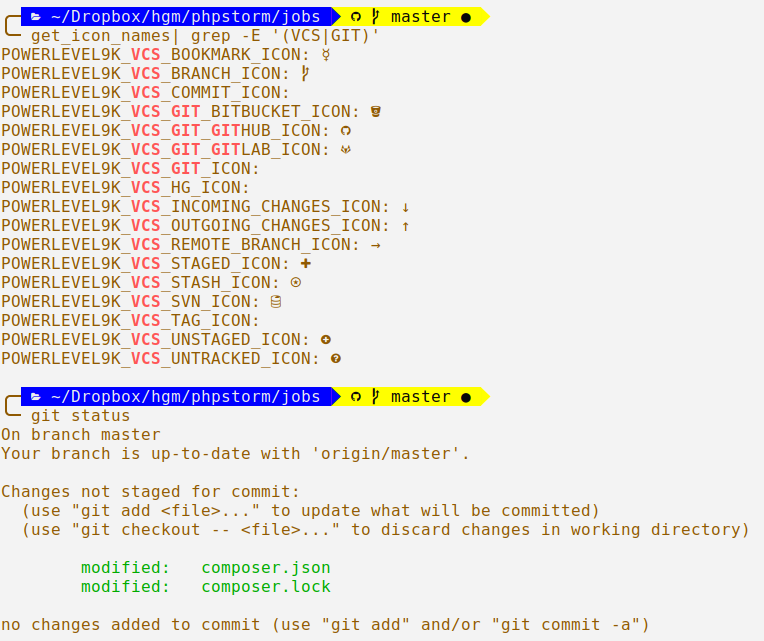
 dharkness
All 9 comments
The readme says the following about VCS:
Compatible | Powerline | Awesome Powerline | Explanation
-- | -- | -- | --
↑4 | ↑4 | 4 | Number of commits your repository is ahead of your remote branch
↓5 | ↓5 | 5 | Number of commits your repository is behind of your remote branch
⍟3 | ⍟3 | 3 | Number of stashes, here 3.
● | ● | | There are unstaged changes in your working copy
✚ | ✚ | | There are staged changes in your working copy
? | ? | | There are files in your working copy, that are unknown to your repository
→ | → | | The name of your branch differs from its tracking branch.
☿ | ☿ | | A mercurial bookmark is active.
@ | | | Branch Icon
None | None | 2c3705 | The current commit hash. Here "2c3705"
None | None | | Repository is a git repository
None | None | | Repository is a Mercurial repository
 onaforeignshore
on 18 Aug 2018
onaforeignshore
on 18 Aug 2018
So the circle appears for compatible/powerline fonts to show that you have unstaged changes in your working copy.
onaforeignshore
on 18 Aug 2018
Oh sorry. I'm using "DejaVuSansMono Nerd Font Mono Book". Shouldn't whatever I can see using get_icon_names look the same in the actual prompts? I've been able to change all the other icons so far.
POWERLEVEL9K_MODE="nerdfont-complete"
Is that icon hard-coded? You can see I have it set to a circle with a plus in it for unstaged and a circle with a question mark in it for untracked in the screenshot above.
POWERLEVEL9K_VCS_UNSTAGED_ICON="\uf059"
POWERLEVEL9K_VCS_UNTRACKED_ICON="\uf059"
After playing around a bit more, it looks like that solid circle icon means the local repo is dirty, meaning it has untracked, unstaged, or staged changes. I've been able to display the untracked and staged icons, but not unstaged. I see where vcs.zsh sets VCS_WORKDIR_DIRTY, but not where the solid circle icon is added as a result.
dharkness
on 19 Aug 2018
As described in the documentation, the icon is for "unstaged changes in your working copy"..
And it's not hardcoded. You can change the icon by setting POWERLEVEL9K_VCS_UNSTAGED_ICON.
The code that shows that icon is the following line:
zstyle ':vcs_info:*' unstagedstr " $(print_icon 'VCS_UNSTAGED_ICON')"
You can see, we just configure VCS_INFO to show that icon, if there are unstaged changes.
 dritter
on 19 Aug 2018
dritter
on 19 Aug 2018
Yes, but here's my config:
POWERLEVEL9K_VCS_UNSTAGED_ICON="\uF06A"
Echoing that Unicode character in the terminal displays a circle with an exclamation mark in it. Yet, the prompt shows a solid circle instead. Either way, I have _no_ icons set to a solid circle.
Note: I've changed the icon from the screenshot above which shows a circle with a plus inside it, but the issue is the same.
dharkness
on 19 Aug 2018
You need to set that variable before you source P9K. That should do the trick.
BUT: This seems not to be the real problem here. Looking at your screenshot, it looks like your MODE isn't set up correctly. I see that, because the branching icon should be a different one in nerdfont-complete, etc. The POWERLEVEL9K_MODE should be set before you source the theme as well. Could you show us your configuration?
dritter
on 19 Aug 2018
That did the trick. I had put all my P9K config at the end of my .zshrc with my aliases and such. I guess that works for colors and most icons, but not the theme. The untracked icon is now fixed. I was also able to remove some of the icon settings I had to override in my previous setup; they're now using the correct default icon, I assume due to the theme.
Thanks! I hadn't even considered that the theme wasn't working since it was mostly correct already.
dharkness
on 19 Aug 2018
Related issues
 shibumi
·
3Comments
dritter
·
5Comments
shibumi
·
3Comments
dritter
·
5Comments
 guidoilbaldo
·
5Comments
guidoilbaldo
·
5Comments
 natemccurdy
·
5Comments
shibumi
·
5Comments
natemccurdy
·
5Comments
shibumi
·
5Comments
Most helpful comment
The readme says the following about VCS:
Compatible | Powerline | Awesome Powerline | Explanation
-- | -- | -- | --
↑4 | ↑4 | 4 | Number of commits your repository is ahead of your remote branch
↓5 | ↓5 | 5 | Number of commits your repository is behind of your remote branch
⍟3 | ⍟3 | 3 | Number of stashes, here 3.
● | ● | | There are unstaged changes in your working copy
✚ | ✚ | | There are staged changes in your working copy
? | ? | | There are files in your working copy, that are unknown to your repository
→ | → | | The name of your branch differs from its tracking branch.
☿ | ☿ | | A mercurial bookmark is active.
@ | | | Branch Icon
None | None | 2c3705 | The current commit hash. Here "2c3705"
None | None | | Repository is a git repository
None | None | | Repository is a Mercurial repository