Powerlevel9k: Option to output hyperlink in directory segment
Now that VTE and other terminals support hyperlinks [1] it would be great if the directory in the prompt was a hyperlink to that directory.
That way you could right click on the prompt and open the file manager there.
[1]
https://gist.github.com/egmontkob/eb114294efbcd5adb1944c9f3cb5feda
 stuaxo
All 9 comments
Hi @stuaxo !
Wow. I didn't know this is possible at all. Thanks for that suggestion. Pretty awesome, as we could use the shortened name as link text and still point to the right directory.
I am a bit concerned about:
- Styling. I am not sure how all Terminal Emulators would render the links. iTerm2 renders it like this:

- Detectability. It seems that there is no way to detect this properly. And if some Terminal Emulators won't ignore the escape sequences, it might be necessary to hide this feature in a feature flag (which would be complicated, as the
dirsegment is complicated anyway). - File Links on Remote Hosts. They wouldn't work, right? No big deal, if the File Manager just shows an error.
- Encodings. Some people use UTF-8 characters in their Directory names.. The Specification says the behaviour is undefined then.
But an interesting feature anyway. 👍
 dritter
on 6 Jun 2018
dritter
on 6 Jun 2018
It's funny, as it's something I've been wanting for years :)
Anyway -
I think it will be ignored if not supported.
It only works on local hosts for now.
The dashed underline isn't my first choice, but it's useful enough that I'd still use it :)
I guess for the home icon could be a file file:/// link to home as well.
I really hope that features like this are taken further, but in the meantime, there are possibilities as-is.... I'd find it handy being able to scroll up in my terminal history and quickly navigate to directories by right-clicking part of the prompt :)
stuaxo
on 6 Jun 2018
I wrote a quick PR to test this "feature" and, while it works, it causes issues with the right prompt
 onaforeignshore
on 1 Jul 2018
onaforeignshore
on 1 Jul 2018
This sounds like a really cool feature, but will require someone investing the time to make it work properly. Realistically, that means someone from the community will need to take it on, as the core developers of P9k are likely not to be able to get to this anytime soon.
I'll leave this issue open as an enhancement request for anyone willing to take on the effort!
 bhilburn
on 9 Oct 2018
bhilburn
on 9 Oct 2018
@onaforeignshore in your test you mentioned it causes the right prompt to move to the left.
I guess this is because powerlevel9k doesn't know that some or all of the output is not visible, messing up it's calculation of the prompt length, and thus the positioning for the right prompt.
Do you know if the amount it's out is something like the length of the path, or length of path plus some or all of the ansi output ?
@bhilburn any idea where I can find code that deals with positioning the right prompt, or working out the length of the prompt ?
stuaxo
on 9 Oct 2018
Got it working! It's really cool!
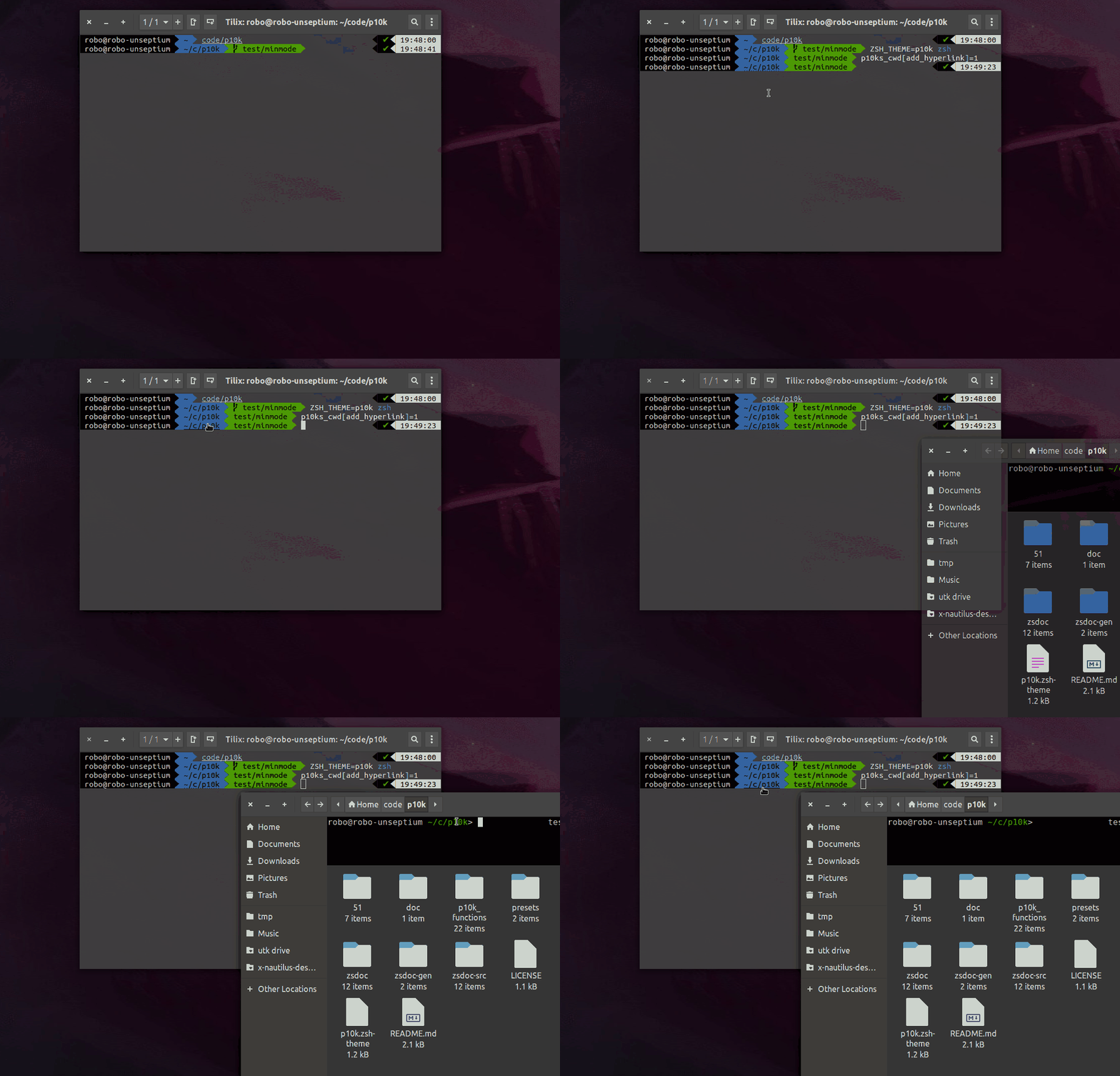
All it needed were the ANSI escapes then use the hidden-char indicators %{stuff without visible length%}
 robobenklein
on 3 Nov 2018
robobenklein
on 3 Nov 2018
Now if there was only a way to go to the git repo from the git segment in there :smiling_imp:
stuaxo
on 5 Nov 2018
@stuaxo Wow! I love that idea! 100% going to steal it, will post code here later (idk how long), but maybe I'll make a separate issue for that feature.
robobenklein
on 5 Nov 2018
I am on a issue-cleaning spree. This issue hasn't had motion in quite some time, and so I am closing it out due to inactivity. If anyone would like to re-open it because they feel it is un-resolved and is something they care about, please feel free to re-raise the discussion!
bhilburn
on 18 Jul 2019
Related issues
 xufab
·
4Comments
xufab
·
4Comments
 iiison
·
3Comments
dritter
·
5Comments
iiison
·
3Comments
dritter
·
5Comments
 edwardsmit
·
3Comments
edwardsmit
·
3Comments
 DanielChabrowski
·
3Comments
DanielChabrowski
·
3Comments
Most helpful comment
Got it working! It's really cool!
All it needed were the ANSI escapes then use the hidden-char indicators
%{stuff without visible length%}