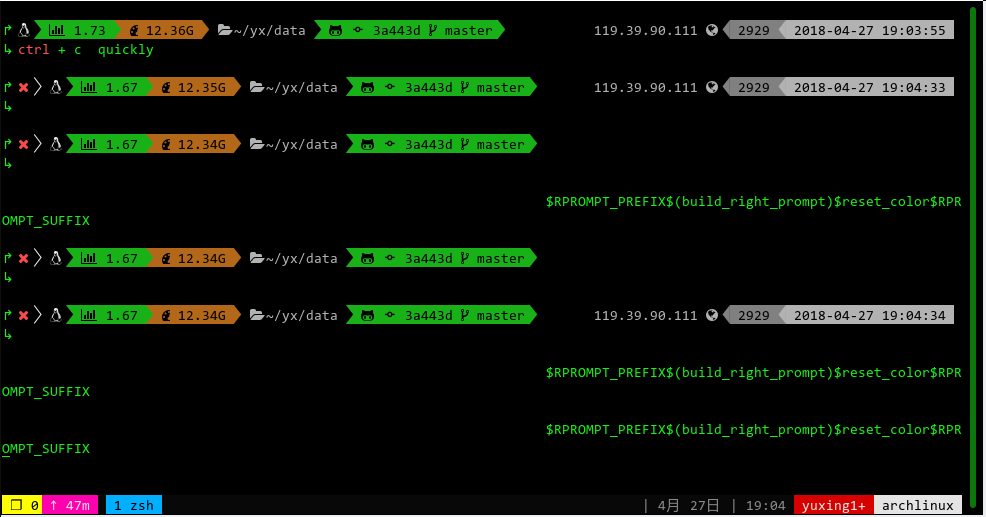
Powerlevel9k: When I quickly press CTRL + c, `$RPROMPT_PREFIX$(build_right_prompt)` appears.
$RPROMPT_PREFIX$(build_right_prompt)$reset_color$RPROMPT_SUFFIX
source /usr/share/zsh/share/antigen.zsh

antigen use oh-my-zsh

antigen bundle git
antigen bundle last-working-dir
antigen bundle z
antigen bundle autojump
#antigen bundle heroku
antigen bundle pip
#antigen bundle lein
antigen bundle command-not-found

antigen bundle zsh-users/zsh-syntax-highlighting

antigen bundle zsh-users/zsh-autosuggestions

antigen bundle zsh-users/zsh-completions

antigen bundle zsh-users/zsh-history-substring-search

#POWERLEVEL9K_MODE='awesome-fontconfig'
#POWERLEVEL9K_MODE='awesome-patched'
POWERLEVEL9K_MODE='nerdfont-complete'

POWERLEVEL9K_PROMPT_ON_NEWLINE=true
POWERLEVEL9K_RPROMPT_ON_NEWLINE=false
POWERLEVEL9K_PROMPT_ADD_NEWLINE=true
POWERLEVEL9K_MULTILINE_FIRST_PROMPT_PREFIX="↱"
POWERLEVEL9K_MULTILINE_LAST_PROMPT_PREFIX="↳ "
#POWERLEVEL9K_COLOR_SCHEME='light'

POWERLEVEL9K_SHORTEN_DIR_LENGTH=3
POWERLEVEL9K_SHORTEN_STRATEGY="truncate_middle"
POWERLEVEL9K_STATUS_VERBOSE=false
POWERLEVEL9K_LEFT_PROMPT_ELEMENTS=(status os_icon load ram dir_writable dir vcs ssh)
POWERLEVEL9K_RIGHT_PROMPT_ELEMENTS=(public_ip history time battery)
POWERLEVEL9K_SHOW_CHANGESET=true
POWERLEVEL9K_CHANGESET_HASH_LENGTH=6

POWERLEVEL9K_DIR_HOME_BACKGROUND="black"
POWERLEVEL9K_DIR_HOME_FOREGROUND="249"
POWERLEVEL9K_DIR_HOME_SUBFOLDER_BACKGROUND="black"
POWERLEVEL9K_DIR_HOME_SUBFOLDER_FOREGROUND="249"
POWERLEVEL9K_DIR_DEFAULT_BACKGROUND="black"
POWERLEVEL9K_DIR_DEFAULT_FOREGROUND="249"

POWERLEVEL9K_TIME_FORMAT="%D{%Y-%m-%d %H:%M:%S}"

POWERLEVEL9K_PUBLIC_IP_HOST="ip.cip.cc"

antigen theme bhilburn/powerlevel9k powerlevel9k
 yxing-xyz
All 41 comments
Could you please tell us the problem you are facing (and edit the title accordingly)?
Also would you please put your configuration in a code block (for better readability of your issue description)?
 iilonmasc
on 27 Apr 2018
iilonmasc
on 27 Apr 2018
yxing-xyz
on 27 Apr 2018
resolved: add antigen theme bhilburn/powerlevel9k powerlevel9k --branch="merging-awesome-font-fix"
yxing-xyz
on 29 Apr 2018
That seems very odd to me, that an completely unrelated branch (merging-awesome-font-fix; for fixing some issues with awesome fonts) fixes your issue with your configuration (MODE="nerdfont-complete")..
 dritter
on 29 Apr 2018
dritter
on 29 Apr 2018
What's even stranger is that the branch merging-awesome-font-fix was (effectively) merged as part of #599.
@yuxing1994 - Would you mind trying the next branch? #599 was merged into next, so if that also fixes things for you, that will be more information for us in debugging this.
 bhilburn
on 30 Apr 2018
bhilburn
on 30 Apr 2018
when i use
# antigen theme bhilburn/powerlevel9k powerlevel9k  --branch="nerdfont-complete"
antigen theme bhilburn/powerlevel9k powerlevel9k  --branch="next"

yxing-xyz
on 2 May 2018
when i use
antigen theme bhilburn/powerlevel9k powerlevel9k  --branch="nerdfont-complete"
# antigen theme bhilburn/powerlevel9k powerlevel9k  --branch="next"
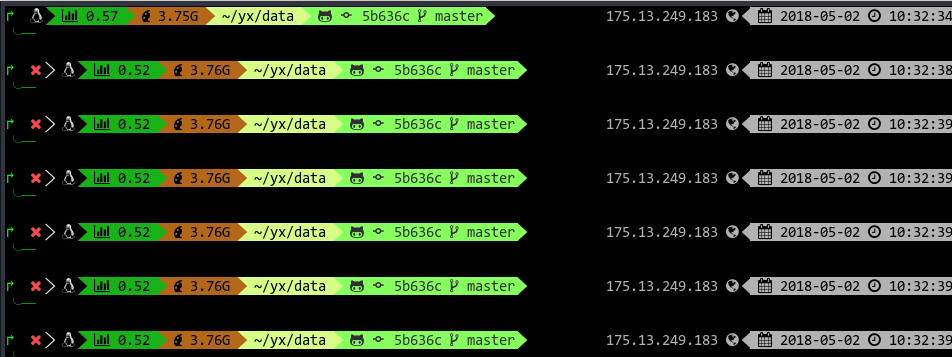
but POWERLEVEL9K_MULTILINE_LAST_PROMPT_PREFIX="↳ " is not true
yxing-xyz
on 2 May 2018
Okay. I tried to bisect this and this is the result:
There are only 'skip'ped commits left to test.
The first bad commit could be any of:
25fc2fb03e37eb232bbcb0f63a791fc78d491b6f
769d82ce63b732e59954e412962ddc0613710967
f46c1bc11b4bd41be1f6feac61d1944891aa6830
efac911431c98062cc9d792f08ce70060844c468
We cannot bisect more!
I needed to skip a few commits, as some broke my prompt totally..
My best guess here is that the PROMPT Variable was build up with the right glyphs before 769d82ce63b732e59954e412962ddc0613710967 and now we avoid double expansion of the prompt. I think when hitting CTRL-C repeatedly ZSH cancels evaluation of the PROMPT variable and you get the "source code" of the that variable..
dritter
on 3 May 2018
@dritter @bhilburn any progress on this issue ?
 brokenmass
on 4 Jun 2018
brokenmass
on 4 Jun 2018
I'm seeing this issue as well :D
 zachdaniel
on 19 Sep 2018
zachdaniel
on 19 Sep 2018
@zachdaniel @brokenmass - @dritter has added this to our v0.7.0 to-do list, which is currently getting worked on in our next codebase.
Can either of you test the next branch and let us know if you see this there, too? It's a significantly different codebase, so it would be good to test.
bhilburn
on 8 Oct 2018
Hi @bhilburn, I have checked out the next branch and am still seeing the same issues when I quickly CTRL + c.
I am getting:
$(__p9k_build_right_prompt)
and then:
reset_color
 jpmarra
on 10 Oct 2018
jpmarra
on 10 Oct 2018
@jpmarra - Yup, I can replicate it on my macOS system, too:

@dritter @onaforeignshore - Let's try to tackle this for v0.7.0. I have a feeling this one is going to be tough.
@fryjustinc - Any chance you're up for looking at this? :)
bhilburn
on 10 Oct 2018
It looks like the first Ctrl+C starts off a new prompt, and the subsequent one cancels processing it. Not sure that there is anything we can do about it. On my Mac, pressing enter after does return the prompt though.
 onaforeignshore
on 13 Oct 2018
onaforeignshore
on 13 Oct 2018
@onaforeignshore The main reason why I scheduled this for v0.7.0 is because I think this is related to performance. This is what we are trying to improve there. If the prompt renders fast enough, this problem will occur much less.
Another cause of this problem could be double expansion of the prompt (see https://github.com/bhilburn/powerlevel9k/issues/812#issuecomment-386407201).
And this issue occurred (at least for me) after this version: 769d82ce63b732e59954e412962ddc0613710967.
dritter
on 13 Oct 2018
@dritter I'm still cloudy on the difference between '...' and "..." in ZSH, so I'll take your word for it 😛
onaforeignshore
on 13 Oct 2018
@bhilburn, @onaforeignshore, @dritter. Hey guys, sorry I dropped off the face of the earth there for a little bit. Had some family stuff pop up unexpectedly right after I started to really learn this codebase. I am back now though. I am looking into a fix for this actively.
 fryjustinc
on 17 Oct 2018
fryjustinc
on 17 Oct 2018
Still seeing this issue on MacOS as of latest pull ... I'll be looking forward to v0.7.0 👍 ...
(commit - 2f4b15041fe31d85dc9ef705b818c3a0e6985da3)

 f47h3r
on 27 Nov 2018
f47h3r
on 27 Nov 2018
What exactly is the argument for not reverting back to double quotes? Mainly performance I presume?
 ❱ # current next
 ❱ time (repeat 500; do __p9k_build_left_prompt NUL; __p9k_build_right_prompt NUL; done)
( repeat 500; do; __p9k_build_left_prompt > /dev/null 2>&1;  > /dev/null 2>&1)  32.47s user 15.38s system 105% cpu 45.378 total
 ❱ # with alterations in two lines (see below)
 ❱ time (repeat 500; do __p9k_build_left_prompt NUL; __p9k_build_right_prompt NUL; done)
( repeat 500; do; __p9k_build_left_prompt > /dev/null 2>&1;  > /dev/null 2>&1)  33.11s user 16.65s system 106% cpu 46.864 total
 ❱ git --no-pager diff
diff --git a/generator/default.p9k b/generator/default.p9k
index b123d15..53c376a 100644
--- a/generator/default.p9k
+++ b/generator/default.p9k
@@ -351,8 +351,8 @@ function __p9k_prepare_prompts() {
   local LC_ALL="" LC_CTYPE="en_US.UTF-8" # Set the right locale to protect special characters

   if [[ "$P9K_PROMPT_ON_NEWLINE" == true ]]; then
-    PROMPT='${__P9K_ICONS[MULTILINE_FIRST_PROMPT_PREFIX]}%f%b%k$(__p9k_build_left_prompt)
-${__P9K_ICONS[MULTILINE_LAST_PROMPT_PREFIX]}'
+    PROMPT="${__P9K_ICONS[MULTILINE_FIRST_PROMPT_PREFIX]}%f%b%k$(__p9k_build_left_prompt)
+${__P9K_ICONS[MULTILINE_LAST_PROMPT_PREFIX]}"
     if [[ "$P9K_RPROMPT_ON_NEWLINE" != true ]]; then
       # The right prompt should be on the same line as the first line of the left
       # prompt. To do so, there is just a quite ugly workaround: Before zsh draws
@@ -366,7 +366,7 @@ ${__P9K_ICONS[MULTILINE_LAST_PROMPT_PREFIX]}'
       RPROMPT_SUFFIX=''
     fi
   else
-    PROMPT='%f%b%k$(__p9k_build_left_prompt)'
+    PROMPT="%f%b%k$(__p9k_build_left_prompt)"
     RPROMPT_PREFIX=''
     RPROMPT_SUFFIX=''
   fi
So performance is suffering (3.3% or 0.002994948s per render YMMV) and the only further downside I could find is one (more) test seems to fail. The diff above merely "reverts" 769d82ce63b732e59954e412962ddc0613710967.
This is diff of test/suite.spec on next to test/suite.spec on next with the diff (since I had loads of fails on vanilla next):
❱ diff -u next_alt_suite next_suite
--- next_alt_suite 2018-12-07 18:20:04.336709791 +0100
+++ next_suite 2018-12-07 18:17:37.269583191 +0100
@@ -113,11 +113,10 @@
testColoringOfVisualIdentifiersDoesNotOverwriteColoringOfSegment
testOverwritingIconsWork
testNewlineOnRpromptCanBeDisable rworld rworld
-ASSERT:expected:<╭─ world ╰─ > but was:<╭─ world ╰─ >
Ran 8 tests.
-FAILED (failures=2)
+OK
••• Now executing test/segments/anaconda.spec •••
testAnacondaSegmentPrintsNothingIfNoAnacondaPathIsSet
@@ -510,7 +509,7 @@
testDetectingUntrackedFilesInSubmodulesWork
testDetectinUntrackedFilesInMainRepoWithDirtySubmodulesWork
testDetectingUntrackedFilesInNestedSubmodulesWork
-Submodule path 'submodule/subsubmodule': checked out 'f0b36a9dc5089f31dcc7c1b192d618e96b62eff5'
+Submodule path 'submodule/subsubmodule': checked out 'fe21ece507820cb004268b82bd64421fb242aa9b'
testDetectingUntrackedFilesInCleanSubdirectoryWorks
testBranchNameScriptingVulnerability
testGitSubmoduleWorks
It looks normal to me on my command line. I think the reason is, that the escaped string is compared to the already evaluated string.
So in my opinion going back to double quotes (+ fixing the test) would fix the problem at the cost of performance.
 Syphdias
on 7 Dec 2018
Syphdias
on 7 Dec 2018
@Syphdias have a look at my PR #1027 . The main reason, why we cannot easily switch back to double quotes is security. IMHO this is not limited to the VCS segment and we should quote every time we read something from external, so that we deal only with sanitized strings.
dritter
on 12 Dec 2018
@yuxing1994 I just merged #1119 into next. Could you check out that branch, and tell us if that works for you?
dritter
on 23 Jan 2019
I still get this issue
 r3lik
on 5 Feb 2019
r3lik
on 5 Feb 2019
@r3lik Did you try out the latest next branch?
dritter
on 5 Feb 2019
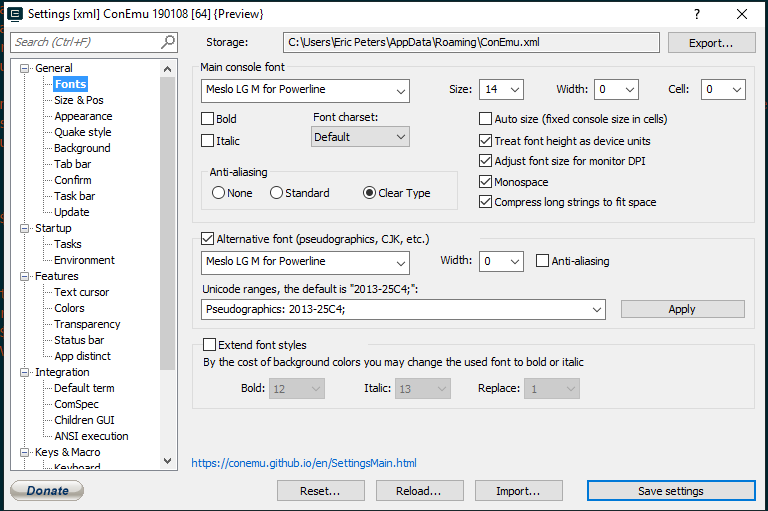
I just tried the next branch, and my column/wrapping issues seem to have gone away in ConEmu/WSL, thanks!
Edit: damn I spoke too soon, I still get weird wrapping issues, and the occasional $(build_right_prompt)
If I hit the delete button here, it deletes the character, but the cursor creates a new line:

 er1c
on 9 Feb 2019
er1c
on 9 Feb 2019
@er1c Can you share some details on your config and how to reproduce that reliably?
I tried <backspace> and <del> seem to do nothing for me (Ubuntu WSL).
Also, the output of bindkey might be interesting. (not sure if /etc/inputrc and ~/.inputrc are relevant for zsh)
Syphdias
on 9 Feb 2019
ConEmu Task: set "PATH=%ConEmuBaseDirShort%\wsl;%PATH%" & %ConEmuBaseDirShort%\conemu-cyg-64.exe --wsl -t zsh -l -i -cur_console:pm:""
bindkey:
"^@" set-mark-command
"^A" beginning-of-line
"^B" backward-char
"^D" delete-char-or-list
"^E" end-of-line
"^F" forward-char
"^G" send-break
"^H" backward-delete-char
"^I" expand-or-complete
"^J" accept-line
"^K" kill-line
"^L" clear-screen
"^M" accept-line
"^N" down-line-or-history
"^O" accept-line-and-down-history
"^P" up-line-or-history
"^Q" push-line
"^R" history-incremental-search-backward
"^S" history-incremental-search-forward
"^T" transpose-chars
"^U" kill-whole-line
"^V" quoted-insert
"^W" backward-kill-word
"^X^B" vi-match-bracket
"^X^E" edit-command-line
"^X^F" vi-find-next-char
"^X^J" vi-join
"^X^K" kill-buffer
"^X^N" infer-next-history
"^X^O" overwrite-mode
"^X^R" _read_comp
"^X^U" undo
"^X^V" vi-cmd-mode
"^X^X" exchange-point-and-mark
"^X*" expand-word
"^X=" what-cursor-position
"^X?" _complete_debug
"^XC" _correct_filename
"^XG" list-expand
"^Xa" _expand_alias
"^Xc" _correct_word
"^Xd" _list_expansions
"^Xe" _expand_word
"^Xg" list-expand
"^Xh" _complete_help
"^Xm" _most_recent_file
"^Xn" _next_tags
"^Xr" history-incremental-search-backward
"^Xs" history-incremental-search-forward
"^Xt" _complete_tag
"^Xu" undo
"^X~" _bash_list-choices
"^Y" yank
"^[^D" list-choices
"^[^G" send-break
"^[^H" backward-kill-word
"^[^I" self-insert-unmeta
"^[^J" self-insert-unmeta
"^[^L" clear-screen
"^[^M" self-insert-unmeta
"^[^_" copy-prev-word
"^[ " expand-history
"^[!" expand-history
"^[\"" quote-region
"^[\$" spell-word
"^['" quote-line
"^[," _history-complete-newer
"^[-" neg-argument
"^[." insert-last-word
"^[/" _history-complete-older
"^[0" digit-argument
"^[1" digit-argument
"^[2" digit-argument
"^[3" digit-argument
"^[4" digit-argument
"^[5" digit-argument
"^[6" digit-argument
"^[7" digit-argument
"^[8" digit-argument
"^[9" digit-argument
"^[<" beginning-of-buffer-or-history
"^[>" end-of-buffer-or-history
"^[?" which-command
"^[A" accept-and-hold
"^[B" backward-word
"^[C" capitalize-word
"^[D" kill-word
"^[F" forward-word
"^[G" get-line
"^[H" run-help
"^[L" down-case-word
"^[N" history-search-forward
"^[OA" up-line-or-beginning-search
"^[OB" down-line-or-beginning-search
"^[OC" forward-char
"^[OD" backward-char
"^[OF" end-of-line
"^[OH" beginning-of-line
"^[P" history-search-backward
"^[Q" push-line
"^[S" spell-word
"^[T" transpose-words
"^[U" up-case-word
"^[W" copy-region-as-kill
"^[[1;5C" forward-word
"^[[1;5D" backward-word
"^[[200~" bracketed-paste
"^[[2~" overwrite-mode
"^[[3~" delete-char
"^[[5~" up-line-or-history
"^[[6~" down-line-or-history
"^[[A" up-line-or-history
"^[[B" down-line-or-history
"^[[C" forward-char
"^[[D" backward-char
"^[[Z" reverse-menu-complete
"^[_" insert-last-word
"^[a" accept-and-hold
"^[b" backward-word
"^[c" capitalize-word
"^[d" kill-word
"^[f" forward-word
"^[g" get-line
"^[h" run-help
"^[l" "ls^J"
"^[m" copy-prev-shell-word
"^[n" history-search-forward
"^[p" history-search-backward
"^[q" push-line
"^[s" spell-word
"^[t" transpose-words
"^[u" up-case-word
"^[w" kill-region
"^[x" execute-named-cmd
"^[y" yank-pop
"^[z" execute-last-named-cmd
"^[|" vi-goto-column
"^[~" _bash_complete-word
"^[^?" backward-kill-word
"^_" undo
" " magic-space
"!"-"~" self-insert
"^?" backward-delete-char
"\M-^@"-"\M-^?" self-insert
/etc/inputrc (no ~):
# /etc/inputrc - global inputrc for libreadline
# See readline(3readline) and `info rluserman' for more information.

# Be 8 bit clean.
set input-meta on
set output-meta on

# To allow the use of 8bit-characters like the german umlauts, uncomment
# the line below. However this makes the meta key not work as a meta key,
# which is annoying to those which don't need to type in 8-bit characters.

# set convert-meta off

# try to enable the application keypad when it is called.  Some systems
# need this to enable the arrow keys.
# set enable-keypad on

# see /usr/share/doc/bash/inputrc.arrows for other codes of arrow keys

# do not bell on tab-completion
# set bell-style none
# set bell-style visible

# some defaults / modifications for the emacs mode
$if mode=emacs

# allow the use of the Home/End keys
"\e[1~": beginning-of-line
"\e[4~": end-of-line

# allow the use of the Delete/Insert keys
"\e[3~": delete-char
"\e[2~": quoted-insert

# mappings for "page up" and "page down" to step to the beginning/end
# of the history
# "\e[5~": beginning-of-history
# "\e[6~": end-of-history

# alternate mappings for "page up" and "page down" to search the history
# "\e[5~": history-search-backward
# "\e[6~": history-search-forward

# mappings for Ctrl-left-arrow and Ctrl-right-arrow for word moving
"\e[1;5C": forward-word
"\e[1;5D": backward-word
"\e[5C": forward-word
"\e[5D": backward-word
"\e\e[C": forward-word
"\e\e[D": backward-word

$if term=rxvt
"\e[7~": beginning-of-line
"\e[8~": end-of-line
"\eOc": forward-word
"\eOd": backward-word
$endif

# for non RH/Debian xterm, can't hurt for RH/Debian xterm
# "\eOH": beginning-of-line
# "\eOF": end-of-line

# for freebsd console
# "\e[H": beginning-of-line
# "\e[F": end-of-line

$endif
Your binds seem to be identical to mine. I tried to reproduce it with ConEmu and the normal Ubuntu WSL and could not. I believe you didn't post your p9k config details and what exactly you do when it happens
Syphdias
on 9 Feb 2019
@er1c Which locale did you set in your terminal?
dritter
on 11 Feb 2019
What would be useful to post? I haven't really customized powerlevel9k. I am using Debian, but I also had the same issue on Ubuntu. Hmm, I might see if I can do a fresh ConEmu install & config and see if that works, for reference, here is what I have: https://gist.github.com/er1c/4c18047659efdc054ff31818713c854c
$ locale
LANG=en_US.UTF-8
LANGUAGE=
LC_CTYPE=en_US.UTF-8
LC_NUMERIC="en_US.UTF-8"
LC_TIME="en_US.UTF-8"
LC_COLLATE="en_US.UTF-8"
LC_MONETARY="en_US.UTF-8"
LC_MESSAGES="en_US.UTF-8"
LC_PAPER="en_US.UTF-8"
LC_NAME="en_US.UTF-8"
LC_ADDRESS="en_US.UTF-8"
LC_TELEPHONE="en_US.UTF-8"
LC_MEASUREMENT="en_US.UTF-8"
LC_IDENTIFICATION="en_US.UTF-8"
LC_ALL=
er1c
on 11 Feb 2019
I have checked out the next branch in ~./oh-my-zsh/custom/themes/powerlevel9k but I'm still getting this issue. I quit iTerm and reopened.

Any ideas?
jpmarra
on 11 Feb 2019
I have pulled latest from master into ~./oh-my-zsh/custom/themes/powerlevel9k on macOS Mojave Version 10.14 (18A391) and seems the issue is gone. Tried opening multiple shells and pressing Ctrl+C also moving from directories up and down the tree and it doesn't show again.
 azec-pdx
on 26 Feb 2019
azec-pdx
on 26 Feb 2019
Meh. I lost track of this report...
@er1c Does this happen on other OSes as well?
@jpmarra On which commit are you exactly? It looks like you are still on master, because we renamed build_right_prompt on next..
@azec-pdx Good to hear! Thx.
dritter
on 26 Feb 2019
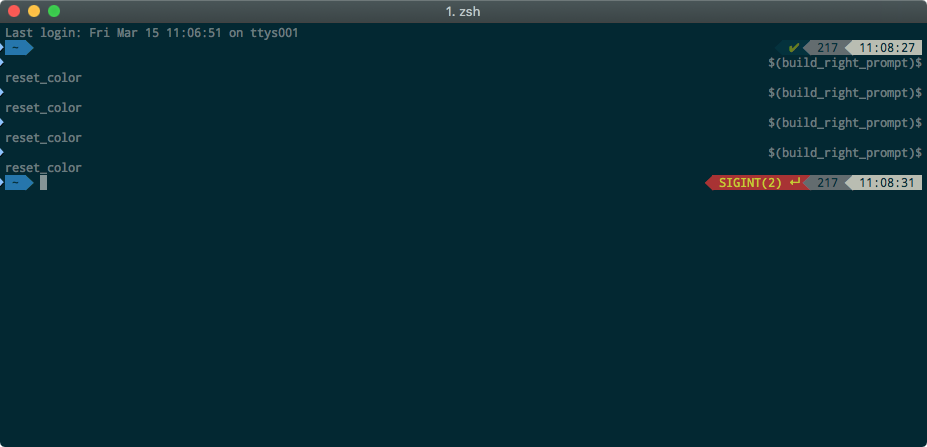
I'm also on Mojave Version 10.14.3 and pulled ~/.oh-my-zsh/custom/themes/powerlevel9k from master and got the updates, but the problem ist still there. I also notice that zsh is really slow and needs a few sends before the prompt is available :(
 Macilias
on 15 Mar 2019
Macilias
on 15 Mar 2019
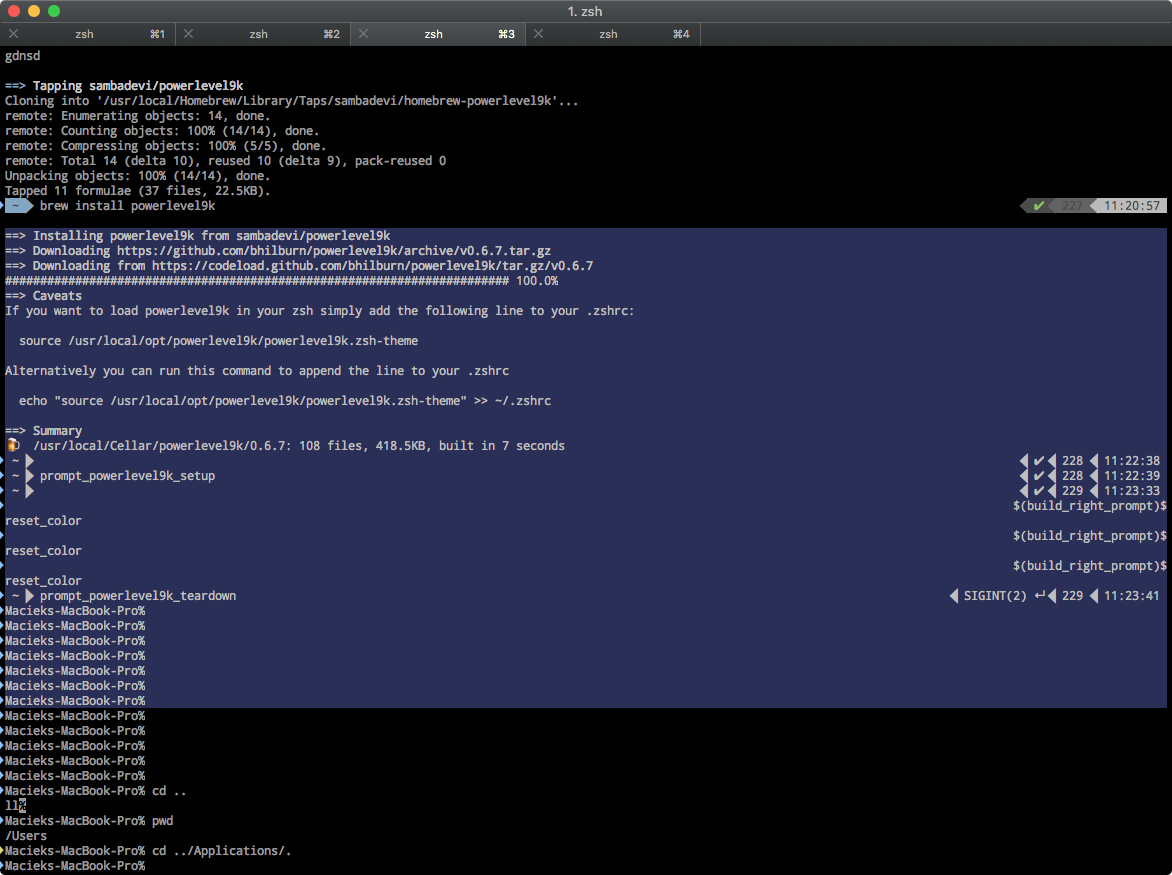
I don't understand why this issue is closed. After follwing the README.md and INSTALL.md and reinstalling via homebrew I still got the issue, and its not occurring with powerlevel9k teared down
Macilias
on 15 Mar 2019
@Macilias It was fixed on the next branch which wasn't merged to master yet (but hopefully will soon)
We recently discovered two bugs with this fix though that we want to fix before the merge to next (background_jobs don't update early enough #1196 and vi_mode breaks #1201)
Syphdias
on 16 Mar 2019
@dritter next Branch Solves this Problem
yxing-xyz
on 26 Apr 2019
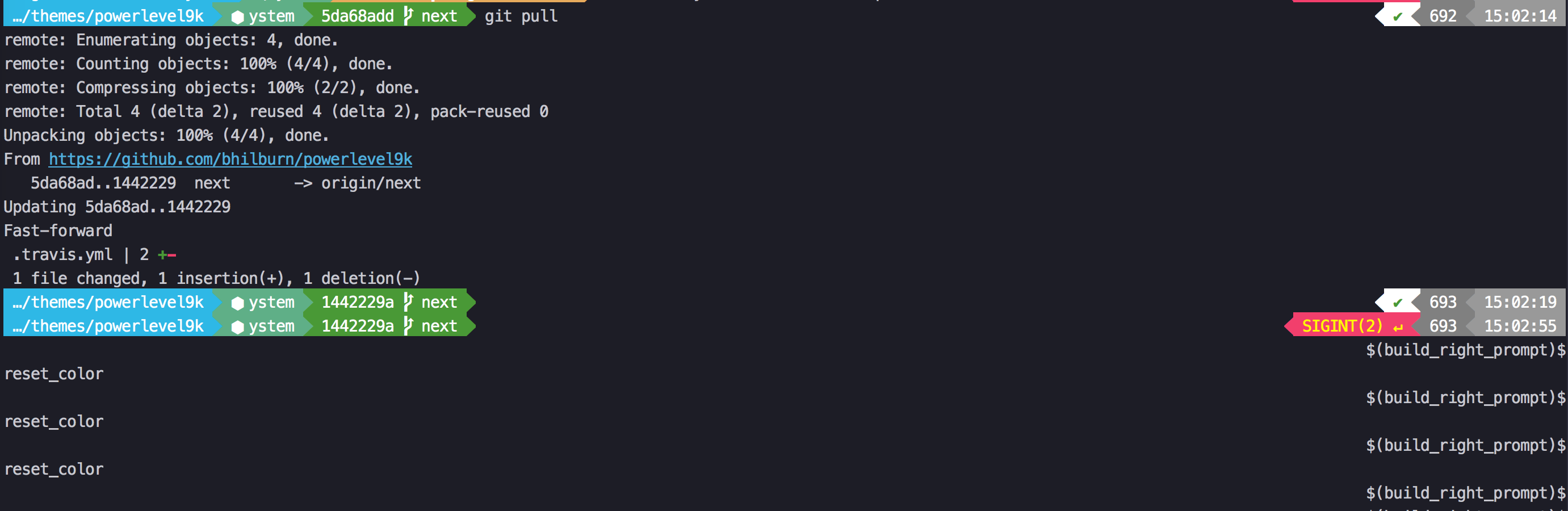
so what was the steps got get rid of the problem?
I changed to cd ~/.oh-my-zsh/custom/themes/powerlevel9k
(I was already on the next branch)
I pulled to update the branch
but the problem is still there
Is there something I´m missing?
Macilias
on 16 May 2019
@Macilias Judging from the screenshot you are either using master branch of p9k or a very old version of next. The fix was merged into next in January 2019. Since then, there is no function named build_right_prompt that is visible in your prompt.
Since you seem to have an up-to-date next branch checked out, a likely explanation is that you are sourcing p9k from another location.
P.S.
Powerlevel10 doesn't have the Ctrl-C problem. It's also backward compatible with master of p9k (unlike next of p9k).
 romkatv
on 16 May 2019
romkatv
on 16 May 2019
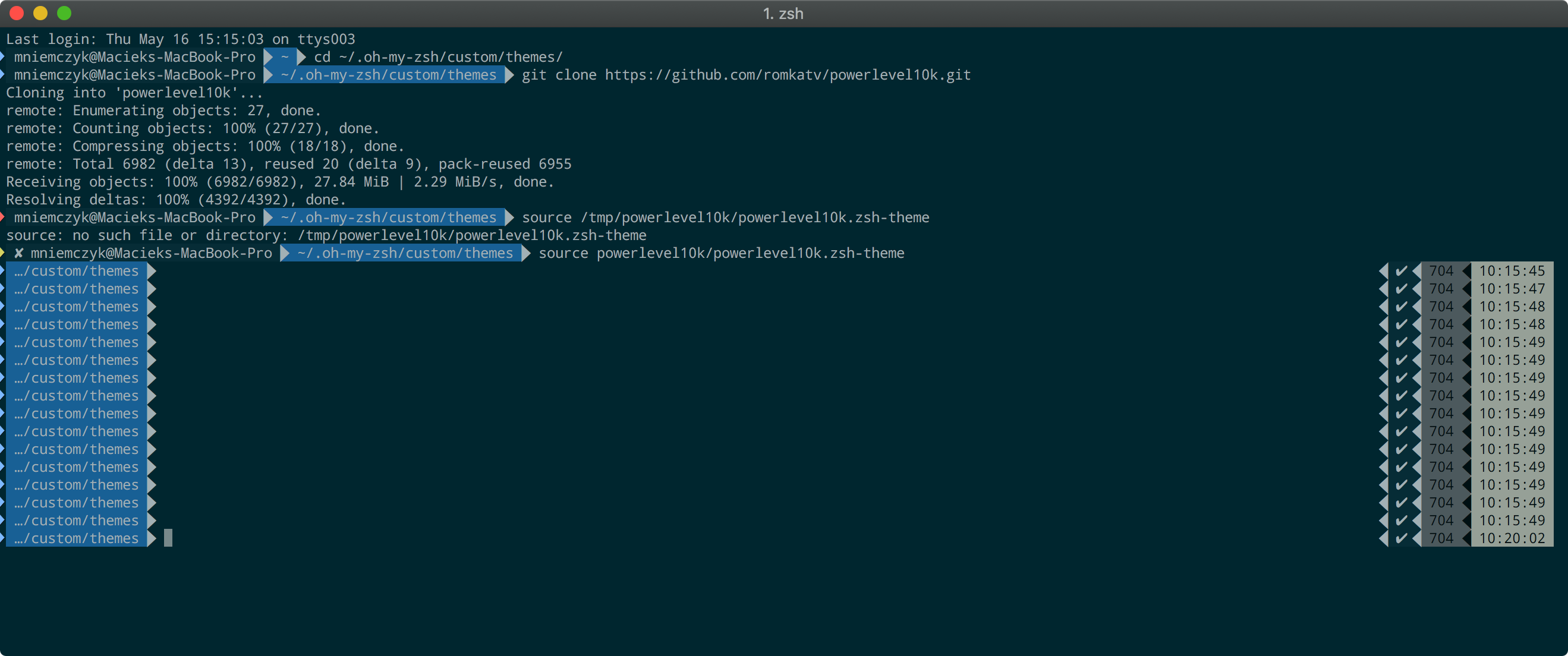
@romkatv thanks for your hints. Switching to Powerlevel10 finally did the trick and regarding the finally acceptable speed I do not think about getting back :)
Are there any known downsides when sticking to Powerlevel10?
Thanks
Macilias
on 17 May 2019
Are there any known downsides when sticking to Powerlevel10?
@Macilias Since Powerlevel10k is functionally equivalent to Powerlevel9k but faster, there is no downside to using it _right now_. If at any point in the future you notice that Powerlevel10k is worse than Powerlevel9k on any metric (please do open an issue against Powerlevel10k if this happens), you can trivially switch back. No lock in.
romkatv
on 17 May 2019
Great, and you have been right about a different source. I found that there has been two installations of oh-my-zsh. One within .dotfiles and one on the same level. Thanks for the support!
Macilias
on 17 May 2019
Related issues
 yoyoys
·
3Comments
yoyoys
·
3Comments
 controversial
·
4Comments
dritter
·
5Comments
controversial
·
4Comments
dritter
·
5Comments
 shibumi
·
5Comments
shibumi
·
5Comments
 davidmpaz
·
3Comments
davidmpaz
·
3Comments
Most helpful comment
@dritter @bhilburn any progress on this issue ?