Powerlevel9k: vcs segment not working
My .zshrc:
# OH-MY-ZSH
ZSH=/home/GERDA/pertoldi/.oh-my-zsh
DEFAULT_USER="pertoldi"
plugins=(git rsync zsh-autosuggestions colored-man-pages colorize)

# powerlevel9k plugin
ZSH_THEME="powerlevel9k/powerlevel9k"
POWERLEVEL9K_MODE='awesome-fontconfig'
POWERLEVEL9K_DIR_HOME_BACKGROUND='003'
POWERLEVEL9K_DIR_HOME_SUBFOLDER_BACKGROUND='003'
POWERLEVEL9K_DIR_DEFAULT_BACKGROUND='003'
POWERLEVEL9K_LEFT_PROMPT_ELEMENTS=(host dir)
POWERLEVEL9K_RIGHT_PROMPT_ELEMENTS=(status background_jobs vcs)
POWERLEVEL9K_STATUS_VERBOSE=false
POWERLEVEL9K_HOME_ICON=''
POWERLEVEL9K_HOME_SUB_ICON=''
POWERLEVEL9K_FOLDER_ICON=''
#POWERLEVEL9K_ROOT_ICON='⚡︎'
POWERLEVEL9K_RIGHT_SEGMENT_SEPARATOR=''
POWERLEVEL9K_SHORTEN_DIR_LENGTH=3
POWERLEVEL9K_SHORTEN_DELIMITER=''
POWERLEVEL9K_SHORTEN_STRATEGY="truncate_from_right"
POWERLEVEL9K_SSH_ICON=''

export UPDATE_ZSH_DAYS=30
COMPLETION_WAITING_DOTS="true"
#
source $ZSH/oh-my-zsh.sh

export LSCOLORS=gxfxbEaEBxxEhEhBaDaCaD
export LS_COLORS="di=34:ln=32:so=93:pi=1;37:ex=31:ow=35:*.root=33:*.pdf=91:*.dat=92"
source ~/.alias
Everything works just fine except when I cd in a git repository:
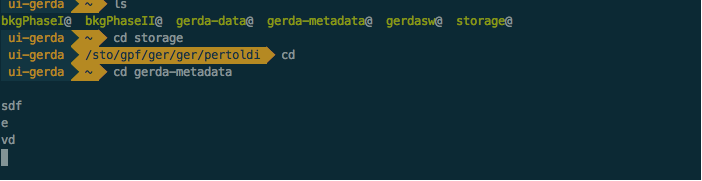
then no segments are displayed at all and the shell seems no to be responsive anymore. What can I try to debug this issue?
 gipert
All 5 comments
Wow. That is, indeed, pretty strange. And, just to make sure, the git repository you are cding into is local (not sshfs mounted or anything)?
What version of git do you have installed?
Also, just to make sure, I see you have configured it into your right prompt, but your screenshot doesn't show that. Is it just that you cut off the image before the right prompt segments?
 bhilburn
on 29 Sep 2017
bhilburn
on 29 Sep 2017
Considering that the server I'm currently working on isn't my property, the file system of the repo seems to be regular to me...
$ git --version
git version 1.7.1
The right prompt appears only when needed, so, for example, on another machine:

gipert
on 29 Sep 2017
Whoa, git 1.7.1 is ancient. I'm pretty sure we are relying on features introduced at least in 2.0+.
How did you install git? There /has/ to be a way to get a more up-to-date version of git on your system.
bhilburn
on 7 Oct 2017
Ahah yep, I was suspecting that...
All this happens on a server for scientific computing, where sysadmins keep constantly downgraded all the developer's tools in order not to break some very ancient, no more mantained, software that people still use. I know this is awful, but that's how it works here...
Anyway thank you, I think we can close this issue.
gipert
on 8 Oct 2017
@luigipertoldi - OOooof. Yeah, that's rough. Sorry =(
bhilburn
on 9 Oct 2017
Related issues
 OATOMO
·
4Comments
OATOMO
·
4Comments
 jpdoria
·
5Comments
jpdoria
·
5Comments
 controversial
·
4Comments
controversial
·
4Comments
 yoyoys
·
3Comments
yoyoys
·
3Comments
 edwardsmit
·
3Comments
edwardsmit
·
3Comments
Most helpful comment
Whoa, git
1.7.1is ancient. I'm pretty sure we are relying on features introduced at least in 2.0+.How did you install git? There /has/ to be a way to get a more up-to-date version of git on your system.