Powerlevel9k: Always show # of Jobs in Verbose - Even 1
Hello!
I was wondering if there was a way so that powerlevel9k can show the # of jobs staring with #1 and then continue on as normally?
EDIT:

What I am trying to achieve is where that it will show "1" when even there is only 1 background job.
Thank you!
 TheBabu
All 5 comments
Very easy fix all you have to do is edit the powerlevel9k.zsh-theme file in the section:
# Segment to indicate background jobs with an icon.
set_default POWERLEVEL9K_BACKGROUND_JOBS_VERBOSE true
prompt_background_jobs() {
  local background_jobs_number=${$(jobs -l | wc -l)// /}
  local wrong_lines=`jobs -l | awk '/pwd now/{ count++ } END {print count}'`
  if [[ wrong_lines -gt 0 ]]; then
     background_jobs_number=$(( $background_jobs_number - $wrong_lines ))
  fi
  if [[ background_jobs_number -gt 0 ]]; then
    local background_jobs_number_print=""
    if [[ "$POWERLEVEL9K_BACKGROUND_JOBS_VERBOSE" == "true" ]] && [[ "$background_jobs_number" -gt 0 ]]; then
      background_jobs_number_print="$background_jobs_number"
    fi
    "$1_prompt_segment" "$0" "$2" "$DEFAULT_COLOR" "cyan" "$background_jobs_number_print" 'BACKGROUND_JOBS_ICON'
  fi
}
All you have to do is change the value from this line [[ "$background_jobs_number" -gt 1 ]]
to zero ([[ "$background_jobs_number" -gt 1 ]])

I was able to achieve exactly what I wanted to do
Other stuff:
Also if you wanted to show the number even if there is no background jobs all of you have to do is change the code so its matches this:
[[ "$background_jobs_number" -gt 1 ]]
[[ background_jobs_number -gt -1 ]]
local background_jobs_number_print="0"
and you get something like this:

(You can also change the local background_jobs_number_print="0" to any text you like so you can instead make it say "No Background Jobs" or something like that
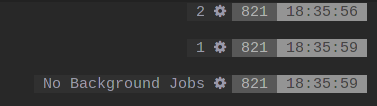
)
TheBabu
on 10 Jul 2017
Just as a suggestion I'd recommend copying the function to your .zshrc with a different name and calling that segment in your config rather than modifying the core p9k files. That way it doesn't get overwritten every time you want to update the code. Also if you want this functionality in the core a pull request is always welcome in my experience =]
 rjorgenson
on 10 Jul 2017
rjorgenson
on 10 Jul 2017
Ah that's a good idea, but I have a dumb question... How do you update powerlevel9k?
TheBabu
on 10 Jul 2017
@Hacksaurus That depends on how you installed it. If you just cloned this repo via git, you can switch into your local folder and do an git pull. But there are other ways to install it (aur, antigen, zplug, etc).
 dritter
on 10 Jul 2017
dritter
on 10 Jul 2017
Oh haha Apparently I installed with normal Arch repos, I'm ok then. :laughing:
TheBabu
on 10 Jul 2017
Related issues
 jpdoria
·
5Comments
jpdoria
·
5Comments
 shibumi
·
5Comments
dritter
·
5Comments
shibumi
·
5Comments
dritter
·
5Comments
 DanielChabrowski
·
3Comments
DanielChabrowski
·
3Comments
 edwardsmit
·
3Comments
edwardsmit
·
3Comments
Most helpful comment
Oh haha Apparently I installed with normal Arch repos, I'm ok then. :laughing: