Powerlevel9k: Awesome Powerline icons cut off
This is probably not a powerlevel9k issue but I figured this would be the best place to start since someone may have an answer. I have recently installed powerlevel9k on 3 different computers. I am using Kayant's config as a starting point and like it so far. I am using SourceCodePro+Powerline+Awesome+Regular since it seemed popular. The problem is with the Awesome powerline icons. This happens on all 3 computers exactly the same. I am running Manjaro/KDE on all three and using Konsole as my primary terminal emulator. I have tried playing with every appearance setting I could find within Konsole but could not get this behavior to stop. I decided to try another terminal emulator (Terminator) and the font seemed fine there. I thought maybe it only affected Qt emulators so I downloaded QTerminal and I had the exact same issue as with Konsole. Weirdly enough the folder icon (outside of home folder) is fine but the other two are cut off. I know as a workaround I could disable these icons but I kind of like them so would rather get it fixed if anyone has any ideas.

 koalaeagle
All 8 comments
Hey man, the solution : https://github.com/bhilburn/powerlevel9k/issues/231
 ghost
on 22 Mar 2017
ghost
on 22 Mar 2017
Ha! Thanks @D4v2z for finding that solution. I completely forgot about it.
Btw. I did a quick research this morning and found out that Konsole has some issues regarding double-width glyphs. Hard to say what other terminal emulators do different. The information that a glyph needs to be printed as double-width is coded somewhere in the font I guess..
 dritter
on 22 Mar 2017
dritter
on 22 Mar 2017
Perfect! Thank you. This is exactly the kind of workaround I was looking for. I must have been searching the wrong key words. Following the example I also added entries for my other cut-off icons:
POWERLEVEL9K_HOME_SUB_ICON=$'\UE18D '
POWERLEVEL9K_FOLDER_ICON=$'\uE818 '
Using this page as reference:
https://github.com/bhilburn/powerlevel9k/blob/master/functions/icons.zsh
koalaeagle
on 23 Mar 2017
Btw. , Just for completeness, easier than looking into functions/icons. zsh would have been to call get_icon_names. ;)
dritter
on 23 Mar 2017
Hi, I did this but no home icon is being displayed, just a square. :(
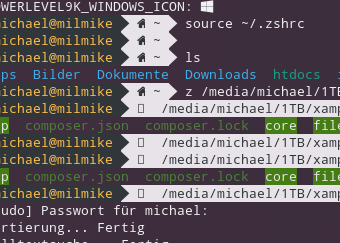
 millsoft
on 31 Oct 2017
millsoft
on 31 Oct 2017
@millsoft It seems that your font does not support all Icons. Which font do you use?
Btw. sorry for the late response.
dritter
on 2 Apr 2018
Hi @dritter
I use mostly the fonts Cousine and Overpass Mono which come from Nerd Fonts Complete
 gusbemacbe
on 22 Oct 2018
gusbemacbe
on 22 Oct 2018
Same issue on latest KDE neon 5.15
 vanushwashere
on 17 Feb 2019
vanushwashere
on 17 Feb 2019
Related issues
 Who23
·
4Comments
Who23
·
4Comments
 natemccurdy
·
5Comments
natemccurdy
·
5Comments
 iiison
·
3Comments
iiison
·
3Comments
 jpdoria
·
5Comments
jpdoria
·
5Comments
 guidoilbaldo
·
5Comments
guidoilbaldo
·
5Comments
Most helpful comment
Same issue on latest KDE neon 5.15