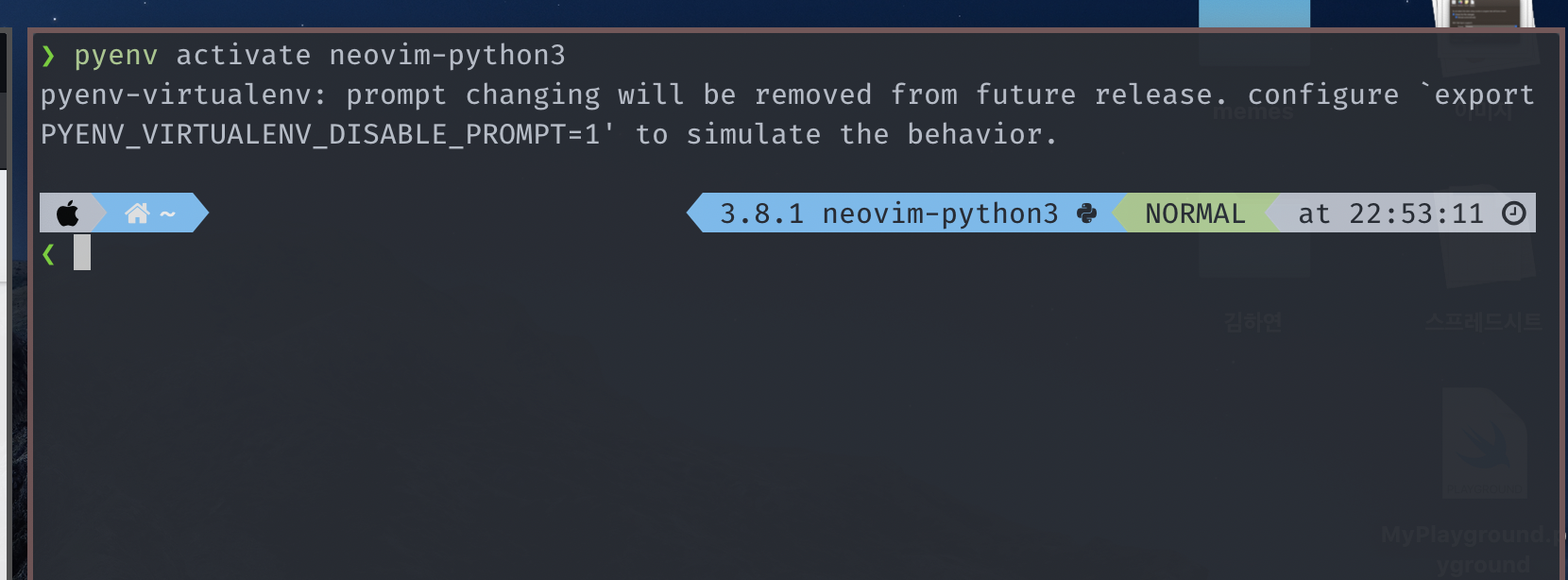
Powerlevel10k: Two python virtualenv segments are shown
Hi, I'm using p10k using the follwoing configuration wizard options:
# Wizard options: nerdfont-complete + powerline, small icons, rainbow, time,
# angled separators, sharp heads, flat tails, 2 lines, disconnected, no frame, sparse,
# many icons, fluent, transient_prompt, instant_prompt=verbose.
I have a pyenv-managed python (3.8.1) and a virtualenv created using it (named neovim-python3).
If I activate it, I see duplicate segments as below:

Is this an expected behavior, or can it be fixed?
I'm using:
zsh 5.7.1 (x86_64-apple-darwin19.0)
macOS Catalina (10.15.3)
 Zeta611
All 21 comments
Is it possible that you also have asdf installed and have legacy_version_file = yes in ~/.asdfrc?
 romkatv
on 9 Feb 2020
romkatv
on 9 Feb 2020
No, I do not have asdf installed. But if it is relevant, I do have pyenv, pyenv-virtualenv, pipenv, and pipx.
Zeta611
on 9 Feb 2020
Let's try to figure out which two segments are displaying the same information. Try hiding the following segments one by one and see when your prompt changes.
- asdf
- virtualenv
- anaconda
- pyenv
To hide segment foo, type the following command:
p10k display '*/foo'=hide
Thank you for a fast reply! I found out that the two were from 'pyenv' and 'virtualenv'. Since my neovim-python3 is using 3.8.1 python, is there a way to change the pyenv prompt to show 3.8.1, instead of the redundant neovim-python3?
Zeta611
on 9 Feb 2020
What's the output of pyenv version-name when your prompt looks like on the screenshot?
romkatv
on 9 Feb 2020
It outputs neovim-python3.
Zeta611
on 9 Feb 2020
This is the output of pyenv versions:
❯ pyenv versions
system
2.7.17
2.7.17/envs/neovim-python2
3.8.1
3.8.1/envs/neovim-python3
3.8.1/envs/tex-minted
neovim-python2
* neovim-python3 (set by PYENV_VERSION environment variable)
tex-minted
pyenv prompt segment is supposed to always display the same thing as pyenv version-name, so it's working as intended.
Try the following configuration options. Do they make your prompt behave the way you want?
# Display the output of `python --version` next to the virtual environment name.
typeset -g POWERLEVEL9K_VIRTUALENV_SHOW_PYTHON_VERSION=true
typeset -g POWERLEVEL9K_VIRTUALENV_{LEFT,RIGHT}_DELIMITER=

# Hide `pyenv` segment if its content has no dots ('.').
typeset -g POWERLEVEL9K_PYENV_CONTENT_EXPANSION='${(M)P9K_CONTENT:#*.*}'
typeset -g POWERLEVEL9K_PYENV_VISUAL_IDENTIFIER_EXPANSION='${${(M)P9K_CONTENT:#*.*}:+${P9K_VISUAL_IDENTIFIER// }}'
The code to hide pyenv is a bit obscure but hopefully at least the comment is clear. Basically, you'll never see pyenv segment if its content (a.k.a. text) has no dots in it.
romkatv
on 9 Feb 2020
This is exactly what I wanted! Thank you :tada:
Zeta611
on 9 Feb 2020
Great!
By the way, you can remove vi_mode from POWERLEVEL9K_RIGHT_PROMPT_ELEMENTS. Prompt symbol displays the same information. It changes depending on vi mode: ❯, ❮, Ⅴ, ▶ for insert, command, visual and replace mode respectively.
romkatv
on 9 Feb 2020
Also good to know! :)
Zeta611
on 10 Feb 2020
Hi @romkatv ,
I was facing the same issue but your solution helped me a lot, thank you for this!
However, the python version which is displayed is not correct if you enable an environment via pyenv activate (see bottom right of the image attached). Can you also help me with this issue?

 timon-schmelzer-gcx
on 15 May 2020
timon-schmelzer-gcx
on 15 May 2020
@tschmel Please try removing virtualenv from POWERLEVEL9K_RIGHT_PROMPT_ELEMENTS and adding this parameter:
typeset -g POWERLEVEL9K_PYENV_CONTENT_EXPANSION='${P9K_CONTENT}${${P9K_PYENV_PYTHON_VERSION:#$P9K_CONTENT}:+ $P9K_PYENV_PYTHON_VERSION}'
Does this work the way you want?
romkatv
on 15 May 2020
Thanks for your fast response, it works like a charm! 👌
For future reference, this is what I had to add to my _.zshrc_ to get it running:
# Define right side elements (all besides virtualenvs)
typeset -g POWERLEVEL9K_RIGHT_PROMPT_ELEMENTS=(status command_execution_time background_jobs direnv asdf
anaconda pyenv goenv nodenv nvm nodeenv rbenv rvm fvm luaenv jenv plenv phpenv haskell_stack kubecontext
terraform aws aws_eb_env azure gcloud google_app_cred context nordvpn ranger nnn vim_shell midnight_commander
nix_shell vi_mode todo timewarrior taskwarrior time)
# Display pyenv and virtuelenv information in the expected format
typeset -g POWERLEVEL9K_PYENV_CONTENT_EXPANSION='${P9K_CONTENT}${${P9K_PYENV_PYTHON_VERSION:#$P9K_CONTENT}:+ $P9K_PYENV_PYTHON_VERSION}'
EDIT: Remove superfluous lines and fix comment (see below)
timon-schmelzer-gcx
on 15 May 2020
# Display the output of `python --version` next to the virtual environment name.
typeset -g POWERLEVEL9K_VIRTUALENV_SHOW_PYTHON_VERSION=true
typeset -g POWERLEVEL9K_VIRTUALENV_{LEFT,RIGHT}_DELIMITER=

# Hide `pyenv` segment if its content has no dots ('.').
typeset -g POWERLEVEL9K_PYENV_CONTENT_EXPANSION='${(M)P9K_CONTENT:#*.*}'
typeset -g POWERLEVEL9K_PYENV_VISUAL_IDENTIFIER_EXPANSION='${${(M)P9K_CONTENT:#*.*}:+${P9K_VISUAL_IDENTIFIER// }}'
You need to delete these. My previous comment describes all changes that are necessary on top of a standard ~/.p10k.zsh.
- Remove
virtualenvfromPOWERLEVEL9K_RIGHT_PROMPT_ELEMENTS - Add this parameter:
typeset -g POWERLEVEL9K_PYENV_CONTENT_EXPANSION='${P9K_CONTENT}${${P9K_PYENV_PYTHON_VERSION:#$P9K_CONTENT}:+ $P9K_PYENV_PYTHON_VERSION}'
You are absolutely right, I edited my previous comment accordingly.
timon-schmelzer-gcx
on 15 May 2020
By the way, this comment isn't accurate:
# Fix python version for pyenv virtualenvs
Parameter POWERLEVEL9K_PYENV_CONTENT_EXPANSION isn't fixing Python version. It defines the format of pyenv segment. Here's the logic of that parameter's value in plain English.
- If
$P9K_PYENV_PYTHON_VERSIONis not empty and unequal to$P9K_CONTENT, display$P9K_CONTENT $P9K_PYENV_PYTHON_VERSION. - Otherwise display just
$P9K_CONTENT.
($P9K_CONTENT is what you normally see in the prompt if you don't define POWERLEVEL9K_PYENV_CONTENT_EXPANSION.)
romkatv
on 15 May 2020
Thanks for the clarification. What about the following:
# Display pyenv and virtuelenv information in the expected format
My goal is for you to understand what the parameter does. If you do, comment is up to you as it goes into your config.
romkatv
on 15 May 2020
Hi, I'm facing a similar doubt, but with ASDF and python venvs. When I activate my venv, ASDF is still shown. Can ASDF be hidden when venvs are activated?

Thank you for powerlevel, it's amazing!
 jvcarli
on 14 Nov 2020
jvcarli
on 14 Nov 2020
@jvcarli Add this to ~/.p10k.zsh:
function p10k-on-pre-prompt() {
  if [[ -n ${VIRTUAL_ENV-} ]]; then
    p10k display '*/asdf'=hide
  else
    p10k display '*/asdf'=show
  fi
}
The restart zsh with exec zsh.
In the future please open a separate issue instead of commenting on a closed one.
romkatv
on 15 Nov 2020
Related issues
 fedemengo
·
7Comments
fedemengo
·
7Comments
 rpathak38
·
4Comments
rpathak38
·
4Comments
 leeallen337
·
3Comments
leeallen337
·
3Comments
 zemuldo
·
4Comments
zemuldo
·
4Comments
 barthalion
·
3Comments
barthalion
·
3Comments
Most helpful comment
pyenvprompt segment is supposed to always display the same thing aspyenv version-name, so it's working as intended.Try the following configuration options. Do they make your prompt behave the way you want?
The code to hide
pyenvis a bit obscure but hopefully at least the comment is clear. Basically, you'll never seepyenvsegment if its content (a.k.a. text) has no dots in it.