Powerlevel10k: `reset-prompt` doesn't show changed directory
How to reproduce it:
1.
docker run -e LANG=C.UTF-8 -e LC_ALL=C.UTF-8 -e TERM=$TERM -it --rm ubuntu bash -uexc '
  cd
  apt update && apt install -y zsh git vim
  git clone https://github.com/romkatv/powerlevel10k.git
  echo "
    cd_pp() {
      cd ..
      zle .reset-prompt && zle -R
    }
    zle -N cd_pp
    bindkey '\''^[[1;5A'\'' cd_pp
    source ~/powerlevel10k/powerlevel10k.zsh-theme" >~/.zshrc
  exec zsh'
- press
<ctrl-up> - press
<enter>or typepwd

 Syphdias
All 93 comments
Thanks for the high-quality bug report. The docker command is especially appreciated.
reset-promptdoesn't show changed directory
In _this_ formulation I'm tempted to say this is not an issue. Powerlevel10k indeed doesn't reevaluate the whole prompt on reset-prompt. It's not just dir prompt, either. If you add git something in cd_pp, git prompt won't be updated. Same thing for pyenv local system and pyenv prompt. In fact, every theme that installs a precmd can be "broken" in this way by changing external environment from a zle widget.
The fact that Powerlevel10k doesn't reevaluate some parts of the prompt is a feature. This enables things like responsive vi_mode that would be be impossible to provide if reset-prompt reevaluated the whole prompt.
Does the example you gave represent a real problem you are trying to solve? If so, there are solutions. The simple solution is this:
cd_pp() {
  cd ..
  BUFFER=
  zle accept-line
}
The downside is that it'll clear your buffer, so you cannot type a command, press <ctrl-up> and then execute the command in the new directory. This can be solved with some extra code. In my dotfiles I bind <alt-left> to go to the previous directory, <alt-right> to go to the next, <alt-up> to cd .. (the same as you have on <ctrl-up>) and <alt-down> to print directory history (to know where <alt-left> and <alt-right> will go). None of these clear the buffer. The code isn't complex but I have it in a rather messy state, so it can be difficult to read.
Here's a demo: https://asciinema.org/a/CKhNEndylHW7uOxFmWcKoESfQ.
I first populate directory history by executing cd a bunch of times. Then I show this history with dirs -v and again by pressing <alt-down>. Then I type p and press <alt-left> (go back in history) and <alt-right> (go forward in history) and finish with another <alt-down>.
I forgot to mention that <alt-left>, <alt-right> and <alt-up> print directory history but it's truncated at 3 entires. <alt-down> prints longer history (truncated at 20).
Notice that it plays nice with zsh-autosuggestions and zsh-syntax-highlighting. The color of p in the prompt changes depending on whether the current directory has a subdirectory whose name starts with p or not, so it has the same color as if I typed p in that directory.
If these workarounds are good enough for you, I suggest to close the issue. If not, please describe what you are trying to achieve.
 romkatv
on 25 May 2019
romkatv
on 25 May 2019
This is pretty much what I wanted to achieve. Though I in place.
I fixed it by calling powerlevel9k_prepare_prompts within my widget and then reset the prompt.
You could add powerlevel9k_prepare_prompts to the chpwd hook (what p9k does), but this would lead to double render on regular cd unless you prevent it from doing so. This wouldn't work for git stuff in widgets of course.
Syphdias
on 25 May 2019
As you've pointed out, hooking into chpwd only allows us to update prompts that depend on $PWD. We cannot hook all changes in the environment that widgets can make, so I don't want to go this route.
If you are implementing widgets that change the environment in a way that affects your prompt, it's your responsibility to refresh the prompt. Thankfully, ZSH has the tools for it.
OK to close this issue as WAI?
romkatv
on 25 May 2019
By the way, if you want to implement keyboard shortcuts for directory navigation without clearing the command line buffer, you might find this helpful: zsh-users/zsh-autosuggestions#431.
romkatv
on 25 May 2019
it's your responsibility to refresh the prompt
Are there any other functions beside powerlevel9k_prepare_prompts that should be called to reset it properly?
By the way, if you want to implement keyboard shortcuts for directory navigation without clearing the command line buffer, you might find this helpful: zsh-users/zsh-autosuggestions#431.
Thanks for the hint!
Syphdias
on 25 May 2019
Are there any other functions beside powerlevel9k_prepare_prompts that should be called to reset it properly?
This is an internal function. You technically can call internal functions but if you do, you are on your own.
By refreshing the prompt I meant calling zle accept-line. This will do everything that's necessary to refresh prompt and will work with any theme.
romkatv
on 25 May 2019
This will do everything that's necessary to refresh prompt and will work with any theme.
Not in place though, I'll take the risk 😉
Syphdias
on 25 May 2019
If you are using Powerlevel10k, you can achieve inplace directory refresh by replacing dir prompt with simple_dir. Adding POWERLEVEL9K_LEFT_PROMPT_ELEMENTS=(simple_dir) to your docker should be enough.
simple_dir doesn't support shortening though. Some shortening strategies would be easy to implement but there are a few that would be pretty tough to add.
It's also possible to make dir auto-refresh on reset-prompt with no other adverse side effects but as I mentioned earlier I don't want to go down that rabbit hole to avoid giving the impression that it's cool to call reset-prompt and expect some particular effect on the prompt from it.
romkatv
on 25 May 2019
It works for me right now. And giving up shortening strategies is not an option for me
Syphdias
on 25 May 2019
It works for me right now.
I won't dissuade you from using it. Even though calling powerlevel9k_prepare_prompts is not an officially supported solution, there will always be a way to fix your setup if upstream breaks you. My own config is full of hacks of this kind. I partially load plugins (with run-tracked) and sometimes override their internals. It's fun!
And giving up shortening strategies is not an option for me.
Good call. Also, even if simple_dir supported all shortening options, there is still no way to make git prompt update on reset-prompt. So you would end up with inconsistent directory and git info in the prompt. Quite awful.
P.S.
Are you actually using Powerlevel10k?
romkatv
on 25 May 2019
My own config is full of hacks of this kind.
I know, I think you wrote somewhere that it "tickles you in the right way". And if my hack breaks, it breaks. I'll find a new solution.
Are you actually using Powerlevel10k?
Yes. You implemented the options I tried to get into p9k last year around September/October.
Syphdias
on 25 May 2019
Are you actually using Powerlevel10k?
Yes.
Welcome aboard :grin:
You implemented the options I tried to get into p9k last year around September/October.
I implemented them after you sent me the link to the PR.
So it wasn't the speed that swayed you over? I'm a bit disappointed. This week I made all the weird prompts fast (although I don't know if you are using any of them). Had to learn all the weird technologies people use. Read a ton of bad bash code in order to reimplement it in ZSH. I think my rewrite of nvm is 500 faster than the original even though it does the same thing. ... and what got _you_ over is two lines of extra logic in a single shortening strategy.
By the way, one big thing I'm contemplating is the support for newline in right prompt. Instead of always having a single line there with only one option where to put it (either at the last prompt line or one above), people will be able to put newline in POWERLEVEL9K_RIGHT_PROMPT_ELEMENTS just like with left prompt. The option POWERLEVEL9K_RPROMPT_ON_NEWLINE will change its meaning slightly. When true (the default), right prompt lines will be aligned at the bottom (the last line of right prompt will be on the same line as user input). When false, they'll be aligned at the top (the first line of right prompt on the same line as the first line of left prompt). So it'll be backward compatible with the way two-line prompt work right now but with extra flexibility. It'll also fix that bug with completion menu. The implementation is brutal though -- it requires correct computation of the prompt length when it's expanded by the shell and written to the tty. And since p10k renders much of the prompt during prompt expansion, this computation will also need to happen during prompt expansion. Hopefully it'll be bonkers crazy :grin:
P.S.
Do you have other PRs for p9k that got stuck? Could you send me links? Also, any useful features that next has but master doesn't?
romkatv
on 25 May 2019
Thanks. And speed wasn't the issue for me, not a big one a least. I think the improvement measured by zsh-prompt-benchmark is about pi-times faster. I probably use some slow segments like virtualenv and battery and I always compare it to p9k's next since this is what I use.

By the way, one big thing I'm contemplating is the support for
newlinein right prompt.
[...]Hopefully it'll be bonkers crazy
I attempted to do this once and stopped quite fast. It gets fidgety very fast (so probably the challenge you are looking for :laughing:). So yeah go for it!
If you are at it already, you could also "get rid of" POWERLEVEL9K_PROMPT_ON_NEWLINE by making it possible to achieve it only with newline segments.
Do you have other PRs for p9k that got stuck? Could you send me links?
Here take a look: https://github.com/bhilburn/powerlevel9k/pulls/Syphdias
Most of them quite small and small features or bugs your reported and probably already fixed in p10k.
Not much note worthy though.
Also, any useful features that next has but master doesn't?
Better docs? :sweat_smile: If I don't forget, I'll see if I can find some. The improvements I brought to the dir and battery segments you already implemented.
Syphdias
on 26 May 2019
I think the improvement measured by zsh-prompt-benchmark is about pi-times faster.
54ms is slower than expected for any p10k configuration unless the machine is unusually slow. Can you help me figure out the problem so that I can fix it?
Could you share the list of your segments? The output of typeset -m POWERLEVEL9K_\*_PROMPT_ELEMENTS would be enough.
It's also possible that some plugin is slowing you down. For example, if you are using zsh-autosuggestions, you need to define ZSH_AUTOSUGGEST_MANUAL_REBIND=1. I should reduce prompt latency by ~15ms. The default value of this parameter is an unfortunate historical artifact. There are no other plugins that even have the equivalent of this mode.
I probably use some slow segments like virtualenv...
virtualenv is practically instant. There are no segments that are faster.
If you have the time, could you try to figure out the latency introduced by each segment you are using? First measure the latency of an empty prompt (no segments at all). Then measure each segment individually. Plus one more measurement with no theme at all and PROMPT="".
I'm optimizing things based on my machine's performance but it may not be representative. Another data point would be very useful. Given that your prompt is slower than expected, there might be an issue that affects not just you but many other users.
romkatv
on 26 May 2019
First off my machine is not that powerful:
inxi -CDm
Memory:    RAM: total: 7.56 GiB used: 2.83 GiB (37.4%)
           RAM Report: permissions: Unable to run dmidecode. Root privileges required.
CPU:       Topology: Dual Core model: Intel Core i7-7500U bits: 64 type: MT MCP L2 cache: 4096 KiB
           Speed: 600 MHz min/max: 400/3500 MHz Core speeds (MHz): 1: 600 2: 608 3: 602 4: 600
Drives:    Local Storage: total: 238.47 GiB used: 89.29 GiB (37.4%)
           ID-1: /dev/nvme0n1 vendor: Samsung model: MZVLW256HEHP-000L7 size: 238.47 GiB
Without anything (zsh -df, theme + zsh-prompt-benchmark)
************************************************************
                Prompt Benchmark Results
************************************************************
Warmup duration           10s
Benchmarked prompts       355
Total time                5.013s
Time per prompt           14.12ms
************************************************************
Also, I use omz (I should probably load the plugins manually) with way too many plugins :wink:.
❯ typeset -m POWERLEVEL9K_\*_PROMPT_ELEMENTS
POWERLEVEL9K_LEFT_PROMPT_ELEMENTS=( virtualenv dir_writable dir vcs root_indicator )
POWERLEVEL9K_RIGHT_PROMPT_ELEMENTS=( status command_execution_time background_jobs custom_rprompt vpn_ip time battery )
❯ echo $plugins
sudo replace-command autojump common-aliases dirhistory docker extract history zsh-completions git ansible pass notes fast-syntax-highlighting zsh-autosuggestions zsh-prompt-benchmark
PS: My startup time is probably unbearably slow for your :laughing:
❯ time (repeat 10 zsh -ic 'exit' NUL)
( repeat 10; do; zsh -ic 'exit' > /dev/null 2>&1; done; )  2.62s user 0.72s system 99% cpu 20M memory 3.345 total
First off my machine is not that powerful
This is more than enough. 54ms for p10k is what I would expect on a Raspberry Pi.
Without anything (zsh -df, theme + zsh-prompt-benchmark)
This is using p10k with the same config as you benchmarked before? 14ms is reasonable. Doing some advanced math, your plugins account for 54 - 14 = 40 milliseconds of prompt latency. It means the latency of p9k/next is 172 - 40 = 132 milliseconds -- 9.5 times greater than p10k.
In case you missed it, ZSH_AUTOSUGGEST_MANUAL_REBIND=1 is a great way to reduce latency with no adverse side effects.
Among your prompts, the only slow(-ish) thing is vpn_ip. And there is, of course, a custom prompt that could be doing anything.
PS: My startup time is probably unbearably slow for your 😆
My shell startup latency is pretty high due to run-tracked. As long as it's under a second I don't care. I think people who care about startup latency are either using a different workflow from mine that requires spawning new interactive shell sessions frequently, or are misguided.
I also think that almost every use of segments such as battery, load and ram is misguided. They show properties of the machine rather than the current shell session. An indicator in a system tray is a much better place for machine-level properties. If a program is running in your shell for a long time, a quick glance at your system tray will tell you if CPU and RAM usage are high. If you aren't using your shell (e.g., doing stuff in a full-screen browser), you still want to see your battery. Your system tray is always there and its indicators update in real time -- just like the actual values that are being measured. Maybe I'm missing something. Why do _you_ have battery in your prompt rather than in a system tray?
romkatv
on 26 May 2019
This is using p10k with the same config as you benchmarked before? 14ms is reasonable. Doing some advanced math, your plugins account for
54 - 14 = 40milliseconds of prompt latency. It means the latency of p9k/next is172 - 40 = 132milliseconds -- 9.5 times greater than p10k
Actually it's closer to 6 times (same directory (p9k repo), same config, p9k next):
************************************************************
                Prompt Benchmark Results
************************************************************
Warmup duration           10s
Benchmarked prompts       60
Total time                5.014s
Time per prompt           83.57ms
************************************************************
I'm not sure where the extra slow down comes from while using p9k...
In case you missed it,
ZSH_AUTOSUGGEST_MANUAL_REBIND=1is a great way to reduce latency with no adverse side effects.
What does it do? From the name I would guess it enables to rebind stuff, which - as far as I know - I don't do.
Why do _you_ have battery in your prompt rather than in a system tray?
- It's more obvious to me somehow.
- Neither cinnamon nor i3blocks combine both my batteries (my personal edge case)
- (true fullscreen (at least in i3) will hide the bar but I rarly use that)
Now that I think of it, writing my own i3blocks script with the same logic as the battery segment might solve these issues. Same for vpn_ip.
Syphdias
on 26 May 2019
In case you missed it,
ZSH_AUTOSUGGEST_MANUAL_REBIND=1is a great way to reduce latency with no adverse side effects.What does it do? From the name I would guess it enables to rebind stuff, which - as far as I know - I don't do.
With ZSH_AUTOSUGGEST_MANUAL_REBIND=1 zsh-autosuggestions behaves like a regular plugin -- it wraps all zle widgets only once during initialization.
With ZSH_AUTOSUGGEST_MANUAL_REBIND=0 it wraps them during initialization _but also_ on every precmd. This allows you to define new zle widgets in an interactive prompt (rather than in ~/.zshrc) and have them instantly be recognized by zsh-autosuggestions. Needless to say, no one does that, and no one expects changes made to zle widgets in an interactive prompt to propagate into plugins without restarting zsh or at least re-sourcing ~/.zshrc.This extravagance costs a lot though.
It's almost certain that there would not even be an option like ZSH_AUTOSUGGEST_MANUAL_REBIND=0 right now if the default behavior of zsh-autosuggestions was ZSH_AUTOSUGGEST_MANUAL_REBIND=1 to begin with. Case in point is zsh-syntax-highlighting. It also needs to wrap all zle widgets to work correctly but doesn't have the option to do it on every precmd. So even if you don't set ZSH_AUTOSUGGEST_MANUAL_REBIND=1, you still cannot define widgets in an interactive session, because no plugins other than zsh-autosuggestions will pick them up.
tl;dr: Set ZSH_AUTOSUGGEST_MANUAL_REBIND=1. The only difference you'll notice is faster prompt.
Now that I think of it, writing my own i3blocks script with the same logic as the battery segment might solve these issues. Same for
vpn_ip.
:point_up:
romkatv
on 27 May 2019
Thanks for taking the time to explain it!
Syphdias
on 27 May 2019
By the way, one big thing I'm contemplating is the support for newline in right prompt.
FYI: I've implemented the hard part of this change in https://github.com/romkatv/powerlevel10k/commit/8956e476988e89bd1104efe301860279a60c8bac. I haven't yet added the support for multi-line right prompt but have already fixed https://github.com/bhilburn/powerlevel9k/issues/1267 and https://github.com/bhilburn/powerlevel9k/issues/1291. It was as tough as I thought it would be but it works great in my tests. Now adding multi-line right prompt on top is relatively straightforward.
romkatv
on 27 May 2019
I realized that your hack is a bit broken. Try typing sleep 1 | false, <enter> and then hit <ctrl-up>. Oops! Status and execution time have disappeared.
In order to fix this, I added powerlevel9k_refresh_prompt_inplace. You need to call it instead of powerlevel9k_prepare_prompts.
romkatv
on 27 May 2019
I think p9k handles the return codes in a separate precmd hook (next) which makes it possible to call powerlevel9k_prepare_prompts separately. Nice work with 8956e47, the commit message give me chills already 😅
Syphdias
on 27 May 2019
Nice work with 8956e47, the commit message give me chills already :sweat_smile:
Yeah, it's pretty cool. If you update p10k and type echo $RPROMPT, you'll see no output. There is no right prompt anymore, everything is in the left prompt. This allowed me to get rid of the hacks that move the position of the cursor one line up and then one line down. These control codes were placed within %{%}, which is illegal, and it was upsetting zsh.
As I mentioned before, the hard thing is figuring out the length of the right prompt before printing it. This is needed in order to know how many spaces to place between the left and the right prompts. This code is here: https://github.com/romkatv/powerlevel10k/blob/7f08e8a053f6850720886aad76b5a112e56126f8/powerlevel9k.zsh-theme#L2426
It's doing binary search with %(l.true-text.false-text) conditional operator (see http://zsh.sourceforge.net/Doc/Release/Prompt-Expansion.html). This handles all the tricky cases such as %{%G%}, nested conditions, etc.
romkatv
on 27 May 2019
Looking forward to your progress!
I ran into this (I know how to hide it, but it's the wrong icon):

Also, any useful features that next has but master doesn't?
I took a look through docs and found some features that are not in master: stack_project, vagrant, P9K_BATTERY_LEVEL_BACKGROUND and P9K_BATTERY_STAGES not relying on each other, P9K_DISK_USAGE_PATH.
PS: I use none of those
Syphdias
on 27 May 2019
Also, only works with POWERLEVEL9K_PROMPT_ON_NEWLINE=true
Syphdias
on 27 May 2019
I ran into this (I know how to hide it, but it's the wrong icon):
Please tell me more. Which config produces the wrong icon?
Also, only works with POWERLEVEL9K_PROMPT_ON_NEWLINE=true
Could you clarify? What works and what doesn't work with/without POWERLEVEL9K_PROMPT_ON_NEWLINE=true?
romkatv
on 28 May 2019
Just submitted https://github.com/romkatv/powerlevel10k/commit/710267c74257f1264e6f6d5ff3df04294e596338. Does it fix the issue? If not, please give a bit more info.
romkatv
on 28 May 2019
It does. Sorry for not providing more info. It broke on minimal use:
POWERLEVEL9K_LEFT_PROMPT_ELEMENTS=(dir newline dir) in zsh -df (both segments on same line), then POWERLEVEL9K_PROMPT_ON_NEWLINE=true lead to wrong icon.
Syphdias
on 28 May 2019
Also, shouldn't there be the prefix icons? P9K_MULTILINE_FIRST_PROMPT_PREFIX_ICON and P9K_MULTILINE_LAST_PROMPT_PREFIX_ICON? (More QA tomorrow)
Syphdias
on 28 May 2019
It does.
Thanks for the confirmation!
Also, shouldn't there be the prefix icons? P9K_MULTILINE_FIRST_PROMPT_PREFIX_ICON and P9K_MULTILINE_LAST_PROMPT_PREFIX_ICON? (More QA tomorrow)
These are displayed only with POWERLEVEL9K_PROMPT_ON_NEWLINE=true. I'm getting the same prompt for p9k and p10k if I define POWERLEVEL9K_LEFT_PROMPT_ELEMENTS=(dir newline dir) and nothing else. And the same prompt if I add POWERLEVEL9K_PROMPT_ON_NEWLINE=true (but not in the interactive shell; p10k doesn't support config changes after the first prompt has been rendered.)
P.S.
I understood your last comment as saying that everything seems to be working correctly now. No wrong icons. Correct me if I misunderstood.
romkatv
on 28 May 2019
Correct
Syphdias
on 28 May 2019
I implemented a ruler in p10k. It can be enabled with POWERLEVEL9K_SHOW_RULER=true. Other options that affect it are POWERLEVEL9K_RULER_BACKGROUND, POWERLEVEL9K_RULER_FOREGROUND and POWERLEVEL9K_RULER_CHAR.
I replaced the empty line with the ruler in Pure Power. I'm not sure yet whether it's a good idea or not. What do you think?
Here's how it looks:
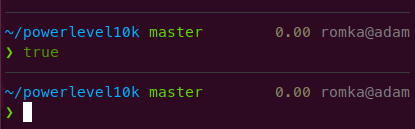
Although it seems that PROMPT is made of 3 lines and RPROMPT is made of 1 line, in reality there is only a single one-line PROMPT. It's just so long that it wraps around and spans 3 lines. If you save it in a variable with p=$(eval print -P \"$PROMPT\"), make your terminal wider and then print, you'll see it in its one-line glory.

romkatv
on 28 May 2019
I also enabled the display of the number of staged and unstaged changes in git prompt in Pure Power. It's a new feature I implemented last week when a user asked for it. I haven't used it myself yet. Not sure it's worth the real estate. You might like it as you generally prefer more bells and whistles in the prompt.
These are controlled by POWERLEVEL9K_VCS_MAX_NUM_{STAGED,UNSTAGED,UNTRACKED}. In Pure Power I set them like this:
POWERLEVEL9K_VCS_MAX_NUM_STAGED=-1
POWERLEVEL9K_VCS_MAX_NUM_UNSTAGED=-1
POWERLEVEL9K_VCS_MAX_NUM_UNTRACKED=1  # this is the default
It'll show all staged and unstaged but only an icon for untracked. Make sure to _not_ set POWERLEVEL9K_VCS_MAX_NUM_UNTRACKED=-1 as it'll cause massive performance issues in some cases. If you want to see the number of untracked files, use POWERLEVEL9K_VCS_MAX_NUM_UNTRACKED=99.
romkatv
on 28 May 2019
I replaced the empty line with the ruler in Pure Power. I'm not sure yet whether it's a good idea or not. What do you think?
I think I like it. I'll try it out and see if it sticks.
I think I found an issue with the length calculation and icon(s):


Just zsh -df(No docker today):
POWERLEVEL9K_SHOW_RULER=true; POWERLEVEL9K_SHOW_RULER=true; POWERLEVEL9K_RULER_CHAR='-'; POWERLEVEL9K_LEFT_PROMPT_ELEMENTS=(dir); POWERLEVEL9K_RIGHT_PROMPT_ELEMENTS=(battery); POWERLEVEL9K_MODE="nerdfont-complete"; POWERLEVEL9K_PROMPT_ON_NEWLINE=true; ZLE_RPROMPT_INDENT=0; source ~/.oh-my-zsh-custom/themes/powerlevel10k/powerlevel10k.zsh-theme
Also: Saw your commit on this (POWERLEVEL9K_VCS_MAX_NUM_{STAGED,UNSTAGED,UNTRACKED}) and was looking forward to it
Syphdias
on 28 May 2019
Why POWERLEVEL9K_VCS_MAX_NUM_{STAGED,UNSTAGED,UNTRACKED}
and not POWERLEVEL9K_VCS_{STAGED,UNSTAGED,UNTRACKED}_MAX_NUM?
Syphdias
on 28 May 2019
I think I found an issue with the length calculation and icon(s):
Damn, I cannot reproduce this. Which terminal and font are you using?
Also, could you run a quick command and send me a screenshot of the result? This needs to be run from your normal zsh session that has p10k sourced.
echo -E $'012345\n\uF240^' && _p9k_prompt_length $'\uF240' && echo $_P9K_RETVAL
(Here ^ is supposed to be pointing at the number that is printed on the third line.)
And one more. Type this and attach a screenshot of the full prompt:
PROMPT=${(pl:$((COLUMNS-1))::-:)}$'\n> ' RPROMPT=$'\uF240' zsh -df
(Here the test is to see if the end of the ruler is aligned with the end of right prompt.)
Why
POWERLEVEL9K_VCS_MAX_NUM_{STAGED,UNSTAGED,UNTRACKED}
and notPOWERLEVEL9K_VCS_{STAGED,UNSTAGED,UNTRACKED}_MAX_NUM?
Damn, I missed these. There is probably only one user and I have his contacts, so we can still change it.
romkatv
on 28 May 2019
Which terminal and font are you using?
Terminal: Tilix
Font: Cousine Nerd Font Regular (size: 11)
But I can reproduce this also in Terminator with (probably) a different font:

(Here
^is supposed to be pointing at the number that is printed on the third line.)

(Here the test is to see if the end of the ruler is aligned with the end of right prompt.)
With a bonus:

Syphdias
on 28 May 2019
Also, could you run a quick command and send me a screenshot of the result? This needs to be run from your normal zsh session that has p10k sourced.
I read over that...it should still be representative since I did it from a prompt where the problem happens as well. It looks the same with my modified purepower
Syphdias
on 28 May 2019
I think this is where I got the font from: https://github.com/ryanoasis/nerd-fonts/tree/master/patched-fonts/Cousine/Regular/complete
Syphdias
on 28 May 2019
This variant of the font? https://github.com/ryanoasis/nerd-fonts/blob/master/patched-fonts/Cousine/Regular/complete/Cousine%20Regular%20Nerd%20Font%20Complete.ttf
I installed it and tested with GNOME Terminal, Tilix and Terminator. Couldn't reproduce on any of them. I do see the same broken alignment that you've posted in your screenshots but it doesn't cause overflow into the next line with Pure Power. I've tested everything with two version of bash: 5.4.2 and the one built from HEAD.
Are you sure you are using the latest version of p10k?
Kinda running of options what the difference in our setups could be. What's your ZSH version? Do you have anything custom in your ~/.Xresources or some other custom settings that affect terminal?
romkatv
on 28 May 2019
Yes, that's the font.
p10k: 58545efa017975ebaec91f403e9b431ae16b77c8
zsh 5.7.1 (x86_64-debian-linux-gnu)
Syphdias
on 28 May 2019
Nothing in ~/.Xresources, an I am using i3wm (cinnmon before that)
Syphdias
on 28 May 2019
Let's try to eliminate some potential differences. Does this fail?
docker run -e LANG=C.UTF-8 -e LC_ALL=C.UTF-8 -e TERM=$TERM -it --rm ubuntu bash -uexc '
  apt update && apt install -y zsh git curl
  git clone https://github.com/romkatv/powerlevel10k.git ~/powerlevel10k
  cd && curl -fsSLO https://raw.githubusercontent.com/romkatv/dotfiles-public/master/.purepower
  echo "
    ZLE_RPROMPT_INDENT=0
    source ~/.purepower
    function custom_rprompt() { print \"\uF240\" }
    source ~/powerlevel10k/powerlevel10k.zsh-theme" >~/.zshrc
  cd ~/powerlevel10k
  exec zsh'
If it does, type custom_rprompt() {}. Does it fail now?
P.S.
Thank you for helping to debug this!
romkatv
on 28 May 2019
I'm not sure who is helping whom here...
It doesn't fail in either case. So it has to be something weird with my machine. locale maybe?
Syphdias
on 29 May 2019
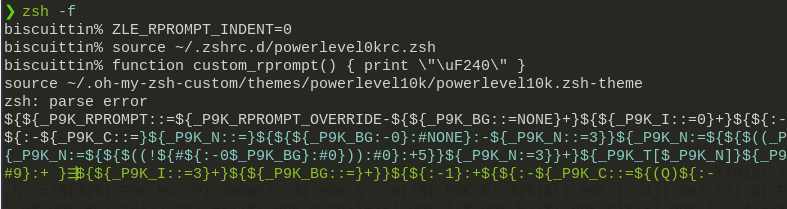
Well, maybe it wasn't the battery symbol causing it. Need to check. Paste this into zsh -f and zsh -df:
ZLE_RPROMPT_INDENT=0
source ~/.purepower
function custom_rprompt() { print \"\uF240\" }
source ~/.oh-my-zsh-custom/themes/powerlevel10k/powerlevel10k.zsh-theme
This breaks everything....
Syphdias
on 29 May 2019
I don't think it's font/icon related, I replaced the icon with a:

Syphdias
on 29 May 2019
You are making too many changes. We know that it works in docker. Now we want to try _the same thing_ but on your host. This should do:
(
  cd $(mktemp -d)
  git clone https://github.com/romkatv/powerlevel10k.git
  curl -fsSLO https://raw.githubusercontent.com/romkatv/dotfiles-public/master/.purepower
  echo "
    ZLE_RPROMPT_INDENT=0
    source $PWD/.purepower
    function custom_rprompt() { print \"\uF240\" }
    source $PWD/powerlevel10k/powerlevel10k.zsh-theme" >.zshrc
  ZDOTDIR=$PWD zsh
)
works fine
Syphdias
on 29 May 2019
That last test uses your global config but doesn't use your local configs. The only difference is in your ~/.zshrc, ~/.zshenv, etc. Could be an option or something else. Please try to figure out what it is either by commenting out things in your config or adding things to the working config. But first I would just blindly try the options hypothesis. Type this in your normal ZSH session (the one that shows broken rendering).
emulate zsh
If this doesn't fix it, then you'll have to do the time-consuming thing I mentioned above.
romkatv
on 29 May 2019
nope, still broken, time consuming it is...
Man, thanks for the patience. I'll nee to grab some sleep, will let you know what I find out tomorrow.
Syphdias
on 29 May 2019
Likewise. Good night.
romkatv
on 29 May 2019
Another easy thing to try tomorrow: Take the last command and replace pure power in it with your own config.
(
  cd $(mktemp -d)
  git clone https://github.com/romkatv/powerlevel10k.git
  echo "
    source $HOME/.zshrc.d/powerlevel10krc.zsh
    ZLE_RPROMPT_INDENT=0
    source $PWD/powerlevel10k/powerlevel10k.zsh-theme" >.zshrc
  ZDOTDIR=$PWD zsh
)
Not asleep yet....
Could you try this?
docker run -e LANG=C.UTF-8 -e LC_ALL=C.UTF-8 -e TERM=$TERM -it --rm debian:buster bash -uexc '
  apt update && apt install -y zsh git curl
  git clone https://github.com/romkatv/powerlevel10k.git ~/powerlevel10k
  cd && curl -fsSLO https://raw.githubusercontent.com/romkatv/dotfiles-public/master/.purepower
  echo "
    ZLE_RPROMPT_INDENT=0
    source ~/.purepower
    function custom_rprompt() { print \"\uF240\" }
    source ~/powerlevel10k/powerlevel10k.zsh-theme" >~/.zshrc
  cd ~/powerlevel10k
  exec zsh'
This breaks! That's perfect. I'll debug it tomorrow.
romkatv
on 29 May 2019
ZSH 5.7.1 was shipped with a bug that causes this issue. It was fixed in https://github.com/zsh-users/zsh/commit/64d13738357c9b9c212adbe17f271716abbcf6ea. I'll try to find a workaround tomorrow. Now I really need to go to bed.
romkatv
on 29 May 2019
This is now fixed. Here's a summary of the ZSH bug.
Bug introduced in https://github.com/zsh-users/zsh/commit/d8d9fee137a5aa2cf9bf8314b06895bfc2a05518. ZSH_PATCHLEVEL=zsh-5.4.2-159-gd8d9fee13. Released in 5.5.
Bug fixed in https://github.com/zsh-users/zsh/commit/64d13738357c9b9c212adbe17f271716abbcf6ea.
ZSH_PATCHLEVEL=zsh-5.7.1-50-g64d137383. Not released yet.
Test (fails on buggy ZSH, passes on correct ZSH):
PROMPT="${(pl:$((COLUMNS))::-:)}<%1(l.%2(l.FAIL.PASS).FAIL)> " zsh -dfis <<<exit
Workaround (passes on buggy ZSH, fails on correct ZSH):
PROMPT="${(pl:$((COLUMNS))::-:)}%{%G%}<%1(l.%2(l.FAIL.PASS).FAIL)> " zsh -dfis <<<exit
Unfortunately, the workaround cannot be applied unconditionally. Doing so would break p10k on ZSH without the bug. So now there is a branch in p10k to apply the workaround if and only if ZSH has the bug. Code: https://github.com/romkatv/powerlevel10k/blob/8b8743c8edc548981274184cfc922757e99df0ea/powerlevel9k.zsh-theme#L2331
romkatv
on 29 May 2019
Nice, looks fixed to me!
Syphdias
on 29 May 2019
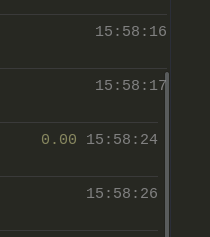
Ironically I now set ZLE_RPROMPT_INDENT=1 again since, if the scrollbar is visible, it obstructs the last segment :sweat_smile:.
Syphdias
on 29 May 2019
Awww, that's not pretty at all. Regular text output also gets obstructed like that? Time to switch to GNOME Terminal! :stuck_out_tongue:
romkatv
on 29 May 2019
Although it seems that
PROMPTis made of 3 lines andRPROMPTis made of 1 line, in reality there is only a single one-linePROMPT
Why did you opt for not putting a newline at the end? I guess you had a reason for doing so, since without it old prompts get moved all over the place if the terminal is resized.
Syphdias
on 30 May 2019
Why did you opt for not putting a newline at the end?
I did it to work around the differences in terminals when it comes to auto-wrapping lines that fit exactly the width of the terminal. Now I went and revisited this code and I think I came up with something that still works but is quite a bit simpler. And it has LF at the end of every prompt line that looks like it goes to the very end. This seems to work but I need to test it more. I did notice some weirdness on MacOS and there is also a difference in how its terminal detects where prompts start and end. I'll need to investigate this. Leaving the code as is for now.
I guess you had a reason for doing so, since without it old prompts get moved all over the place if the terminal is resized.
The way you phrase critique always gives me a chuckle :grin:
If your terminal attempts to reflow text when you shrink it (unlike xterm that simply truncates every line), non-trivial prompts will cause a mess. Here's p9k with default settings. I typed reset and then resized the terminal back and forth.
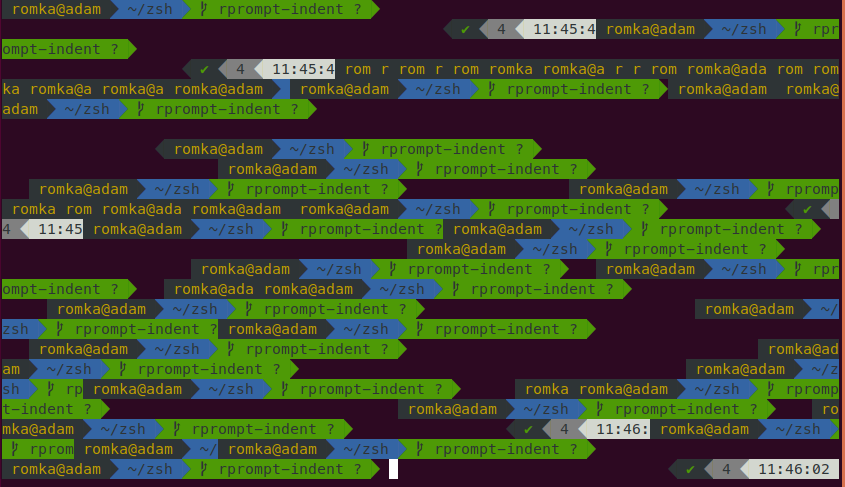
Here's a much simpler example. Type PROMPT='${(pl.$((COLUMNS-${ZLE_RPROMPT_INDENT:-1}))..-.)}'$'\n> ' zsh -df and then setopt prompt_subst && reset. After resizing you'll get something like this:
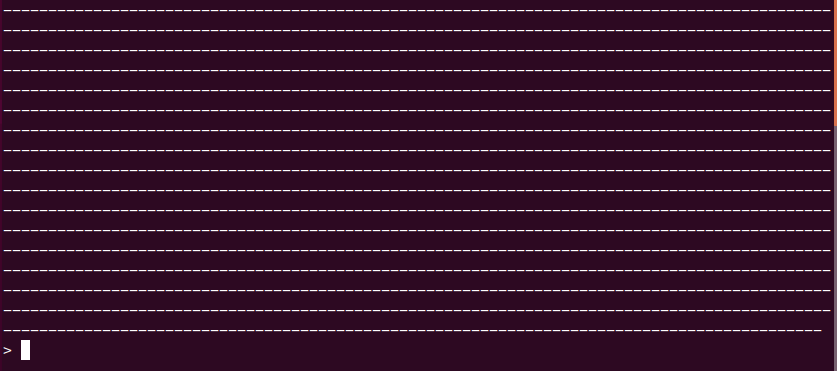
If you set ZLE_RPROMPT_INDENT=10 and resize the terminal slowly, there will be no mess. You'll need to shrink the terminal in a jerky movement to make prompt spill over.
Curiously, this doesn't create a mess: PROMPT="${(pl:$((COLUMNS-1))::-:)}"$'\n> ' zsh -df. However, at least in GNOME Terminal, resizing back and forth with this prompt will erase previous text.
I think the worst parts of this are caused by bugs in ZSH. Probably fixable but the motivation isn't great enough for me to care.
romkatv
on 30 May 2019
The way you phrase critique always gives me a chuckle
I'll try to insult you next time :stuck_out_tongue_winking_eye: but for now thanks for the LFs :+1:.
I know about this "jerkiness" all too well. p9k does it als well as p10k and I guess it's a zsh, maybe. Not sure if ZLE_RPROMPT_INDENT=10 is worth it, though. Wouldn't you miss the mess if it was fixed?
Curiously, this doesn't create a mess:
PROMPT="${(pl:$((COLUMNS-1))::-:)}"$'\n> ' zsh -df. However, at least in GNOME Terminal, resizing back and forth with this prompt will erase previous text.
...but it eats the previous lines.
Syphdias
on 30 May 2019
I know about this "jerkiness" all too well. p9k does it als well as p10k and I guess it's a zsh, maybe. Not sure if
ZLE_RPROMPT_INDENT=10is worth it, though. Wouldn't you miss the mess if it was fixed?
I wouldn't miss it but I probably wouldn't notice it either. I never resize my terminals. I always have two with fixed size at fixed locations.
If this bothers you, fix it. ZSH folks use arcane dev tools but they are friendly and responsive. Given that the problem can be reproduced with a simple prompt, it must be not too hard to figure out what's going on. It may not be easy or even possible to _fix_ but at least you'll know why it works the way it does.
By the way, I've also tested it with a prompt that uses prompt expansion instead of parameter expansion for dynamic prompt rendering. I was hoping that it'll help with the ruler in p10k. The results are even worse. Here:
PROMPT="${(l,9000,,%-2(l.-.),)}" zsh -df
This prompt renders as many dashes as can fit in one line, leaving just one empty space at the end. If you resize your terminal slooowly, it behaves. If you jerk it, shit hits the fan real hard.
romkatv
on 31 May 2019
Was more of a joke, that one would miss it ;) It doesn't bother me too much as long as two things work:
- No eaten up history, a mess is ok
- the commands should still start on the left (fixed with the newline(s))
Syphdias
on 31 May 2019
After some additional extensive testing I've found out that newline after the rules can cause issues in some exotic situations:
- Only when
ZLE_RPROMPT_INDENT=0. - Only when sync part of the prompt is slower than key repeat rate.
- Only on some ZSH versions.
- Only on some terminals.
I tried lots of different variations of the code and settled on https://github.com/romkatv/powerlevel10k/commit/639443fa6c612784cdd3b703efcab81509eb7c3b. It has the following logic.
- If
ZLE_RPROMPT_INDENT > 0, use\n. - If
ZLE_RPROMPT_INDENT = 0, do not use\nbut do use a glitch as a workaround for broken ZSH versions (between 5.5 and 5.7.1 inclusive).
It means that with ZLE_RPROMPT_INDENT=0 you'll get weird stretching and shifting of old prompts. when resizing your terminal. I figured this preferable to having an extra ruler sometimes displayed when you aren't even resizing your prompt.
IIUC, you are using ZLE_RPROMPT_INDENT=1, so there should be no change for you.
P.S.
Handling ZLE_RPROMPT_INDENT=0 turned out much harder than I though.
romkatv
on 31 May 2019
Probably the reason there is a whitespace at the end for p9k
Syphdias
on 31 May 2019
I don't think I understand what you mean but it's almost certainly not the reason. I've read history of p9k code back and forth.
What p9k has is %E%k after right prompt. This is done while background color of the rightmost segment of right prompt is still active. This essentially emulates ZLE_RPROMPT_INDENT=0 regardless of the actual value of ZLE_RPROMPT_INDENT. This is IMO uncool.
This was done because someone wanted to use ZLE_RPROMPT_INDENT=0 but setting it wasn't working reliably (because of the bug that I've recently fixed in ZSH). So they did the %E hack. This made p9k behave with ZLE_RPROMPT_INDENT=1 the way it should behave with ZLE_RPROMPT_INDENT=0. Any other value of ZLE_RPROMPT_INDENT (e.g., 0 or 2) produces inadequate results that are clearly not intended.
p9k never had to deal with the issues I've been dealing here because it never had the features that trigger them. Specifically, it's difficult to define left prompt that has at least one line that spans to the edge of the screen. p10k now has two features that do this: the ruler and emulation of right prompt (where it's not really right prompt but a part of left prompt).
Or maybe I completely misunderstood your quip.
Edit: The short version is that there is no space at the end of p9k prompt. It becomes pretty clear if you set ZLE_RPROMPT_INDENT=5 and then ZLE_RPROMPT_INDENT=0. The right prompt is in fact _missing_ the trailing space, hence with ZLE_RPROMPT_INDENT=0 it'll look truncated.
romkatv
on 31 May 2019
Yes, I was referring to #68 and went with the title
Syphdias
on 31 May 2019
That issue is ostensibly about an extra space at the end of p10k right prompt. Compared to p9k, every right prompt has an extra space.
romkatv
on 31 May 2019
My experiment with the way prompt behaves when resizing terminal window: https://github.com/romkatv/zsh/tree/prompt-wrap. This works better in some cases but not always. I think with your config it should work correctly. Care to try?
romkatv
on 14 Jun 2019
Sure! Well, it's a lot less messy and definitely a step forward!
I tried this:
docker run -e LANG=C.UTF-8 -e LC_ALL=C.UTF-8 -e TERM=$TERM -it --rm debian:buster bash -uexc '
  apt update && apt install -y git build-essential libncurses-dev gcc autoconf man curl
  cd && curl -fsSLO https://raw.githubusercontent.com/Syphdias/dotfiles/master/.zshrc.d/powerlevel0krc.zsh
  git clone --depth 1 https://github.com/romkatv/powerlevel10k.git ~/powerlevel10k
  echo "
    ZSH_THEME=powerlevel10k
    source ~/powerlevel0krc.zsh
    cd ~/powerlevel10k && source powerlevel10k.zsh-theme
    " >~/.zshrc
  git clone --depth 1 -b prompt-wrap https://github.com/romkatv/zsh.git ~/zsh
  cd ~/zsh
  ./Util/preconfig
  ./configure
  make -j 20 install.bin install.modules install.fns
  exec zsh'
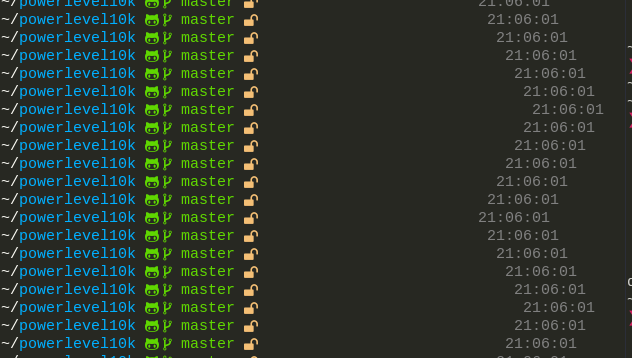
Syphdias
on 14 Jun 2019
It works better with p9k. Maybe because it uses the native RPORMPT or because of how p10k is actually slower in actually rendering PROMPT since it's just one variable with the ready-to-render string while p10k has to do a bit more. I'm just guessing though and also not sure how one could measure that...
Syphdias
on 14 Jun 2019
Wow, that screenshot looks very broken. I think it was a different version form my experiments that worked acceptably with your config. The problem is that there is no good combination of termcap sequences that yields good results everywhere. I think I'll shelf this problem. Seems like a lost cause.
I'm more excited to see that you got rid of battery in your prompt. This is huge! Are nonfunctional icons next to go?
romkatv
on 15 Jun 2019
Only one (maybe two) non-functional icons left and I quite like the little octocat/gitlab fox or whatever; you could argue it tells me something about the remote 😉. And the branch icon is just fitting. So they probably won't go any time soon.
Fun fact: Since I moved my dotfiles I hadn't removed the battery segment yet and curled it in the container. I pushed the removal just for this test.
The problem is that there is no good combination of termcap sequences that yields good results everywhere. I think I'll shelf this problem. Seems like a lost cause.
That's too bad since it is way better than before.
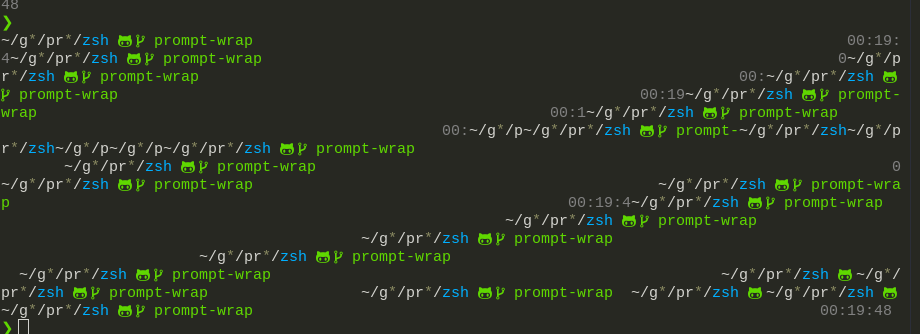
Syphdias
on 15 Jun 2019
After some additional extensive testing I've found out that newline after the rules can cause issues in some exotic situations:
- Only when
ZLE_RPROMPT_INDENT=0.- Only when sync part of the prompt is slower than key repeat rate.
- Only on some ZSH versions.
- Only on some terminals.
For the record, this weirdness was caused by bugs in countprompt() function in ZSH. I fixed them in https://github.com/zsh-users/zsh/commit/80aa807a61cf10ebf459ba8e06621a5ec33041dc.
The most important bug can be observed by running this command:
PROMPT="${(pl.$COLUMNS..-.)}%f"$'\n' zsh -df
and then hitting esc-x followed by reset-prompt. Prompt will move one line up when it should've stayed put.
Practical rules for multi-line prompts:
- If at all possible, make all prompt lines strictly shorter than
$COLUMNSby inserting\nin suitable places. This will work correctly on all terminals and all ZSH versions. - All prompt lines that fill the width of the terminal must not end in
\n(at least until https://github.com/zsh-users/zsh/commit/80aa807a61cf10ebf459ba8e06621a5ec33041dc gets adopted) and should just overflow. - For every overflowing line there should be
%{%G%}in the prompt ifZSH_PATCHLEVELis in[zsh-5.4.2-159-gd8d9fee13, zsh-5.7.1-50-g64d137383). - If prompt overflows in the middle of a tab character, it'll be terribly broken on most terminals.
romkatv
on 20 Jun 2019
That's too bad since it is way better than before.
I've made another attempt: https://github.com/romkatv/zsh/tree/fix-winchanged. Seems to work. The only problem is when your prompt starts at the very top and shrinking the window pushes its first line above the viewport. In this case you'll still see a mess if you scroll up. This case may be unfixable.
If you enable ZLE_RPROMPT_INDENT=0, this problem disappears because terminal (at least GNOME Terminal) won't push prompt upwards when you are shrinking the window, so the start of the current prompt is always within the viewport. The difference in behavior is caused by the presence of \n in the default case and absence of it with ZLE_RPROMPT_INDENT=0. I could add an option to not insert \n even when ZLE_RPROMPT_INDENT is not zero. This will, unfortunately, turn past multi-line prompts into single-line prompts if you widen the window. This may not be a big deal because past prompts get broken anyway when you are shrinking the window.
WDYT?
romkatv
on 15 Jul 2019
This may not be a big deal because past prompts get broken anyway when you are shrinking the window.
I think I've mentioned it before. I'm not a fan of leaving out the line feed since it moves the past command.
With ZLE_RPROMPT_INDENT=1 the prompt moves up and kind of resets this "viewport" like Ctrl-L does. (I don't have a good name for it (*)).
Is this supposed to happen or also a side effect of the "pushing up"?
* To get the behavior I mean:
- New prompt
- press enter a few times
- Press
Ctrl-L - Scroll up until you see some lines that disappeared with 3.
- Press
enter - The viewport jumps down
Syphdias
on 15 Jul 2019
I think I've mentioned it before. I'm not a fan of leaving out the line feed since it moves the past command.
Now I understand! Yes, moving the _commands_ is pretty bad.
With ZLE_RPROMPT_INDENT=1 the prompt moves up and kind of resets this "viewport" like Ctrl-L does.
I see how Ctrl-L (a.k.a. clear) adds a bunch of empty lines after the last prompt. My patch is doing worse than that. It's not pushing empty lines, it's pushing the first prompt line. If it happens to be an empty line, you are lucky. Try POWERLEVEL9K_SHOW_RULER=true to see how bad it can be.
FWIW, ZSH without my patch is also broken in this case but instead of pushing crap lines up, it'll instead _eat_ lines up.
romkatv
on 15 Jul 2019
Funny, how a seemingly small bug can be so hard to fix...
If it happens to be an empty line, you are lucky. Try
POWERLEVEL9K_SHOW_RULER=trueto see how bad it can be.
Ouch..
Syphdias
on 15 Jul 2019
I didn't understand from your comments whether the fix works as intended and whether you think it's better than the current behavior.
If the prompt line isn't at the very top, does terminal resizing work correctly for you?
If the prompt line is at the very top, do you think the behavior with this patch (some junk added above the fold) is not much worse than the behavior without it (some lines disappear above the fold)?
romkatv
on 15 Jul 2019
I didn't understand from your comments whether the fix works as intended and whether you think it's better than the current behavior.
Without the ruler it works find (with the exception of the edge case) and it's a huge improvement, no doubt!
Try
POWERLEVEL9K_SHOW_RULER=trueto see how bad it can be.
I thought you were aware, that the ruler sill breaks it. This was with ZLE_RPROMPT_INDENT=1:
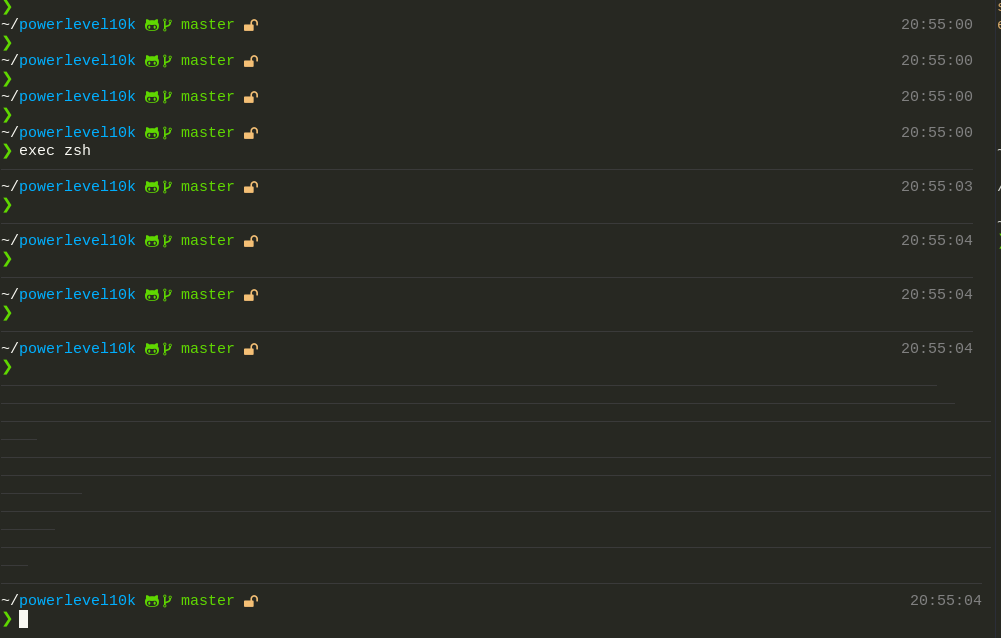
ZLE_RPROMPT_INDENT=0 has different problems.
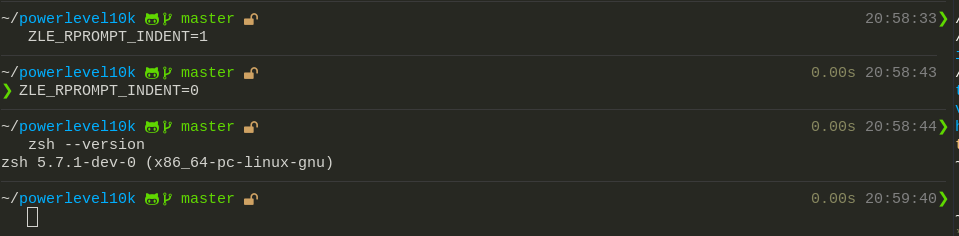
Tested with this:
% docker run -e LANG=C.UTF-8 -e LC_ALL=C.UTF-8 -e TERM=$TERM -it --rm debian:buster bash -uexc '
  apt update && apt install -y git build-essential libncurses-dev gcc autoconf man curl
  cd && curl -fsSLO https://raw.githubusercontent.com/Syphdias/dotfiles/master/.zshrc.d/powerlevel0krc.zsh
  git clone --depth 1 https://github.com/romkatv/powerlevel10k.git ~/powerlevel10k
  echo "
    ZSH_THEME=powerlevel10k
    source ~/powerlevel0krc.zsh
    cd ~/powerlevel10k && source powerlevel10k.zsh-theme
    " >~/.zshrc
  git clone --depth 1 -b fix-winchanged https://github.com/romkatv/zsh.git ~/zsh
  cd ~/zsh
  ./Util/preconfig
  ./configure
  make -j 20 install.bin install.modules install.fns
  exec zsh'
I modified only two variables while testing POWERLEVEL9K_SHOW_RULER and ZLE_RPROMPT_INDENT.
Looks like it doesn't break with this config:
% docker run -e LANG=C.UTF-8 -e LC_ALL=C.UTF-8 -e TERM=$TERM -it --rm debian:buster bash -uexc '
  apt update && apt install -y git curl zsh
  cd && curl -fsSLO https://raw.githubusercontent.com/Syphdias/dotfiles/master/.zshrc.d/powerlevel0krc.zsh
  git clone --depth 1 https://github.com/romkatv/powerlevel10k.git ~/powerlevel10k
  echo "
    ZSH_THEME=powerlevel10k
    source ~/powerlevel0krc.zsh
    cd ~/powerlevel10k && source powerlevel10k.zsh-theme
    " >~/.zshrc
  exec zsh'
I'm not sure if it's your modifications that cause this. Could be something unrelated.
Syphdias
on 15 Jul 2019
Without the ruler it works find (with the exception of the edge case) and it's a huge improvement, no doubt!
Thanks for the feedback!
I thought you were aware, that the ruler sill breaks it.
Wasn't aware but I did reproduce this with Tilix. If you shrink the window gently, everything works but if you jerk it, you can create a phantom ruler. After that I managed to reproduce this in GNOME Terminal. It's harder but still possible to create a phantom ruler.
This is surprising to me because I understood the code pretty well and cannot explain why this is happening. I won't look at it right now though.
ZLE_RPROMPT_INDENT=0 has different problems.
Is your screenshot showing a broken _current_ prompt? It's normal that the past prompts get all weird but the current prompt must not break.
I wasn't able to reproduce this when I took your first docker command and added ZLE_RPROMPT_INDENT=0 to it. Works fine both in GNOME Terminal and Tilix.
Is it possible that you typed ZLE_RPROMPT_INDENT=0 in an interactive ZSH session after the first prompt got rendered? This isn't supported. You need to put all settings and options in your ~/.zshrc. I have a TODO to make hot config changes work but it's not very high on my priority list. Apart from theme devs no one does this stuff.
romkatv
on 15 Jul 2019
- Docker command from above
sed -i 's/#typeset -g POWERLEVEL9K_SHOW_RULER=true/typeset -g POWERLEVEL9K_SHOW_RULER=true/;s/ZLE_RPROMPT_INDENT=1/ZLE_RPROMPT_INDENT=0/' ~/powerlevel0krc.zshexec zsh

Trying in GNOME/Cinnamon Terminal now (building)
Syphdias
on 16 Jul 2019
Same problem and it seems to be related to the ruler.
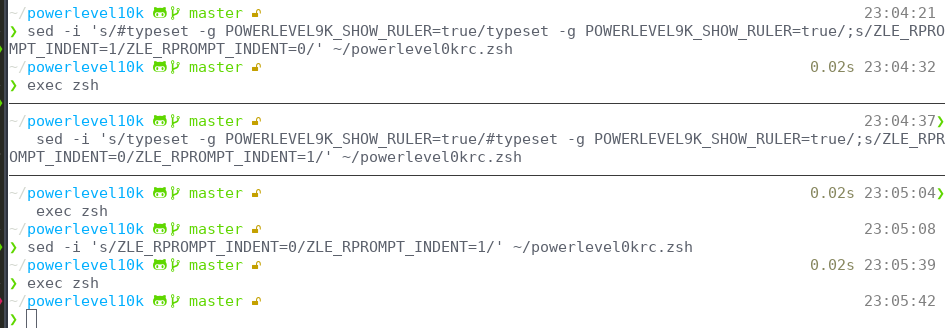
Syphdias
on 16 Jul 2019
Believe it or not, this problem is caused by --depth 1. When zsh repo is checked out with this flag, $ZSH_PATCHLEVEL in the built ZSH is empty. p10k needs to figure out whether ZSH was built with https://github.com/zsh-users/zsh/commit/64d13738357c9b9c212adbe17f271716abbcf6ea, which went in after 5.7.1 came out and before the next version will come out. If $ZSH_PATCHLEVEL is empty, all p10k knows is that ZSH is based on 5.7.1. In this case it assumes it's the unpatched 5.7.1. I think this is the best I can do.
Same problem and it seems to be related to the ruler.
If I read your screenshot correctly, you've done these tests:
- Ruler off, indent 1 => works.
- Ruler on, indent 0 => broken.
- Ruler off, indent 1 => works (the same as test 1).
- Ruler off, indent 1 => works (the same as test 1).
I believe the following are the conditions under which this issue applies:
- ZSH must be built with https://github.com/zsh-users/zsh/commit/64d13738357c9b9c212adbe17f271716abbcf6ea but
$ZSH_PATCHLEVELmust not disclose this. ZLE_RPROMPT_INDENT=0.- Left prompt should contain a full line. This can be done by enabling ruler or by having right prompt not on the last prompt line. The more full lines there are in the left prompt, the more visible are the artifacts.
(2) and (3) instruct p10k to print a full prompt line. When doing so, it should know whether printing a full prompt line triggers a certain off-by-one bug in ZSH so that it can apply a correction. Due to the missing $ZSH_PATCHLEVEL it incorrectly decides ZSH does have the bug (that is, it does not have the fix for the bug) and applies the correction when it isn't needed.
Thanks for your patience and your help!
romkatv
on 16 Jul 2019
Sorry for the late response, just combing through my emails right now...
When
zshrepo is checked out with this flag,$ZSH_PATCHLEVELin the built ZSH is empty.
Are you saying the zsh which is running the docker command is screwing up? Ord do you mean the result of the makewill not have that flag? If so how can this happen with a shallow clone?
4. Ruler off, indent 1 => works (the same as test 1).
Yes, though it was supposed to be indent 0 to get all cases...
Will you or have you send your patch upstream yet?
Syphdias
on 21 Jul 2019
Are you saying the zsh which is running the docker command is screwing up? Ord do you mean the result of the makewill not have that flag? If so how can this happen with a shallow clone?
When you are compiling zsh from source, it embeds the output of git describe into the source. This doesn't work with --depth 1, so you get a broken zsh binary that has empty $ZSH_PATCHLEVEL.
By the way, I never use --depth 1 and remove it from all commands that I copy paste. It saves two seconds at best but then you cannot use the repo if you want to.
Will you or have you send your patch upstream yet?
I've sent it: https://www.zsh.org/mla/workers//2019/msg00561.html. It's not likely to go through. Mikael Magnusson reported that it doesn't work although I'm almost certain he tested the unpatched zsh when he thought he were testing my patch. The reason I think this was is because I've tested it on the same terminal and what he describes as the behavior of my patch is indeed how the unpatched zsh behaves. Bart Schaefer seems opposed to the patch but I cannot engage him enough so that he gives me specific reasons. Both Mikael and Bart are important, so their opposition is bad. I'll try to push it again some time later after I test it on a million terminals but without a single person being in favor the patch is likely dead on arrival. Oh well.
romkatv
on 21 Jul 2019
This can be solved with some extra code. In my dotfiles I bind …
@romkatv This was exactly what I was trying to achieve as well. I just migrated from 9k to 10k (the official Arch repos has migrated over!), and alt-up, etc. was one of the things that broke in the move. I'm not sure if I missed it, but could you please share your code for alt-{up,left,right,down}? Thanks in advance!
 protist
on 21 Mar 2020
protist
on 21 Mar 2020
You can find these bindings and a few other nice things in https://github.com/romkatv/zsh4humans.
I recommend trying it in a non-committal way:
# Back up the existing zshrc.
mv ~/.zshrc ~/.zshrc.bak

# Download zshrc from zsh4humans.
curl -fsSLo ~/.zshrc https://raw.githubusercontent.com/romkatv/zsh4humans/master/.zshrc

# Start zsh.
zsh
See if you like how Alt-Arrows work. Not just Alt-Up but also Alt-Left/Right to go back/forward and Alt-Down to go "deeper". Completions and Ctrl-R are also very nice.
To go back to your original zshrc and to remove zsh4humans cache files:
mv ~/.zshrc.bak ~/.zshrc
rm -rf ~/.cache/zsh4humans
Thanks @romkatv! Yes, I love the idea of the other directional arrows. I only had left and up bound previously. Unfortunately my ~/.zshrc is already >500 lines long, so I wouldn't totally replace it. I'll have a look through your suggestions and cherry-pick bits out. Thanks again!
protist
on 21 Mar 2020
I'll have a look through your suggestions and cherry-pick bits out.
That's a good way to go about it. My suggestion was first to try zsh4humans as is just to see what different keys do. This will make it easier to decide what to copy over.
romkatv
on 21 Mar 2020
Ah got it. From your description and animation above, it looks brilliant! I'm sold already.
protist
on 21 Mar 2020
Related issues
 Mystic8b
·
4Comments
Mystic8b
·
4Comments
 alex-popov-tech
·
4Comments
alex-popov-tech
·
4Comments
 gigglearrows
·
4Comments
gigglearrows
·
4Comments
 dylanjm
·
3Comments
dylanjm
·
3Comments
 barthalion
·
3Comments
barthalion
·
3Comments