Powerbi-docs: Special Characters in Field Values
Trying to allow user to filter on some fields, and one field's values contains an apostrophe and ampersand. How do we allow for the values to contain special characters?
PreFilterLink =
var __base = "https://app.powerbi.com/groups/me/"
var __appID = "______"
var __reportid = "______"
var __ctid = "______"
var __ReportSection = "ReportSection______"
var __ResponsibleGroup = if(ISFILTERED(QualifiedEventList[ResponsibleGroup])
," and QualifiedEventList/ResponsibleGroup in ('" & CONCATENATEX( filters(QualifiedEventList[ResponsibleGroup]),QualifiedEventList[ResponsibleGroup],"','") &"')","")
var __LegacyArea = if(ISFILTERED(ServiceCenterHierarchy[Legacy Area])
," and ServiceCenterHierarchy/Legacy_x0020_Area in ('" & CONCATENATEX( filters(ServiceCenterHierarchy[Legacy Area]),ServiceCenterHierarchy[Legacy Area],"','") &"')","")
...
var __Normalization = if(ISFILTERED(QualifiedEventList[Normalization])
," and QualifiedEventList/Normalization in ('" & CONCATENATEX( filters(QualifiedEventList[Normalization]),QualifiedEventList[Normalization],"','") &"')","")
var __filters = __ResponsibleGroup & __LegacyArea ... & __Normalization
var __filtersR = if( len(__filters) < 5
,""
,right(__filters,len(__filters)-5)
)
return
if(__appID = ""
,__base & "reports/" & __reportid & "/" & __ReportSection & "?filter=" & __filtersR
,__base & "apps/" & __appID & "/reports/" & __reportid & "/" & __ReportSection & "?filter=" & __filtersR & "&ctid="&__ctid
)
Document Details
⚠ Do not edit this section. It is required for docs.microsoft.com ➟ GitHub issue linking.
- ID: 70b360f3-21a7-adc2-896a-b1dfd5d9e384
- Version Independent ID: 15e8c09f-46ad-68f9-75e6-c3d5c2c214e5
- Content: Filter a report using query string parameters in the URL - Power BI
- Content Source: powerbi-docs/service-url-filters.md
- Service: powerbi
- Sub-service: powerbi-service
- GitHub Login: @maggiesMSFT
- Microsoft Alias: maggies
 soldstatic
All 19 comments
Thanks for your comment, @soldstatic This looks like product feedback or a product question, rather than documentation feedback. You can submit product feedback or feature ideas by going to Power BI Ideas. You can also engage with the Power BI engineering team by being active in the Power BI Community.
 srigney2142
on 21 Oct 2019
srigney2142
on 21 Oct 2019
Hi, I disagree. I believe this is a part of the filtering functionality that simply needs to be documented. I'm sure there's an easy way to escape the characters, I'm just not sure what that way is. Thanks though!
soldstatic
on 21 Oct 2019
Thanks for your comment, @soldstatic I've assigned this issue to the doc author for review.
srigney2142
on 21 Oct 2019
Hi, @soldstatic -- have you tried using the Unicode for your special characters? Here's the place in the doc that describes how to use Unicode:
https://docs.microsoft.com/en-us/power-bi/service-url-filters#special-characters-in-url-filters
In this Unicode table, https://unicode-table.com/en/#control-character, looks like
& = 0026
and a straight apostrophe:
' = 0027
Does that answer your question?
 maggiesMSFT
on 21 Oct 2019
maggiesMSFT
on 21 Oct 2019
Hey y'all! Thanks so much for your help. I've tried that with the _x?_, but it appears to just treat it as part of the string when it's in the variable (which is a string).
For instance, trying to pass the following:
?filter=ServiceCenterHierarchy/Service_x0020_Center in ('F&M','Lee's Summit')&ctid=__
Among many others, I've tried this unicode slant:
?filter=ServiceCenterHierarchy/Service_x0020_Center in ('F_x0026_M','Lee_x0027_s Summit')&ctid=__
soldstatic
on 22 Oct 2019
Ah, it's in the value, not in the table or field name. Hmmm. I'll have to get back to you on that.
maggiesMSFT
on 23 Oct 2019
Hi all,
just a quick solution that I found.
In the value, for '&', you can actually use %26 instead of _x0026_
I'm not sure whether this issue was fixed minutes ago or what.. as I was trying to put # in the value which turns out %23 works just fine
 vincentys99
on 23 Oct 2019
vincentys99
on 23 Oct 2019
@soldstatic
as for your example,
?filter=ServiceCenterHierarchy/Service_x0020_Center in ('F&M','Lee's Summit')&ctid=__
you can write like this,
?filter=ServiceCenterHierarchy/Service_x0020_Center in ('F%26M','Lee%27s Summit')&ctid=__
Let me know if that solves your problem.
vincentys99
on 23 Oct 2019
Hey that works great for the &! But it doesn't work for the '. I tried to escape the ' by doing '' as well, but still no dice.
After the page loads this is what's in the URL bar (so it's automatically converting all ' to %27), but I need to escape it somehow.
?filter=ServiceCenterHierarchy~2FService_x0020_Center%20in%20(%27F%26M%27,%27Lee%27s%20Summit%27)&ctid=__
soldstatic
on 23 Oct 2019
I did some try and error but still unable to escape the apostrophe.
Since I was able to use %22 (double quotes) within the value parameter, I guess the problem might be the two single quotes surrounding the value.
My suggestion would be update on this by using two double quotes instead of single quotes. Although it may restrict to escape the double quotes but come to think of it, how common is it to have values with double quotes? But in the end, it would be best if every symbols are able to be escaped.
I have another solution for this but it may provide quite an impact to the query efficiency. So let's just forget it.
p.s. I might be talking big since I'm new to web development and am of course have no idea on how PowerBI datasets work in the backend.
vincentys99
on 23 Oct 2019
I tried the below too but it doesn't work:
?filter=ServiceCenterHierarchy/Service_x0020_Center in ("Lee's Summit")&ctid=____
soldstatic
on 2 Dec 2019
Anyone able to get this to work?... all of my sales people named o'grady and o'conner are getting screwed here..
The irish mafia is coming after me.. help!
I can confirm soldstatics experience
double quotes DONT work.. ever,
and that replacing the ' with an %27 or _x0027 doesn't either, because when the link actually goes...it does replace..but not escape the special characters... you just end up with a slighlty less legible link that also doesn%27t work.
Slaint!
 gebberry
on 13 Dec 2019
gebberry
on 13 Dec 2019
Anyone able to get this to work?... all of my sales people named o'grady and o'conner are getting screwed here..
The irish mafia is coming after me.. help!
I can confirm soldstatics experience
double quotes DONT work.. ever,
and that replacing the ' with an %27 or _x0027 doesn't either, because when the link actually goes...it does replace..but not escape the special characters... you just end up with a slighlty less legible link that also doesn%27t work.
Slaint!
gebberry
on 13 Dec 2019
No @gebberry, I couldn't get it to work. Sounds like you better pay up for your protection!
@maggiesMSFT any luck looking into this?
soldstatic
on 17 Dec 2019
Hi, @gebberry and @soldstatic --happy to report a fix is coming soon, around mid-March. You'll be able to use 2 single quotes in the filter string to return 1 single quote in the value. So tell the Irish mafia to back off!
maggiesMSFT
on 20 Feb 2020
Hi, @maggiesMSFT, is this fix coming soon?
Thanks.
 ThomasJanuary88
on 24 Mar 2020
ThomasJanuary88
on 24 Mar 2020
Any update on this?
 dschlabach
on 14 Apr 2020
dschlabach
on 14 Apr 2020
@dschlabach @soldstatic @gebberry @vincentys99 we have a fix checked in that allows escaping single quotes in OData values. We follow the OData standard which escapes a single quote by using 2 consecutive single quotes.
For example:
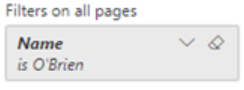
?filter=Table/Name eq 'O''Brien'
Becomes:
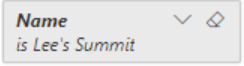
?filter=Table/Name eq 'Lee''s Summit'
Becomes:
And of course the "in" operator supports this escaping as well:
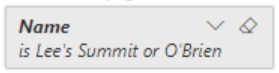
- ?filter=Table/Name in ('Lee''s Summit', 'O''Brien')
Becomes:
Notes:
- This is for values only. For identifiers we use the __x0000__ escape format described in the documentation: https://docs.microsoft.com/en-us/power-bi/service-url-filters#special-characters-in-url-filters
- Other special characters are already supported in values. Now single quotes are supported by using ''
 Mdevlin4
on 29 Apr 2020
Mdevlin4
on 29 Apr 2020
Thanks to all of you, @dschlabach @soldstatic @gebberry @vincentys99, and thanks to @Mdevlin4 for the fix! I've updated the article. Update should be live Monday May 4, 2020.
maggiesMSFT
on 2 May 2020
Related issues
 scarbone-msft
·
3Comments
scarbone-msft
·
3Comments
 mariuspc
·
4Comments
mariuspc
·
4Comments
 RealNoArms
·
3Comments
RealNoArms
·
3Comments
 ruanonline
·
5Comments
ruanonline
·
5Comments
 abhi-debuginside
·
3Comments
abhi-debuginside
·
3Comments
Most helpful comment
I did some try and error but still unable to escape the apostrophe.
Since I was able to use %22 (double quotes) within the value parameter, I guess the problem might be the two single quotes surrounding the value.
My suggestion would be update on this by using two double quotes instead of single quotes. Although it may restrict to escape the double quotes but come to think of it, how common is it to have values with double quotes? But in the end, it would be best if every symbols are able to be escaped.
I have another solution for this but it may provide quite an impact to the query efficiency. So let's just forget it.
p.s. I might be talking big since I'm new to web development and am of course have no idea on how PowerBI datasets work in the backend.