Powerbi-docs: Billing Profile ID
"You can get your billing profile ID from the Azure portal. Navigate to Cost Management + Billing, select your billing account, and then select Biling profiles in the sidebar. Select your billing profile and select Properties in the sidebar. Copy your billing profile ID."
Can you please update the doc on how to accurately find the billing profile id? I'm an EA customer and the profile ID I see in the portal is just our current EA number. Also when I try to enter the billing profile id (our EA number) into PowerBI get an error "TenantId: Failed to discover tenantsBillingAccountId: Failed to discover tenants" and I'm not the only one: https://community.powerbi.com/t5/Desktop/Using-new-Azure-Cost-Management-Connector-issues-with-Account-ID/td-p/645034
Thanks
Document Details
⚠ Do not edit this section. It is required for docs.microsoft.com ➟ GitHub issue linking.
- ID: 3e71361e-a9bb-89ee-27ee-7e38a60914a0
- Version Independent ID: df5a9b26-4eb1-a396-1c84-9f3ec6232753
- Content: Connect to Azure cost and usage from Power BI Desktop - Power BI
- Content Source: powerbi-docs/desktop-connect-azure-consumption-insights.md
- Service: powerbi
- Sub-service: powerbi-desktop
- GitHub Login: @davidiseminger
- Microsoft Alias: davidi
 jzuchora87
All 19 comments
Hi, @jzuchora87 -- thanks for your comment! I've referred it to the author, who'll get back to you.
 maggiesMSFT
on 27 Apr 2019
maggiesMSFT
on 27 Apr 2019
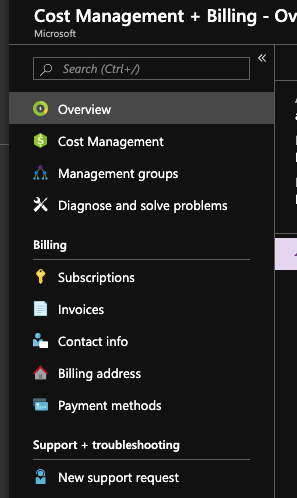
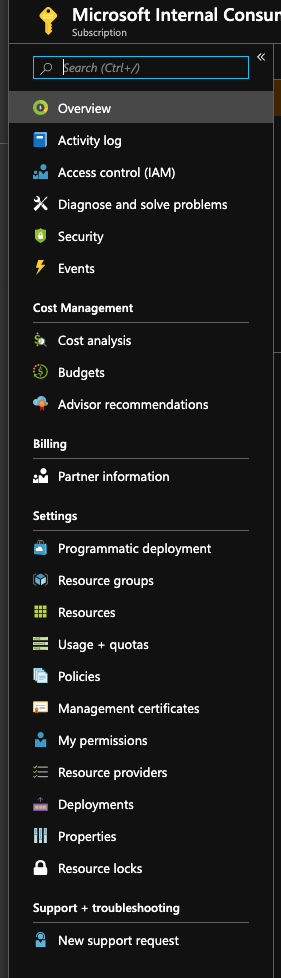
I'm on the actual Microsoft Corporate tenant for AIRS and there is no left bar Billing Profile option. In fact. I would suggest updating the documentation to reference the current Azure Portal User interface nomenclatures. For example, i don't see the term "Billing Account" anywhere. It appears instead the Billing account may correlate to the Subscription. Select the Subscription and then you can see cost details.
Cost Management + Billing - Overview page
The named Subscription - Overview page (not billing account) Subscription
 awentzel
on 31 May 2019
awentzel
on 31 May 2019
Additionally, when connecting to Azure Cost Management the "Billing Profile ID" isn't a thing on Azure Portal so it's confusing. The watermark hint shows what is really a subscription id. Here I recommend calling it Azure Subscription Id rather than Billing Profile Id.
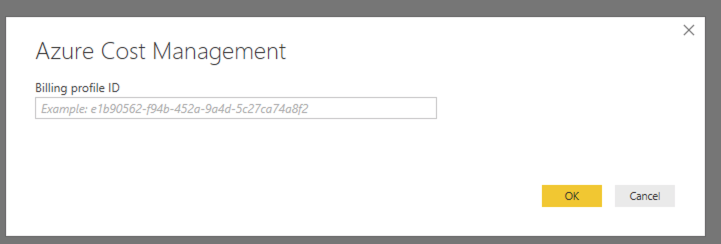
awentzel
on 31 May 2019
Subscription Id is not the right answer here either. As using subscription id throws this error "TenantId: Failed to discover tenantsBillingAccountId: Failed to discover tenants", as another user mentioned above.
 sbhuttan
on 19 Jun 2019
sbhuttan
on 19 Jun 2019
Hi,
I had the same issue and in contact with Microsoft, they share with me a similar connector that could be used.
The explain that exists a difference between a kind of your contract that you have in your enviroment. Please, see the below documentation:
https://docs.microsoft.com/en-us/power-bi/desktop-connect-azure-consumption-insights#connect-with-azure-consumption-insights
 DiegosilveiraIT
on 11 Jul 2019
DiegosilveiraIT
on 11 Jul 2019
@DiegosilveiraIT, It was a good idea. Except when using this connect it then asks for "Enrollment ID", which is only valid on Enterprise Subscription. So while that may help those subscription types, it doesn't help mine. I'd recommend to Microsoft that it should be a value that can be used that applies to all subscriptions. Using different connectivity methods is confusing to the community and will be challenging to document accurately.
awentzel
on 7 Aug 2019
Thanks for all the feedback, adding @shilpiguatam who can help resolve the best way to clarify the documentation.
 davidiseminger
on 20 Aug 2019
davidiseminger
on 20 Aug 2019
@davidiseminger - assigning back to you to follow up with Ben Shy. I can't get his GitHub handle (@BenShy) to resolve here.
 mgblythe
on 9 Sep 2019
mgblythe
on 9 Sep 2019
I have the same issue - cant see a billing id within costmanagement + billing.
This would be a much simpler connection if we can just sign into Azure; then any cascaded permissions on cost management are pulled through from the azure account to PowerBI
 ahughes257
on 10 Sep 2019
ahughes257
on 10 Sep 2019
I've reported this to our engineering team, and will work with them to get the updates taken care of. Sorry for the inconvenience.
davidiseminger
on 19 Sep 2019
+1 on this.
 eosho
on 19 Sep 2019
eosho
on 19 Sep 2019
+1, I need the Billing Profile ID to show up in my Azure portal please.
 Chai-NED
on 23 Sep 2019
Chai-NED
on 23 Sep 2019
Thank you for your input and feedback. Updates to this article are in the works, which will hopefully address all of these concerns and questions. Adding the owners of the updates and services. @bandersmsft
davidiseminger
on 26 Sep 2019
@davidiseminger I'm getting Ben's input on this.
 bandersmsft
on 26 Sep 2019
bandersmsft
on 26 Sep 2019
First, there are currently two connectors: one supports EA, the other MCA. No other billing accounts are supported by either connector, so Microsoft internal account's aren't supported. We are in the process of splitting this article into two so that each one is specific to it's own connector. I expect the result will help prevent confusion.
The Azure Consumption Insights connector only supports EA agreements. The connector needs your Azure enrollment number and your API access key. Both are shown in the Azure EA portal, as described in the article.
The current Azure Cost Management (Beta) version of the connector only supports Microsoft Customer Agreements. To determine if you are under an Microsoft Customer Agreement and have access to a billing account, follow the steps outlined at Check access to a Microsoft Customer Agreement. The connector needs your MCA Billing Profile ID. You can find the ID in Azure Cost Management, as described in the article.
BTW, upcoming updates to the Azure Cost Management connector will include support for Enterprise Agreement (EA) customers. Until the update is available, Enterprise Agreement customers should continue using the Azure Consumption Insights connector.
please-close
bandersmsft
on 26 Sep 2019
Hi, I know this is an old thread and I get that the API only works for EA or MCA customers, but are there any plans to extend this to ALL subscription types? I am an MS Gold Partner and cannot use the API but I have a lot of subscriptions where cost management is important...
 rodneyjoyce
on 1 May 2020
rodneyjoyce
on 1 May 2020
It would also be helpful to know when updates are released so we can try this out again. Thanks
awentzel
on 21 May 2020
Yes, would like an update too, thanks.
 cloudstake
on 1 Jul 2020
cloudstake
on 1 Jul 2020
I am struggling to find ours as well - we are on the MS-AZR-0003P offer and I don't see this value anywhere in the portal.
Please update the documentation for the top 5 most used subscription offers so that folks can find this!
 csijake
on 10 Sep 2020
csijake
on 10 Sep 2020
Related issues
 KarlLaude
·
3Comments
KarlLaude
·
3Comments
 abhi-debuginside
·
3Comments
abhi-debuginside
·
3Comments
 tofu001
·
6Comments
tofu001
·
6Comments
 fishnexj
·
4Comments
fishnexj
·
4Comments
 mariuspc
·
4Comments
mariuspc
·
4Comments
Most helpful comment
Hi, I know this is an old thread and I get that the API only works for EA or MCA customers, but are there any plans to extend this to ALL subscription types? I am an MS Gold Partner and cannot use the API but I have a lot of subscriptions where cost management is important...