Powerbi-docs: How to add service principal to workspace with the Power BI service?
The page states "Add the service principal as an admin to the new workspace you created. You can manage this task through the APIs or with the Power BI service.". How to add the service principal as an admin to the workspace with the Power BI service (rather than API)? The access management pane only supports entering named users, not service principals.
Document Details
⚠ Do not edit this section. It is required for docs.microsoft.com ➟ GitHub issue linking.
- ID: c135bb4c-618b-478d-bce7-ac8608e3caac
- Version Independent ID: a297498b-afa2-575d-417c-0cb4696a90af
- Content: Service principal with Power BI - Power BI
- Content Source: powerbi-docs/developer/embed-service-principal.md
- GitHub Login: @markingmyname
- Microsoft Alias: maghan
 algattik
All 14 comments
It's not super obvious but I was able to select my service principal by typing the first few letters of its name into the access management pane.
 tobyndockerill
on 28 Mar 2019
tobyndockerill
on 28 Mar 2019
Hi, @algattik -- thanks for your question! And thanks, @tobyndockerill, for your comment! I'm referring this to the author to see if he needs to update the article.
 maggiesMSFT
on 29 Mar 2019
maggiesMSFT
on 29 Mar 2019
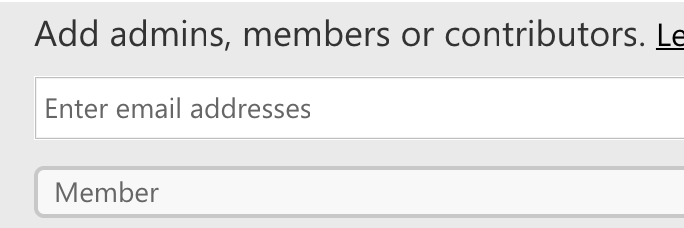
Thanks a lot! I see indeed that you can add a service principal, and even a security group.
It would be great to:
- Update the article to explain this
- Update "Enter email addresses" in the UI
algattik
on 29 Mar 2019
@algattik You are correct, you can now add a Security Group (including a service principal) or just the service principal name (application ID) to a workspace.
There is an update coming to this article planned for 2 weeks that will include this info.
Thank you.
 markingmyname
on 29 Mar 2019
markingmyname
on 29 Mar 2019
We will now proceed to close this thread. If there are further questions regarding this matter, please tag me in your reply. We will gladly continue the discussion, and we will reopen the issue.
markingmyname
on 29 Mar 2019
It works in GUI, but only via the "Workspace access" interface not "Access" tab in Admin portal
Go to Power BI Admin portal and add admin account to Workspace with Admin access.
Go to Workspaces -> ... -> Workspace access -> type the application name (AppID will show up here) -> add as Admin.
This does NOT work via the Admin portal -> Workspaces -> Access tab!!!
 bjornprins
on 8 May 2019
bjornprins
on 8 May 2019
I have tried adding a service principal name but it does not appear in the Workspace Access list when I type the name... The security group appears, but not the SP. What is wrong here?
Thank you
 djpirra
on 23 May 2019
djpirra
on 23 May 2019
There is an update coming to this article planned for 2 weeks that will include this info.
Did it arrive? There's still no details except some clipped screenshot from unknown page.
 alexb5dh
on 23 May 2019
alexb5dh
on 23 May 2019
I am stuck here...
Have my SP created will permissions to access the Power BI API...
Power BI have a security group setup to access the rest API and the service principal is assigned to it...
Workspace has the security group as ADMIN
Even with all of this I am getting "forbibben" when testing using POSTMAN. What is missing here?
djpirra
on 26 May 2019
Any update on this?
 aschuhardt
on 14 Jun 2019
aschuhardt
on 14 Jun 2019
Even with all of this I am getting "forbibben" when testing using POSTMAN. What is missing here?
Did you use endpoints with group/workspace id? Most of the actions have equivalent ones with id.
alexb5dh
on 14 Jun 2019
Make sure postman is getting the token correctly. If you get the
authorization token using the oauth2 from Postman it does not work since
the client_credentials are not passed using the right parameter.
Em sex, 14 de jun de 2019 às 03:14, Oleksii Bespalov <
[email protected]> escreveu:
Even with all of this I am getting "forbibben" when testing using POSTMAN.
What is missing here?
Did you use endpoints with group/workspace id? Most of the actions have
equivalent ones with id.—
You are receiving this because you commented.
Reply to this email directly, view it on GitHub
https://github.com/MicrosoftDocs/powerbi-docs/issues/931?email_source=notifications&email_token=ADZ5Q5RNP4DPLBTETMTA6J3P2LIF3A5CNFSM4HB5GKPKYY3PNVWWK3TUL52HS4DFVREXG43VMVBW63LNMVXHJKTDN5WW2ZLOORPWSZGODXVI7XA#issuecomment-501911516,
or mute the thread
https://github.com/notifications/unsubscribe-auth/ADZ5Q5SZBWBKUEGYZEYAZKLP2LIF3ANCNFSM4HB5GKPA
.>
Melhores Cumprimentos,
Luis Simões
djpirra
on 15 Jun 2019
I feel like I'm missing something obvious, but can someone provide a step by step explanation with screenshots, URLs, or navigation paths on how to set up a service principal in Power BI so I can use it to query everything from the REST API using that service principal? I've followed a dozen different pages trying to connect all of the dots, but I can't get there.
I've enabled service principals and specified a group under the developer settings in Power BI. However, I can't seem to make that group an admin anywhere. I saw that I should be able to add a service principal to a workspace as an admin under the Power BI Admin Portal > Workspaces > Access, but I don't have a name/email address for my service principal (that I can find) and the application/object GUIDs fail with a message that it's an invalid email address. I also tried searching with my registered application's name and the group name with no change.
@markingmyname tagging you since you said to above
 code-po8
on 26 Feb 2020
code-po8
on 26 Feb 2020
re-assign @KesemSharabi
markingmyname
on 26 Feb 2020
Related issues
 karmamule
·
5Comments
karmamule
·
5Comments
 yoshihirok
·
3Comments
yoshihirok
·
3Comments
 ferdsjoseph
·
3Comments
ferdsjoseph
·
3Comments
 tofu001
·
6Comments
tofu001
·
6Comments
 abhi-debuginside
·
3Comments
abhi-debuginside
·
3Comments
Most helpful comment
It works in GUI, but only via the "Workspace access" interface not "Access" tab in Admin portal
Go to Power BI Admin portal and add admin account to Workspace with Admin access.
Go to Workspaces -> ... -> Workspace access -> type the application name (AppID will show up here) -> add as Admin.
This does NOT work via the Admin portal -> Workspaces -> Access tab!!!