Powerbi-docs: Adding Service Principal as workspace admin via API - how exactly ?
The documentation quickly runs through this, but it has been my blocker so far trying this new method.
"5. Add the service principal as an admin to the new workspace you created. You can manage this task through the APIs or with the Power BI service."
How do I actually do that when the exact API that is linked here (https://docs.microsoft.com/pl-pl/rest/api/power-bi/groups/addgroupuser) is requiring me to put email address of the user in the requests, body. Service principal, unless I'm mistaken, does not have an email address (or I can't find in in AAD). Trying to put in object id, both as a emailAddress or as identifier fails.
Any idea how to move past this?
Document Details
⚠ Do not edit this section. It is required for docs.microsoft.com ➟ GitHub issue linking.
- ID: c135bb4c-618b-478d-bce7-ac8608e3caac
- Version Independent ID: a297498b-afa2-575d-417c-0cb4696a90af
- Content: Service principal with Power BI - Power BI
- Content Source: powerbi-docs/developer/embed-service-principal.md
- GitHub Login: @markingmyname
- Microsoft Alias: maghan
 kumbol
All 13 comments
Hi, we just updated the documentation and added a sample for service principal:
https://docs.microsoft.com/en-us/rest/api/power-bi/groups/addgroupuser#example_for_giving_admin_access_right_to_a_service_principal
 eligr
on 11 Feb 2019
eligr
on 11 Feb 2019
Excellent, got it up & running now! Perfect! Thank you very much :-)
kumbol
on 11 Feb 2019
@kumbol, thank you for the feedback.
@eligr, Thank you for the update.
 markingmyname
on 4 Mar 2019
markingmyname
on 4 Mar 2019
We will now proceed to close this thread. If there are further questions regarding this matter, please tag me in your reply. We will gladly continue the discussion and we will reopen the issue.
markingmyname
on 4 Mar 2019
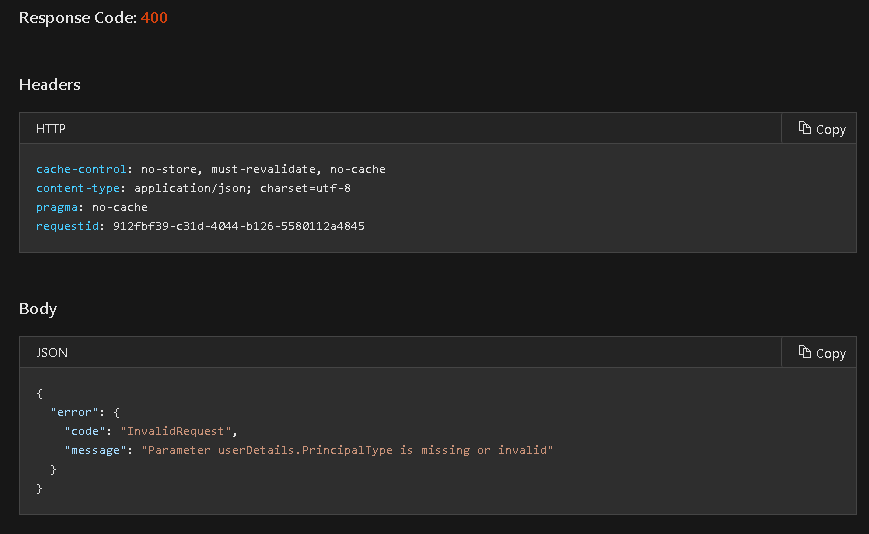
Latest example doesn't seem to work anymore. principalType: "App" results in an error:
Parameter userDetails.PrincipalType is missing or invalid
{
"identifier": "{Service Principle Object ID}",
"groupUserAccessRight": "Admin",
"principalType": "App"
}
 craig-miller
on 19 Apr 2019
craig-miller
on 19 Apr 2019
REST API doesn't seem to work anymore. Get Status 400: BadRequest if I do a POST.
"message": "'userDetails' is a required parameter"
Now I am unable to give Admin access to a Service Principal on a Power BI Workspace. According the documentation this should work:
https://docs.microsoft.com/en-us/rest/api/power-bi/groups/addgroupuser#principaltype
I can't find anything refering to userDetails
 bjornprins
on 8 May 2019
bjornprins
on 8 May 2019
It works in GUI, but only via the new Contact List interface.
Go to Power BI Admin portal and add admin account to Workspace with Admin access.
Go to Workspaces ->
This does NOT work via the Admin portal -> Workspaces -> Access tab!!!
bjornprins
on 8 May 2019
It is not working for me, using REST API and doing a POST I get this error:
"error": {
"code": "PowerBIEntityNotFound",
 salasosvaldo
on 14 May 2019
salasosvaldo
on 14 May 2019
Any update on this?
 ulriksenstian
on 1 Aug 2019
ulriksenstian
on 1 Aug 2019
It does not work with service principal. I also get the same error. code": "PowerBIEntityNotFound".
 shahanur
on 2 May 2020
shahanur
on 2 May 2020
I'm having the same issue trying to link my app to power bi through the API. Has this been resolved?
 coreyspagnoli
on 30 Jul 2020
coreyspagnoli
on 30 Jul 2020
Also running into this exact issue above - the request looks fairly simple, but this does not seem to work. Is there any update on this?
 kjhangiani
on 3 Oct 2020
kjhangiani
on 3 Oct 2020
Nevermind - figured it out. The particular workspace I was testing it on was still using the old workspaces - after upgrading to new workspace (can you do that from the API?), everything worked as expected
kjhangiani
on 3 Oct 2020
Related issues
 edfreeman
·
3Comments
edfreeman
·
3Comments
 scarbone-msft
·
3Comments
scarbone-msft
·
3Comments
 Pacoup
·
5Comments
Pacoup
·
5Comments
 AlejandroDominguez89
·
5Comments
AlejandroDominguez89
·
5Comments
 louissalome
·
6Comments
louissalome
·
6Comments
Most helpful comment
It works in GUI, but only via the new Contact List interface. ... -> Workspace access -> type the application name (AppID will show up here) -> add as Admin.
Go to Power BI Admin portal and add admin account to Workspace with Admin access.
Go to Workspaces ->
This does NOT work via the Admin portal -> Workspaces -> Access tab!!!