Pow: Strange behavior with persistent session
I am running Pow with the PowPersistentSession extension and the Mnesia session cache backend in production (with some tweaks to allow TOTP-based 2FA).
While my desktop clients seem to be behaving fine with the default persistence expiration of 1 month, I am observing some very bizarre behavior with mobile Chrome, which will persist at the shortest for only a few minutes until tabs are switched, and then forget the user's supposedly persistent session, requiring them to log in again.
I have even observed behavior that would indicate to me that there is some kind of bug in mobile Chrome with regard to cookie handling. Basically, it is possible to have both a tab that is not signed in and a tab that is signed in at the same time. When you reload the tab that is not signed in, it remains not signed in. When you reload the tab that is signed in, it remains signed in; then when you return and refresh the other tab, it becomes signed in again.
The only reason I bring this up here is because this isn't problem happening with my Rails application, which uses Devise. I will try to get a drilldown into the cookies in more detail when the issue occurs again. Any suggestions are welcome.
 liamwhite
All 62 comments
Never mind, I just had it happen on my desktop too. The server deleted the persistent session cookie.
liamwhite
on 15 Dec 2019
That sounds very odd, and may be unrelated to Pow. Are you able to replicate the issue consistently, and if so, can you write down the steps so I can test this? Also is happening in both production and local?
I would check whether it’s because the cookie is lost, or the actual persistent session data is being deleted in the PowPersistentSession cache.
 danschultzer
on 15 Dec 2019
danschultzer
on 15 Dec 2019
I am reasonably certain the cookie is not being lost; it is being deleted by the server.

The cookie's expiration time is set to next month, and it's httponly, so the only possible way for it to go away (as it did when the session was lost) would be if the server deleted it.
liamwhite
on 15 Dec 2019
I believe I've identified the conditions under which this happens:
- The persistent session cookie is set
- The Phoenix session (
_philomena_keyin this example) has expired or is about to expire - The VM has been restarted (full emulator reboot) since the last time a page was loaded in the affected browser
liamwhite
on 17 Dec 2019
Oh, I see. What cache backend do you use? The default is ETS which will be cleared after VM restart.
danschultzer
on 18 Dec 2019
Mnesia cache, as stated in the OP
liamwhite
on 18 Dec 2019
Mnesia cache, as stated in the OP
Sorry, didn’t take the time to read the issue carefully. I’ll set up a demo and test this scenario to see what may go wrong.
danschultzer
on 18 Dec 2019
I might have figured out what the issue is.
When the app is restarted, hundreds of these error messages are emitted in quick succession:
** (exit) {:aborted, {:no_exists, [Pow.Store.Backend.MnesiaCache, ["credentials"]]}}
00:28:20.061 [error] #PID<0.3007.0> running PhilomenaWeb.Endpoint (connection #PID<0.3006.0>, stream id 1) terminated
Is there a way to ensure the credential cache store is properly initialized before the endpoint is able to start?
liamwhite
on 21 Dec 2019
I added some log detail to prod. https://github.com/liamwhite/pow/commit/f654b36320b1afb3e348a6b578773807fa421489
This is what seems to be happening
13:02:28.091 [warn] Deleting expired persistent session key philomena_87586f04-6adf-4ccc-a086-xxxxxxxxxxxx
13:02:28.093 [warn] Deleting expired persistent session key philomena_87586f04-6adf-4ccc-a086-xxxxxxxxxxxx
13:02:28.446 [warn] Deleting expired persistent session key philomena_87586f04-6adf-4ccc-a086-xxxxxxxxxxxx
13:02:28.446 [warn] Failed to find persistent session key philomena_87586f04-6adf-4ccc-a086-xxxxxxxxxxxx
13:05:05.690 [warn] Deleting expired persistent session key philomena_d221f0cc-5916-46a6-b5fe-xxxxxxxxxxxx
13:05:05.690 [warn] Failed to find persistent session key philomena_d221f0cc-5916-46a6-b5fe-xxxxxxxxxxxx
13:05:40.077 [warn] Deleting expired persistent session key philomena_8c881d66-c42e-41d6-8bf3-xxxxxxxxxxxx
13:05:40.077 [warn] Failed to find persistent session key philomena_8c881d66-c42e-41d6-8bf3-xxxxxxxxxxxx
13:06:24.304 [warn] Deleting expired persistent session key philomena_b42a6353-e300-40b4-840f-xxxxxxxxxxxx
13:06:24.304 [warn] Failed to find persistent session key philomena_b42a6353-e300-40b4-840f-xxxxxxxxxxxx
13:06:24.469 [warn] Deleting expired persistent session key philomena_b42a6353-e300-40b4-840f-xxxxxxxxxxxx
13:06:24.469 [warn] Failed to find persistent session key philomena_b42a6353-e300-40b4-840f-xxxxxxxxxxxx
13:06:47.856 [warn] Deleting expired persistent session key philomena_0af27431-d18a-43ea-8fef-xxxxxxxxxxxx
13:06:47.858 [warn] Deleting expired persistent session key philomena_0af27431-d18a-43ea-8fef-xxxxxxxxxxxx
13:06:49.574 [warn] Deleting expired persistent session key philomena_0af27431-d18a-43ea-8fef-xxxxxxxxxxxx
13:06:49.574 [warn] Failed to find persistent session key philomena_0af27431-d18a-43ea-8fef-xxxxxxxxxxxx
13:08:20.323 [warn] Deleting expired persistent session key philomena_8caa43cf-ae17-40b0-8c67-xxxxxxxxxxxx
13:08:20.323 [warn] Failed to find persistent session key philomena_8caa43cf-ae17-40b0-8c67-xxxxxxxxxxxx
13:08:31.145 [warn] Deleting expired persistent session key philomena_30913fe1-57a9-4aef-ae12-xxxxxxxxxxxx
13:08:31.145 [warn] Failed to find persistent session key philomena_30913fe1-57a9-4aef-ae12-xxxxxxxxxxxx
Found reproduction steps for the philomena app:
- Sign in with persistent session enabled
- Go to notifications page
- Open up the browser inspector and delete the _philomena_key session (has the same effect as if it would have expired on its own)
- Run the following in the JS console:
js function killPersistentSessionCookie() { Promise.race([ fetch("/notifications/unread"), fetch("/notifications/unread"), fetch("/notifications/unread"), fetch("/notifications/unread"), fetch("/notifications/unread"), fetch("/notifications/unread") ]); } - About 80% of the time you will end up logged out after this completes. If not, repeat until you are logged out.
[warn] Deleting expired persistent session key philomena_717a5884-4822-456a-9a15-xxxxxxxxxxxx
[warn] Failed to find persistent session key philomena_717a5884-4822-456a-9a15-xxxxxxxxxxxx
The code that rolls the persistent session token is too eager and interferes with legitimate usecases where requests will end up racing / being dispatched at the same time.
One possible way to fix this is to bump the expiry time of the old session by a minute or two before it is deleted, so as to allow other concurrent requests time to complete and not force deauthentication.
liamwhite
on 25 Dec 2019
@danschultzer any update?
liamwhite
on 30 Dec 2019
I see what happens. The put call in the GenServer is async, so it may take a little bit before it has stored the persistent session. However the cookie will always be deleted when it's checked. So if two requests happens right after each other, the first one successfully rolls the persistent session key, but the subsequent one may delete the cookie right after if the GenServer hasn't yet finished. This can only happen if the user session is not already active, which makes sense since it's also an async call.
I believe the best solution is to let the cookie expire after 10 seconds since the last request rather than immediately. This should give enough time in case there are some subsequent requests. The PR is up in #366.
danschultzer
on 30 Dec 2019
I just want to note that I upgraded pow to the tip of master as it was this morning (90d674a458faacb0314aec751477cae3d3c0fbb3) and deployed it, but my users are still reporting that they are being logged out.
liamwhite
on 8 Jan 2020
I tested the logic and it works as expected. Are you able to replicate the issue?
danschultzer
on 10 Jan 2020
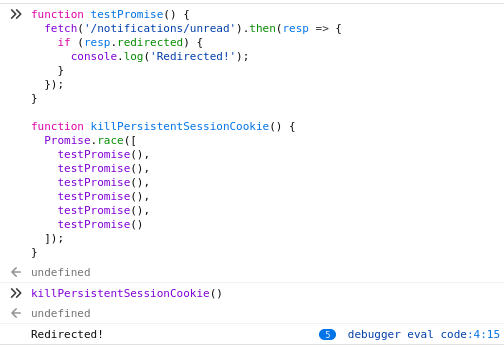
I was still able to get the console to show unexpected behavior with a slight modification to the above test, using the following code:
function testPromise() {
  fetch('/notifications/unread').then(resp => {
    if (resp.redirected) {
      console.log('Redirected!');
    }
  });
}

function killPersistentSessionCookie() {
  Promise.race([
    testPromise(),
    testPromise(),
    testPromise(),
    testPromise(),
    testPromise(),
    testPromise()
  ]);
}
This function, when run normally, should not log anything to the console. In practice, when the key deletion conditions above are replicated, I see anywhere from 2 to 4 of the requests logging a server redirect.
According to my understanding of the code, which may not be correct, there is still a condition in which the cookie may not be updated correctly. If the user agent sends multiple requests concurrently, and then aborts the one that would have ended up expiring the cookie, intentionally due to navigation or because of unreliable network conditions, then as far as I understand the user will be signed out no matter what.
Edit: I was just subjected to a logout again while using the site (though the amount of times I have been logged out has definitely decreased in frequency.)
Edit 2: Logged out again this morning. Of note, both times were on a mobile device, with an unreliable network connection.
liamwhite
on 10 Jan 2020
I think I know what goes on now.
When you do two requests at once the request cookie will be the same value. The first request will then roll the id and return a new cookie value. The second request will fail since the ID is now rolled, and then return an expiring cookie with the same old id that that request was sending, overriding the new id set in the first request. The only way to solve this server side is to not update the cookie at all unless a new value is to be set, or maybe have some kind of short term temporary storage for the old id to be converted into the new id (feels unsafe since it would mean that the token can be used multiple times).
This might also cause problem with sessions since when you update the Plug session it'll update the cookie value. The second request will then still use the old value, which will no longer work and then it'll simply delete the session. Have you experienced forced sign out while still being in an active session? I suspect this does occur as well.
So the first could be fixed, but you would still have the second issue. I would strongly recommend making all requests sequential, e.g. adding a queue system in your JS. Alternatively you can just open a socket to handle all requests and not deal with cookies at all. LiveView can be used for this.
danschultzer
on 12 Jan 2020
or maybe have some kind of short term temporary storage for the old id to be converted into the new id
This is the fix I desired initially and what I alluded to with this statement:
One possible way to fix this is to bump the expiry time of the old session by a minute or two before it is deleted, so as to allow other concurrent requests time to complete and not force deauthentication.
The notification fetching behavior is intended to be sequential. If the tab is inactive for some time, when it is reactivated the user agent will queue all of the interval calls it missed sequentially. However, due to fact that promises cannot block, the requests end up being dispatched concurrently. I can fix this with a bit more code and a tail-recursive setTimeout instead.
We didn't use a socket in the past in part because of the way we discovered users prefer to browse the website. Typical users open anywhere from three to five tabs at a time, and there are anywhere from 1000 to 5000 of these users active at any given time. Less typical users open between 10 and 100 tabs. We found that opening a socket connection for every tab was overwhelming our old Rails backend when we tried years ago. I do not feel the complication of a ServiceWorker handling socket requests, to cut it down to one socket connection per user, is justified. I expect Phoenix to fare better in terms of sheer number of connections it can support, but I'd rather not have to deal with such things.
Have you experienced forced sign out while still being in an active session? I suspect this does occur as well.
Yes.
Even if I fix the issue with concurrent requests, that will not fix the problem of if the user agent aborts the request that would expire the cookie, or if it is dropped due to an unreliable network connection. The user will still be forcibly deauthenticated in this scenario.
liamwhite
on 13 Jan 2020
I feel that the most robust route would be not to drop the old cookie from the persistent session cache until the client starts to send requests with the new cookie value (and then perhaps also have a short TTL after the client starts sending the new cookie, but before the old cookie is really dropped). This prevents fixation in most cases while also preventing the jarring user experience of constantly being signed out.
liamwhite
on 13 Jan 2020
After looking at plug session, it seems that it doesn't expire the cookie when the session is being deleted. So I've created a branch to not expire any cookies:
{:pow, github: "danschultzer/pow", ref: "dont-expire-cookies", override: true}
I'll have to think this through, but it makes sense that cookie expiration is only dealt with in the client. One issue is that an invalid token will still be renewed if a user is authenticated, but I guess it's not a big deal as it can't be used to auth.
I tested with the above branch and I don't experience any issues now.
Edit: Looks like the cookie is deleted after all so there would still be the issue with active sessions being dropped.
danschultzer
on 13 Jan 2020
I think I've been hitting this same issue. My cookie will sometimes survive for the month, but often times much shorter. It doesn't survive long on mobile, and I _think_ on desktop it's more likely to drop after a server deploy.
My cache backend is Pow.Store.Backend.MnesiaCache, happy to share any other config that would help to troubleshoot.
 dfalling
on 17 Jan 2020
dfalling
on 17 Jan 2020
Any update to this situation?
I am getting signed out just about every day now, sometimes multiple times per day, and the fix I made to the notification fetcher seems to have made it worse, not better...
liamwhite
on 21 Jan 2020
@dfalling do you also have multiple AJAX requests at once?
@liamwhite did you test with the dont-expire-cookies branch? Seems to resolve the issue. I still have to think it through, but this seems to be the way to go. I did a short test setting session_ttl_renewal: 0 so the session was constantly renewed to see if the Plug session would also be override the cookie with the Plug.Conn.delete_session/1 call, but it just ignores it unless a response cookie is set.
danschultzer
on 21 Jan 2020
I do! Many of my screens fire off multiple requests in parallel.
dfalling
on 21 Jan 2020
Ok, let me prioritize #390.
I want to dig deeper into it so I'm 100% sure of what I'm doing, but seems like the right approach. The new method will be that cookies are never deleted or expired from the server, unless the cookie has also been set in the same response. I believe that's how Plug session works. It will mean that an invalid persistent session cookie will stay in the client until the client expires it, or it's overridden by the server when the user signs in again.
danschultzer
on 21 Jan 2020
@danschultzer No, I didn't. I wanted to be sure that's the right approach before considering anything.
liamwhite
on 21 Jan 2020
I've merged #390. I believe it's the right approach.
@liamwhite please let me know if you are no longer able to trigger the issue in dev using the master branch with {:pow, github: "danschultzer/pow", override: true}.
@dfalling if you are able to trigger this in dev environment then please try out the master branch as well.
danschultzer
on 21 Jan 2020
Great! I can try in dev. I can't get master branch to work using your example, or other variations with branch: "master".
❯ mix deps.get
* Updating pow (https://github.com/danschultzer/pow.git)
fatal: not in a git directory
** (Mix) Command "git --git-dir=.git config remote.origin.url https://github.com/danschultzer/pow.git" failed
Have you used other deps with github/git source instead of hex.pm? The above works for me (elixir 1.9.4/otp 22/git 2.21.0). It sounds like an issue with git or Elixir in your env.
danschultzer
on 21 Jan 2020
Yeah, I'm using wax, but with a tag:
{:wax, github: "tanguilp/wax", tag: "0.1.3"},. I'll reach out on the Elixir slack to see if anyone knows what's up.
dfalling
on 21 Jan 2020
Okay, I've updated the dependency and deployed. Fingers crossed that the issue will go away for good this time.
I noticed the following occurring with my test script, even after updating:
The server log does appear to indicate that it does get to the right place eventually (it first redirects to /session/new, and then redirects back to the intended page). This would still break POST requests, no?
liamwhite
on 22 Jan 2020
I've deployed as well. So far so good but I'll give it a few days to see if I get logged out.
dfalling
on 22 Jan 2020
The server log does appear to indicate that it does get to the right place eventually (it first redirects to /session/new, and then redirects back to the intended page). This would still break POST requests, no?
Yeah, the difference is that the persistent session don’t get expired on these requests.
danschultzer
on 22 Jan 2020
Still does not appear to be fixed, even after deploying b420b86
https://derpibooru.org/forums/meta/topics/report-site-bugs-here?post_id=4675582#post_4675582
https://derpibooru.org/forums/meta/topics/philomena-open-beta-breaking-api-changes?post_id=4675587#post_4675587
(plus I was logged out myself several times, and received three reports from users on chat clients)
liamwhite
on 22 Jan 2020
😭 Nothing should be expired now. I added two tests to be sure simultaneous requests didn't expire any cookies. There was a change to the cookie name though, so this could be active sessions that was moved over and didn't have the new persistent session cookie.
I'm testing the app right now to see if I can trigger this by the use case you mentioned, halting connections and see what happens when it all loads up again after the session has expired.
danschultzer
on 22 Jan 2020
The cookie name change could have definitely been the reason. I'll see if it happens to me again.
liamwhite
on 22 Jan 2020
I didn't get logged out in a situation in which I would have normally been logged out. Feeling cautiously optimistic that this is resolved.
liamwhite
on 22 Jan 2020
So far so good here too.
dfalling
on 22 Jan 2020
Oof, my mobile browser logged me out again today, much sooner than I would hope due to the persistent session. I don't have much in my logging- just a 401 on the first request. What logging should I do for Pow to see what's going on? Just swap add :warn? It's set to :info now.
dfalling
on 24 Jan 2020
😞
:info is more verbose than :warn. Pow doesn't log the session life cycle at all, so @liamwhite forked pow to add the log events.
I have telemetry planned, and it might be a good way for you to quickly hook in to logging lifecycle. It's still experimental so use with care. I've rebased the branch and tested it to ensure that it works: {:pow, github: "danschultzer/pow", ref: "telemetry"}
In the Application.start/2 attach to the events (you can increase/limit the events as you prefer):
defmodule MyApp.Application do
  use Application

  @otp_app :my_app

  def start(_type, _args) do
    children = [
      MyApp.Repo,
      MyAppWeb.Endpoint,
      Pow.Store.Backend.MnesiaCache
    ]

    attach_telemetry_log()

    opts = [strategy: :one_for_one, name: MyAppWeb.Supervisor]
    Supervisor.start_link(children, opts)
  end

  defp attach_telemetry_log() do
    events = [
      [@otp_app, :pow, Pow.Plug.Session, :create],
      [@otp_app, :pow, Pow.Plug.Session, :delete],
      [@otp_app, :pow, PowPersistentSession.Plug.Cookie, :create],
      [@otp_app, :pow, PowPersistentSession.Plug.Cookie, :delete]
    ]

    :ok = :telemetry.attach_many("log-handler", events, &MyApp.LogHandler.handle_event/4, nil)
  end

  # ...
end
defmodule MyApp.LogHandler do
  require Logger

  @otp_app :my_app

  def handle_event([@otp_app, :pow, Pow.Plug.Session, :create], _measurements, metadata, _config) do
    Logger.info("[Pow.Plug.Session] Session #{session_id(metadata)} initiated for user #{user_id(metadata)} with fingerprint #{session_fingerprint(metadata)}")
  end
  def handle_event([@otp_app, :pow, Pow.Plug.Session, :delete], _measurements, metadata, _config) do
    Logger.info("[Pow.Plug.Session] Session #{session_id(metadata)} has been terminated")
  end
  def handle_event([@otp_app, :pow, PowPersistentSession.Plug.Cookie, :create], _measurements, metadata, _config) do
    Logger.info("[PowPersistentSession.Plug.Cookie] Persistent session #{session_id(metadata)} stored with fingerprint #{session_fingerprint(metadata)}")
  end
  def handle_event([@otp_app, :pow, PowPersistentSession.Plug.Cookie, :delete], _measurements, metadata, _config) do
    Logger.info("[PowPersistentSession.Plug.Cookie] Persistent session #{session_id(metadata)} deleted")
  end

  defp session_id(%{key: session_id}) when is_binary(session_id), do: hash(session_id)
  defp session_id(_any), do: "N/A"

  defp user_id(%{value: {%{id: id}, _metadata}}), do: id
  defp user_id(_any), do: "N/A"

  defp session_fingerprint(%{value: {_user, metadata}}) do
    case Keyword.get(metadata, :fingerprint) || get_in(metadata, [:session_metadata, :fingerprint]) do
      nil         -> session_fingerprint(nil)
      fingerprint -> hash(fingerprint)
    end
  end
  defp session_fingerprint(_any), do: "N/A"

  # You SHOULD NOT expose session IDs in logs
  defp hash(value) do
    salt = Application.get_env(@otp_app, :hash_salt, "secret")

    :sha256
    |> :crypto.hash([value, salt])
    |> Base.encode16(case: :lower)
  end
end
There should probably be more events, but this is a start.
danschultzer
on 24 Jan 2020
Ok, I have it up and working- I can see create/delete calls for session and the persistent cookie. The failure isn't logged though- I'm guessing there's an issue with renewing the session from the Persistent cookie? Maybe I need logging around reading that?
I do still have 3 valid cookies for that session
- app_name_key
- app_name_persistent_session_cookie
- app_name_persistent_session
dfalling
on 25 Jan 2020
Were you signed out unexpectedly? And there were no Session .. has been terminated or Persistent session ... deleted message? If it's not the client, then I would guess there is an issue with the backend cache store. Renewal would show up as delete/create messages with same fingerprint. You can track the [:pow, Pow.Store.Backend.MnesiaCache, :invalidate] event to see if this is invalidation by the cache, but I doubt that's it.
If you hook up to the node with iex terminal you can check if a session is still alive by calling Pow.Store.CredentialsCache.sessions([otp_app: :my_app], user), or check what users are signed in with Pow.Store.CredentialsCache.users([otp_app: :my_app], MyApp.Users.User).
If you are on elixir slack/discord, feel free to message me there. It might be easier to debug this over chat than in this issue.
danschultzer
on 25 Jan 2020
Aah, I'll push this to dev- I was trying locally which doesn't use the mnesia cache.
dfalling
on 25 Jan 2020
Ok, pushed to prod and all of my sessions started failing. I tried those checks in a repl and they both come back empty. I could have sworn my sessions were surviving deploys, but maybe that's actually the problem.
I'm on the Elixir Slack. I can ping you in the afternoon tomorrow if that's easier to troubleshoot.
dfalling
on 25 Jan 2020
Yeah, please do. I would need to know more about your particular setup. My initial guesses would be:
- Each deploy is uploaded to a new directory, and the Mnesia files are not stored within a shared directory
- The deploy process destroys the container/server thus deleting all Mnesia files in the process
danschultzer
on 25 Jan 2020
Signed out again. Got a couple more reports of it happening internally as well.
liamwhite
on 28 Jan 2020
I think I figured it out. Both Pow.Plug.Session and PowPersistentSession.Plug.Cookie should use Plug.Conn.register_before_send/2 to update data. I looked up how Plug.Session worked and this is what it does.
What likely happens is that the AJAX request is being processed, but the response is very slow. Since the plug is the first thing that gets done, the cookie/session has been updated, but the response is not yet returned. When you then go to a new page, the AJAX request gets aborted, but the persistent session was already dealt with. Not sure if it's only a dev thing, but when testing the app I notice that the request are very slow. I believe this issue would be much more prevalent in apps with slow requests, but could happen in any.
It's late here, but I'll work on this tomorrow.
danschultzer
on 29 Jan 2020
Opened #398 to resolve this. I'll test the exact issue described above later today, but the PR will be merged in whether I can replicate the issue or not as this conforms the Pow plug modules to how Plug.Session handles writes.
danschultzer
on 30 Jan 2020
Merged to master. I didn't find any way to test this, so it's still just a guess whether this actually resolves any issue. However it now works exactly the same way as Plug.Session and doesn't do any writes to cookie/store until it's ready to return the response.
danschultzer
on 30 Jan 2020
I'm (still) getting problems with being logged in in one tab, and not another, when I open pages rapidly on Derpibooru. To be specific, it has only occurred when I've opened links essentially simultaneously (under a quarter of a second between them), and it is always the case that the first tab is logged in, while some amount of tabs at the end are not.
I'm using Opera, which is a Chromium derivative.
 Nebulon-BFrigateFTW
on 7 Feb 2020
Nebulon-BFrigateFTW
on 7 Feb 2020
@Nebulon-BFrigateFTW Does the tab where you are logged out keep you signed in when you reload? It sounds like a race condition. I'll test it out and see if I can replicate this scenario.
Also, I see that Pow was updated to v1.0.17 an hour ago with this commit: https://github.com/derpibooru/philomena/commit/9ea7980e3f704f0b05660690d127a93571b8a381
v1.0.17 has better handling of cookie writes, but not sure if it helps in this case.
danschultzer
on 7 Feb 2020
@danschultzer
Yes, it does.
This happened 48 minutes ago.
Nebulon-BFrigateFTW
on 7 Feb 2020
Can confirm that I'm able to replicate the issue by deleting the session cookie, then open up two tabs immediately. At least locally this is due to responses being very slow. Seems like it takes 5-10 seconds. This would be reproducible with a blank Phoenix project by just letting the controller action sleep for a few seconds.
To remedy this, and the issues with AJAX requests, I'll look into idempotency, rather than making it possible to use the persistent session token multiple times. I'm planning to set up a custom plug that;
- Sets a randomly generated idempotency key as a cookie when persistent session token (or session id) is generated
- Stores, for a short time, the combined idempotency key and persistent session token (or session id) as key with the user as value, whenever the persistent session token (or session id) is rolled
- If persistent session lookup fails, looks up the idempotency key and persistent session token key (or session id), and sets the user for the conn
The reason I don't want to let the persistent session token be usable more than once, is that it defeats the purpose of the persistent session store. In that case it's better and easier to just handle it with JWT.
danschultzer
on 7 Feb 2020
@Nebulon-BFrigateFTW https://github.com/derpibooru/philomena/pull/33 is in production, let me know if you still experience this issue
danschultzer
on 9 Feb 2020
@danschultzer I experienced the issue last night.
Nebulon-BFrigateFTW
on 11 Feb 2020
Yeah, I'm still having issues as well. I've switched to the Postgres store to rule out my Mnesia cache being invalidated.
dfalling
on 17 Feb 2020
@Nebulon-BFrigateFTW I'm working on this https://github.com/derpibooru/philomena/pull/36 but I'm concerned of reports where sessions are entirely lost (doesn't keep signed in when reloading the tab). I would like to resolve that before finishing up that PR.
@dfalling do you loose the session entirely or does it stay active when you reload?
I'm continuing this in #435 with a condensed overview as this issue has gotten too long. Please continue with new reports over there. I would especially be thankful for reproducible setups.
This is a super frustrating issue since it seems to be caused by numerous things. I don't know if there is anything else I can do, but fixing this step by step.
danschultzer
on 22 Feb 2020
@danschultzer I had to stop using the Postgres pow session store due to incompatibilities with the current version, so that's likely the cause of my session loss again. I'm trying to find another option that can persist sessions across server deploys other than hot deploys.
dfalling
on 23 Feb 2020
You can also use the redis cache example, common setup for Heroku style setups with no persistent disk.
danschultzer
on 23 Feb 2020
Thanks! I tried the redis cache and after a couple of deploys my session still persisted. The Postgres session store was updated and it seems to fix my problem as well.
dfalling
on 25 Feb 2020
That's great! I'm upping priority on #435 these days. Please let me know if any issues comes up.
danschultzer
on 26 Feb 2020
@dfalling has everything worked as expected so far?
danschultzer
on 16 Mar 2020
Yeah, it's been solid for me- no surprise dropped sessions.
dfalling
on 16 Mar 2020
Related issues
 mreishus
·
5Comments
mreishus
·
5Comments
 chevinbrown
·
6Comments
danschultzer
·
6Comments
chevinbrown
·
6Comments
danschultzer
·
6Comments
 Abat
·
6Comments
Abat
·
6Comments
 volkerholloh
·
3Comments
volkerholloh
·
3Comments
Most helpful comment
I didn't get logged out in a situation in which I would have normally been logged out. Feeling cautiously optimistic that this is resolved.