Postprocessing: Skinned Mesh producing faint artifact with SSAO Pass
Description of the bug
Skinned meshes cause incorrect depth calculations, that affect the SSAO pass. I suspect that the problem might be possibly in three.js itself, but I can't know for sure, as this artifact only appears with post-processing enabled. This is more pronounced with Skinned meshes, but I actually think that it's a depth problem in general.
To Reproduce
Use a skinned mesh (doesn't have to be playing an animation), and when inspecting the SSAO pass by setting the blend function mode to NORMAL, faint outlines of the base mesh can be visible.
Expected behavior
No faint outlines of the base mesh should be visible.
Screenshots
These two videos showcase well the outline issue.
Library versions used
- Three: 0.123.0
- Post Processing: 6.20.1
Desktop
- OS: Linux
- Browser Firefox 85 and Chromium 88
- Graphics hardware: AMD RX 480
 veryprofessionaldodo
All 12 comments
This is probably caused by three's override material system. Try enabling the workaround.
 vanruesc
on 29 Jan 2021
vanruesc
on 29 Jan 2021
I'll look into into Monday first thing in the morning, thank you!
veryprofessionaldodo
on 29 Jan 2021
Indeed, it does fix the issue quite nicely. Thanks for the help!
veryprofessionaldodo
on 1 Feb 2021
Quick question, I don't want to open a new issue since it's just a small question regarding SSAO, and not a feature request, nor an issue per se. I'm getting small artifacts due to depth imprecisions, which can mitigated by using logarithmic depth buffer. However, since the variations are now so small that I can't see any effects. Is there any way of using two depth buffers, one for the main rendering, and one for the SSAO?
veryprofessionaldodo
on 4 Feb 2021
If you enable logarithmic depth, all built-in materials will use logarithmic depth. The DepthPass would also render logarithmic depth. It's possible to set a different depth texture for the SSAO effect via SSAOEffect.setDepthTexture(depthTexture, depthPacking), but you'll have to write a custom material to render the depth texture.
With the current behaviour of the EffectComposer, the main depth texture will be assigned to passes (and effects) once they are added to it. So the depth texture should only be changed _after_ the associated effect pass has been added to the composer.
vanruesc
on 4 Feb 2021
I'll try these out today, and I'll report back with the results, thanks for the support!
veryprofessionaldodo
on 5 Feb 2021
Sorry, but I'm having a tough time understanding this. Here's the current chain of events:
- create a renderer with logarithmicDepthBuffer enabled;
- create a new
EffectComposerusing said rendererd; - create depthDownsamplingPass and normalDepthBuffer for SSAO;
- create ssaoTextureEffect and ssaoEffect;
- add depthDownsamplingPass to
EffectComposer; - create
EffectPassfor the SSAO, and add it to theEffectComposer; - create custom
DepthPass; - set ssaoEffect depth texture to be the texture of the newly created
DepthPass;
However, no changes happen. I also tested by adding the last DepthPass to the EffectComposer, but I resulted in some weird results
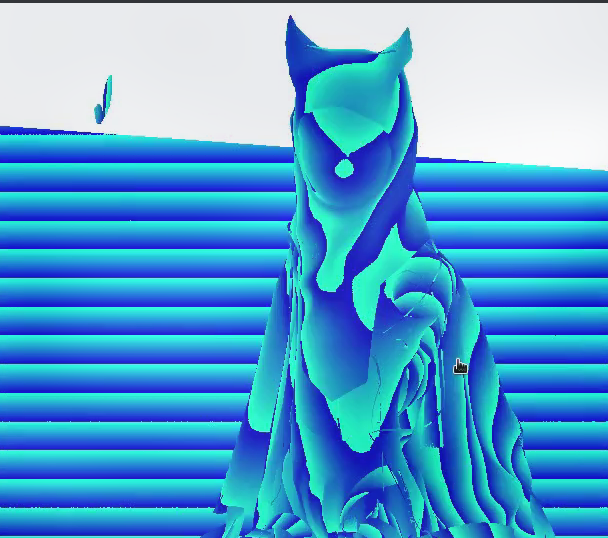
veryprofessionaldodo
on 5 Feb 2021
I think the chain should look more like this:
const renderPass = new RenderPass(scene, camera);
const customDepthPass = new CustomDepthPass();
const normalPass = new NormalPass();

const depthDownsamplingPass = new DepthDownsamplingPass({
    normalBuffer: normalPass.texture
});

const ssaoEffect = new SSAOEffect(camera, null, {
    normalDepthBuffer: depthDownsamplingPass.texture
});

const effectPass = new EffectPass(camera, ssaoEffect);

composer.addPass(renderPass);
composer.addPass(customDepthPass);
composer.addPass(normalPass);
composer.addPass(depthDownsamplingPass);
composer.addPass(effectPass);

depthDownsamplingPass.setDepthTexture(customDepthPass.texture, RGBADepthPacking);
effectPass.setDepthTexture(customDepthPass.texture, RGBADepthPacking);
CustomDepthMaterial (untested)
import { RGBADepthPacking, ShaderMaterial } from "three";

const depthVertexShader = `
#include <common>
#include <uv_pars_vertex>
#include <displacementmap_pars_vertex>
#include <morphtarget_pars_vertex>
#include <skinning_pars_vertex>
#include <clipping_planes_pars_vertex>

varying vec2 vHighPrecisionZW;

void main() {

    #include <uv_vertex>
    #include <skinbase_vertex>

    #ifdef USE_DISPLACEMENTMAP

        #include <beginnormal_vertex>
        #include <morphnormal_vertex>
        #include <skinnormal_vertex>

    #endif

    #include <begin_vertex>
    #include <morphtarget_vertex>
    #include <skinning_vertex>
    #include <displacementmap_vertex>
    #include <project_vertex>
    #include <clipping_planes_vertex>

    vHighPrecisionZW = gl_Position.zw;

}`;

const depthFragmentShader = `
#if DEPTH_PACKING == 3200

    uniform float opacity;

#endif

#include <common>
#include <packing>
#include <uv_pars_fragment>
#include <map_pars_fragment>
#include <alphamap_pars_fragment>
#include <clipping_planes_pars_fragment>

varying vec2 vHighPrecisionZW;

void main() {

    #include <clipping_planes_fragment>
    vec4 diffuseColor = vec4(1.0);

    #if DEPTH_PACKING == 3200

        diffuseColor.a = opacity;

    #endif

    #include <map_fragment>
    #include <alphamap_fragment>
    #include <alphatest_fragment>

    // Higher precision equivalent of gl_FragCoord.z.
    float fragCoordZ = 0.5 * vHighPrecisionZW[0] / vHighPrecisionZW[1] + 0.5;

    #if DEPTH_PACKING == 3200

        gl_FragColor = vec4(vec3(1.0 - fragCoordZ), opacity);

    #elif DEPTH_PACKING == 3201

        gl_FragColor = packDepthToRGBA(fragCoordZ);

    #endif

}`;

class CustomDepthMaterial extends ShaderMaterial {

    constructor(depthPacking = RGBADepthPacking) {

        super({

            type: "CustomDepthMaterial",

            defines: {
                DEPTH_PACKING: depthPacking.toFixed(0)
            },

            fragmentShader: depthFragmentShader,
            vertexShader: depthVertexShader

        });

    }

}
CustomDepthPass (untested)
import { RGBADepthPacking } from "three";
import { CustomDepthMaterial } from "./CustomDepthMaterial";

export class CustomDepthPass extends DepthPass {

    constructor(scene, camera, options) {

        super(scene, camera, options);

        this.renderPass.overrideMaterial = new CustomDepthMaterial({
            depthPacking: RGBADepthPacking
        });

    }

}
Thanks for the help, truly! I'll test these monday morning, thank you once again!
veryprofessionaldodo
on 5 Feb 2021
Unfortunately this doesn't work, but it might be because of setup on my end. I can show you the file I'm using here, with the complete setup I'm doing.
I've done things pretty much verbatim, but this is the result I'm getting so far:
However, one good thing that I can see is that the depth pass is indeed changing, as this isn't the result I was getting before. I think that the issue might be in fine-grained configuration for the shaders, what do you think?
veryprofessionaldodo
on 8 Feb 2021
SSAO's distance and proximity settings are sensitive to the near and far plane settings of the camera. You could try to set near/far to a different value for the depth pass:
...
composer.addPass(new LambdaPass(() => {

    camera.near = 0.3;
    camera.far = 1000;

}));

composer.addPass(customDepthPass);

composer.addPass(new LambdaPass(() => {

    camera.near = originalNear;
    camera.far = originalFar;

}));
...
Yeah, that's what I thought initially, but unfortunately that is not the case. I'm inclined to believe it might be a bias problem, since if I have a bias higher than 0 automatically cuts all the impact. It can actually be seen in the video I sent, and I have no idea why.
veryprofessionaldodo
on 8 Feb 2021
Related issues
 thewizardwand
·
3Comments
thewizardwand
·
3Comments
 dghez
·
4Comments
dghez
·
4Comments
 bendxr
·
4Comments
bendxr
·
4Comments
 lhamadopagode
·
4Comments
dghez
·
4Comments
lhamadopagode
·
4Comments
dghez
·
4Comments