Postgres: User and DB were not created from environment variable arguments
Hi
Having problem to set database name with database user, details are below:
Dockerfile:
FROM postgres:10.4-alpine

LABEL maintainer="Vadim Bryksin <[email protected]>"

HEALTHCHECK --interval=30s --timeout=15s CMD pg_isready -U postgres  || exit 1
Building docker:
docker build -t postgres_db . -f deployment\db\Dockerfile
Docker images:
REPOSITORY                 TAG                 IMAGE ID            CREATED             SIZE
postgres_db                latest              541471b4064f        5 seconds ago       39.5MB
postgres                   10.4-alpine         f298e9fa532e        6 days ago          39.5MB
docker4w/nsenter-dockerd   latest              cae870735e91        7 months ago        187kB
Running container with:
docker run -it --rm --name postgres_db -v db-data:/var/lib/postgresql/data -p 5432:5432 -e POSTGRES_DB=snippet_db -e POSTGRES_USER=snippet_user -e POSTGRES_PASSWORD=P@88w0rd postgres_db
Connecting trough Navicat UI tool:
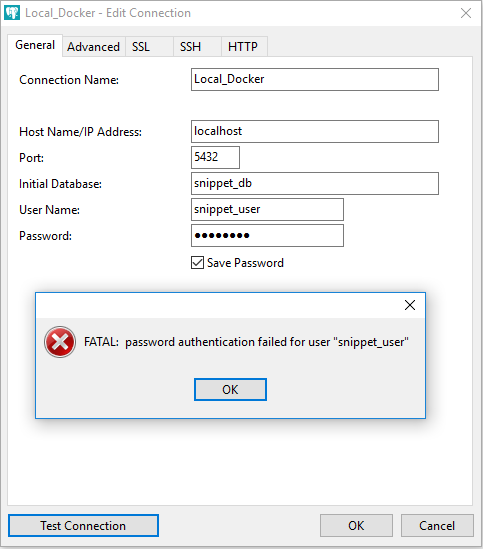
Postgres output log:
2018-05-31 21:57:03.245 UTC [147] FATAL:  password authentication failed for user "snippet_user"
2018-05-31 21:57:03.245 UTC [147] DETAIL:  Role "snippet_user" does not exist.
        Connection matched pg_hba.conf line 95: "host all all all md5"
Changing user to default: postgres
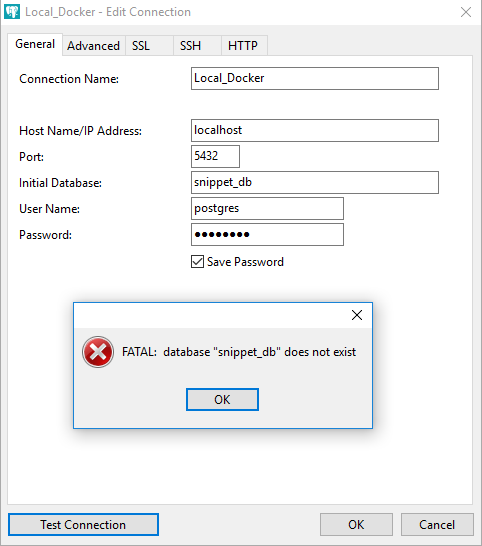
Postgres output log:
2018-05-31 22:00:07.921 UTC [195] FATAL: database "snippet_db" does not exist
Changing to default DB:
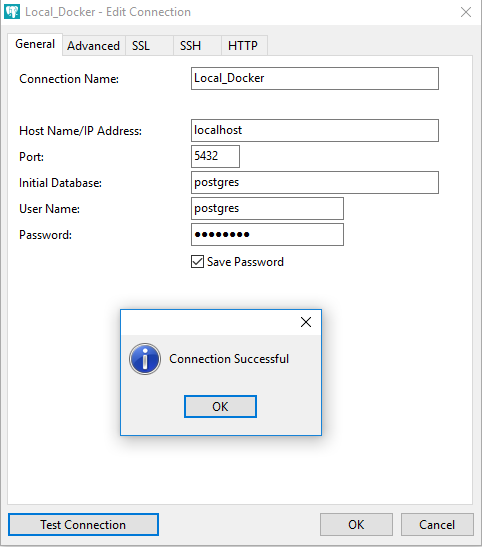
Conclusion:
From all environment variables passed during the container execution was accepted only: POSTGRES_PASSWORD
Other variables: POSTGRES_USER and POSTGRES_DB were ignored!
Possibly relates to an already closed issue: https://github.com/docker-library/postgres/issues/41
 Bryksin
All 5 comments
pgtest is the build of your Dockerfile
$ docker run -dit --rm --name postgres_db -v db-data:/var/lib/postgresql/data -p 5432:5432 -e POSTGRES_DB=snippet_db -e POSTGRES_USER=snippet_user -e POSTGRES_PASSWORD=P@88w0rd pgtest
f8b720b412fcce9866bae16c1403cf80bef578a9d2e26d9996c0a95749232e11
$ docker exec -it postgres_db bash
# psql -d snippet_db -U snippet_user -W
Password for user snippet_user:
psql (10.4)
Type "help" for help.

snippet_db=#
db-data is an empty directory in the build context
I'm not familiar with navicat, but the problem might reside there
 wglambert
on 1 Jun 2018
wglambert
on 1 Jun 2018
Issue might be that the password is entered incorrectly, database snippet_db isn't specified to psql
I've checked cross-container connectivity for psql as well
$ docker run -dit --rm --name postgres_db -v db-data:/var/lib/postgresql/data -p 5432:5432 --network=network -e POSTGRES_DB=snippet_db -e POSTGRES_USER=snippet_user -e POSTGRES_PASSWORD=P@88w0rd pgtest
b05db68967be0c9eec8117d86a2449e4d9b054d90c543a189e8e71d73c960a23

$ docker run -dit --rm --name postgres_db1 -v db-data:/var/lib/postgresql/data --network=network -e POSTGRES_DB=snippet_db -e POSTGRES_USER=snippet_user -e POSTGRES_PASSWORD=P@88w0rd pgtest 337a4f8617f188c32e13f3e182c6a117df1b2a958c850bdb38e9b5fbd3f1b8d9

$ docker ps
CONTAINER ID        IMAGE               COMMAND                  CREATED             STATUS                   PORTS                    NAMES
337a4f8617f1        pgtest              "docker-entrypoint.s…"   2 minutes ago       Up 2 minutes (healthy)   5432/tcp                 postgres_db1
b05db68967be        pgtest              "docker-entrypoint.s…"   3 minutes ago       Up 3 minutes (healthy)   0.0.0.0:5432->5432/tcp   postgres_db

$ docker exec -it postgres_db bash
# psql -h postgres_db1 -d snippet_db -U snippet_user -W
Password for user snippet_user:
psql (10.4)
Type "help" for help.

snippet_db=#
Uhhh it is definitely not a navicat problem as well as not a wrong password, as during those 3 screenshots with connection info in navicat - password was entered only once, it wasn't re-entered for each screenshot, and at the 3d attempt with default user and db it did work out
Also, DB logs from container clearly tells the problem:
2018-05-31 21:57:03.245 UTC [147] DETAIL: Role "snippet_user" does not exist.
and
2018-05-31 22:00:07.921 UTC [195] FATAL: database "snippet_db" does not exist
Regarding db-data - it is docker volume which was created with this command:
docker volume create --name db-data -d local
It was done so because I'm on Win platform and trying to use NTFS for postgress data which is running in Linux environment, as the solution I found the recommendation to use docker volume - link to the solution
Bryksin
on 1 Jun 2018
Did you ever start the postgres container without specifiying the user and database? If there was a database already initialized once in your Docker volume, then later runs with different env vars will not change the users, that is only done on first initialization.
See also https://github.com/docker-library/postgres/issues/203#issuecomment-255200501
 yosifkit
on 1 Jun 2018
yosifkit
on 1 Jun 2018
docker volume prune
That was exactly the case :)
Docker volume had already stored data from previous runs, where I didn't set the user and DB yet.
Closing ticket, my bad! sorry guys and thank you for detecting this problem
Bryksin
on 1 Jun 2018
Related issues
 mcnesium
·
3Comments
mcnesium
·
3Comments
 AnatoliyTishaevTR
·
3Comments
AnatoliyTishaevTR
·
3Comments
 AndriiOmelianenko
·
4Comments
AndriiOmelianenko
·
4Comments
 weeger
·
4Comments
weeger
·
4Comments
 rap2hpoutre
·
3Comments
rap2hpoutre
·
3Comments
Most helpful comment
Did you ever start the postgres container without specifiying the user and database? If there was a database already initialized once in your Docker volume, then later runs with different env vars will not change the users, that is only done on first initialization.
See also https://github.com/docker-library/postgres/issues/203#issuecomment-255200501