Postgres-operator: Allow multiple volumes (for multiple tablespaces)
IIUC, the postgresql CRD only allows for a single volume to be specified. I'd like to use multiple tablespaces feature in PostgreSQL for which I need multiple volume support.
Possible use cases for this:
- 'huge tables', older partitions on slower cheaper volumes. (e.g. TimescaleDB, Spilo image seems to have this extension already.)
- 'huge database size', allow to put some tables on separate volumes with different I/O requirements, or the indexes of some.
Possibly related: #479
 gertvdijk
All 13 comments
Hi, I need multiple volumes too. My use case is different. I have an initContainer used to fetch a client certificate and a CA cert from my internal PKI and I need to share the generated files with the postgresql via an emptyDir shared volume.
 seuf
on 31 Oct 2019
seuf
on 31 Oct 2019
I'm actually working on a PR for this..
I'll keep the actual volume key in the postgresql manifest to keep it simple for users who don't want to use additional volumes. and just add a addintionalVolumes key to allow mounting any other volume source.
Example :
  additionalVolumes:
    - name: foo
      mountPath: /opt/host
      volumeSource:
        emptyDir: {}
Where volumeSource is a K8s volume source (it can be a hostPath, Pvclaim, emptyDir, configMap, etc...)
seuf
on 26 Nov 2019
@seuf: Do you have an example how to define a PVC as an additional volume? I have this configured, but it does not work:
                additionalVolumes:
                  - name: backup-psql
                    size: "{{ postgres_pvsize }}G"
                    storageClass: rook-ceph-block
                    mountPath: /backup-psql
                    volumeSource:
                      persistentVolumeClaim:
                        claimName: backup-psql
 dk-do
on 14 Oct 2020
dk-do
on 14 Oct 2020
Hi @dk-do , To mount a persistentVolumeClaim, this one should already exists.
First create a pvclaim :
apiVersion: v1
kind: PersistentVolumeClaim
metadata:
  labels:
    app: backup-postgresql
  name: backup-postgresql
  namespace: database
spec:
  accessModes:
  - ReadWriteOnce
  resources:
    requests:
      storage: 10Gi
  storageClassName: rook-ceph-block
Then mount it in your postgresql :
             additionalVolumes:
                  - name: backup-psql
                    mountPath: /backup-psql
                    volumeSource:
                      persistentVolumeClaim:
                        claimName: backup-psql
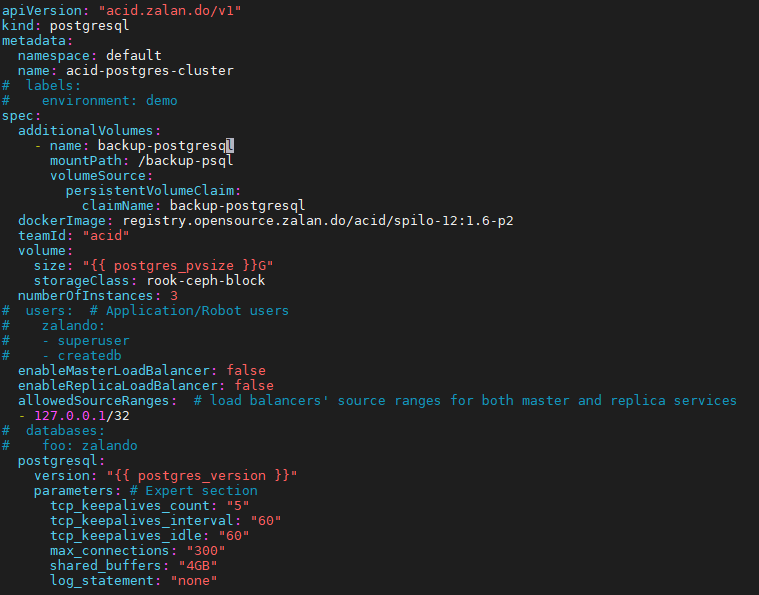
I tried it, but unfortunately it won't work. Here is a screenshot of the manifest (we deploy it using the ansible K8S module):
dk-do
on 14 Oct 2020
does your pvclaim already exists ? you need to create it first.
kubectl -n default get pvc
does your pvclaim already exists ? you need to create it first.
kubectl -n default get pvc
@seuf
Yes, the PVC is available:
NAME                                          STATUS   VOLUME                                     CAPACITY   ACCESS MODES   STORAGECLASS      AGE
backup-postgresql                             Bound    pvc-37fa193a-02a1-4c63-98f4-cca04864f111   10Gi       RWO            rook-ceph-block   11d
data-etcd-0                                   Bound    pvc-95e7dc61-8cc0-4629-9696-fc4dfd428e30   16Gi       RWO            rook-ceph-block   33d
data-etcd-1                                   Bound    pvc-59ec1d75-17b7-47cd-a443-358b8a35f6ee   16Gi       RWO            rook-ceph-block   33d
data-etcd-2                                   Bound    pvc-b2f077d1-18ac-4354-a274-5523f85cb177   16Gi       RWO            rook-ceph-block   33d
datadir-mongodb-mongodb-replicaset-0          Bound    pvc-c3e3b862-5fbb-43f7-9eed-c8bd14877909   10Gi       RWO            rook-ceph-block   14d
datadir-mongodb-mongodb-replicaset-1          Bound    pvc-1939557e-c6c5-47cb-b51c-2598c5172dec   10Gi       RWO            rook-ceph-block   14d
datadir-mongodb-mongodb-replicaset-2          Bound    pvc-ba47ef90-5eeb-4d46-bffd-257316612098   10Gi       RWO            rook-ceph-block   14d
elasticsearch-master-elasticsearch-master-0   Bound    pvc-172d5923-6ff2-4dc9-9608-23b1f1ee27f9   100Gi      RWO            rook-ceph-block   33d
elasticsearch-master-elasticsearch-master-1   Bound    pvc-d501c8c6-3b0f-4d9c-90f3-e5ada5b35252   100Gi      RWO            rook-ceph-block   33d
elasticsearch-master-elasticsearch-master-2   Bound    pvc-e945cfa7-51af-4204-ab76-ec6a038ed929   100Gi      RWO            rook-ceph-block   33d
es-plugin-pvc                                 Bound    es-plugin-pv                               1Gi        RWX                              33d
es-snaps-pvc                                  Bound    es-snaps-pv                                50Gi       RWX                              33d
etcd-snapshotter                              Bound    pvc-47dc01c7-7e11-42cc-b86b-eeb6124f43e2   16Gi       RWX            rook-ceph-fs      33d
fs-snaps-pvc                                  Bound    fs-snaps-pv                                50Gi       RWX                              33d
logstash-logstash-logstash-logstash-0         Bound    pvc-2b36ce93-6085-4b35-8695-8aee1adc27fa   5Gi        RWO            rook-ceph-block   33d
logstash-logstash-logstash-logstash-1         Bound    pvc-d93fa438-6378-4a36-ac49-066c0ce2dd41   5Gi        RWO            rook-ceph-block   33d
pgdata-acid-postgres-cluster-0                Bound    pvc-70a0dd1e-334b-43d4-97de-0ae04497b5e1   10Gi       RWO            rook-ceph-block   11d
pgdata-acid-postgres-cluster-1                Bound    pvc-e9385634-29d3-41bf-a16c-26c68952f02c   10Gi       RWO            rook-ceph-block   11d
pgdata-acid-postgres-cluster-2                Bound    pvc-d497dda5-e073-43f3-9e27-8677b92f56e5   10Gi       RWO            rook-ceph-block   11d
@seuf
Your approach would work if you want to attach the same pvc to both pods, but the goal here is (I think), that we would like to have a possibility to define additional volume for data where still be the "share nothing" approach. This means, that if you have 2 pods, it will create 2 PVC and attach one PVC to one pod and another one to another pod.
I would also welcome this feature. My main problem is, that PostgreSQL is not able to manage size of it's data... Can define e.g. tablespace with a specific size which will be a limit for the DB. You need to solve this by OS resources (quotas and so on).
 xzizka
on 11 Nov 2020
xzizka
on 11 Nov 2020
@xzizka
Yes, this is exactly what I am looking for:
but the goal here is (I think), that we would like to have a possibility to define additional volume for data where still be the "share nothing" approach. This means, that if you have 2 pods, it will create 2 PVC and attach one PVC to one pod and another one to another pod.
dk-do
on 12 Nov 2020
There is a targetContainers option that can be used to specify on which container the additionalVolume will be mounted, but in case of a statefulset, all replicas will have the same container name postgres.
Maybe a new option targetPods can be added to specify on which pod the volume should be mounted ?
seuf
on 12 Nov 2020
I would prefer to create a new volume the same way as the default volume for pgroot is defined. Just to allow create them more than one.
With targetPod you mentioned, you need to know the number of pods you will be using. If you scale up or scale down the cluster you then need to attach, configure and create these volumes manually. This is why I would prefer the automated solution like for pgrood.
xzizka
on 12 Nov 2020
This is my favourite approach as well:
I would prefer to create a new volume the same way as the default volume for pgroot is defined. Just to allow create them more than one.
With targetPod you mentioned, you need to know the number of pods you will be using. If you scale up or scale down the cluster you then need to attach, configure and create these volumes manually. This is why I would prefer the automated solution like for pgrood.
dk-do
on 12 Nov 2020
This feature would be very helpful for EKS users who want to take advantage of instance storage on storage optimized EC2 nodes. I'm interested in taking advantage of the new D3 nodes in EC2, but manually provisioning persistent volumes and managing tablespace assignments for each read-replica isn't the best. The reason I've opted to use this awesome operator in the first place is to minimize the need for manual intervention :)
A fair comparison might be the strimzi operator for Kafka, which allows users to declare multiple claims like:
   storage:
      type: jbod
      volumes:
        - id: 0
          type: persistent-claim
          size: 2T
          class: kafka
        - id: 1
          type: persistent-claim
          size: 2T
          class: kafka
        - id: 2
          type: persistent-claim
          size: 2T
          class: kafka
Each pod in the statefulset then has a set of pvcs generated for it.
I'd be interested in contributing to this whether it's in flight or not if it has the maintainers' blessing!
 towlinejk
on 17 Dec 2020
towlinejk
on 17 Dec 2020
Related issues
 RichieSams
·
6Comments
RichieSams
·
6Comments
 hedgss
·
3Comments
hedgss
·
3Comments
 valer-cara
·
7Comments
valer-cara
·
6Comments
valer-cara
·
5Comments
valer-cara
·
7Comments
valer-cara
·
6Comments
valer-cara
·
5Comments
Most helpful comment
I'm actually working on a PR for this..
I'll keep the actual
volumekey in the postgresql manifest to keep it simple for users who don't want to use additional volumes. and just add aaddintionalVolumeskey to allow mounting any other volume source.Example :
Where volumeSource is a K8s volume source (it can be a hostPath, Pvclaim, emptyDir, configMap, etc...)