Postal: Fast server IP can be Domain? So I can reverse proxy.
Fast server: Can we reverse proxy this into Nginx? Because some cloud providers doesn't really have public IP address available for direct bind, which means they all are NATed through cloud network. Please take a look at following picture of GCP virtual server.
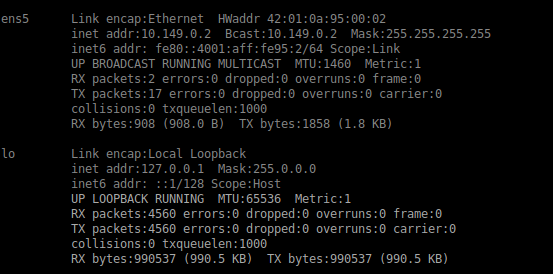
As you see, there is no external IP address available to use. Which means I cannot simply bind to something like:
fast_server:
  enabled: true
  bind_address: 103.58.193.95
Another example: I created a fresh virtual server on DigitalOcean.com. But they only allow 1 network interface per server, which means I cannot have 2 external IP. Only 1. There is Floating IP option, that can be plugged into any server. But it doesn't add any external network interface, some kind of NAT also.
For these reason, I'm out of luck to use Clicking and tracking feature. Is there any workaround?
 shinebayar-g
All 7 comments
The config allows you to specify the ports you wish to use for the fast server: https://github.com/atech/postal/blob/master/config/postal.defaults.yml#L30-L31
So you could reverse proxy it.
The only problem would be that you would have to manually keep the nginx configuration updated with all the domains and create/link to the SSL certificates.
FYI DigitalOceans floating IP attaches to a second internal IP address (e.g. 10.16.0.6) so does actually give your server two public IP addresses.
 willpower232
on 25 Sep 2018
willpower232
on 25 Sep 2018
FYI DigitalOceans floating IP attaches to a second internal IP address (e.g. 10.16.0.6) so does actually give your server two public IP addresses.
Oh okay, I will try this.
Some side note: Postal didn't work on GCP virtual server. It was giving some IPv6 related error when trying to send email, even after disabling IPv6 in both postal and kernel. So I went back to good old DigitalOcean vps.
shinebayar-g
on 25 Sep 2018
I believe there have been other issues around Googles desire that you don't send email from their servers so it already wasn't a perfect home for Postal, good to hammer it in though.
willpower232
on 25 Sep 2018
I just assigned Floating IP to my droplet and result is:
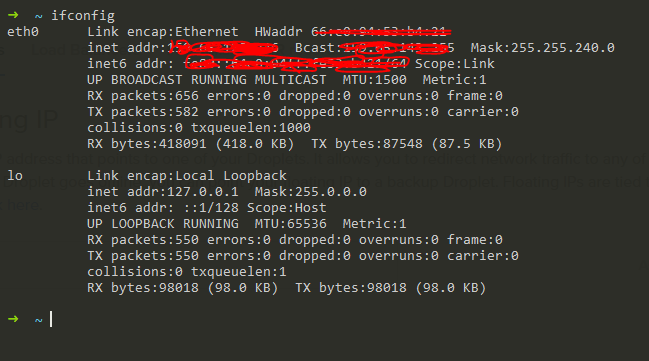
I tried to reboot, result was same.
When I try to bind to Floating IP:

How can I achieve what you said above?
shinebayar-g
on 25 Sep 2018
It looks like you're missing the internal connection from your network configuration, you should see something like this
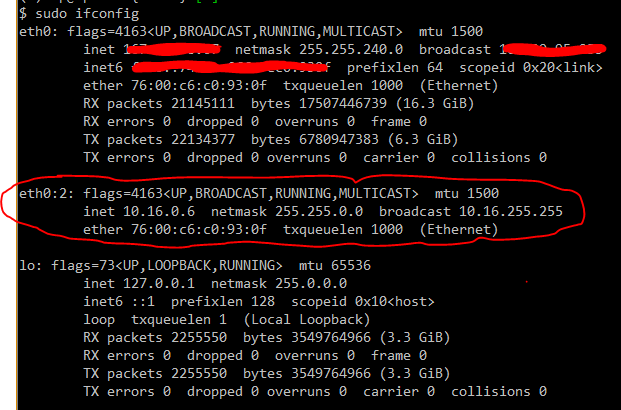
You should contact DigitalOcean support about enabling it on your droplet and I suspect you'll need to follow something like these instructions to enable your additional IP https://www.digitalocean.com/docs/networking/floating-ips/how-to/enable-old/
Edit: as I said before, the internal IP represents the floating IP so you could bind the fast server to that IP address and it would appear as your floating IP externally. You will not be able to bind directly to your floating IP address.
willpower232
on 25 Sep 2018
Hmm I see, I enabled private network following this tutorial https://www.digitalocean.com/docs/networking/private-networking/how-to/enable/.
Turned off Droplet and Enabled Private networking, followed the tutorial and here is the result.
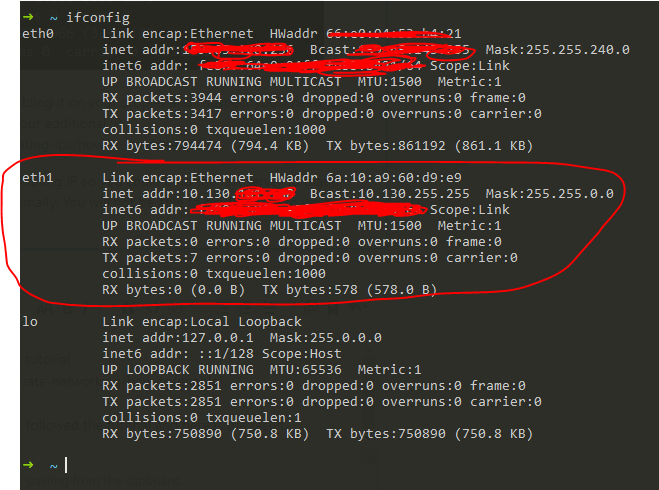
And bind fast_server to this IP address.
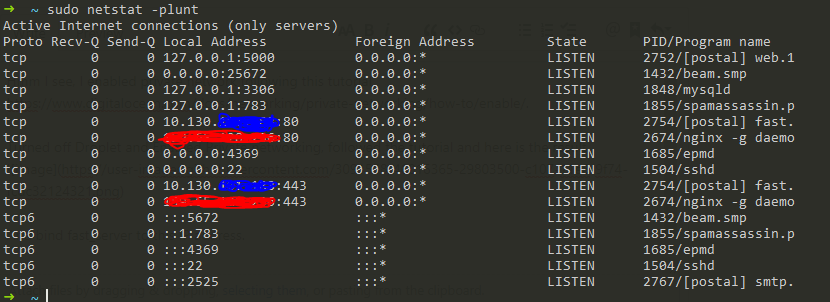
red one is my main external IP address.
Blue one is new private network IP address.
Fast server is up. But when I access my Floating IP address in browser, I see this:
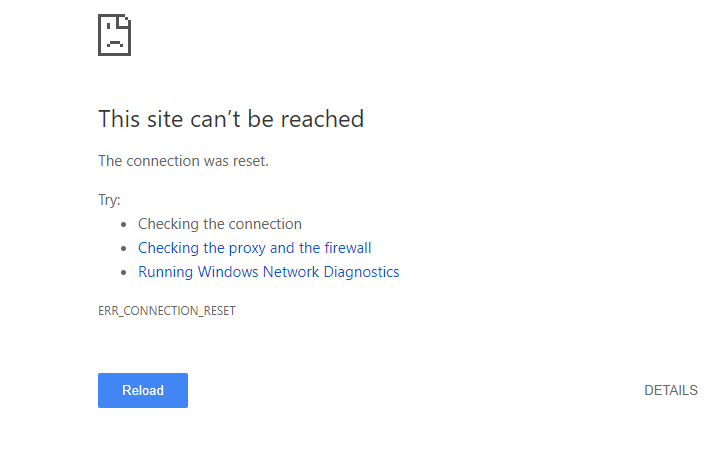
However when I SSH into Floating IP, it connects to my Droplet without problem.
Edit: In your linked tutorial https://www.digitalocean.com/docs/networking/floating-ips/how-to/enable-old/ it says
Droplets created after October 20, 2015 automatically have an anchor IP, but if your Droplet was created before this date, you’ll need to add an anchor IP manually.
If you try to assign a Floating IP to Droplet without an anchor IP, instructions to add one will open up.
My droplet was created few days ago and when I was creating Floating IP no instructions appeared. I assume there is no problem at that part.
Edit2: Oh oh oh!
It turned out Anchor IP is different from Private network IP.
Here is how it worked out:
curl -s http://169.254.169.254/metadata/v1/interfaces/public/0/anchor_ipv4/address
Output should be something like
10.15.0.6
And in postal.yml bind fast_server to this IP address. Then accessing Floating IP showed this:

Is it fast_server's response?
shinebayar-g
on 25 Sep 2018
Thats correct yes, if you enable click tracking for one of your domains and send some messages, you should be able to see whether they were opened or had links clicked now.
willpower232
on 25 Sep 2018
Related issues
 elfeffe
·
3Comments
elfeffe
·
3Comments
 broskees
·
4Comments
broskees
·
4Comments
 moskoweb
·
6Comments
moskoweb
·
6Comments
 oasis1234
·
5Comments
shinebayar-g
·
3Comments
oasis1234
·
5Comments
shinebayar-g
·
3Comments
Most helpful comment
It looks like you're missing the internal connection from your network configuration, you should see something like this
You should contact DigitalOcean support about enabling it on your droplet and I suspect you'll need to follow something like these instructions to enable your additional IP https://www.digitalocean.com/docs/networking/floating-ips/how-to/enable-old/
Edit: as I said before, the internal IP represents the floating IP so you could bind the fast server to that IP address and it would appear as your floating IP externally. You will not be able to bind directly to your floating IP address.