We're trying to get the setup postal for our production usage and have noticed that with a single worker in place, the mails go out rather slowly(about 100 mails/sec). I acknowledge that the system is highly scalable as the documents suggest and from reviews. But, being new to the Ruby world and to postal, is there a documentation which would help me establish a full-fledged distribution?
A link to documentation or an explanation of how to do it would help. I could also take part in creating the Wiki page(if absent) for it once I get it up and working.
PS: The project has been a real life-saver in terms of understanding the email domain and for our cost savings.
 agnibha
All 21 comments
I can't remember where in the wiki it says but in /opt/postal/config/postal.yml you can add more workers with the following option:
workers:
  quantity: 10
 willpower232
on 2 Aug 2017
willpower232
on 2 Aug 2017
Hi @willpower232, thanks for that. I would do that but, I want to know how the overall architecture is in terms of how procodile manages the different workers and SMTP servers.
If I'm guessing it right, there can be multiple workers for one SMTP server and multiple such SMTP servers can horizontally scale.
agnibha
on 2 Aug 2017
AFAIK there is only ever one SMTP server process and workers are the only process that can have customisable multiples.
There is a wiki page about the processes https://github.com/atech/postal/wiki/Processes
willpower232
on 2 Aug 2017
I would suggest that 100 emails per second is quite fast, particularly for a single worker.
There is no relationship between SMTP servers and workers, you can have as many of each as you like and they will all share the workload.
You will be limited to one SMTP process per host (but these are quite fast). Scaling to multiple hosts will allow far more workers, and additional SMTP servers (one per host) but you will need to set up a centralized database and message queue.
 catphish
on 5 Aug 2017
catphish
on 5 Aug 2017
Hi there,
First of all, thanks so much for open sourcing this awesome project. It was so easy to set up with the quick install script.
But, we're getting very slow delivery rate. I see the OP has achieved 100 emails per second which is awesome. I've set up in Amazon EC2, got an Elastip IP (attached to that instance) cleared like mentioned in https://github.com/atech/postal/issues/192 and amazon confirmed the same.
We have over 100k emails to be sent to our clients every night (number is growing every day) with a PDF attachment, the faster it can be sent, the better. Email size could be just under 200kb. We tried to send sample of 2k emails. First of all, the messages/minute seems to be updating very slowly. How exactly is it calculated? Are those only delivered messages that are considered?
Secondly, the rate at which the mails are being sent, seems to be very slow. 2k emails took over 10minutes to be sent. (either soft fail or sent). What could be the issue here? Is there any configuration I need to do? I understand that having multiple workers may not help in speeding up the delivery. (I have 10 workers set up in postal.yml as mentioned in this thread) Is it possible to set up two or more smtp servers in one instance and have one proxy to load balance between the servers which use same queue?
Current architecture is, the PDF generator resides in a different server and it sends to the postal server via a script. It takes just above 4 minutes to queue 2k emails in the postal server. (We are evaluating if we could move all the attachments and mail content to the postal server first and then trigger sending email)
Thanks for the help.
 vishnus
on 8 Aug 2017
vishnus
on 8 Aug 2017
@vishnus I would draw your attention to an earlier issue https://github.com/atech/postal/issues/192 as completing that form with Amazon will probably improve your experience with them. If you continue having problems, please open a new issue.
willpower232
on 8 Aug 2017
@willpower232 Yes that process is completed. I will benchmark with a larger data set and see before opening a new issue. Thanks
vishnus
on 9 Aug 2017
Hi @willpower232, in an instance of postal, I wanted to initiate 3 workers. I've changed the worker size as you said in your comment above. But somehow, one of the workers is failing to start. I'm getting this as an error line in "postal status"
* worker only has 2 instances (should have 3)
agnibha
on 1 Sep 2017
Do you have lots of available memory on your server? If you set it to 4 workers, how many do you get?
willpower232
on 2 Sep 2017
Hi @willpower232
We're able to send 500 message / minute on a small instance. (2core, 15gb, 10 workers and 4 threads each). We have upgraded the servers to 8core, 32gb and would like to know how we can leverage this. What would be an optimal worker / thread combination?
PS, DB has max_connection as 800 which can be increased a bit more..
vishnus
on 4 Dec 2017
Optimum worker/thread ratios would be difficult to calculate as it depends entirely on your situation, particularly if you are still sending thousands of emails as above.
Our Postal is set to 8 workers and is using up less than 3GB of RAM.
If you have 15GB of RAM available on your current setup, it might be worth increasing the workers beyond 10 to see what happens.
Other than that, you might want to have another look at https://github.com/atech/postal/issues/290#issuecomment-320446517 and try having multiple servers with a central queue and database.
willpower232
on 4 Dec 2017
Hi @willpower232
We have 32gb of RAM and 10 workers. When we increase the number of workers to 15, it gives this:
- worker only has 10 instances (should have 15)
Btw, we were able to hit 940+ mails per minute with this new hardware :) Still load is not completely utilized.
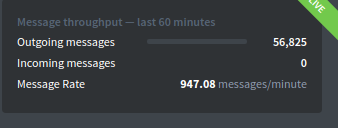
So if we can go beyond 10 workers, I'm hopeful we can achieve even more speed.. we send out over 200k emails a day. Please advice.
vishnus
on 5 Dec 2017
Did you restart Postal to apply your changes? This is a bit beyond me with those volumes of email.
If you rely heavily on Postal, it might be worth approaching atech themselves for some professional support as they will be able to support you better directly than any of us randomers on here.
willpower232
on 5 Dec 2017
Restart didnt work, but once I kill the app and started again, it worked.. and we've crossed 1200 messages / minute :)
vishnus
on 13 Dec 2017
Can anyone tell how many worker and thread should i used if my server had 32GB RAM..?
 Manishjodhani
on 21 Feb 2018
Manishjodhani
on 21 Feb 2018
Can anyone tell how many worker and thread should i used if my server had 32GB RAM..?
There's not really a specific number. I would start by allocating 25% of the RAM to MySQL, running 10 workers, and observing performance. If all the workers are busy, and neither the database nor the CPU are the bottleneck, simply increase the number of workers until you reach the needed performance.
catphish
on 21 Feb 2018
Hi,
After going through a few iterations of the whole codebase, we were able to
see that there are some bottlenecks at the rabbitmq end which doesn't let
enough emails to go through it. Also, newer messages are not
enqueued/accepted until enough number of messages are consumed from it.
Looked like major design flaws since rabbitmq does allow many more messages
to be stored on it. The problem was seemingly with the bunny library used.
But, we couldn't find a workaround.
In total, we were never able to reach a throughput of 1.2k emails/minute no
matter how many workers.
Thanks
Agnibha Kumar Nath
On Wed, Feb 21, 2018 at 9:14 PM, Charlie Smurthwaite <
[email protected]> wrote:
Can anyone tell how many worker and thread should i used if my server had
32GB RAM..?There's not really a specific number. I would start by allocating 25% of
the RAM to MySQL, running 10 workers, and observing performance. If all the
workers are busy, and neither the database nor the CPU are the bottleneck,
simply increase the number of workers until you reach the needed
performance.—
You are receiving this because you authored the thread.
Reply to this email directly, view it on GitHub
https://github.com/atech/postal/issues/290#issuecomment-367368611, or mute
the thread
https://github.com/notifications/unsubscribe-auth/ADi06UDO9tQ5QTlt8E8UJq9oMl8n9mlPks5tXDmugaJpZM4Oq8jP
.
agnibha
on 21 Feb 2018
That's very interesting, we've had several issues with Bunny performance in the past, though I'm still surprised this was the bottleneck. Each worker's bunny should only see that worker's tasks, so I don't really understand how this could be possible unless the bottlebneck was in the backend RabbitMQ server.
Personally I'd like to see a move to an alternative message queue, but that's a major task, and not one that's been necessary for us.
catphish
on 21 Feb 2018
There were a few other bottlenecks involving storing GBs of plain text data
on to mysql/mariadb in general. But, simply not being able to send greater
than 1.5k-2k mails even after stubbing the storage of the entire email and
commenting the actual send_email function was a little annoying, since we
had tried checking the efficiency of RabbitMQ, which was able to serve a
few 100k messages per second. Then, we tried simple enqueueing and
dequeueing with bunny library in the way it's used in the code. That
brought down the throughput to 5-10k messages. Adding the send_email and
storage would mean additional resource utilization.
Thanks
Agnibha Kumar Nath
On Wed, Feb 21, 2018 at 9:46 PM, Charlie Smurthwaite <
[email protected]> wrote:
That's very interesting, we've had several issues with Bunny performance
in the past, though I'm still surprised this was the bottleneck. Each
worker's bunny should only see that worker's tasks, so I don't really
understand how this could be possible unless the bottlebneck was in the
backend RabbitMQ server.Personally I'd like to see a move to an alternative message queue, but
that's a major task, and not one that's been necessary for us.—
You are receiving this because you authored the thread.
Reply to this email directly, view it on GitHub
https://github.com/atech/postal/issues/290#issuecomment-367380469, or mute
the thread
https://github.com/notifications/unsubscribe-auth/ADi06cpnESYoTpjquWomz_4XG4ludQZUks5tXEFtgaJpZM4Oq8jP
.
agnibha
on 28 Feb 2018
Hello Everyone,
I have installed a Postal on a dedicated server and the server configuration is 32GB Ram and 500GB Hard Disk.
root@ns101022:~# lscpu
Architecture: x86_64
CPU op-mode(s): 32-bit, 64-bit
Byte Order: Little Endian
CPU(s): 8
On-line CPU(s) list: 0-7
Thread(s) per core: 2
Core(s) per socket: 4
Socket(s): 1
NUMA node(s): 1
Vendor ID: GenuineIntel
CPU family: 6
Model: 158
Model name: Intel(R) Xeon(R) CPU E3-1270 v6 @ 3.80GHz
Stepping: 9
CPU MHz: 3999.926
this is my server configuration but the sending speed rate is 0.00.
What is the issue and how can I resolve this.
Please help me with this.
Thanks in Advance
 zeba121
on 5 Feb 2020
zeba121
on 5 Feb 2020
@zeba121 please do not reply to closed issues, check that your Postal server is working fully using postal status and open a new issue with more information if you're still having problems
willpower232
on 7 Feb 2020
Related issues
 elfeffe
·
3Comments
elfeffe
·
3Comments
 stayallive
·
5Comments
stayallive
·
5Comments
 destroyer998
·
5Comments
destroyer998
·
5Comments
 fschndr
·
6Comments
fschndr
·
6Comments
 ajsb85
·
4Comments
ajsb85
·
4Comments
Most helpful comment
I can't remember where in the wiki it says but in
/opt/postal/config/postal.ymlyou can add more workers with the following option: