Posh-git: install.ps1 is not digitally signed
System Details
- posh-git version/path: 1.0.0-beta3 (taken from CHANGELOG.md) s:\users\userDocuments\WindowsPowerShell\posh-git
- PowerShell version: 5.1.17134.165
- Git version: 2.17.0.windows.1
- Operating system name and version: Microsoft Windows NT 10.0.17134.0
Issue Description
I downloaded posh-git from the Zip download on the website.
I'm unable to run the install.ps1 file because PowerShell complains that my execution policy is too strict. It's already set to RemoteSigned as per the instructions on the website.
My guess is that this is an issue with the current release's signature? (I'm guessing it's meant to be signed, since the instructions don't say to disable everything).
Installing from PowerShellGallery has worked OK - the issue may only be with the Zip download on the website.
Some output:
PS s:\users\user\Documents\WindowsPowerShell\posh-git> .\install.ps1
.\install.ps1 : File s:\users\user\Documents\WindowsPowerShell\posh-git\install.ps1 cannot be loaded. The file
s:\users\user\Documents\WindowsPowerShell\posh-git\install.ps1 is not digitally signed. You cannot run this script on
the current system. For more information about running scripts and setting execution policy, see
about_Execution_Policies at https:/go.microsoft.com/fwlink/?LinkID=135170.
At line:1 char:1
+ .\install.ps1
+ ~~~~~~~~~~~~~
    + CategoryInfo          : SecurityError: (:) [], PSSecurityException
    + FullyQualifiedErrorId : UnauthorizedAccess
PS s:\users\user\Documents\WindowsPowerShell\posh-git> $PSVersionTable.PSVersion

Major  Minor  Build  Revision
-----  -----  -----  --------
5      1      17134  165


PS s:\users\user\Documents\WindowsPowerShell\posh-git> Get-ExecutionPolicy
RemoteSigned
PS s:\users\user\Documents\WindowsPowerShell\posh-git>
 Patabugen
All 8 comments
Interesting! I've never actually tried installing from a Zip download, but it makes sense that Windows would flag the zipped files as remote/unsafe.
I would recommend either a git clone (easy to update) or PowerShell Gallery (easy to update) or Chocolatey (easy to update) as better installation options.
 dahlbyk
on 15 Aug 2018
dahlbyk
on 15 Aug 2018
Ah you are correct - I needed to Unblock the file (Right Click -> Properties -> Tick Unblock -> Click OK) before extracting the ZIP file.
I'd be tempted to make some kind of change to avoid other people getting stuck like I did - the ZIP and TAR downloads are very prominent on the website. Perhaps even just having an "Install" button alongside them (for people who want to install, rather than just download) which links to the instructions to clone.
I also didn't clone because I didn't care for the whole git repo (although perhaps I should, to get updates more easily).
In short - there's nothing wrong with the code but some re-thinking of the Getting Started for newbies would be useful. I can send a pull request if you agree in principle?
Patabugen
on 16 Aug 2018
What are you seeing the prominent Zip/Tar links? That may be part of GitHub that I can't control.
dahlbyk
on 16 Aug 2018
 Patabugen
on 17 Aug 2018
Patabugen
on 17 Aug 2018
A ha! Thanks
dahlbyk
on 17 Aug 2018
As aleady mentioned, if you download the ZIP and your PS execution policy is set to Remote Signed, you need to execute Unblock-File <path-to-zip>. Then you'll be able to import the module. This is how it is for all modules downloaded from the web. I've had this issue for years w/PSCX so I switched to an MSI to avoid this issue. But that comes with its own set of problems. Really, these days, just use Install-Module posh-git -Scope CurrentUser. This is the preferred way to install modules in PowerShell.
 rkeithhill
on 18 Feb 2019
rkeithhill
on 18 Feb 2019
powershell command line run :
Set-ExecutionPolicy RemoteSigned -Scope CurrentUser
detail description :
https://docs.microsoft.com/tr-tr/powershell/module/microsoft.powershell.core/about/about_execution_policies?view=powershell-5.1
 ozkansen
on 6 Mar 2019
ozkansen
on 6 Mar 2019
Thank you very much!👍
Problem:
File scripts\bundled_installer.ps1 cannot be loaded.
The file C:\Users\Aelo\Documents\aws-elastic-beanstalk-cli-setup-master\scripts\bundled_installer.ps1 is not digitally
signed. You cannot run this script on the current system. For more information about running scripts and setting
execution policy, see about_Execution_Policies at https:/go.microsoft.com/fwlink/?LinkID=135170.
    + CategoryInfo          : SecurityError: (:) [], ParentContainsErrorRecordException
    + FullyQualifiedErrorId : UnauthorizedAccess
Solution:
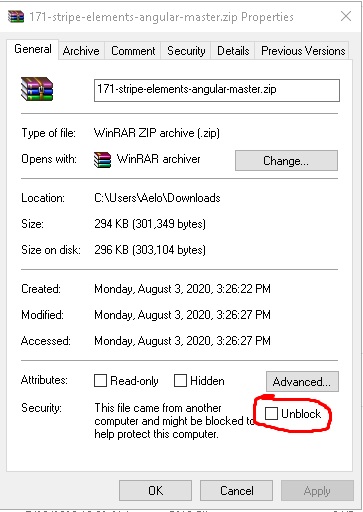
I needed to Unblock the file by right clicking on the zip. And ticking the
unblock checkbox.
This solved my problem.
 powderblock
on 12 Aug 2020
powderblock
on 12 Aug 2020
Related issues
 arafat-ar13
·
8Comments
arafat-ar13
·
8Comments
 jpierson
·
9Comments
jpierson
·
9Comments
 AnthonyMastrean
·
9Comments
AnthonyMastrean
·
9Comments
 nairby
·
6Comments
nairby
·
6Comments
 codedog
·
7Comments
codedog
·
7Comments
Most helpful comment
powershell command line run :
Set-ExecutionPolicy RemoteSigned -Scope CurrentUserdetail description :
https://docs.microsoft.com/tr-tr/powershell/module/microsoft.powershell.core/about/about_execution_policies?view=powershell-5.1