Popper-core: Popper content isn't near the button and jumped when button inside <foreignObject> of SVG on Google Chrome Android
Current Behavior 😯
Popper content isn't near the button and jumped when button inside

Expected Behavior 🤔
It should be like this:
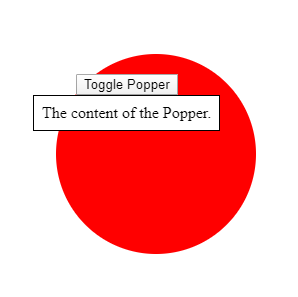
It works great on pc and ios, but android doesn't.
Steps to Reproduce 🕹
You can see my example here and run on google chrome of android: https://codepen.io/FezVrasta/pen/zYvJwgW
 namlq93
All 12 comments
What Android version and which browser version?
 FezVrasta
on 11 May 2020
FezVrasta
on 11 May 2020
What Android version and which browser version?
I'm using android 10 and google chrome ver 81.
namlq93
on 11 May 2020
I didn’t notice you are using v1, please upgrade to v2 and let me know if it’s still a problem.
I'll close it for now, I will reopen it if the error happens even with v2
FezVrasta
on 11 May 2020
This issue is present in v2 as well, and is not specific to android - happens in chrome 81 on desktop linux too (but doesn't happen in firefox)
 ardcore
on 14 May 2020
ardcore
on 14 May 2020
Great, may you please post a repro sandbox so that I can take a look?
FezVrasta
on 14 May 2020
@FezVrasta sure: https://jsfiddle.net/e2r8501a/
ardcore
on 14 May 2020
It seems to be related to the function getBoundingClientRect(). I created an issue on bugs.chromium. And they linked to the issue.
namlq93
on 15 May 2020
Cool, from what I understand we can't do much to fix this, it's a browser bug.
FezVrasta
on 15 May 2020
As far as I understand, I could hack around this issue by using a modifier function (shift/offset) in which I would (after doing browser detection) revert the incorrectly applied devicePixelRatio:
shift: {
    fn: (d) => {
      if (!d.popper) {
        d.offsets.reference.left /= window.devicePixelRatio;
        d.offsets.reference.top /= window.devicePixelRatio;
      }
      return d;
    }
  },
this actually positions my popups perfectly in chrome, but the huge downside is that I lose the "flip" functionality. @FezVrasta any advice/idea on to apply a similar fix without disabling flipping?
(the other idea would be to use virtualElement as a referenceObject, but since I'm using popper indirectly (via blueprintjs) it's not possible in my case)
ardcore
on 15 May 2020
I don't have any Linux device to reproduce the problem so I can't play with it first hand.
You could try to run your custom modifier as soon as possible, and patch the state.rects.reference values. Doing so the rest of the modifiers should read the patches values and work as expected.
FezVrasta
on 15 May 2020
Further investigation revealed that this bug is also happening on chrome@windows (not sure about mac), and is present when window.devicePixelRatio is not equal to 1. You could probably emulate this by using custom zoom settings in your browser.
I wasn't able to go around this using custom modifiers - it seems that, for some reason, even using custom modifier with order: 1 disables the "flip" modifier (or at least does something that prevents the flip modifier from working correctly).
As of now, the only working solution I came up with is monkey-patching getBoundingClientRect:
if (window.chrome) {
  HTMLElement.prototype.getBoundingClientRect = function() {
    const rect = Element.prototype.getBoundingClientRect.call(this);
    if (this.closest('foreignObject')) {
      return {
        x: rect.x / window.devicePixelRatio,
        y: rect.y / window.devicePixelRatio,
        left: rect.left / window.devicePixelRatio,
        top: rect.top / window.devicePixelRatio,
        width: rect.width / window.devicePixelRatio,
        height: rect.height / window.devicePixelRatio,
        right: rect.right / window.devicePixelRatio,
        bottom: rect.bottom / window.devicePixelRatio,
      };
    }
    return rect;
  };
}
This aligns popups perfectly, but the downside is that it may have a big performance penalty in some scenarios due to the additional parents() call.
ardcore
on 15 May 2020
I have the same issue in Chrome and Safari.
I use d3 and tippyjs-react and when I ZoomIn/ZoomOut page my tooltips jumps:
without zooming:

Zoom 90%:
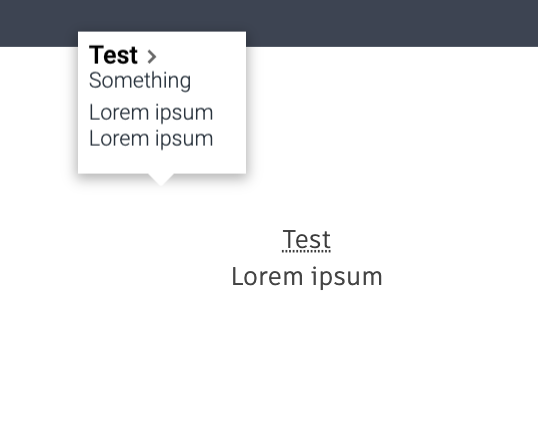
@ardcore , @FezVrasta Your solution breaks tooltip in my case. Do you have any idea how I can fix that ?
 mifonBejenari
on 25 May 2020
mifonBejenari
on 25 May 2020
Related issues
 skitterm
·
5Comments
skitterm
·
5Comments
 cixonline
·
5Comments
FezVrasta
·
5Comments
cixonline
·
5Comments
FezVrasta
·
5Comments
 Sawtaytoes
·
5Comments
FezVrasta
·
3Comments
Sawtaytoes
·
5Comments
FezVrasta
·
3Comments