Popper-core: Can this be done with Popper?
I tried using the Spectrum chat, but got "internal server error" when I uploaded images, so I'll try my luck here instead.
Using the default modifiers, the vertical flipping works great, but if it doesn't fit in the viewport horizontally, it doesn't do any alignment at all.
Here's my default placement:
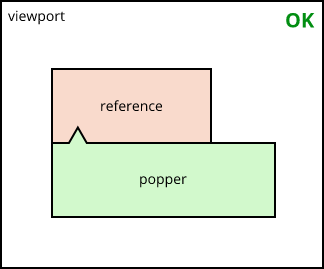
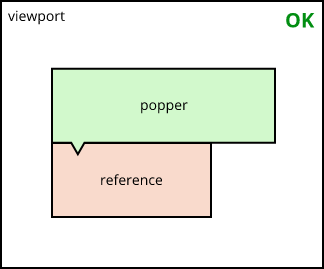
If it cant fit vertically, it flips as it should:
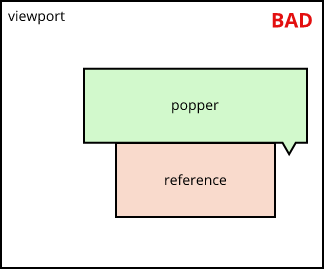
However, if it doesn't fit horizontally, it just positions itself somewhere along the x-axis without any alignment:
Instead I would like it to align to the end:
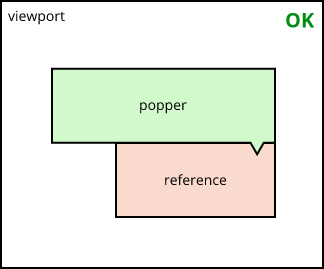
Is this achievable?
 johnknoop
All 6 comments
Looks like I managed to solve it using a custom shift function:
shift: {
    enabled: true,
    fn: (data: Data, options: Object) => {
        const { offsets } = data;
        const { popper, reference } = offsets;

        // Can it fit if left-aligned?
        if (reference.left + popper.width < window.innerWidth) {

            popper.left = reference.left;

            data.placement = data.flipped
                ? 'top-start'
                : 'bottom-start';

        } else {
            // Otherwise, right-align it
            const referenceRight = reference.left + reference.width;
            popper.left = referenceRight - popper.width;

            data.placement = data.flipped
                ? 'top-end'
                : 'bottom-end';
        }

        return data;
    }
},
Is this the way to do it, or am I mutating the wrong properties or something? (I'm a Popper newbie)
johnknoop
on 5 Mar 2019
Have you tried to use the flipVariations option of flip?
 FezVrasta
on 5 Mar 2019
FezVrasta
on 5 Mar 2019
Have you tried to use the
flipVariationsoption offlip?
Hi @FezVrasta
No, I wasn't even aware of those. That doesn't seem to be described in the documentation, nor in the TypeScript definitions.
johnknoop
on 5 Mar 2019
Have you tried to use the
flipVariationsoption offlip?
@FezVrasta It's not released yet.
https://github.com/FezVrasta/popper.js/releases
Can you please make fresh releases for popper.js and react-popper?
 atomicbrainman
on 31 Mar 2019
atomicbrainman
on 31 Mar 2019
flipVariations is now released
FezVrasta
on 23 Apr 2019
flipVariationsByContent seems to be the one I want. However it doesn't seem to work under all conditions.
These options:
placement: 'bottom-start',
modifiers: {
    flip: {
        enabled: true,
        flipVariationsByContent: true,
        boundariesElement: 'viewport',
        behavior: 'flip'
    },
    shift: {
        enabled: true,
    },
    preventOverflow: {
        boundariesElement: 'viewport',
        padding: Number(this.preventOverflowPadding),
    },
    computeStyle: {
        gpuAcceleration: false
    },
}
work for one of my top-menu fly-outs:

...but not the other:

I've highlighted the reference element with a red pencil. The x-placement attribute is 'bottom-start', making the arrow appear in the top-left corner, but the placement is obviously bottom-end.
I'll have to stick to my custom shift function until this is fixed.
johnknoop
on 3 Aug 2019
Related issues
 c0bra
·
5Comments
c0bra
·
5Comments
 gcanabate
·
3Comments
gcanabate
·
3Comments
 cixonline
·
5Comments
cixonline
·
5Comments
 tyrw
·
4Comments
tyrw
·
4Comments
 diondiondion
·
4Comments
diondiondion
·
4Comments