Popper-core: make Popper#update sync + make scheduleUpdate return promise
CodePen Demo
https://codepen.io/anon/pen/NwZQwK
What is the expected behavior?
In the CodePen, the popper should incorrectly be positioned if the update was sync. But because it's not, the last transform line is what Popper knows about, not the first one.
Any other comments?
The asynchronous popper.update() can cause some issues if the next line of code assumes the popper's position has been updated. The onUpdate() callback can't really be used depending on the code structure.
I've been able to remedy this for a while with setTimeout() defer calls (not sure if this is 100% reliable though), but it would be easier just to have a sync update method.
That, or update is sync while scheduleUpdate is async.
Is there a case where this wouldn't be appropriate?
 atomiks
All 27 comments
I don't think Popper#update can become synchronous, it relies on DOM read/write that is by nature asynchronous.
It would probably be cool to make Popper#update and Popper#scheduleUpdate return a promise so that you can do:
async onCreate() {
  await instance.scheduleUpdate();
  doSomethingAfterIt();
}
 FezVrasta
on 8 Dec 2017
FezVrasta
on 8 Dec 2017
Really? I thought that was sync behavior..
I thought it was because you debounce update():
    // make update() debounced, so that it only runs at most once-per-tick
    this.update = debounce(this.update.bind(this));
Good catch, still I'm not sure that's the only non-sync code we have 🤔
FezVrasta
on 8 Dec 2017
Well I got rid of the debounce() wrap and the async behavior disappears and becomes fully sync! So I don't think there is.
atomiks
on 8 Dec 2017
Wow cool, good to know.
I think we can plan this change in the next major version, along with a promise-based API for scheduleUpdate.
FezVrasta
on 8 Dec 2017
Unfortunately I came across a pretty huge issue. On Samsung Internet and UC Browser, for whatever reason the defer call doesn't work and the tooltip ends up transitioning from the top of the document each update because the popper update is async. I didn't know this was happening since I couldn't test on these browsers..
A setTimeout has been wrapped in a requestAnimationFrame, but that was an issue, and I tried doing this:
function defer(fn) {
  if (window.Promise) {
    Promise.resolve().then(() => {
      setTimeout(fn)
    })
  } else {
    setTimeout(fn)
  }
}

// I call popper.update(), then run the show call wrapped in the defer function.
but the issue still occurs in those browsers. After removing the debounce wrap in Popper, the issue stops.
Would it be possible to make a temporary addition for v1, Popper#updateSync, while noting that it is a temporary method that will become update() in v2? I REALLY need sync behavior right now... unless you can suggest how to fix the defer call.
https://twitter.com/guypod/status/653962117872254976
:(
atomiks
on 15 Dec 2017
That looks like a browser bug, I'm not sure how am I supposed to avoid it..
FezVrasta
on 15 Dec 2017
It seems like using a timeout of 50-60ms fixes it... Not ideal, but eh.. Will have to detect those browser user agents I guess?
atomiks
on 15 Dec 2017
Probably we need to add them here:
https://github.com/FezVrasta/popper.js/blob/master/packages/popper/src/utils/debounce.js#L2
They don't support Promise right?
FezVrasta
on 15 Dec 2017
They do. https://caniuse.com/#feat=promises
Also, they need at least 50ms, 40ms doesn't work, so 1ms with your code wouldn't work?
Also I thought browsers enforced a minimum of 4ms anyway?
atomiks
on 15 Dec 2017
the setTimeout is used just to schedule the update to the next tick, most browsers will do it with 0, some need at least 1.
But if UC supports Promises then it's not using setTimeout at all
FezVrasta
on 15 Dec 2017
But if UC supports Promises then it's not using setTimeout at all
That's what I was thinking... maybe the code needs to be deferred after the "microtask"(?) finishes? I'm not actually sure what a microtask is, or how that piece of code works.
Edit: https://jakearchibald.com/2015/tasks-microtasks-queues-and-schedules/
According to this, browsers all handle it differently, so I don't think there would be a reliable way to ensure it runs afterwards..
atomiks
on 15 Dec 2017
You can't do:
popper.update();
somethingAfter();
This is not how Popper.js works, you have to run the code in the onUpdate callback.
FezVrasta
on 15 Dec 2017
Yes, which is why deferring it appears to work for most browsers bar a few
I had the idea of modifying onUpdate() before the call, then setting it back to its original configuration. That's why a few months ago I suggested adding a callback which you can supply as the argument to .update() which runs after the update (overriding onUpdate()). Or the sync method as mentioned here.
atomiks
on 15 Dec 2017
Alright, so I was able to solve the issue without any timeouts, but it's somewhat hackish. This is what I mean.
const _onCreate = this.popperInstance.options.onCreate
const _onUpdate = this.popperInstance.options.onUpdate

this.popperInstance.options.onCreate = this.popperInstance.options.onUpdate = () => {
  this.popper.offsetHeight // we need to cause reflow... THIS was getting me hung up.
  callback()
  this.popperInstance.options.onUpdate = _onUpdate
  this.popperInstance.options.onCreate = _onCreate
}
As you can see, I want to run the callback (which sets the class to begin the transition) onUpdate()... but I have some default stuff that happens there specifically for the event listeners. So I need to save it as a reference then set it back once finished.
This is why:
- I suggested supplying a callback to update(), to mitigate this.
- Suggested sync behavior (which works, I just needed to cause document reflow, which was tripping me up.)
atomiks
on 16 Dec 2017
Hey @FezVrasta im writing a library that uses popper but I cannot assume that the environment my code runs in will support Promises. How do you feel about scheduleUpdate supporting both callbacks and Promises, similar to Vue's $nextTick. The code could look like:
function scheduleUpdate(cb) {
  requestAnimationFrame(() => this.debouncedUpdate(cb || () => {}));
  if (!cb && typeof Promise !== 'undefined') {
    return new Promise(resolve => cb = resolve);
  }
}
Id be happy to submit a PR with this code and tests to along with it
 bimbiltu
on 12 Apr 2018
bimbiltu
on 12 Apr 2018
Yup that's fine, thanks for pointing it out
FezVrasta
on 17 Apr 2018
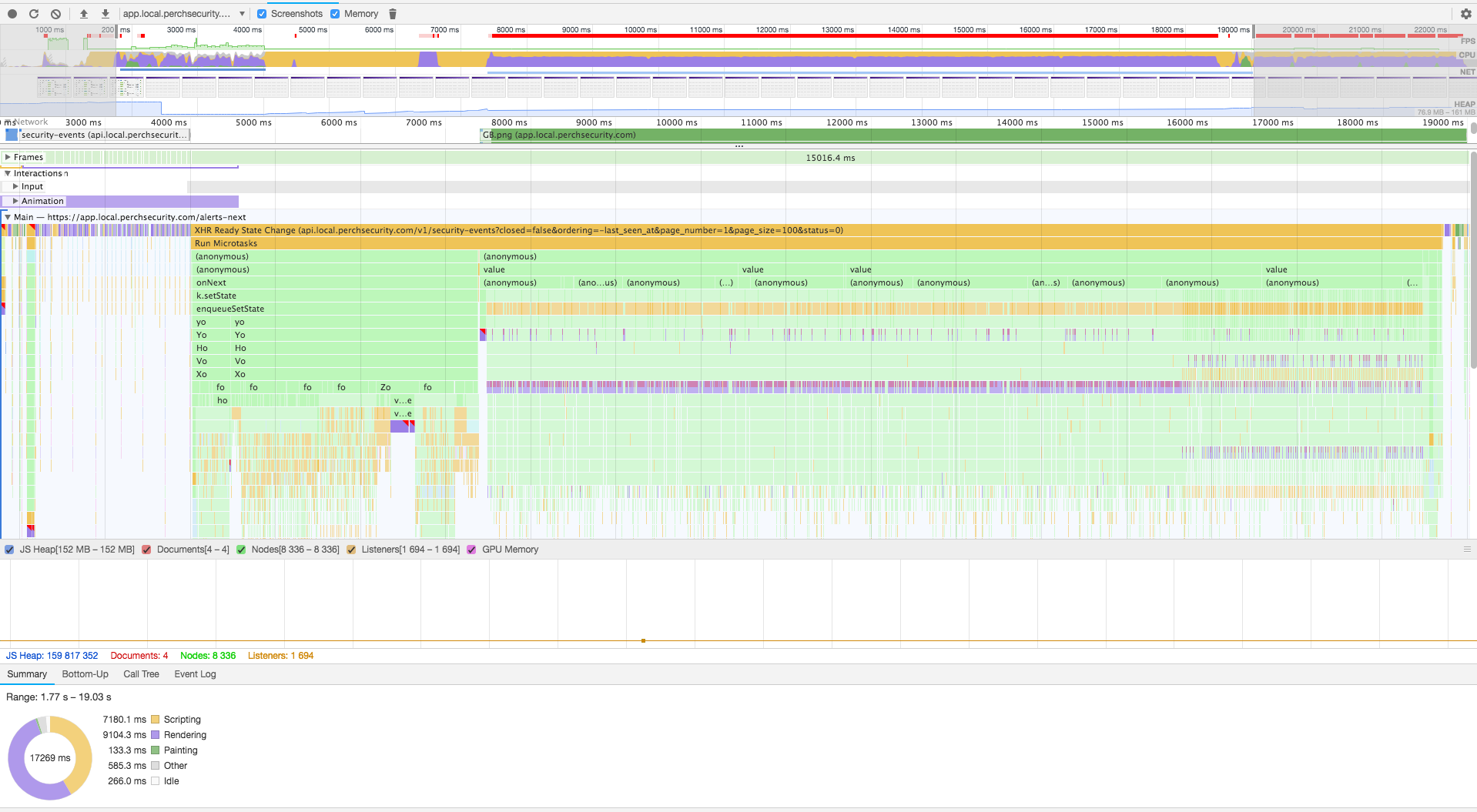
I work on a project utilizing Material-UI's Tooltip. We have a table whose rows can contain 10-20 tooltips each. Once the total number of tooltips goes over ~100, render times become perceptibly slow — coming to a near halt once there are hundreds or thousands. Profiling revealed what appeared to be death by a thousand cuts originating with Popper.js — whenever react-popper's Tooltip got mounted, 1-5ms was spent positioning the tooltip. Along with React's housekeeping (which is more pronounced in dev, of course), this contributed to a ~15000ms render time.
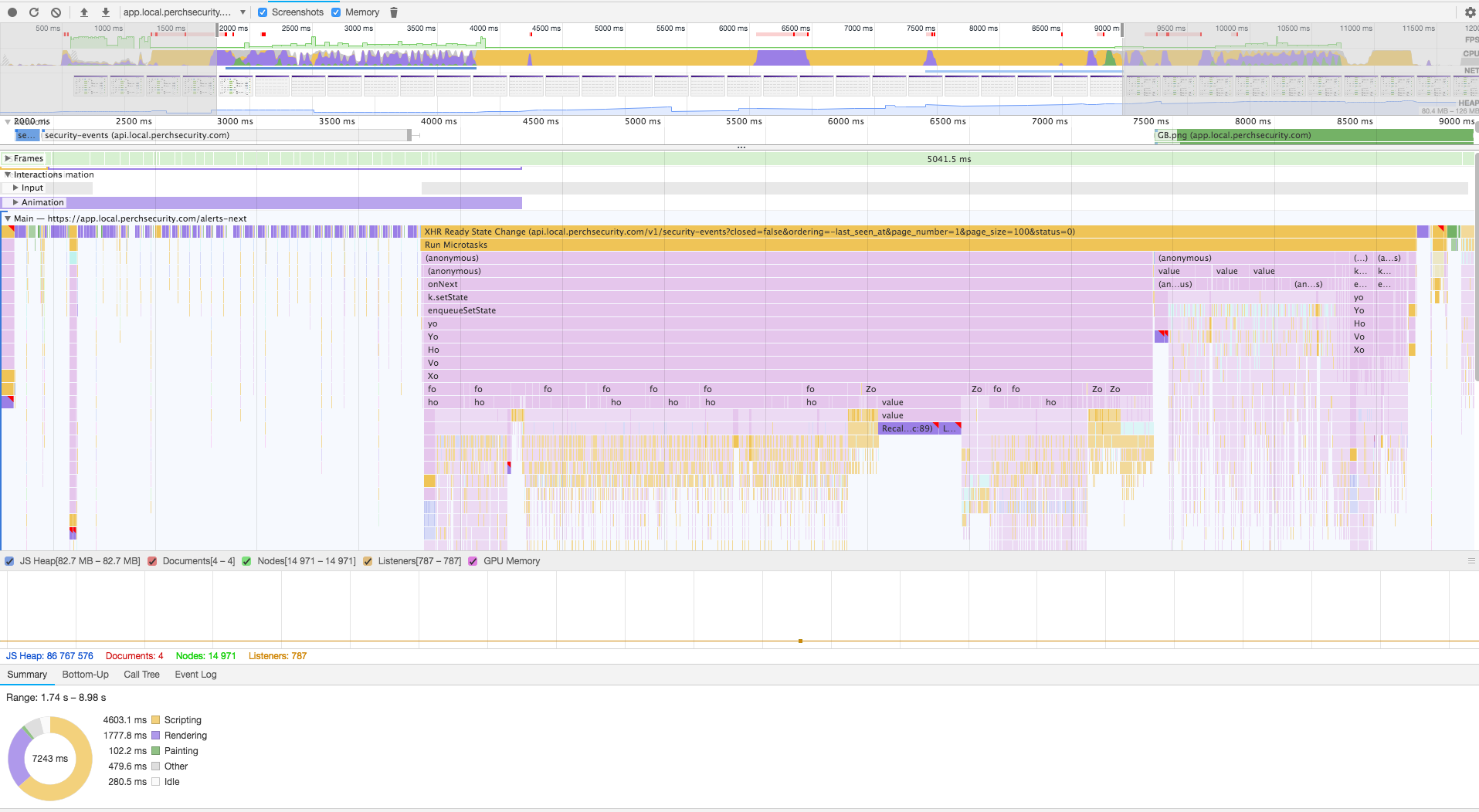
I came across Wilson Page's _Preventing layout thrashing_ while researching, and with a "_fuck it, let's see what happens_" attitude, I had a go introducing fastdom to popper.js. Mainly, runModifiers was made async (with Promises), and the preventOverflow modifier was updated to batch DOM reads and writes.
Before
The request ends around 4000ms, and completes rendering around 19000ms.
Frame duration: _15016ms_
After
The request ends around 3700ms, and completes rendering around 8700ms.
Frame duration: _5041ms_
I was gonna clean up the code and have a go at a PR. Then I saw the voluminous tests and realized it might be more effort than I'm willing to throw away if it's unwanted, or duplicated.
Is there any desire to make _more_ things async, with the intention of batching DOM reads and writes, so's us nincompoops shoving thousands of Tooltips onto one screen can continue our buffoonery?
 theY4Kman
on 21 Aug 2018
theY4Kman
on 21 Aug 2018
@theY4Kman have you tried deferring the creation of the popper instance until it's needed (when hovered over)?
atomiks
on 21 Aug 2018
Yeah, I tried out the new React context business, which made it really easy to "opt-in" to rendering the tooltips only after first hover. Scrolling through the table was pretty laggy. I suppose it could be debounced and made more manageable — guess I don't know till I try. Tuning around reflows for performance strikes me as ugly... but then, I'm half-man, half-ugly, so whose that conscience sticking on the sole of my shoe?
theY4Kman
on 21 Aug 2018
Maybe you have the event listeners enabled for every single tooltip even when they are hidden, which is performing DOM calcs on each scroll event. They should be enabled only when the tooltip is visible
atomiks
on 21 Aug 2018
Oh, I was unclear: I organized it so once a _row_ was hovered over, all its 10-20 tooltips would be positioned. Scrolling itself wasn't inherently slow, but having the mouse over the rows while scrolling through _was_ slow — at least the first time. I'm not sure why I wouldn't try making each tooltip position itself on hover, instead of 10-20 at a time... which leads me to believe either A) I tried it and something was ugly, then forgot about it, or B) I'm an idiot. Either way, I'm giving it a go now. We'll see what happens.
theY4Kman
on 21 Aug 2018
Ah, right — it was because the Hover context provider needed a DOM node to attach event listeners to, and finding a DOM node ref for a mixed bag of pure, regular, and HTML components was a crapshoot.
theY4Kman
on 21 Aug 2018
Regardless, I'm gonna assume no one is working on async'ing it up. I don't presume anyone wants it, or that it has anyone's support — but I'll presume I'm not duplicating effort :P
theY4Kman
on 25 Aug 2018
Sorry for the delay @theY4Kman the work for the async API is on the v2 branch, since this would be a breaking change and can't be shipped in the current codebase.
FezVrasta
on 25 Aug 2018
No worries; I know how it goes. I'm embarrassed I didn't look there :P Cheers. Thanks for the heads-up.
theY4Kman
on 26 Aug 2018
Closing because it has been implemented in the next branch, we now have Popper#update which runs asynchronously and returns a promise, and Popper#forceUpdate which runs synchronously.
FezVrasta
on 19 Nov 2018
Related issues
 c0bra
·
5Comments
c0bra
·
5Comments
 diondiondion
·
4Comments
diondiondion
·
4Comments
 memboc
·
3Comments
memboc
·
3Comments
 nainardev
·
3Comments
nainardev
·
3Comments
 QJan84
·
4Comments
QJan84
·
4Comments