Popper-core: Tooltip Positioning Issue
Issue
When integrating with Bootstrap (if this needs to be logged with BS please let me know), I've noticed that when I set a container's min-height programmatically or statically to fill the viewport, the positioning of any tooltips within this container go off-center.
CodePen demo
https://codepen.io/davcpas1234/full/KXxYdZ/
Pre-requisites
- Requires "a" wrapper element to have
min-heightcalculated by jQuery to be equal to 100%
What is the expected behavior?
Tooltip is displayed in correct position relative to element (a button in this example)
What went wrong?
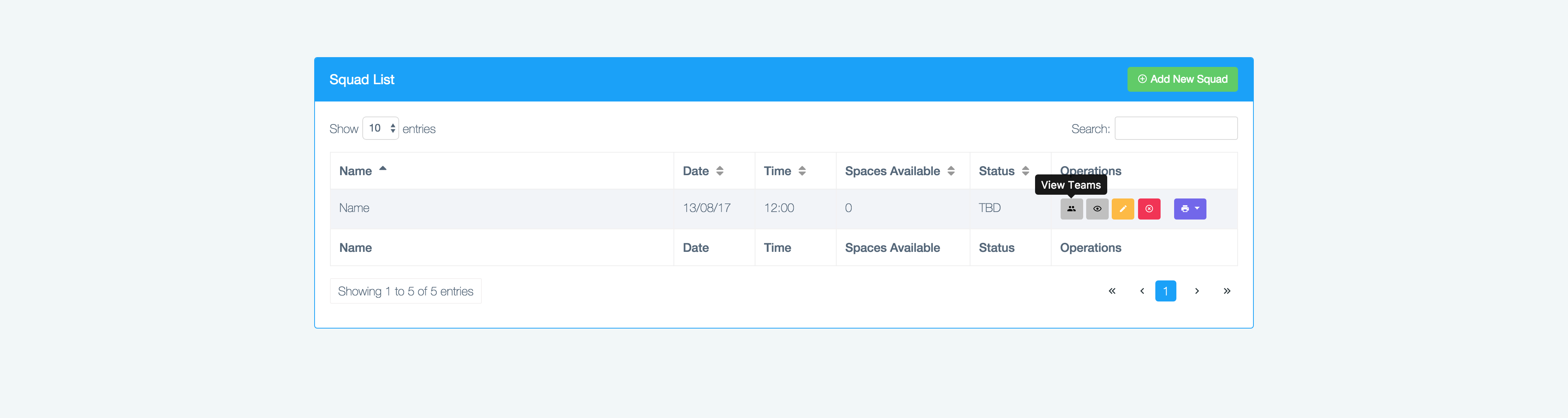
Tooltip is displayed off-center (screenshot from codepen):

Positioning resolves if resized when "displayed"

I'm suspecting that this has something to do with the scrollbar, as when the scrollbar is displayed the tooltips are displayed in the correct position:

Any other comments?
- Tested on Chrome 61.0.3163.100
- Tested on Edge
- Tested on Chrome Canary 63.0.3239.5
 davcpas1234
All 21 comments
I can't reproduce on Chrome 61
 FezVrasta
on 18 Oct 2017
FezVrasta
on 18 Oct 2017
Hi @FezVrasta, I've updated the code pen. This issue is reflected correctly. Apologies!
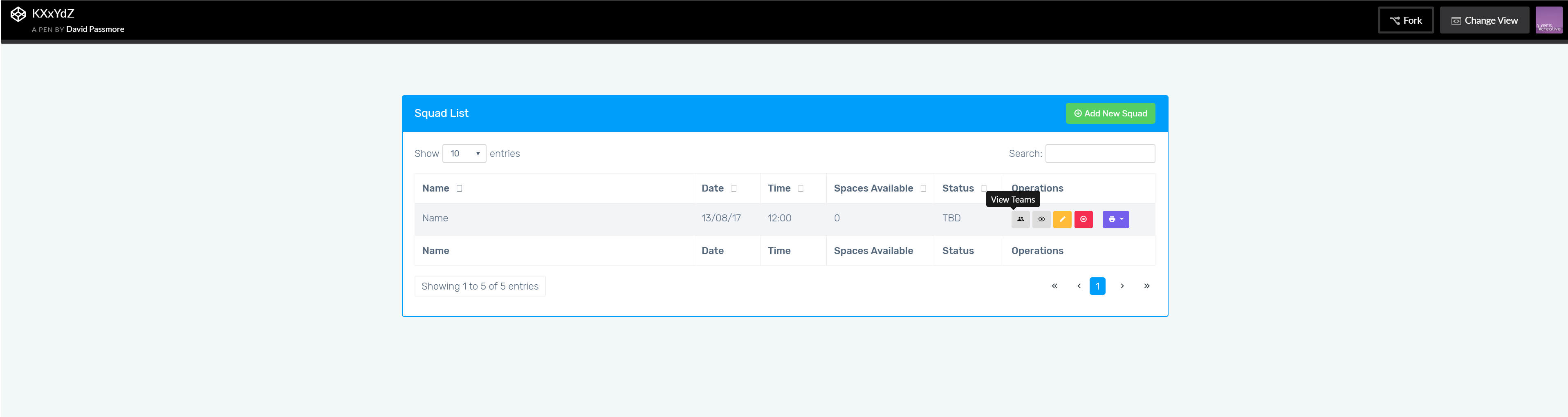
Subsequently, I've discovered that this is not dependent on resolution, as originally thought.
davcpas1234
on 24 Oct 2017
I've created an additional codepen with a workaround, for my specific example: https://codepen.io/davcpas1234/full/OxeJXN
If I programmatically force-apply a 1px overflow, the tooltips are positioned correctly:

davcpas1234
on 24 Oct 2017
Side by side:

Hopefully this helps @FezVrasta 👍
davcpas1234
on 24 Oct 2017
I am also experiencing this. The tooltip is 9 pixels to the left of the center when the scrollbar isn't present.
 ctian1
on 31 Oct 2017
ctian1
on 31 Oct 2017
I still can't reproduce it... Do I have to do something specific?
FezVrasta
on 31 Oct 2017
Hey.
I'm also experiencing this problem.
At first I was pretty confused cause the problem appeared only on the external monitor, not on my laptop’s screen. I could drag the same browser window from one to another and the behaviour of the tooltips changed. On the bigger screen tooltip is always shifted to the left – just about 17px.
So I’ve checked if it is somehow connected with the vertical scrollbar and the answer is “yes”.
When there is no scrollbar – the tooltips are shifted to the left.
This codepen shows the issue for me - but only without the scrollbar present.
https://codepen.io/davcpas1234/full/KXxYdZ/
Do you have any idea why?
 michalduda
on 16 Nov 2017
michalduda
on 16 Nov 2017
Are you on Windows?
FezVrasta
on 16 Nov 2017
Yes, Windows 10 x64.
I've tested it on Chrome 62, Firefox 56 and Edge 15.
Also tested on 3 other PCs (Windows 7 and 10, Chrome, from my colleagues at work) and the bug shows in every case.
Are there any more details that I can share?
michalduda
on 17 Nov 2017
If you could record a little clip to show me how you reproduce it and how you don't it would be awesome.
You may use https://www.cockos.com/licecap/
FezVrasta
on 17 Nov 2017
Sure, here it is:

Also, as davcpas1234 mentioned in the first post, when you resize the window when the tooltip is displayed - the position gets fixed and the tooltip is centered as it should.
michalduda
on 17 Nov 2017
This issue is potentially linked to the below:
https://github.com/twbs/bootstrap/issues/25013
https://github.com/FezVrasta/popper.js/issues/510
davcpas1234
on 1 Jan 2018
@davcpas1234 Yep, and I'm even considering using a seperate library for tooltips because of this. Really annoying. Has anyone found a quick fix for this yet?
 kjdion84
on 1 Jan 2018
kjdion84
on 1 Jan 2018
Even calling .tooltip('update') does not correct the issue.
kjdion84
on 1 Jan 2018
@FezVrasta Here is a minimal reproduction using min-height: 100vh on the container.
https://codepen.io/anon/pen/paWMeV/
Version 63.0.3239.132 (Official Build) (64-bit) on macOS 10.13.3
 danwad
on 15 Feb 2018
danwad
on 15 Feb 2018
I was seeing a similar issue and I figured out the root cause.
As was said previously, the situation arises when an element on the page has as height the entire viewport (100vh). Imagine the following DOM:
What happens is that right before the computation of the position of the popper, the popper gets position: absolute. However, since the popper appears after the page in the DOM, it will be positioned after it as well. Since the height of the page then becomes 100vh + height(popper), the scrollbar appears. This can be seen on https://codepen.io/anon/pen/zRaaLa.
So right before the position is computed, the scrollbar appears (whereas it was invisible before). As you can imagine, this messes it up and this is why the positioning is shifted just by the width of the scrollbar. After the computation is done, the popper is positioned and so the scrollbar disappears.
Solution 1 (in client): place the popper element before any element on the page that has a 100vh height.
See https://codepen.io/anon/pen/rJKKoK for why this works.
Solution 2 (in client): set top: 0 on the popper
This would force the positioning of the popper while the computation is done. After, this property would be overridden as the library sets a top property in the style attribute.
@danwad Here is a fork of your Codepen where this fix is applied: https://codepen.io/anon/pen/GQGGmV. As you can see, the tooltip is correctly centered simply by adding .tooltip { top: 0; }.
Solution 3 (in library):
Alternatively, I managed to fix it by surrounding the line https://github.com/FezVrasta/popper.js/blob/master/packages/popper/src/methods/update.js#L29 (call to getReferenceOffsets) with:
this.popper.style.top = 0;
data.offsets.reference = getReferenceOffsets(...);
this.popper.style.top = null;
This prevents the scrollbar from appearing when it matters, i.e. when computing the reference offsets. However, I'm not 100% sure that this fix won't mess up some other edge cases.
I hope this helps!
 YoranBrondsema
on 22 Feb 2018
YoranBrondsema
on 22 Feb 2018
@YoranBrondsema could we set top to 0 before this line maybe?
https://github.com/FezVrasta/popper.js/blob/master/packages/popper/src/modifiers/applyStyle.js#L52
FezVrasta
on 22 Feb 2018
@FezVrasta Yes, that would actually even be better as you would only do it once. Once the top is set, it is never reset right?
YoranBrondsema
on 22 Feb 2018
The value of top will be overridden depending by the settings used by Popper.js, if gpuAcceleration is set to false it will be replaced with the top offset of the popper, if set to true, it will stay set to 0.
Feel free to send a PR.
FezVrasta
on 22 Feb 2018
FYI, this is also happening to me when I place the element as the last element in the body, while I have the height of
and as 100%.Solution 2 (setting top in the CSS) worked great for me!
 travislaynewilson
on 22 Mar 2018
travislaynewilson
on 22 Mar 2018
Closing as dupe of #510, I think this is the only plausible solution?
FezVrasta
on 3 Apr 2018
Related issues
 Johann-S
·
3Comments
Johann-S
·
3Comments
 nainardev
·
3Comments
nainardev
·
3Comments
 rosskevin
·
6Comments
rosskevin
·
6Comments
 diondiondion
·
4Comments
diondiondion
·
4Comments
 Madhu94
·
3Comments
Madhu94
·
3Comments
Most helpful comment
I was seeing a similar issue and I figured out the root cause.
As was said previously, the situation arises when an element on the page has as height the entire viewport (
100vh). Imagine the following DOM:What happens is that right before the computation of the position of the popper, the popper gets
position: absolute. However, since the popper appears after the page in the DOM, it will be positioned after it as well. Since the height of the page then becomes100vh + height(popper), the scrollbar appears. This can be seen on https://codepen.io/anon/pen/zRaaLa.So right before the position is computed, the scrollbar appears (whereas it was invisible before). As you can imagine, this messes it up and this is why the positioning is shifted just by the width of the scrollbar. After the computation is done, the popper is positioned and so the scrollbar disappears.
Solution 1 (in client): place the popper element before any element on the page that has a
100vhheight.See https://codepen.io/anon/pen/rJKKoK for why this works.
Solution 2 (in client): set
top: 0on the popperThis would force the positioning of the popper while the computation is done. After, this property would be overridden as the library sets a
topproperty in thestyleattribute.@danwad Here is a fork of your Codepen where this fix is applied: https://codepen.io/anon/pen/GQGGmV. As you can see, the tooltip is correctly centered simply by adding
.tooltip { top: 0; }.Solution 3 (in library):
Alternatively, I managed to fix it by surrounding the line https://github.com/FezVrasta/popper.js/blob/master/packages/popper/src/methods/update.js#L29 (call to
getReferenceOffsets) with:This prevents the scrollbar from appearing when it matters, i.e. when computing the reference offsets. However, I'm not 100% sure that this fix won't mess up some other edge cases.
I hope this helps!