Popper-core: Popper position is wrong with transform: scale
Hi,
wenn I set a transform to scale in the style, positioning of the popup element is wrong. Here is a short example in CodePen:
https://codepen.io/kaflake/pen/EvNZxp
I think it use now scaled positions and sizes to calculate the popup position, but else it should use still orginal size, cause the transform value also effect on the popup
 kaflake
All 11 comments
Thanks for the bug report, there's definitely something wrong in this case.
 FezVrasta
on 4 Aug 2017
FezVrasta
on 4 Aug 2017
I think it could be because Popper wants to set the transform CSS property to position the element. If you then override the transform with a scale then old transform is no longer being applied...
But then the issue is... How do you use CSS transforms in combination with Popper? I guess it could work if put the scale on the element within the popper element?
 maxpaj
on 4 Sep 2017
maxpaj
on 4 Sep 2017
I worked around this by modifying getBoundingClientRect() function to solve for the pre-scaled value`
 var scale = rect.width / element.offsetWidth;
  var result = {
    left: Math.round(rect.left / scale),
    top: Math.round(rect.top / scale),
    width: Math.round((rect.right - rect.left) / scale),
    height: Math.round((rect.bottom - rect.top) / scale)
  };
 nomoon
on 17 May 2019
nomoon
on 17 May 2019
Cool! Would you mind to send a PR with your change?
FezVrasta
on 18 May 2019
@FezVrasta: Absolutely. I realize that scale can be different in X and Y so I should probably calculate those separately. Also, since getBoundingClientRect can return floats, I’m not entirely sure if I should round things at this point? I suspect rounding might prevent half-pixel issues for when top/left is used instead of translate.
nomoon
on 20 May 2019
Hey, wondering why this is marked as closed?
I'm having a similar issue with a library using popper under the hood (Tippy), and the CodePen example still shows the popper misplaced even though it uses the latest version of popper.
 guidupuy
on 31 Jul 2020
guidupuy
on 31 Jul 2020
I must have referenced the wrong issue ID.
FezVrasta
on 31 Jul 2020
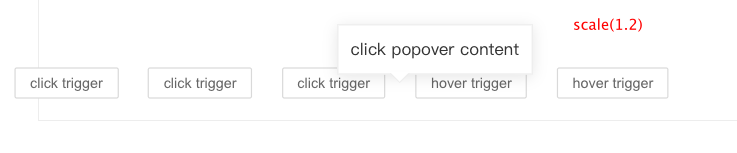
Hey, Is there have any good solution now?
when I use scale...

 Devil-Cong
on 6 Aug 2020
Devil-Cong
on 6 Aug 2020
Just ran into this issue. I think @maxpaj is right. Setting any transform style is overridden by popper to set the translate3d to position the element. In my case, the transform: scale is being used in a CSS animation from scale(0.8) to scale(1) for a little pop effect. So, I don't think I can even do something in a modifier to fix this issue.
Interesting that this is essentially a problem because transform is pretty overloaded in CSS.
If anyone has a good solution to this problem, I'll be happy to create a PR. The solution would have to work with animations, since I think animating popups would be a somewhat common use-case.
Maybe the best solution is to not use transform: translate3d and instead use some other positioning method?
 rakeshpai
on 20 Nov 2020
rakeshpai
on 20 Nov 2020
A decided this issue for my project, i'm creating modifier with beforeRead phase and applying patch for state.rects.reference.
patchScaleFactor.ts
import { Modifier } from '@popperjs/core'
import getLayoutRect from '@popperjs/core/lib/dom-utils/getLayoutRect'

export const patchScaleFactor: Modifier<'patchScaleFactor', {}> = {
  enabled: true,
  name: 'patchScaleFactor',
  phase: 'beforeRead',
  requires: ['popperOffsets'],
  fn: ({ state }) => {
    if (state.elements.reference instanceof HTMLElement) {
      state.rects.reference = getLayoutRect(state.elements.reference)
    }
  },
}
Demo with modifier for CodeSandbox (You can remove modifier and see how it will be without it)
 yarastqt
on 18 Dec 2020
yarastqt
on 18 Dec 2020
Just ran into this issue. I think @maxpaj is right. Setting any
transformstyle is overridden by popper to set thetranslate3dto position the element. In my case, thetransform: scaleis being used in a CSS animationfromscale(0.8)toscale(1)for a little pop effect. So, I don't think I can even do something in a modifier to fix this issue.Interesting that this is essentially a problem because
transformis pretty overloaded in CSS.If anyone has a good solution to this problem, I'll be happy to create a PR. The solution would have to work with animations, since I think animating popups would be a somewhat common use-case.
Maybe the best solution is to not use
transform: translate3dand instead use some other positioning method?
you can disable gpuAcceleration to prevent this behavior:
      var options = {
        modifiers: [{
          name: 'computeStyles',
          options: {
            gpuAcceleration: false // true by default
          }
        }]
      };
 allex
on 8 Jan 2021
allex
on 8 Jan 2021
Related issues
 diondiondion
·
4Comments
diondiondion
·
4Comments
 kerf007
·
3Comments
kerf007
·
3Comments
 nainardev
·
3Comments
nainardev
·
3Comments
 c0bra
·
5Comments
c0bra
·
5Comments
 Madhu94
·
3Comments
Madhu94
·
3Comments
Most helpful comment
Hey, Is there have any good solution now?


when I use scale...