Popper-core: Doesn't work inside tables
CodePen demo
https://codepen.io/anon/pen/RVeQyL
Steps to reproduce the problem
- Put reference element inside of a table
- Initialize Popper.js on it
What is the expected behavior?
Popper should show up next to reference element.
What went wrong?
Popper shows up in wrong location, or if page is scrolled, sometimes it gets hidden.
 franciscolourenco
All 20 comments
EDIT: I've reproduced with popper only and switched the jsbin to codepen.
franciscolourenco
on 19 May 2017
Umh that's unexpected 🤔
 FezVrasta
on 19 May 2017
FezVrasta
on 19 May 2017
@FezVrasta any clue on why this happens?
franciscolourenco
on 19 May 2017
Nope, sorry but I'm not at home these days so I'm not able to investigate.
FezVrasta
on 19 May 2017
Updated the codepen to make it more clear
franciscolourenco
on 30 Jun 2017
I'm seeing the issue as popper.offsetParent returning a grandparent with position: relative, instead of the <td> container element, and am able to work around it by setting position: relative on the <td> directly.
 mponizil
on 20 Jul 2017
mponizil
on 20 Jul 2017
@mponizil that only works partially, because the popper width will be calculated based on the width of the td, and so will be constrained if you have a lot of text and want the popper width to adjust automatically.
franciscolourenco
on 20 Jul 2017
@aristidesfl hah, indeed I realized that just after posting!
mponizil
on 20 Jul 2017
Best workaround I've found so far:
new Tooltip({
      container: document.body,
      boundariesElement: document.body
})
The problem is this:

https://developer.mozilla.org/en-US/docs/Web/API/HTMLElement/offsetParent
I guess I'll have to create a custom offsetParent implementation to get rid of this quirkiness..
FezVrasta
on 23 Jul 2017
You all guys, please review #363 and let me know if it fixes your problems.
FezVrasta
on 23 Jul 2017
released as 1.11.0
FezVrasta
on 26 Jul 2017
Not sure if it is a big thing to fix, but the fix in #276 doesn't work for <th> elements.
 razzmatazz
on 29 Jan 2018
razzmatazz
on 29 Jan 2018
I can verify also that this doesn't work in <th> elements. I worked around it by changing my <th> elements to <td> elements, but that does hurt my brain a bit.
 rufusroflpunch
on 23 Feb 2018
rufusroflpunch
on 23 Feb 2018
Agreed, this doesn't work inside <th>. Reopen!
 hally9k
on 25 Apr 2018
hally9k
on 25 Apr 2018
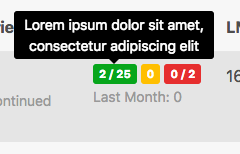
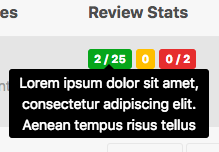
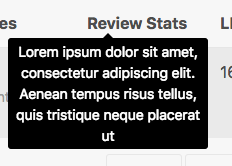
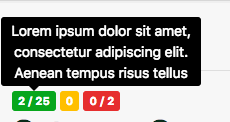
I have an issue with tables too. Small tooltips are correctly-positioned, but once they are a bit tall, they get mispositioned. The target is inside a TD.
Small tooltip (correct)
Big tooltip (incorrect)
Outside of the table (correct)
 eliseumds
on 1 Jun 2018
eliseumds
on 1 Jun 2018
Workaround that works for now:
<div class="table-responsive" style="margin:-200px 0;">
    <table class="table" style="padding:-200px 0;">
        <!-- popovers and tooltips inside will now work -->
    </table>
</div>
Works if container is outside of .table-responsive
 simbunch
on 5 Jun 2018
simbunch
on 5 Jun 2018
We still have an issue with popover inside table wrapped in a Bootstrap table-responsive container.
Example KO - table with
table-responsive: https://codepen.io/anon/pen/xabVxp or https://codepen.io/anon/pen/oPgLOz
As you can see, the position of the popover is quite odd / unusual and in some cases the popover isn't fully visible.- Example OK - table without
table-responsive: https://codepen.io/anon/pen/zJxBBe
Here everything work fine and the popover is fully visible.
- Example OK - table without
I think it may be related to this issue.
 florianlacreuse
on 21 Aug 2018
florianlacreuse
on 21 Aug 2018
Update: my issue seems more related to issue #611.
florianlacreuse
on 25 Oct 2018
These issues should be fixed in v2, I don't have any codepen to test it (since the recent examples rely on Bootstrap), but similar table-related issues are fixed so I'm pretty confident.
FezVrasta
on 16 Dec 2019
Related issues
 tyrw
·
4Comments
tyrw
·
4Comments
 skitterm
·
5Comments
skitterm
·
5Comments
 Madhu94
·
3Comments
FezVrasta
·
3Comments
Madhu94
·
3Comments
FezVrasta
·
3Comments
 cixonline
·
5Comments
cixonline
·
5Comments
Most helpful comment
I can verify also that this doesn't work in
<th>elements. I worked around it by changing my<th>elements to<td>elements, but that does hurt my brain a bit.