Popcorn-desktop: Build 443 "marked as seen" data is gone
Operating System Version:
Windows 10 build 2004
Popcorn Time Version:
dev build 443
Download date:
today (27-11-2020)
Expected Behaviour
After updating all settings, favourites and watched movie/series marked as seen (#1858)
Actual Behaviour
it takes the settings and favourites but doesn't add the "marked as seen" movies/series
Steps to reproduce the behaviour
- download dev build 443
- install
- open PCT to see all "marked as seen" are gone
 dutchy1001
All 13 comments
Hmm cant reproduce. Can you try marking some more items then reinstalling 443 on top again?
Also maybe disconnect trakttv while you do this in case its related.
If you check #1858 all it does is copy everything inside \User Data\Default\data\ in a temp dir before it clears the install dir then copies them back. I dont see why it would be ok for the rest but leave watched.db out.
 kiriles90
on 28 Nov 2020
kiriles90
on 28 Nov 2020
Can't reproduce it either now.
I did re-connect track.tv yesterday and solved some errors what was showing in console. Maybe it was linked
( PS:
see #1863 the last 3 errors still come up when force sync with track.tv )
Closing for now unless someone else can reproduce it.
dutchy1001
on 28 Nov 2020
Yeah saw them. Trakttv integration and the watchlist are a bit of a mess to be honest. None has had a chance to have a look at them for a long time afaik. Its something that should be checked at some point.
kiriles90
on 28 Nov 2020
After opening today PCT again all "watched" movies/series have been reset. Opened it a few times to see if it was a glitch not reading the "watched db" but with no success.
Manual checking the "watched db" and the file is empty. (I have a backup, Pheww)
All my series in the favourite are present but it has cleared the "seen" icon, this is also the case in the movie tab.
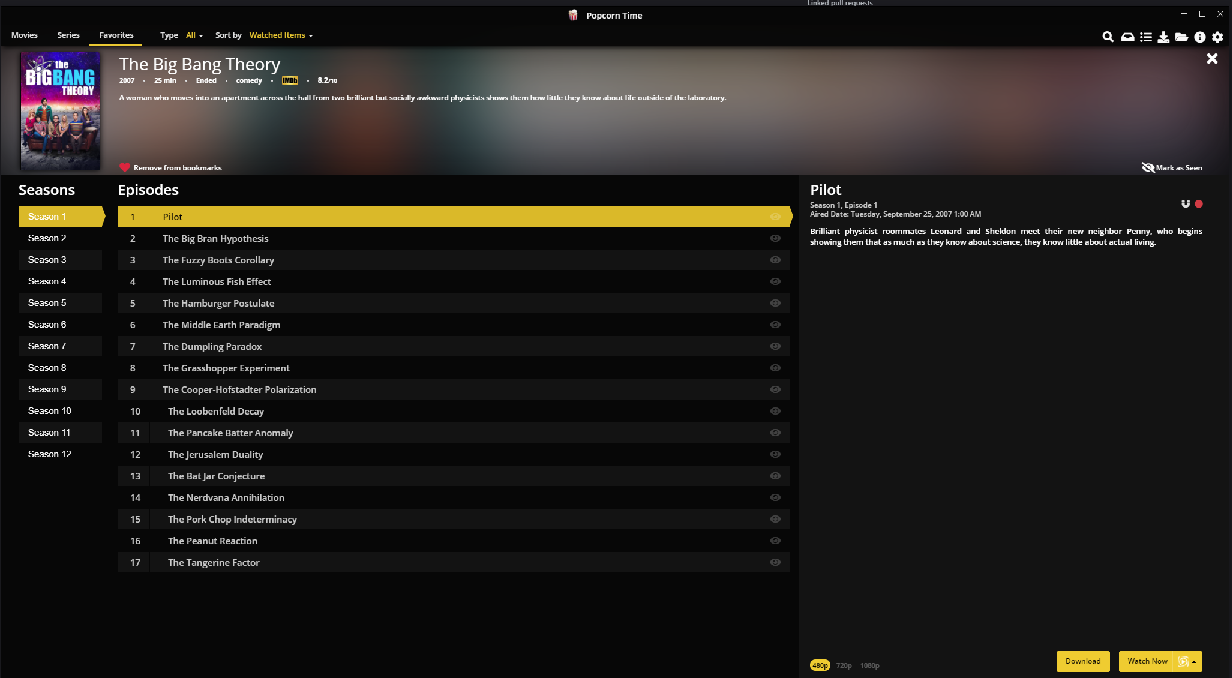
1 Example from the favourite folder that I 100% have watched.
dutchy1001
on 28 Nov 2020
So its not the installer whatever it is. I suspect trakttv to be honest but havent looked at it more because I wasnt able to reproduce it. That and/or something corrupts your watched.db and PCT keeps clearing it.
kiriles90
on 28 Nov 2020
Looks like it need some time before it "clears" the "watched" db.
I will leave PCT till tomorrow and see if it deletes it again then.
I will do the same again then with Track.tv disabled
dutchy1001
on 28 Nov 2020
Not sure why this happened 2 times now but can't reproduce it again. I did made a new backup and compared them.
Differance can be seen here:
https://www.diffchecker.com/TRqKuLU4
Deleted lines on left side are added to the bottom of the right side.
Left is from before build 442, right side is made with build 443 (strait after install)
dutchy1001
on 29 Nov 2020
Updated to build 444 with no loss of "seen" movie's or series.
closing this now. If issue occurs again we'll see to reopen or make a new post.
dutchy1001
on 3 Dec 2020
:+1:
Get 445 btw, 444 is a bit broken.
kiriles90
on 3 Dec 2020
I had the same problem several time with different versions (on Mac) over the last months.
Had it again today.
PS: Can I see the build version somewhere?
 ppo
on 30 Dec 2020
ppo
on 30 Dec 2020
To find the build number is indeed a bit confusing.
Open PCT and click on the info tab, the _i_ right top corner
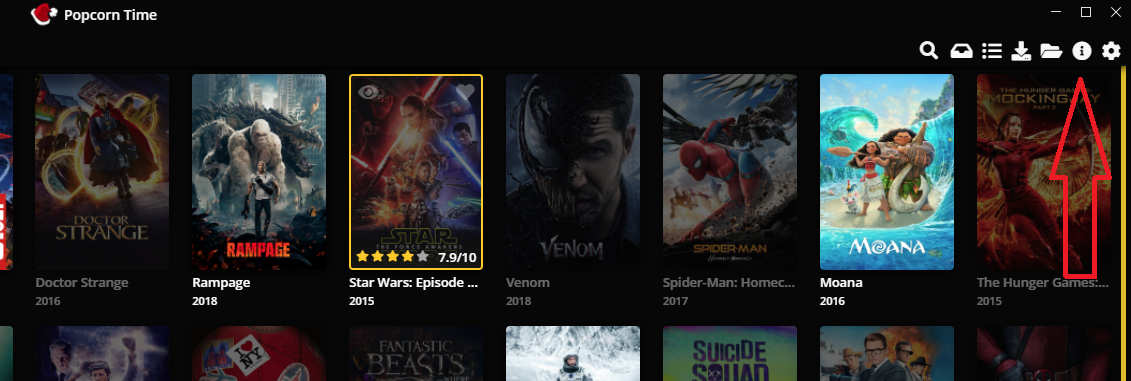
When on this page you can see on the right bottom corner:
0.4.4 "Love in the Time of Corona" Beta - HEAD (xxxxxxx)

The xx will be the same first 8 digits on the download page were it says Revision:.
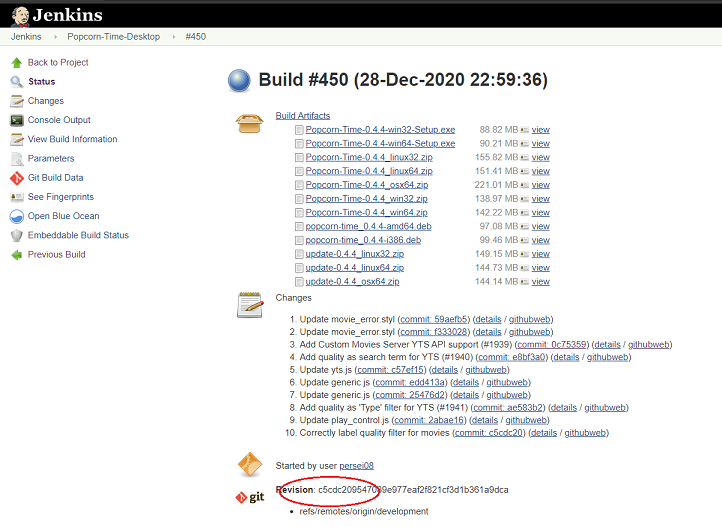
This is the only way to verify what (dev)build your using
dutchy1001
on 30 Dec 2020
Thanks @dutchy1001 but I don't have the - HEAD (…) part (I just installed the build 450, osx64).

ppo
on 30 Dec 2020
I use a windows 10 pc, not sure it should be any different on a mac
dutchy1001
on 30 Dec 2020
Related issues
 benjavalero
·
4Comments
benjavalero
·
4Comments
 kumavis
·
5Comments
kumavis
·
5Comments
 allan-andrade
·
3Comments
allan-andrade
·
3Comments
 lucasdcrk
·
3Comments
lucasdcrk
·
3Comments
 rohinarora
·
4Comments
rohinarora
·
4Comments