Popcorn-desktop: Auto-translated subtitles
Sometimes subtitles are not available in my desired language or are too bad and I don't find other ones to load in the app. So I end up translating the subtitles in the original language.
To do that, I must find them online, try them in the app to be sure they're good and well synchronized, upload them on a subtitles auto-translate site, download the file, load it in the app.
It would be great if the app could do these steps for me. Or at least allow me to save the subtitles from PCT.
Proposal: Add a link "auto-translate" (in the subtitles dropdown/modal).
When clicking on it, ask to select an available subtitles file.
Then ask for the target language.
If connected to OpenSubtitles, maybe also ask when stopping the movie if the subtitles were perfect (or good enough?) to upload them. And maybe even, if they're not correct, ask if we want to fix them. Whether we want to be asked that could be added in the settings. (BTW, I don't understand the "Automatic Subtitle Uploading". I didn't find your documentation and Google found nothing. Is it when I load custom subtitles?)
 ppo
ppo
All 6 comments
@ppo I don't want to sound rude but it's important to respect the issue/feature request templates. We spend time reading the reports and we ask the peoples to take few extra seconds to follow the templates so it make thing easier to read and to understand.
I hope you understand.
Now about your request, I don't think machine translated subtitles are good enough... but maybe you can show me i'm wrong.
What is the site you use to translate you subs ?
Now, actually subtitles are requested to opensubtitles. People can always upload them there to appear in PCT results.
Also I think opensubtitles community isn't too much fan of machine translated subtitles because they're often bad translation.
For the "automatic subtitle upload" it's when you add subtitles by choosing "Custom..." ... I 'm not 100% sure but I think it isn't uploading as soon as you add them but after some time or maybe around the end of the movie.
Also there isn't documentation for everything. sometimes it's even outdated.
 Persei08
on 7 Nov 2020
Persei08
on 7 Nov 2020
I doubt that they will implement this to PCT as subs are taken from 3rd party site.
There is an easy way to save the subs (and any movie/serie) that PCT downloads.
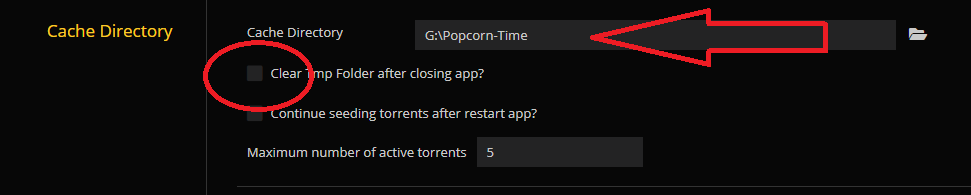
I have changed my "Cache Directory" location for easy access and turned " Clear Tmp Folder after closing app?" off (there by default in the AppData folder). This way all movies/series you watch will be kept on your pc and have to be deleted manual. You can pause watching the movie/serie after a few seconds, translate the subs and resume watching (this works best with an external player as you can choose your own subs in most of them).
As it doesn't delete on closing the PCT app you can then use the sub file for your translation.
 dutchy1001
on 7 Nov 2020
dutchy1001
on 7 Nov 2020
I don't think machine translated subtitles are good enough...
I'm with this tbh. They are never even remotely good enough to be worth implementing. Even for 5 minute youtube videos they are a mess and more of a distraction than helpful in 99% of the cases. Maybe someday..
Btw, for access to the subtitles Popcorn Time automatically downloads, just enable the 'Cache folder button' in the settings. It will add a button in your filterbar that when you click opens the cache directory (wherever that may be, or just change the location to somewhere easier to get to like @dutchy1001 said). Then just pause the native or external player you're using, do what you want with the subtitles, load the edited file again via 'custom..' and resume playback.
 kiriles90
on 7 Nov 2020
kiriles90
on 7 Nov 2020
I used a few times https://translate-subtitles.com/ to translate English to French.
The translation is far from being perfect, but good enough to understand… which is better than not understanding at all 😉
This is to be seen as a last resort option, and I know it so I still listen to the original words and I auto-correct some parts in the subtitles. _(I basically understand everything in English so it's just for some words I don't know, or it helps when I'm too tired/brain-dead 😉)_
This request is to not have to do all the configuration and the manual work. For advanced user it shouldn't be a real problem but for others it may be very difficult.
But you decide what to include or not, I just propose 😉
PS: @Persei08 Sorry for the format, I didn't think it was that important. But thank you for explaining me that.
ppo
on 26 Nov 2020
I don't know how you watch a movie or series with PCT but if you use an external player from SMPlayer you have an option to download extra subs.
I have explained this in this post here (with pictures 😉)
This might be an other option you can try and see if there is a better translated version available for you.
dutchy1001
on 26 Nov 2020
Thanks @dutchy1001 but as I said, auto-translation is the last resort, when I don't find any available, of course 😉
ppo
on 27 Nov 2020
Related issues
 sorin-costea
·
3Comments
sorin-costea
·
3Comments
 Villelmo
·
4Comments
Villelmo
·
4Comments
 kumavis
·
5Comments
kumavis
·
5Comments
 LuMagalhaes
·
4Comments
LuMagalhaes
·
4Comments
 vanhelsing2042
·
4Comments
vanhelsing2042
·
4Comments
Most helpful comment
@ppo I don't want to sound rude but it's important to respect the issue/feature request templates. We spend time reading the reports and we ask the peoples to take few extra seconds to follow the templates so it make thing easier to read and to understand.
I hope you understand.
Now about your request, I don't think machine translated subtitles are good enough... but maybe you can show me i'm wrong.
What is the site you use to translate you subs ?
Now, actually subtitles are requested to opensubtitles. People can always upload them there to appear in PCT results.
Also I think opensubtitles community isn't too much fan of machine translated subtitles because they're often bad translation.
For the "automatic subtitle upload" it's when you add subtitles by choosing "Custom..." ... I 'm not 100% sure but I think it isn't uploading as soon as you add them but after some time or maybe around the end of the movie.
Also there isn't documentation for everything. sometimes it's even outdated.