Popcorn-desktop: Latest Dev build deletes everything in a Directory
The new dev build is deleting everything in my D drive, windows 10 x64, and I had to force close the PT installer using task manager so it doesn't erase my whole drive, what is this new drastic issue now??
It's so unexpected, it got rid of almost 5 GB worth of files before I closed it using task manager.
I downloaded the latest build 427 from ci site, and did a fresh install, I uninstalled the older version, and started to install 407, but it did this, I use the D drive path always, not the first time.
A possible "workaround" is to Choose the Popcorn-Time folder (if it already exists) for the installation
OR
We have to create a new folder named Popcorn-Time wherever you want to install PT.
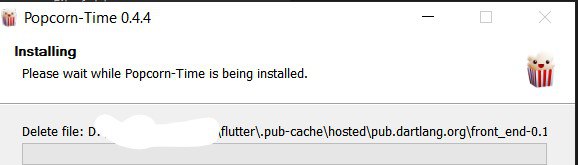
_Originally posted by @abh-oss01 in https://github.com/popcorn-official/popcorn-desktop/issues/1567#issuecomment-664772450_
 abh-oss01
All 17 comments
I downloaded the latest build 407 from ci site
I presume you mean build 427
As build 427 has only a tiny code change it could be started in build 426.
I do not have a separate drive to test/confirm this on ATM but will try to find an old desktop pc to try this.
 dutchy1001
on 28 Jul 2020
dutchy1001
on 28 Jul 2020
Yes, it's 427, a proofing error, I'll try reproducing it, and send a video.
abh-oss01
on 28 Jul 2020
I have tried to reproduce it on a spare pc but what I do it won't delete any other file then the PCT folder.
I installed build 426 upto build 428 both 32 and 64 bit, but nothing gets deleted then the files from the PCT folder.
I have let the installer create the folder to install PCT and updated without that version to the same folder.
I will try some more...
I've updated my main pc now to build 428 with no hassle (besides database import always going wrong)
dutchy1001
on 28 Jul 2020
@abh-oss01 Installed 424 up to 428. Also on Windows, and with a D:\ and E:\ drive. It didn't try to delete anything. Also nothing related to the installer was changed from 424 to 428 you can inspect the changes if you want they aren't that many.
Something else is the issue here. Try to replicate it if you can and post more info (secure your files ofc first)
EDIT:
I use the D drive path always, not the first time.
Wait so you just throw Popcorn Time's installation in D:\?? no subfolder (e.g D:\Popcorn-Time) no nothing? Why? If yes then that's why it tried to delete everything in what it though it was its own install directory even though its the drive's base.. Older versionsbuilds will do the same.
 kiriles90
on 28 Jul 2020
kiriles90
on 28 Jul 2020
I know you won't be able to reproduce this, there is a thing you must do:
Delete the Popcorn-Time folder, as in when someone is installing PT the very first time, when PT makes the folder itself.
But for the reproduction of this bug, you must change the default directory "out" of Popcorn-Time folder, it must be something else, just not Popcorn-Time.
I can't explain it this way, it's quite hard for me, like I said, I will _try_ sending a video soon.
There's just one thing you gotta do, the install folder must not be Popcorn-Time,
Here's what I did today:
For example, the default path PT chose is in C drive, but I always change it to D and it never has had any such issues until today.
Since I wanted to make a fresh installation, I uninstalled the 426 build, and downloaded build 427 from CI site, and started the installation, and as always selected the D drive path, where the previous build had always been (I had chosen to delete caches and databases too, for a fully fresh installation).
But I just .... chose the directory with one slight change, I chose D/Mystuff/
which means PT did not get a chance to create the Popcorn-Time folder which it does if it's installed in C drive users (that is, if the install path option is not touched while installing.
So, in my D/Mystuff there is literally everything on the drive, it's literally the whole drive, I have about 400 GB data here, and remember, there isn't a Popcorn-Time folder here.... the install path is D/Mystuff
and then I click OK, and what followed after costed me 5 GBs of irrecoverable data loss, which could have been more if I had not force stopped the installation using the task manager :)
abh-oss01
on 28 Jul 2020
@abh-oss01 I understand. But that's not the installer's error. Its a bit.. user error :) VLC's installer e.g will do the same in many updates, clear its install dir, if that install dir is the base of your D:\ drive, or D:\My stuff it will clear that.
Why not just install Popcorn Time in D:\My Stuff\Popcorn-Time like it was ment to (programs like their own install directories) and not fear this happening again? Like I said it could have happened with a number of other installers/apps.
As for Popcorn Time.. none changed any code related to the installer. It could have happened with previous versions too. Try it but secure your files first.
kiriles90
on 28 Jul 2020
It literally just went "Deleting D/Mystuff/flutter........ “
and just like that, it permanently deleted the WHOLE flutter folder, about 3.5 GB and about 1.2 GB data from some game folder, which has made the game unplayable now.
What I mean to say is, there does exist some serious bug, very serious one, and it's a Dev build, hence it must be isolated and fixed asap, before (if) this build is released as stable for thousands of unsuspecting people, and I considered this a humble duty from my side, to report this bug to the team as soon as I encountered it.
Hope this helps, and like I said earlier, I will try reproducing it again, and make a screen record too, and post here.
abh-oss01
on 28 Jul 2020
If yes then thats why it tried to delete everything in what it though it was its own install directory even though its D drive's base.. Older versionsbuilds will do the same.
Yes I always do that, nothing really new, but I mostly just update, and not do uninstall and reinstall, like this time.
Also, why must it delete anything which exists in the folder anyway? It must not even touch anything else, right?
Can it be made to not touch anything if Popcorn-Time doesn't exist??
I mean, I assumed the installer create the Popcorn-Time folder itself, why didn't it?
It's expected to, if it doesn't exist.
Why should it touch something which is not of it's concern at all??
abh-oss01
on 28 Jul 2020
The default installation path when you run the installer is C:\Users\[username]\AppData\Local\Popcorn-Time
You went and manually edited that to D:\My stuff what did you expect would happen..
It wanted to create a \Popcorn Time subdir, but you told it not to. Or else your path should have been D:\My stuff\Popcorn-Time
Why should it touch something which is not of it's concern at all??
The installer doesnt know that :) You told it that's its install dir. Its non-shared clearable \Popcorn-Time dir. It believed you.
P.s Sorry if I'm sounding like I'm trying to add insult to injury, I'm not. Just explaining what happened and why..
kiriles90
on 28 Jul 2020
Hense the reason I could not reproduce this as I never install a program in a general location but always in a folder on it's own (this also then keeps clarity in your folders) .
I'm not sure if the installer can be "forced" to create a folder for install like the "cache directory" does, when you change that to D:\ or E:\ it would automatic change it to D:Popcorn-Time or E:Popcorn-Time.
I mean no matter what location you give it, the installer will add "Popcorn-Time" to it. It might be overkill but it prevent mistakes like what happend to _abh-oss01_ .
Well atleast we know now "what not to do"
dutchy1001
on 28 Jul 2020
I'm not sure if the installer can be "forced" to create a folder for install like the "cache directory" does.
Why not?
when you change that to D:\ or E:\ it would automatic change it to D:Popcorn-Time or E:Popcorn-Time.
It didn't.
I mean no matter what location you give it, the installer will add "Popcorn-Time" to it.
It didn't do it.
abh-oss01
on 29 Jul 2020
Its non-shared clearable
\Popcorn-Timedir. It believed you.
Why is it clearable for the installer? It shouldn't be clearable at all, right?
P.s Sorry if I'm sounding like I'm trying to add insult to injury, I'm not. Just explaining what happened and why..
Oh I know, it's fine.
abh-oss01
on 29 Jul 2020
Why is it clearable for the installer? It shouldn't be clearable at all, right?
Why not? Many apps clean out their install dirs before installing (in all versions or specific ones) to avoid conflicts with older files, remove any old files no longer needed and save disk space or to clear out old cache/temp files to start the new installation fresh (we're not talking about a couple of files either, many times e.g in Popcorn Time's case is tens of thousands, you might know to e.g uninstall 0.3.10 before installing 0.4.4, John might not. At best that's 20k useless files, worst case they create conflicts)
Other installers might not delete stuff but do other things e.g drop a couple of thousand random files and folders in your D:\My Stuff base dir and create a huge mess.. (that's what Popcorn Time would have done too once it finished deleting your files.. :)
Anyway to avoid this happening again since from what I understand you install many things in a custom dir, and since you cant rely on if whatever random installer has a safeguard in place against this specific situation that is a bit of a user error (e.g Popcorn Time's didn't) pay attention to the default path before you modify it. If it has a \Popcorn-Time or a \Videolan or \Google Chrome or whatever at the end just make sure you add it in the end of your custom path too before you click install because it means the installer wont do it for you behind the scenes. (if that was the case then it wouldn't show up in the default path either, and very few installers are like that, most show&require the full path to avoid confusion, like Popcorn Time's)
kiriles90
on 29 Jul 2020
I'm not sure if the installer can be "forced" to create a folder for install like the "cache directory" does.
Why not?
I can't answer that as I don't do coding
when you change that to D:\ or E:\ it would automatic change it to D:Popcorn-Time or E:Popcorn-Time.
It didn't.
When I click on the "cache directory" in settings a "windows explorer" pops up, I only select, on the left side, 1 of my drives (then click "Select Folder") and it automatic adds then "Popcorn-Time" for me (this happens on all windows machines I install PCT on).
I mean no matter what location you give it, the installer will add "Popcorn-Time" to it.
It didn't do it.
This is a sugestion to be implemented in a later version if possible to avoid the issue you had.
dutchy1001
on 29 Jul 2020
@Persei08 close since its not an actual issue?
kiriles90
on 26 Sep 2020
@Persei08 there's a suggestion in this. The last comment from @dutchy1001
abh-oss01
on 27 Sep 2020
hmm.. I reopen, I think it could be the bug I mention in #1712
 Persei08
on 2 Oct 2020
Persei08
on 2 Oct 2020
Related issues
 123Olairy
·
3Comments
123Olairy
·
3Comments
 allan-andrade
·
3Comments
allan-andrade
·
3Comments
 msamyelsheikh
·
4Comments
msamyelsheikh
·
4Comments
 kumavis
·
5Comments
kumavis
·
5Comments
 LuMagalhaes
·
4Comments
LuMagalhaes
·
4Comments
Most helpful comment
Why not? Many apps clean out their install dirs before installing (in all versions or specific ones) to avoid conflicts with older files, remove any old files no longer needed and save disk space or to clear out old cache/temp files to start the new installation fresh (we're not talking about a couple of files either, many times e.g in Popcorn Time's case is tens of thousands, you might know to e.g uninstall 0.3.10 before installing 0.4.4, John might not. At best that's 20k useless files, worst case they create conflicts)
Other installers might not delete stuff but do other things e.g drop a couple of thousand random files and folders in your
D:\My Stuffbase dir and create a huge mess.. (that's what Popcorn Time would have done too once it finished deleting your files.. :)Anyway to avoid this happening again since from what I understand you install many things in a custom dir, and since you cant rely on if whatever random installer has a safeguard in place against this specific situation that is a bit of a user error (e.g Popcorn Time's didn't) pay attention to the default path before you modify it. If it has a
\Popcorn-Timeor a\Videolanor\Google Chromeor whatever at the end just make sure you add it in the end of your custom path too before you click install because it means the installer wont do it for you behind the scenes. (if that was the case then it wouldn't show up in the default path either, and very few installers are like that, most show&require the full path to avoid confusion, like Popcorn Time's)