Popcorn-desktop: Watch now button don't work
Operating System Version:
Windows 10, macOS, Linux
Popcorn Time Version:
0.4.4-0
Download date:
14/04/20
Expected Behaviour
...
Until earlier this morning the app was working fine, but now it doesn't.
Actual Behaviour
...
I opened the app a few minutes ago to watch a tv series, although it is opening properly when I click "watch now" nothing happens. It feels like the button is purely cosmetic, the same thing happened yesterday with the X button. I had to close the app using the task manager, however, X is now working properly which leaves me to believe it has something to do with the app itself?
edit 25/05/2020: Adding OSes
 QuatNevas
All 32 comments
I have the same problem on same version on mac OSX
 EdenEitani
on 15 Apr 2020
EdenEitani
on 15 Apr 2020
Same problem, 0.4.4 Linux version.
 axelmeunier
on 16 Apr 2020
axelmeunier
on 16 Apr 2020
I have same problem with Mac OS 10.14.6 macOS Mojave and PopCornTime 0.4.4 latest version.
Tried older version 0.4.3 and 0.4.2 and it goes infinite loop loading
 nemishdoshi
on 18 Apr 2020
nemishdoshi
on 18 Apr 2020
@dutchy1001 and @team-pct Can you please help?
nemishdoshi
on 18 Apr 2020
@nemishdoshi
I'm sorry but don't know anything about mac or their OSX. You could update to the latest build here and see if that fixes the issue.
 dutchy1001
on 18 Apr 2020
dutchy1001
on 18 Apr 2020
@dutchy1001
Tried with link provided by you and same issue button doesn't work.
Also I got the latest build from here - https://get.popcorntime.app/repo/build/
and it still doesn't work.
One strange thing that is observed is if you click multiple times on Watch Now button sometimes it will work but not on each movie/series.
nemishdoshi
on 18 Apr 2020
@nemishdoshi
I don't know the link you used, but I cant tell you if that is the same build as the link I provided.
Maybe without linking to use this might work.
https://ci.popcorntime.sh/job/Popcorn-Time-Desktop/413/
dutchy1001
on 18 Apr 2020
@dutchy1001 I tried your link as well https://ci.popcorntime.sh/job/Popcorn-Time-Desktop/413/
Downloaded latest build and same issue Watch Now button doesn't work. Looks like some serious issue. Because it is failing in Windows, Linux and Mac
nemishdoshi
on 18 Apr 2020
I had the one before the last build, it worked for several times, until I favourited one series and it started again. (That's the only thing I changed).
Then I installed the latest build and nothing works.
EdenEitani
on 18 Apr 2020
@nemishdoshi
That the link doesn't work is not an issue we can fix, it works for me and many other people. It seems to me that it looks like a MAC issue as I can even open it on my (android)phone (and dl from there). Have you tried to type it in instead of clicking it or copy/paste
The link you posted (repo/build) I never seen before, I guess it's the link from the pct.sh site which isn't always the latest build
@EdenEitani
I tried and put a serie in my favorite folder and still everything works fine.
dutchy1001
on 18 Apr 2020
@dutchy1001 I am able to access the link. Some issue with my ISP. But I downloaded Popcorn-Time from your link and I still see the issue "Watch Now" button doesn't work. I am asking for that fix not link fix :). Sometimes it works and sometimes it doesn't. Issue seems to be intermittent
nemishdoshi
on 18 Apr 2020
@nemishdoshi
Maybe someone with Mac experience might have an idea then as I don't do Mac, on Windows for me it works fine.
Thx anyway for letting us know it's your ISP and not the link :)
dutchy1001
on 18 Apr 2020
Strange I did nothing it started working again. Click on "Watch Now" and wait for 3-4 seconds it will start
nemishdoshi
on 19 Apr 2020
There has been a new build through the night (depending on were you live :) )
dutchy1001
on 19 Apr 2020
Will check soon how things go in the latest build. Thanks @dutchy1001
nemishdoshi
on 19 Apr 2020
I am having the same issue, on windows 10, with the latest update of popcrontime.. whats going on?
 nickus1998
on 19 Apr 2020
nickus1998
on 19 Apr 2020
the same exact issue on windows 10. the watch now, download and the close button does not work very often. I downloaded as well the last version and still no improvement for this.
 rosumatei
on 20 Apr 2020
rosumatei
on 20 Apr 2020
I had to close the app using the task manager, however, X is now working properly which leaves me to believe it has something to do with the app itself?
 Sherrycu69
on 20 Apr 2020
Sherrycu69
on 20 Apr 2020
Hi there, I had the same problem with closing the app.
The issue is with a function that deletes downloaded movies after you click close button.
If there is any torrent being active, deletion function throws an error and the closing action fails.
As a workaround you can disable 'deletion of temp' in advanced settings.
You can also modify the app and fix the issue (until you update):
On Windows:
Modify c:\Users\USER_NAME\AppData\Local\Popcorn-Time\src\app\app.js
Change the function deleteFolder so that is looks like this:
(add try/catch)
var deleteFolder = function (path) {
  try {
    rimraf.sync(path);
  } catch (err) {
    console.log('Err when deleting folder', err);
  }
};
I have no time to create a PR, but someone else could have.
 david-benes
on 21 Apr 2020
david-benes
on 21 Apr 2020
Have you tried the last ci.popcorntime.app build ?
 team-pct
on 21 Apr 2020
team-pct
on 21 Apr 2020
@team-pct I have not. According to its sources it seems that close button is fixed there.
david-benes
on 22 Apr 2020
the problem is not solved with the last new build for me. watch button stil is not working
nickus1998
on 22 Apr 2020
Here is what I get in the Terminal when clicking the Watch now button:
[9353:78087:0501/153838.937744:ERROR:stun_port.cc(96)] Binding request timed out from 192.168.86.x:62073 (en7)
I get that timeout multiple times
It sometimes work though, so that's weird. Is the server just overloaded?
 fbarbare
on 1 May 2020
fbarbare
on 1 May 2020
@pcenta Sorry, forgot to mention you
fbarbare
on 1 May 2020
@fbarbare Can you add a file source? On right side of log there's a file named where that happened.
As far as I know, everything on 192.168.xxx.xxx is reserved and cannot be a public IP so it should be application server.
 pcenta
on 1 May 2020
pcenta
on 1 May 2020
@pcenta What's the path and name of the file? I'm running it locally but can't seem to find any log file. Not sure what you're looking for
fbarbare
on 2 May 2020
@fbarbare
If you open op Poprcorn Time and press F12 on keybord you'll get something like this:
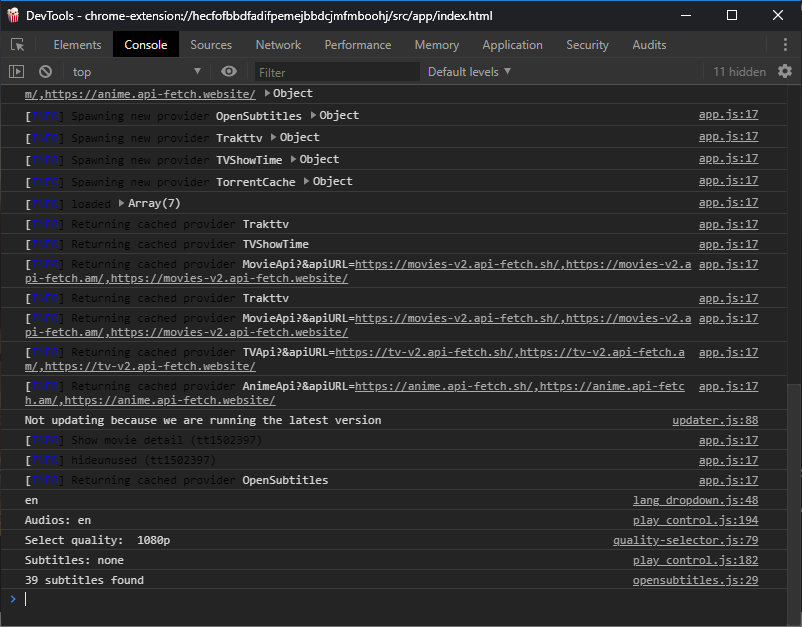
Under the Console tab there is 'log' of recent events. Normal ones are not colored, red ones present error (not present in screenshot). On the right side of each row is "source" of error, and upon expanding it there is a trace from where the error originates from.
Please refer to #1437 since the issue is similar and there's an existing screenshot there.
pcenta
on 2 May 2020
I am getting this Error: Error: ENOENT: no such file or directory, open '/Users/*****/Movies/Popcorn Time/TorrentCache/6f764dc646c1fa52e756ca4fb9cb35ed32e819fd'
It seems to come from the function fetchTorrent in streamer.js
fs.writeFileSync(App.settings.tmpLocation + '/TorrentCache/' + infoHash, uri);
I do not seem to have a TorrentCache folder in /Users/*****/Movies/Popcorn Time.
Maybe using the mkdirp package to make sure those folders are there on Launch could help.
fbarbare
on 3 May 2020
I was able to get the streams to play again, by opening the file at: C:\Users\[username]\AppData\Local\Popcorn-Time\src\app\lib\streamer.js
I then replaced this code:
this.torrentModel.set('video_file', {
    name: path.basename(torrent.files[fileIndex].path),
    size: fileSize,
    index: fileIndex,
    path: path.join(torrent.path, torrent.files[fileIndex].path)
});
With this:
this.torrentModel.set('video_file', {
    name: path.basename(torrent.path),
    size: fileSize,
    index: fileIndex,
    path: torrent.path,
});
An error still occurs later on (due to torrent.files being empty), but it doesn't seem to cause any actual issues.
(Note that sometimes you do have to press the "Watch now" button multiple times, however; for me, two was enough.)
 Venryx
on 28 May 2020
Venryx
on 28 May 2020
Right click ----> Run as Administrator ----> 'Watch now'
Worked for me, might work for you.
If it doesn't work then don't come at me.
 hrdodo
on 23 Jul 2020
hrdodo
on 23 Jul 2020
On linux try run it on terminal with command:
$ popcorn-time --no-sandbox
Worked for me !! Beside, after a while i run it without typing "--no-sandbox" and it worked also and the button worked magically lol .. i don't understand actually what's happening around there.
 zaidnz
on 14 Sep 2020
zaidnz
on 14 Sep 2020
On linux try run it on terminal with command:
$ popcorn-time --no-sandboxWorked for me !! Beside, after a while i run it without typing "--no-sandbox" and it worked also and the button worked magically lol .. i don't understand actually what's happening around there.
This works for me too thx
 Pross
on 18 Oct 2020
Pross
on 18 Oct 2020
Related issues
 rohinarora
·
4Comments
rohinarora
·
4Comments
 vRITHNER
·
4Comments
vRITHNER
·
4Comments
 benjavalero
·
4Comments
benjavalero
·
4Comments
 tiotrom
·
4Comments
tiotrom
·
4Comments
 Villelmo
·
4Comments
Villelmo
·
4Comments