Popcorn-desktop: Annoying Volume control pops up blocking the screen --- chrome-extension://h...
Operating System Version:
Windows 10 Pro
Popcorn Time Version: Popcorn-Time 0.4.3 and prior versions
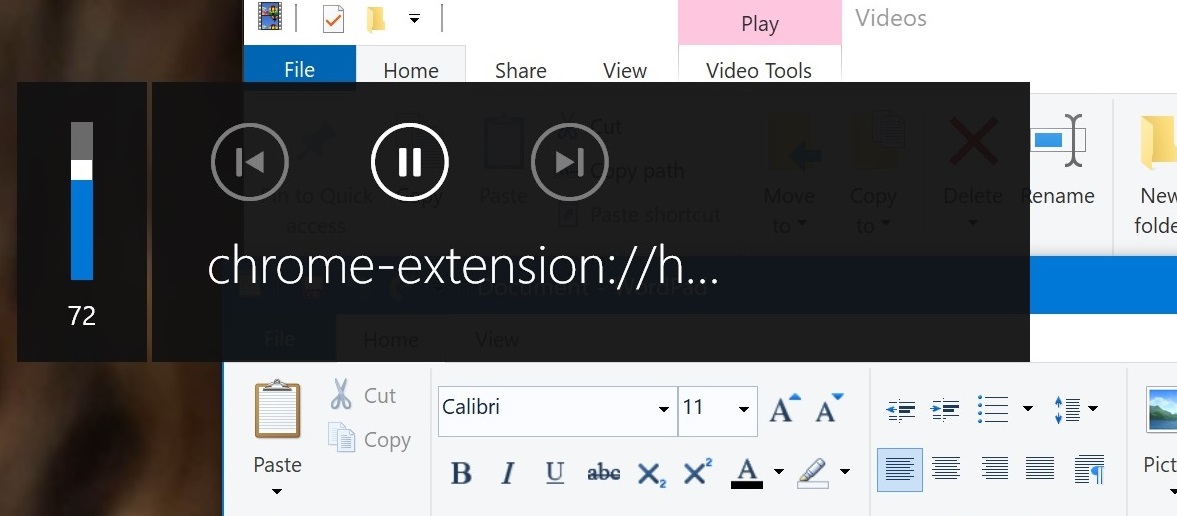
Only when Popcorn-Time is playing a video, my windows computer volume control is taken over by a box that pops up and partially blocks my screen for a few seconds. It doesn't matter what window is open, if Popcorn-Time is playing in another window, my volume control is taken over.
I tried the recommended way of eliminating this popup in Chrome:
chrome://flags/#hardware-media-key-handling
But this will not affect the popup I'm referring to herein.
This popup I'm referring to, with title chrome-extension://h... only popups whenever ONLY Popcorn-Time is running AND MUST BE playing a media file. My Chrome browser is closed and doesn't show in task manager at all. Just Popcorn Time must be playing a media file.
Can this EXTREMELY annoying popup be fixed?
Steps to reproduce this:
- Start Popcorn-Time and play a media file.
- Press a volume key on your computer.
3.Voila - the popup volume control appears. - Open a another window with Popcorn-Time playing in another window in the foreground. The open window can be anything...any program, even a word processor.
- Press a volume control key and VOILA again the popup appears.
- ADDITIONALLY, the popup appears whenever the computer emits any windows error tone.
I am almost certainly positive this is caused by Popcorn-Time.
Any help here?
 joliett1234
All 20 comments
This a Windows 10 thingy, when ever you have something on your screen that has sound it will pop up like that.
Happens to me too if I use PCT default player or an external player like SMPlayer/VLC Player.
Not sure they can do something about it then.
 dutchy1001
on 10 Apr 2020
dutchy1001
on 10 Apr 2020
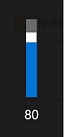
Hi, Thanks for your reply. This large popup is not a window thing. When popcorntime is playing a file, that's the only time that popup appears. For instance, I closed the popcorntime media file that is playing and this is what shows...the WIndow small unobtrusive volume popup...
This is what appears when a media file is playing in Popcorntime:
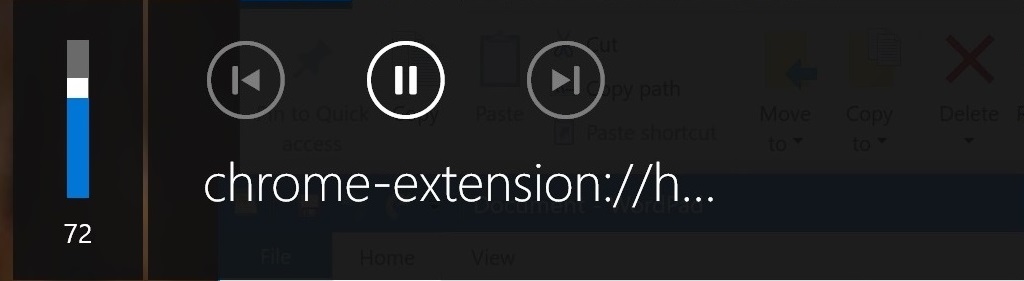
This is what I am guessing the problem is:
It is known that Chrome has the problem where that large volume popup shows up on it's regular browser. It can be stopped by setting the flag at:
chrome://flags/#hardware-media-key-handling
Now Popcorn-Time is perhaps using the chrome browser within the source code that was compiled without using turning that flag off, as shown at chrome://flags/#hardware-media-key-handling. Or something along that line. Setting the flag off now has no effect on Popcorn-Time. If the developer who wrote code for the implementation of Chrome into Popcorn-Time can look into this, perhaps the problem would be solved.
joliett1234
on 10 Apr 2020
You are correct, it does NOT show when using SMPlayer or VLC media player.
When disabled in Chrome (or Brave as I use) it does not show on the browser anymore, thx for pointing this out.
dutchy1001
on 10 Apr 2020
1276 this also shows up on my kde connect that mirrors the desktop notifications on your phone but only for "movies". any trailer i watch, there are correct notifications shown
 test2a
on 14 Apr 2020
test2a
on 14 Apr 2020
Here's a workaround to fix the issue in Windows.
Steps
1) Open in notepad: "%localappdata%Popcorn-TimeUser DataLocal State"
2) After the first '{' paste the following without any spaces or newlines.
"browser":{"enabled_labs_experiments":["hardware-media-key-handling@2"]},
3) Save file and exit notepad.
 BuddhaB0B-RD
on 3 Jul 2020
BuddhaB0B-RD
on 3 Jul 2020
@BuddhaB0B-RD
Great find. It reduces the big Chrome volume bar back to the small windows volume bar on the right top of the screen.
Tested and working in the latest dev build 424
dutchy1001
on 3 Jul 2020
I knew it could be done...great job and thank you BuddhaBOB-RD. Excited akso that it's in the the latest dev build 424.
Thank you all!
joliett1234
on 6 Jul 2020
@joliett1234
This fix is not in the latest dev build (build 424) you have to do this manual.
I hope a dev will add this to the next dev build.
dutchy1001
on 6 Jul 2020
@dutchy1001 can you try something for me please? open your \package.json (latest dev build will do) and change line 24 to
"chromium-args": "--remote-debugging-port=9222 --enable-node-worker --disable-features=HardwareMediaKeyHandling",
and let me know if it works please?
Its what you are doing above but a potentially better place for it. The only issue is.. it does more than disable that media popup, it also disables any media keys on the keyboard&mouse so I'm not sure if we should make a PR for this or people will have an issue.
 kiriles90
on 1 Oct 2020
kiriles90
on 1 Oct 2020
You are correct, it removes the annoying volume control, but then my keyboard volume control does not work...I agree, better to not PR this...thanks for your effort!
joliett1234
on 1 Oct 2020
This works for me too and my keyboard volume and other media keys still works (logitech G19) as well.
dutchy1001
on 1 Oct 2020
@joliett1234 @dutchy1001 thank you for confirming.
It wont kill the keys, it will just stop nwjs from taking control of them, (e.g when you press the hardware mute button you mute everything now, -if you have that function available system wide-, not just Popcorn Time's player)
If you guys want I can make the PR and we can ask for more opinions?
kiriles90
on 1 Oct 2020
I always use an external player (SMPlayer) so for me it doesn't matter if implemented or not.
I do have the volume control changed on my browser (Brave browser) which is build on chromium (same as Google Chrome browser) to get rid of this ugly media bar.
1. Open Google Chrome (or Brave browser).

2. Copy and paste the link below into the address bar of Chrome, and press Enter (same link works on Brave).

chrome://flags/#hardware-media-key-handling

3. Select Disabled in the Hardware Media Key Handling flag drop down menu.

4. Click/tap on the RELAUNCH NOW button at the bottom to apply.
Not sure this way for the browsers can be used in PCT as it's based on Chromium (as far i know).
dutchy1001
on 1 Oct 2020
Not sure this way for the browsers can be used in PCT as it's based on Chromium (as far i know).
Its the same flag, just the way to set it is a bit different. You either do it via \package.json and disable/enable for everyone (or users can do this themselves ofc) or you add the --disable-features=HardwareMediaKeyHandling as a command line argument (e.g on a Windows shortcut or something)
Tbh I dont have any preference either, enabled/disabled makes no difference to me nor is an issue to make a PR for it, its half a line. The question is.. should we disable it? :thinking:
@team-pct @Persei08 @ArcticZeroo @pcenta @ivan1986 any insight?
kiriles90
on 1 Oct 2020
I think that current behaviour is expected. Windows does offer integration with media applications although it's less useful in our case.
The problem is that with current situation we can only disable/enable this for everyone since I don't think there is a way to disable it programatically without any user input.
Since we struggle with this in multiple issues, does anyone know a nice way to somehow bring in user parameters on app start before? We could try a dirty way of using a file as "storage" for startup parameters. Then this could be added to app settings and it would be applied on application startup.
 pcenta
on 1 Oct 2020
pcenta
on 1 Oct 2020
Tbh I dont have any preference either, enabled/disabled makes no difference to me nor is an issue to make a PR for it, its half a line. The question is.. should we disable it? 🤔
I do agree that when using the PCT player it takes the eye of the movie/serie as it stays a few seconds on to long. But like I said, I use an external player which doesn't have this issue (if we can even call it an issue).
dutchy1001
on 1 Oct 2020
Yeah, I don't really see what here is actually a "bug". It seems like PCT is actually doing the right thing here, no? I think most users would prefer to keep the ability to use their media keys to control play/pause/etc, even if the volume bar is larger as a result.
If windows 10 is constantly making volume bar pop up, I really don't think it's the fault of popcorn time.
I do think there's probably a possibility for PCT to show a more detailed media title rather than the chrome-extension:// shown in the screenshot from the original post here.
 ArcticZeroo
on 2 Oct 2020
ArcticZeroo
on 2 Oct 2020
@ArcticZeroo yep, I think I'm starting to tend more to this too
I do think there's probably a possibility for PCT to show a more detailed media title rather than the chrome-extension:// shown in the screenshot from the original post here.
So https://github.com/popcorn-official/popcorn-desktop/issues/1276, yes this would be nice if fixed.
@Persei08 maybe close this if you also agree, seems to be the consensus we shouldn't mess with it
kiriles90
on 2 Oct 2020
On electron issues board there are some discussions about this too.
Check https://github.com/electron/electron/issues/21731#issuecomment-576380718 and following comments there.
and also https://github.com/electron/electron/issues/18253#issuecomment-589542934.
Apparently on electron calling
app.commandLine.appendSwitch('disable-features', 'HardwareMediaKeyHandling,MediaSessionService');
before app ready event is triggered do the job... but I can't find equivalent thing for nwjs.
But I think maybe it could be done by an option in settings which will add (or remove) the argument in packages.json's chromium-args line and then display a notification to restart PCT can be displayed.
This is not really nice, but it could works.
No is it really necessary to add an option just for that ?
Because we can just tell users who need it to edit their packages.json.
 Persei08
on 2 Oct 2020
Persei08
on 2 Oct 2020
Its what @pcenta is talking about above. We were discussing it some time ago too because we also need it to allow a 'native titlebar' option in the settings. I had looked a bit back then, found some implementations, but none were clean enough to make a PR with. There should be relatively clean/cleaner ways to do this out there though, and it will solve a couple of issues if not more if its ever implemented.
kiriles90
on 2 Oct 2020
Related issues
 allan-andrade
·
3Comments
allan-andrade
·
3Comments
 vanhelsing2042
·
4Comments
vanhelsing2042
·
4Comments
 lucasdcrk
·
3Comments
lucasdcrk
·
3Comments
 LuMagalhaes
·
4Comments
LuMagalhaes
·
4Comments
 benjavalero
·
4Comments
benjavalero
·
4Comments
Most helpful comment
Here's a workaround to fix the issue in Windows.
Steps
1) Open in notepad: "%localappdata%Popcorn-TimeUser DataLocal State"
2) After the first '{' paste the following without any spaces or newlines.
"browser":{"enabled_labs_experiments":["hardware-media-key-handling@2"]},
3) Save file and exit notepad.