Popcorn-desktop: No subtitles in v4
Operating System Version:
Windows 10
Popcorn Time Version:
v4.0
Download date:
18/03
Expected Behaviour
Show subtitles
...
Actual Behaviour
Doesn't show subtitles
...
Steps to reproduce the behaviour
Tried setting different languages as default
 leossmith
All 9 comments
Subtitles work fine, you need to click on the bottom right side of the "movie" page and choose your language from there.
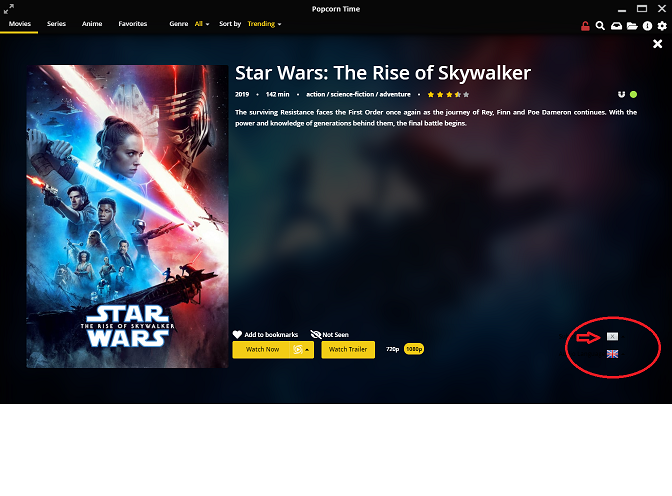
I do know it's a bit confusing as you can set a default language in the settings which indeed isn't working the way it should.
 dutchy1001
on 19 Mar 2020
dutchy1001
on 19 Mar 2020
Sorry I forgot to mention that i was referring to Series. There is no option to select language any more. Also there is no option when you start watching the episode.
In movies it works without issues.

I tried setting a default language to "force" subtitles from the global settings but that didnt work either.
leossmith
on 19 Mar 2020
I have no issue with "English subs" in the series section, there is an other post that refers to non-English subs not working.
When testing this myself with "Young Sheldon"(S03E09) both the Dutch language and English did work for me. I presume there are still episodes from a/any serie that just don't have subs added (yet).
dutchy1001
on 19 Mar 2020
Similarly when I go to series and episode you refer to, I dont have an option to select a language before starting the episode. When I start it, again I cannot select subtitles.
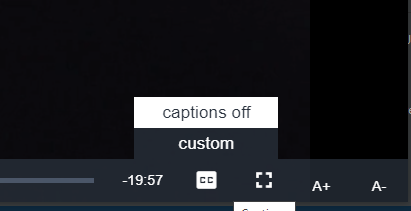
Also if i click on custom, nothing happens.
leossmith
on 19 Mar 2020
What language are you trying to get?
Could it be an issue with the popcorn default player?
I use SMPlayer to watch any film or serie, you can then also add a sub you download from "opensubtitle.org".
If you know were popcorn time stores the temp file (or change it in the settings to a location you have easy access too) what your watching, you could then check that location for the subtitle's file (.srt or .vtt). I have notest that in some cases the file was there but didn't display in the player.
dutchy1001
on 19 Mar 2020
 team-pct
on 19 Mar 2020
team-pct
on 19 Mar 2020
that link brings you back to version 0.3.10.
Version 0.4.0 has it's issue's but the subs issue can be overcome by using alternative players and subs download from opesubtitles.org or simular sites.
dutchy1001
on 19 Mar 2020
Subtitle issue was fixed https://ci.popcorntime.sh/job/Popcorn-Time-Desktop/394
team-pct
on 20 Mar 2020
Subtitle issue was fixed https://ci.popcorntime.sh/job/Popcorn-Time-Desktop/394
It now works on build 394. Thank you for fixing that.
leossmith
on 21 Mar 2020
Related issues
 LuMagalhaes
·
4Comments
LuMagalhaes
·
4Comments
 kk47042
·
3Comments
kk47042
·
3Comments
 Faaabiii
·
4Comments
Faaabiii
·
4Comments
 vRITHNER
·
4Comments
vRITHNER
·
4Comments
 msamyelsheikh
·
4Comments
msamyelsheikh
·
4Comments
Most helpful comment
Similarly when I go to series and episode you refer to, I dont have an option to select a language before starting the episode. When I start it, again I cannot select subtitles.
Also if i click on custom, nothing happens.