These would be useful for compiling/running Pony programs in containers with a smaller size.
I was thinking of having images for new releases from now on (0.xx.xx-alpine), alongside the Ubuntu ones (0.xx.xx); and an alpine image that is the counterpart of latest. Plus, since Alpine is already a supported platform, it should not require much work outside of the release process itself, which is currently in the hands of @SeanTAllen. Although I didn't find where these images are built/pushed automatically, if at all.
 EpicEric
All 21 comments
The images are built from the Dockerfile automatically by Dockerhub. To fit in the current structure (which I would prefer), we should pick either Ubuntu or Alpine. I'm quite ok with switching the Dockerfile to use Alpine.
 SeanTAllen
on 5 Apr 2019
SeanTAllen
on 5 Apr 2019
@EpicEric if we were to switch to alpine, i think we should consider doing the same for the changelog tool container and the pony-stable one as well.
SeanTAllen
on 5 Apr 2019
Actually, I'd prefer to stick with Ubuntu if we were to use only one image. The reason being more people are used to it, specifically for getting dependencies through apt. Alpine would be interesting for slightly more advanced use cases, such as I've mentioned in the OP. There are other reasons why one base image or another may be preferred.
CircleCI has a blog post on how to automate Docker builds. Of course, this leads to another release dependency, but we already have the CI job validate-docker-image-builds that could be adapted for multiple Dockerfiles.
Looking at other popular languages, most have two distributions, one Debian-based as the main release and one Alpine-based (python, golang, node, php, erlang/elixir, ruby, java, openjdk/clojure). But I've found some exceptions:
EpicEric
on 5 Apr 2019
We don't have to switch away from DockerHub or add more steps to release processes to add an alpine image. The DockerHub automated build settings allow you to have multiple build rules with an explicit Dockerfile location:
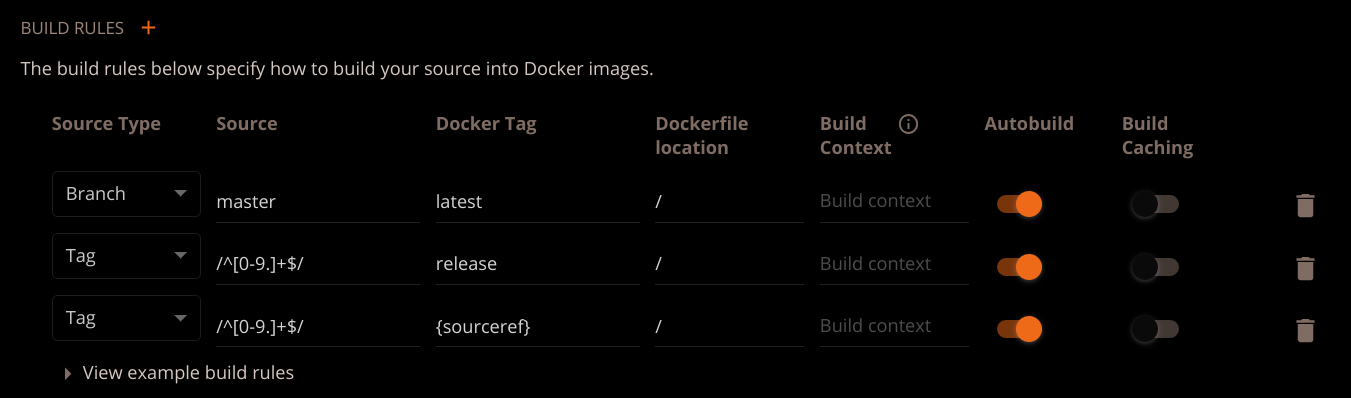
I think we can have our cake and eat it too here.
 jemc
on 9 Apr 2019
jemc
on 9 Apr 2019
Interesting. The RELEASE_PROCESS.md doc would need to be updated to account for this.
SeanTAllen
on 9 Apr 2019
That's good news! What we'd need then is a Dockerfile for Alpine in a different folder (say, .dockerhub/alpine), adding an additional test command to validate-docker-image-builds, and the following additional build rules:
Source Type | Source | Docker Tag | Dockerfile location | Build Context | ...
--- | --- | --- | --- | --- | ---
Branch | master | alpine | /.dockerhub/alpine/Dockerfile | / | ...
Tag | /^[0-9.]+$ | release-alpine | /.dockerhub/alpine/Dockerfile | / | ...
Tag | /^[0-9.]+$ | {sourceref}-alpine | /.dockerhub/alpine/Dockerfile | / | ...
EpicEric
on 9 Apr 2019
I've hit a wall, because pony-stable is not available in Alpine from apk, unlike the current Ubuntu image which installs it from apt.
Would it make sense to A) support Alpine and apk as an official installation platform for ponyc and pony-stable, and add it as another platform to our release process (re-ping @SeanTAllen); B) build and install pony-stable from source locally; or C) something else?
EpicEric
on 16 Apr 2019
I would say Option B is best for the short term - building pony-stable should be simple once you already have ponyc.
Option A would be a larger commitment to maintain the apk builds.
jemc
on 16 Apr 2019
I can work with Option B for now. Something else to consider is whether the same should be done for the main Ubuntu image as well.
EpicEric
on 16 Apr 2019
There currently appears to be an issue with the GitHub API that is related with webhooks, which is preventing Docker automated build changes from being applied... I'll follow it up and apply the new rules once it's fixed.
EpicEric
on 9 May 2019
TL;DR: You probably can't update automated builds in Docker Hub without GitHub repo admin permissions.
My issue is that, when I save the "Automated Builds" configuration, Docker Hub sends a request (PATCH https://cloud.docker.com/api/build/v1/ponylang/source/...) that was returning status code 422 UNPROCESSABLE ENTITY. The response from Docker Hub simply says:
{"error": "Error trying to create webhook for ponylang/ponyc: 404 Client Error: Not Found for url: https://api.github.com/repos/ponylang/ponyc/hooks"}
I've contacted GitHub's support about the 404 error and they've told me:
Fetching the list of webhooks for a repository requires authentication because it's not publicly available information. You'll need to authenticate (https://developer.github.com/v3/#authentication) as someone who has admin permissions to the repository. Seems like your account (EpicEric) has only write permissions to the repository in question ponylang/ponyc, so even if you authenticated -- you wouldn't be able to access the list of webhooks.
The same is true in the UI -- you need admin permissions to access the list of webhooks.
And from the link above:
Requests that require authentication will return 404 Not Found, instead of 403 Forbidden, in some places. This is to prevent the accidental leakage of private repositories to unauthorized users.
My guess is that Docker Hub is using the current user's credentials to set up the appropriate webhooks in the GitHub repository, but since I don't have the GitHub permissions to do so, it fails.
Someone else with Docker Hub org admin permissions _and_ GitHub repo admin permissions should set up the additional build rules accordingly.
EpicEric
on 9 May 2019
I get the same error:
HTTP/1.1 422 UNPROCESSABLE ENTITY
Date: Tue, 14 May 2019 16:52:39 GMT
Content-Type: application/json
Content-Length: 150
X-RateLimit-Remaining: 59
X-XSS-Protection: 1; mode=block
X-Content-Type-Options: nosniff
X-RateLimit-Limit: 60
X-Frame-Options: deny
Access-Control-Allow-Origin: *
X-RateLimit-Reset: 60
Server: nginx
Strict-Transport-Security: max-age=31536000

{"error": "Error trying to create webhook for ponylang/ponyc: 404 Client Error: Not Found for url: https://api.github.com/repos/ponylang/ponyc/hooks"}
I have tried various combinations of linking and unlinking my GitHub account to DockerHub, both for ponylang org and my personal account there. In all cases I got the 422 failure shown above.
jemc
on 14 May 2019
@jemc seems like our linkage is broken in general? does that explain the broken builds recently?
SeanTAllen
on 14 May 2019
I have temporarily given @EpicEric the "Owner" role on the ponylang GitHub org so he can continue his contact thread with DockerHub support and figure out what's going on with our broken linkage.
Eventually, we probably want to link the @ponylang-main GitHub account to DockerHub instead of any personal account, but for now @EpicEric can try with his personal account to figure out what's going on.
jemc
on 14 May 2019
I received an e-mail earlier today (and I imagine everyone with admin permissions did, too) that "Docker Hub Builder" from Docker was approved as a third-party application. This let me create the automated builds.
I have manually triggered a build for the "alpine" image to see if the configuration works.
EpicEric
on 15 May 2019
@EpicEric that was me trying to fix whatever was broken. hopefully it worked. i had to remove from my account (that was previously linked) all permissions for docker hub and then re-add them then it allowed me to once again grant access to the ponylang org.
SeanTAllen
on 15 May 2019
@EpicEric the alpine build failed as it said it was a directory not a file for Dockerfile location. I changed to /.dockerhub/alpine/Dockerfile and kicked off a new build.
SeanTAllen
on 15 May 2019
You've accidentally added a dash to the end of the Dockerfile location; I've removed it and kicked off another build.
EpicEric
on 16 May 2019
The Docker build was successful, and the image works fine. It should build the other images on the next release.
Thanks for the help, @SeanTAllen and @jemc!
EpicEric
on 16 May 2019
Is there any work remaining to switch to using @ponylang-main for the DockerHub/GitHub connection?
jemc
on 21 May 2019
Related issues
 willemneal
·
5Comments
willemneal
·
5Comments
 sgebbie
·
9Comments
sgebbie
·
9Comments
 marsuk
·
5Comments
EpicEric
·
9Comments
SeanTAllen
·
9Comments
marsuk
·
5Comments
EpicEric
·
9Comments
SeanTAllen
·
9Comments
Most helpful comment
That's good news! What we'd need then is a Dockerfile for Alpine in a different folder (say,
.dockerhub/alpine), adding an additional test command tovalidate-docker-image-builds, and the following additional build rules:Source Type | Source | Docker Tag | Dockerfile location | Build Context | ...
--- | --- | --- | --- | --- | ---
Branch |
master|alpine|/.dockerhub/alpine/Dockerfile|/| ...Tag |
/^[0-9.]+$|release-alpine|/.dockerhub/alpine/Dockerfile|/| ...Tag |
/^[0-9.]+$|{sourceref}-alpine|/.dockerhub/alpine/Dockerfile|/| ...