Pomelo.entityframeworkcore.mysql: Problem updating a DateTime Column.
Steps to reproduce
Ideally include a complete code listing that we can run to reproduce the issue.
Alternatively, you can provide a project/solution that we can run.
The issue
I'm trying to update DateTime Columns using the following code:
public ErrorViewModel UpdateFamilyMember(string ServerName, uint familyMemberSerial, DateTime? memorialDay, DateTime? expireGroupGift)
        {
            var member = _context.Familymembers.FirstOrDefault(x => x.Id == familyMemberSerial);
            if(member == null) return new ErrorViewModel("Could not find familyMember", 1);
            if (memorialDay != null) member.MemorialDate = (DateTime)memorialDay; // casting the nullable away.
            if (expireGroupGift != null) member.ExpireGroupGift = (DateTime)expireGroupGift; // casting the nullable away.
            _context.SaveChangesAsync();
            return new ErrorViewModel("Success", 0);
        }
My table looks like this:
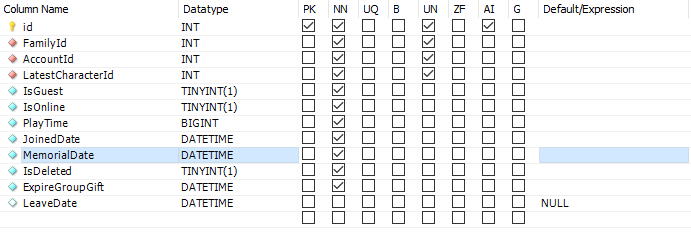
My Class imported using Pomelo's db-context look like this:

...
Microsoft.AspNetCore.Hosting.Diagnostics: Information: Request starting HTTP/1.1 GET http://localhost:51542/Square/Family/UpdateMemorialDay/1|2020-10-10 10:10:10
Microsoft.AspNetCore.Routing.EndpointMiddleware: Information: Executing endpoint 'LuniaAPI.API.SquareApi.PROC_Test (LuniaAPI)'
Microsoft.AspNetCore.Mvc.Infrastructure.ControllerActionInvoker: Information: Route matched with {action = "PROC_Test", controller = "SquareApi"}. Executing controller action with signature Microsoft.AspNetCore.Mvc.IActionResult PROC_Test(LuniaAPI.Structs.HeadersParameters, UInt32, System.String) on controller LuniaAPI.API.SquareApi (LuniaAPI).
Microsoft.EntityFrameworkCore.Infrastructure: Information: Entity Framework Core 5.0.1 initialized 'luniaContext' using provider 'Pomelo.EntityFrameworkCore.MySql' with options: SensitiveDataLoggingEnabled DetailedErrorsEnabled QuerySplittingBehavior=SingleQuery ServerVersion 8.0.21-mysql
Microsoft.EntityFrameworkCore.Database.Command: Information: Executed DbCommand (1ms) [Parameters=[@__familyMemberSerial_0='1'], CommandType='Text', CommandTimeout='30']
SELECT `f`.`id`, `f`.`AccountId`, `f`.`ExpireGroupGift`, `f`.`FamilyId`, `f`.`IsDeleted`, `f`.`IsGuest`, `f`.`IsOnline`, `f`.`JoinedDate`, `f`.`LatestCharacterId`, `f`.`LeaveDate`, `f`.`MemorialDate`, `f`.`PlayTime`
FROM `familymember` AS `f`
WHERE `f`.`id` = @__familyMemberSerial_0
LIMIT 1
Microsoft.AspNetCore.Mvc.Infrastructure.ObjectResultExecutor: Information: Executing ObjectResult, writing value of type 'LuniaAPI.DTO.ErrorViewModel'.
Microsoft.AspNetCore.Mvc.Infrastructure.ControllerActionInvoker: Information: Executed action LuniaAPI.API.SquareApi.PROC_Test (LuniaAPI) in 11.3262ms
Microsoft.AspNetCore.Routing.EndpointMiddleware: Information: Executed endpoint 'LuniaAPI.API.SquareApi.PROC_Test (LuniaAPI)'
Microsoft.AspNetCore.Hosting.Diagnostics: Information: Request finished in 18.8929ms 200 application/json; charset=utf-8
Microsoft.EntityFrameworkCore.Database.Command: Error: Failed executing DbCommand (2ms) [Parameters=[@p1='1', @p0='2020-10-10T10:10:10.0000000' (DbType = DateTime)], CommandType='Text', CommandTimeout='30']
UPDATE `familymember` SET `MemorialDate` = @p0
WHERE `id` = @p1;
SELECT ROW_COUNT();
The thread 0x6a2c has exited with code 0 (0x0).
The thread 0xa3e8 has exited with code 0 (0x0).
...
Further technical details
MySQL version: 8.0.21
Operating system: Windows-10
Pomelo.EntityFrameworkCore.MySql version: 5.0.0-alpha.2
Microsoft.AspNetCore.App version: NET Core 3.1
Other details about my project setup:
modelBuilder.Entity<Familymember>(entity =>
            {
                entity.ToTable("familymember");

                entity.HasIndex(e => e.AccountId, "fk_FamilyMember_Accounts1_idx");

                entity.HasIndex(e => e.LatestCharacterId, "fk_FamilyMember_Characters_idx");

                entity.HasIndex(e => e.FamilyId, "fk_FamilyMember_Family1_idx");

                entity.Property(e => e.Id).HasColumnName("id");

                entity.Property(e => e.ExpireGroupGift).HasColumnType("datetime");

                entity.Property(e => e.JoinedDate).HasColumnType("datetime");

                entity.Property(e => e.LeaveDate).HasColumnType("datetime");

                entity.Property(e => e.MemorialDate).HasColumnType("datetime");

                entity.HasOne(d => d.Account)
                    .WithMany(p => p.Familymembers)
                    .HasForeignKey(d => d.AccountId)
                    .HasConstraintName("fk_FamilyMember_Accounts1");

                entity.HasOne(d => d.Family)
                    .WithMany(p => p.Familymembers)
                    .HasForeignKey(d => d.FamilyId)
                    .HasConstraintName("fk_FamilyMember_Family1");

                entity.HasOne(d => d.LatestCharacter)
                    .WithMany(p => p.Familymembers)
                    .HasForeignKey(d => d.LatestCharacterId)
                    .HasConstraintName("fk_FamilyMember_Characters");
            });
 Teles1
All 15 comments
@Teles1 Please post a valid SQL CREATE TABLE statement instead of the screenshot (e.g. by executing SHOW CREATE TABLE `familymember`;) and the code for the Familymember class instead of the screenshot.
What happens, when you execute the query manually using the MySQL command line utility (replacing the parameters with their values)?
As a general observation, your request seem to take quite a long time (e.g. 18.8929ms).
 lauxjpn
on 4 Jan 2021
lauxjpn
on 4 Jan 2021
CREATE TABLE `familymember` ( `id` int unsigned NOT NULL AUTO_INCREMENT, `FamilyId` int unsigned NOT NULL, `AccountId` int unsigned NOT NULL, `LatestCharacterId` int unsigned NOT NULL, `IsGuest` tinyint(1) NOT NULL, `IsOnline` tinyint(1) NOT NULL, `PlayTime` bigint NOT NULL, `JoinedDate` datetime NOT NULL, `MemorialDate` datetime NOT NULL, `IsDeleted` tinyint(1) NOT NULL, `ExpireGroupGift` datetime NOT NULL, `LeaveDate` datetime DEFAULT NULL, PRIMARY KEY (`id`), KEY `fk_FamilyMember_Family1_idx` (`FamilyId`), KEY `fk_FamilyMember_Accounts1_idx` (`AccountId`) /*!80000 INVISIBLE */, KEY `fk_FamilyMember_Characters_idx` (`LatestCharacterId`), CONSTRAINT `fk_FamilyMember_Accounts1` FOREIGN KEY (`AccountId`) REFERENCES `accounts` (`Id`) ON DELETE CASCADE ON UPDATE CASCADE, CONSTRAINT `fk_FamilyMember_Characters` FOREIGN KEY (`LatestCharacterId`) REFERENCES `characters` (`Id`) ON DELETE CASCADE ON UPDATE CASCADE, CONSTRAINT `fk_FamilyMember_Family1` FOREIGN KEY (`FamilyId`) REFERENCES `family` (`id`) ON DELETE CASCADE ON UPDATE CASCADE ) ENGINE=InnoDB AUTO_INCREMENT=3 DEFAULT CHARSET=utf8
--
public partial class Familymember
{
public uint Id { get; set; }
public uint FamilyId { get; set; }
public uint AccountId { get; set; }
public uint LatestCharacterId { get; set; }
public bool IsGuest { get; set; }
public bool IsOnline { get; set; }
public long PlayTime { get; set; }
public DateTime JoinedDate { get; set; }
public DateTime MemorialDate { get; set; }
public bool IsDeleted { get; set; }
public DateTime ExpireGroupGift { get; set; }
public DateTime? LeaveDate { get; set; }
public virtual Account Account { get; set; }
public virtual Family Family { get; set; }
public virtual Character LatestCharacter { get; set; }
}
It took a long time because the was the first request I made. usually it's 5ms ish
If I query manually it works just fine. The update goes thru.
I tried using _context.SaveChanges(false) and it seems to work fine but I wonder why the async isn't working. I'm not really an expert in C# but is it because the variables are going out of scope before executing the query?
Teles1
on 4 Jan 2021
@Teles1 You need to await the call to SaveChangesAsync:
C#
await _context.SaveChangesAsync();
 ajcvickers
on 4 Jan 2021
ajcvickers
on 4 Jan 2021
@ajcvickers Doesn't that ruin the purpose of it being async after all?
I'm calling it async because it doesn't matter to me if it fails or not.
Teles1
on 4 Jan 2021
I really appreciate the support on a Sunday night. LOL, That's crazy!
Teles1
on 4 Jan 2021
@Teles1 Async APIs do async I/O. Fire-and-forget is strongly discouraged, and not want you want here. (If you are going to tryto do that you will have significant issues managing things like the DbContext.)
ajcvickers
on 4 Jan 2021
@Teles1 It's not really support; I just happened to see the question in my feed while doing something else. :-)
ajcvickers
on 4 Jan 2021
You need to await the call to SaveChangesAsync:
@ajcvickers Thanks, I missed that!
lauxjpn
on 4 Jan 2021
Doesn't that ruin the purpose of it being async after all?
I'm calling it async because it doesn't matter to me if it fails or not.
@Teles1 Calling async methods in ASP.NET Core is usually done for scalability purposes, so that ASP.NET can reuse its worker threads to process additional requests, while the async operation is going on (e.g. updating a database record). This is only of concern for high throughput apps though. If your app has (and always will have) a limited user base, there is usually little gain in making async calls at all.
So if you are unfamiliar with async await patterns in C#, then there is usually no need to use them at all in your custom ASP.NET code, unless you are developing an app that needs to handle many concurrent requests a second.
lauxjpn
on 4 Jan 2021
It depends on what the call is. In this specific case, I don't need to wait for the operation to complete to send the results to the web.
I'm doing most of the work inside my c++ server application and only calling the API to populate and save changes etc.
I'm now wondering how can I accomplish an async call( SaveChangesAsync() ) and return, making the call go out of scope, right after that call is made?
Teles1
on 4 Jan 2021
@Teles1 Async APIs do async I/O. Fire-and-forget is strongly discouraged, and not want you want here. (If you are going to tryto do that you will have significant issues managing things like the DbContext.)
Whoops! I missed this comment.
Thank you very much for the help!
Teles1
on 4 Jan 2021
It depends on what the call is. In this specific case, I don't need to wait for the operation to complete to send the results to the web.
I don't think that this scenario is supported in the way you are trying to achieve it with ASP.NET Core (it would usually work in desktop or console apps though).
There can be multiple issues with the approach you are using, e.g. your DbContext (depending on how it is registered) is likely to be disposed once the request runs out of scope, which it likely will in most cases if you don't do additional work after the non-awaited async call (it would be non-derterministic anyway).
Long story short, you should ask yourself, if this performance gain of one UPDATE statement execution, that was shown in your log as taking 2ms, does really matter that much to you. If it doesn't, than just make your call using await. This it definitely the preferred way, because it can also throw if an error arises, which you then can handle.
If those 2ms do matter to you, than the simplest way to deal with it is to spawn a new Task (which will reuse a free background-thread if one is available), and execute the database operation from inside the task. Since your DbContext is likely to be scoped for your request, you will need to create your own service provider scope for your task and use this scope to retrieve your DbContext. If you are doing it this way, you don't need to await your explicitly created task, your request can run out of scope and your database operation will continue.
Beware that depending on how many explicit tasks you will need to create each second, now assuming this is a high throughput application, this _will_ measurably hurt your scalability at some point. However, when this mark is reached, you could delegate the work to some kind of background service instead, that runs on its own thread (and optionally managed its own worker thread pool) and just manages a queue of operations to perform. Since you don't care about, whether the database operations fail or succeed, this should work for you. You could then scale the background service by the amount of service instances hosted and each of their individual thread pools.
lauxjpn
on 4 Jan 2021
It depends on what the call is. In this specific case, I don't need to wait for the operation to complete to send the results to the web.
I don't think that this scenario is supported in the way you are trying to achieve it with ASP.NET Core (it would usually work in desktop or console apps though).
There can be multiple issues with the approach you are using, e.g. your
DbContext(depending on how it is registered) is likely to be disposed once the request runs out of scope, which it likely will in most cases if you don't do additional work after the non-awaitedasynccall (it would be non-derterministic anyway).Long story short, you should ask yourself, if this performance gain of one
UPDATEstatement execution, that was shown in your log as taking2ms, does really matter that much to you. If it doesn't, than just make your call usingawait. This it definitely the preferred way, because it can also throw if an error arises, which you then can handle.If those
2msdo matter to you, than the simplest way to deal with it is to spawn a newTask(which will reuse a free background-thread if one is available), and execute the database operation from inside the task. Since yourDbContextis likely to be scoped for your request, you will need to create your own service provider scope for your task and use this scope to retrieve yourDbContext. If you are doing it this way, you don't need toawaityour explicitly created task, your request can run out of scope and your database operation will continue.Beware that depending on how many explicit tasks you will need to create each second, now assuming this is a high throughput application, this _will_ measurably hurt your scalability at some point. However, when this mark is reached, you could delegate the work to some kind of background service instead, that runs on its own thread (and optionally managed its own worker thread pool) and just manages a queue of operations to perform. Since you don't care about, whether the database operations fail or succeed, this should work for you. You could then scale the background service by the amount of service instances hosted and each of their individual thread pools.
Wow! Thank you very very much for the complete explanation! And nah. The 2ms doesn't really matter to me that much it'd be nice to save it completely async but for my application usage, I think it'll be more than enough. thanks once again
Teles1
on 4 Jan 2021
@Teles1 No problem.
(In my personal experience, it is usually more effective to, instead of optimizing performance issues that are currently insignificant, spend the time to put some limits (metrics and measurements) in place, that will notify you once the app takes longer than it should. That way, you will end up optimizing only where and when it is actually needed and can keep your source code as simple and maintainable as possible.)
lauxjpn
on 4 Jan 2021
Noted!
Teles1
on 4 Jan 2021
Related issues
 lebartha
·
3Comments
lauxjpn
·
3Comments
lebartha
·
3Comments
lauxjpn
·
3Comments
 neistow
·
4Comments
neistow
·
4Comments
 a641545621
·
3Comments
a641545621
·
3Comments
 pjc89
·
3Comments
pjc89
·
3Comments
Most helpful comment
@Teles1 You need to await the call to SaveChangesAsync:
C#
await _context.SaveChangesAsync();