Pomelo.entityframeworkcore.mysql: Query translations of booleans make it difficult for MySQL to use index
The issue
When writing a query using a boolean in the where clause (using Linq) the SQL translation ends up being either "NOT (`t`.`booleanColumnName`)" or "`t`.`booleanColumnName`".
I get no problem from the NOT statement, but "t.booleanColumnName' causes MySQL not to be able to query across an index that that column is included in. However, tweaking the SQL manually to read "`t`.`booleanColumnName` = 1" allows MySQL to follow an available index for that column.
On a system with just shy of 19 million rows usage of indexes for these queries makes an enormous difference to query time.
Steps to reproduce
If needed I can spend some time making a fake DB schema with data to explain, but hopefully this should be easily enough replicable that I don't need to.
Further technical details
MySQL version: 8.0.20
Operating system: Ubuntu 20.04
Pomelo.EntityFrameworkCore.MySql version: 3.1.1
Microsoft.AspNetCore.App version: .net core 3.1
 awnetwork
All 14 comments
Interestingly, if I change the LINQ WHERE clause to read "&& t.MyBoolean == true", rather than "&& t.MyBoolean" the SQL changes into something compatible with the index; "(`t`.`booleanColumnName` = TRUE)".
Am I ignorant of a side-effect here? Or should these SQL statments be the same for the given 2 LINQ expressions?
awnetwork
on 14 Jun 2020
Generally speaking, we will translate a LINQ expression as closely as possible to its original. So it is not too surprisingly, that semantically equal LINQ statements might be represented by different SQL statements.
However, if a statements does not use an available column, even if it theoretically should be able to, then we should translate this statement in a way, that it makes use of the index.
I will take a closer look at this.
 lauxjpn
on 14 Jun 2020
lauxjpn
on 14 Jun 2020
This seems to be a MySQL/MariaDB bug. There might be good reasons for this behavior, but I can't think of any.
Anyway, we will explicitly translate boolColumn to boolColumn = TRUE when appropriate from now on.
lauxjpn
on 16 Jun 2020
Alternatively you can use the IS operator to test boolean values. The following distinction is from the MariaDB documentation.
There is an important difference between using IS TRUE or comparing a value with TRUE using =. When using =, only 1 equals to TRUE. But when using IS TRUE, all values which are logically true (like a number > 1) return TRUE
 mguinness
on 16 Jun 2020
mguinness
on 16 Jun 2020
Alternatively you can use the IS operator to test boolean values. The following distinction is from the MariaDB documentation.
I was not aware of that. However, tests show that `boolColumn` IS TRUE doesn't use available indices either.
Because of that, I did a couple more tests, with the following results:
Currently, how an expression is being translated, depends on the expression:
context.Entity.Where(e => e.BoolColumn) is translated to WHERE `BoolColumn` = TRUE
context.Entity.Where(e => e.BoolColumn == true) is translated to WHERE `BoolColumn` = TRUE
context.Entity.Where(e => !e.BoolColumn) is translated to WHERE NOT(`BoolColumn`)
context.Entity.Where(e => e.BoolColumn == false) is translated to WHERE `BoolColumn` = FALSE
The former two queries will only return rows, where BoolColumn equals 1. A BoolColumn of 2 would not be returned.
The later two queries will only return rows, where BoolColumn equals 0. A BoolColumn of 2 would not be returned.
If you want to query for all values but 0, then use the following queries:
context.Entity.Where(e => e.BoolColumn != false) is translated to WHERE (`BoolColumn` = TRUE) <> FALSE
context.Entity.Where(e => !(e.BoolColumn == false)) is translated to WHERE NOT(`BoolColumn` = TRUE)
The first one currently does not use indices, while the second one will result in an index range scan, that still uses indices, but possibly not as efficiently as the previous variants that just test a single value.
I did another check on context.Entity.Where(e => e.BoolColumn), and it turn out to return all values but 0 , so we should alter the translation to .WHERE `BoolColumn` <> FALSE instead (using an index range scan), to be consistent with the previous behavior and don't introduce regression bugs
We should also translate context.Entity.Where(e => e.BoolColumn != false) to WHERE `BoolColumn` <> FALSE (also using an index range scan).
lauxjpn
on 16 Jun 2020
I was not aware of that. However, tests show that
`boolColumn` IS TRUEdoesn't use available indices either.
If the index cardinality is low then the optimizer may choose to ignore it, see MySQL not using index for a better explanation. However if it used the index for `boolColumn` = 1 I'd say that's an inconsistency within MySQL.
Based on your testing and attempts to avoid regressions you're taking the correct approach. @awnetwork since you have millions of rows can you validate the tests in your environment?
mguinness
on 17 Jun 2020
If the index cardinality is low then the optimizer may choose to ignore it, see MySQL not using index for a better explanation.
@mguinness Yes, I am aware of that. I checked all queries against EXPLAIN (including its key and possible_keys columns).
@awnetwork If you want to verify the optimized implementation, use the one from #1107. That PR will also be part of our nightly builds in about an hour.
lauxjpn
on 17 Jun 2020
@mguinness I added another commit that verifies the key/index usage in the tests. Looks like GitHub is currently having some issues though, because the commit hasn't appeared as part of the PR yet.
Let's wait and see.
lauxjpn
on 17 Jun 2020
@mguinness Yes, I am aware of that. I checked all queries against EXPLAIN (including its key and possible_keys columns).
Well, I did so for MySQL 8.x, but not for the other versions. As it turned out, translating to WHERE `BoolColumn` = TRUE is the only reliable way over all supported database systems and versions, to make use of indices.
For further information, see #1107.
lauxjpn
on 17 Jun 2020
Apologies, I've only just seen this now. I shall take a look now.
awnetwork
on 17 Jun 2020
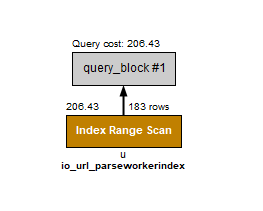
BoolColumn = 1 does hit the index, returning 183 rows on my data
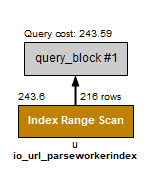
BoolColumn = TRUE also hits the index, but returns marginally more rows to inspect
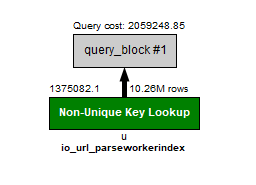
BoolColumn IS TRUE fails to use the index, I can see in the explain that it selected the index for use on other columns in the where, but ignored the boolean column in the same index and returned just over 10 million items.
awnetwork
on 17 Jun 2020
I don't see any difference in outputs between 3.1.1 and 3.2.0-preview.20417.6 (presuming that's the latest).
LINQ
            db.Url.First(u =>
                    !u.IsLocked &&
                    u.DateParsed == DateTime.MinValue &&
                    u.DateLastRefreshed > DateTime.MinValue &&
                    u.ShouldParse);

            db.Url.First(u =>
                    !u.IsLocked &&
                    u.DateParsed == DateTime.MinValue &&
                    u.DateLastRefreshed > DateTime.MinValue &&
                    u.ShouldParse == true);

            db.Url.First(u =>
                    !u.IsLocked &&
                    u.DateParsed == DateTime.MinValue &&
                    u.DateLastRefreshed > DateTime.MinValue &&
                    !u.ShouldParse);

            db.Url.First(u =>
                    !u.IsLocked &&
                    u.DateParsed == DateTime.MinValue &&
                    u.DateLastRefreshed > DateTime.MinValue &&
                    u.ShouldParse == false);
OLD
SELECT `u`.`UrlId`, `u`.`DateAdded`, `u`.`DateIndexed`, `u`.`DateLastRefreshed`, `u`.`DateLocked`, `u`.`DateParsed`, `u`.`DateRanked`, `u`.`DomainId`, `u`.`IsLocked`, `u`.`ShouldParse`, `u`.`Url`
FROM `Url` AS `u`
WHERE ((NOT (`u`.`IsLocked`) AND (`u`.`DateParsed` = '0001-01-01 00:00:00.000000')) AND (`u`.`DateLastRefreshed` > '0001-01-01 00:00:00.000000')) AND `u`.`ShouldParse`
LIMIT 1

SELECT `u`.`UrlId`, `u`.`DateAdded`, `u`.`DateIndexed`, `u`.`DateLastRefreshed`, `u`.`DateLocked`, `u`.`DateParsed`, `u`.`DateRanked`, `u`.`DomainId`, `u`.`IsLocked`, `u`.`ShouldParse`, `u`.`Url`
FROM `Url` AS `u`
WHERE ((NOT (`u`.`IsLocked`) AND (`u`.`DateParsed` = '0001-01-01 00:00:00.000000')) AND (`u`.`DateLastRefreshed` > '0001-01-01 00:00:00.000000')) AND (`u`.`ShouldParse` = TRUE)
LIMIT 1

SELECT `u`.`UrlId`, `u`.`DateAdded`, `u`.`DateIndexed`, `u`.`DateLastRefreshed`, `u`.`DateLocked`, `u`.`DateParsed`, `u`.`DateRanked`, `u`.`DomainId`, `u`.`IsLocked`, `u`.`ShouldParse`, `u`.`Url`
FROM `Url` AS `u`
WHERE ((NOT (`u`.`IsLocked`) AND (`u`.`DateParsed` = '0001-01-01 00:00:00.000000')) AND (`u`.`DateLastRefreshed` > '0001-01-01 00:00:00.000000')) AND NOT (`u`.`ShouldParse`)
LIMIT 1

SELECT `u`.`UrlId`, `u`.`DateAdded`, `u`.`DateIndexed`, `u`.`DateLastRefreshed`, `u`.`DateLocked`, `u`.`DateParsed`, `u`.`DateRanked`, `u`.`DomainId`, `u`.`IsLocked`, `u`.`ShouldParse`, `u`.`Url`
FROM `Url` AS `u`
WHERE ((NOT (`u`.`IsLocked`) AND (`u`.`DateParsed` = '0001-01-01 00:00:00.000000')) AND (`u`.`DateLastRefreshed` > '0001-01-01 00:00:00.000000')) AND (`u`.`ShouldParse` = FALSE)
LIMIT 1
NEW
SELECT `u`.`UrlId`, `u`.`DateAdded`, `u`.`DateIndexed`, `u`.`DateLastRefreshed`, `u`.`DateLocked`, `u`.`DateParsed`, `u`.`DateRanked`, `u`.`DomainId`, `u`.`IsLocked`, `u`.`ShouldParse`, `u`.`Url`
FROM `Url` AS `u`
WHERE ((NOT (`u`.`IsLocked`) AND (`u`.`DateParsed` = '0001-01-01 00:00:00')) AND (`u`.`DateLastRefreshed` > '0001-01-01 00:00:00')) AND `u`.`ShouldParse`
LIMIT 1

SELECT `u`.`UrlId`, `u`.`DateAdded`, `u`.`DateIndexed`, `u`.`DateLastRefreshed`, `u`.`DateLocked`, `u`.`DateParsed`, `u`.`DateRanked`, `u`.`DomainId`, `u`.`IsLocked`, `u`.`ShouldParse`, `u`.`Url`
FROM `Url` AS `u`
WHERE ((NOT (`u`.`IsLocked`) AND (`u`.`DateParsed` = '0001-01-01 00:00:00')) AND (`u`.`DateLastRefreshed` > '0001-01-01 00:00:00')) AND (`u`.`ShouldParse` = TRUE)
LIMIT 1

SELECT `u`.`UrlId`, `u`.`DateAdded`, `u`.`DateIndexed`, `u`.`DateLastRefreshed`, `u`.`DateLocked`, `u`.`DateParsed`, `u`.`DateRanked`, `u`.`DomainId`, `u`.`IsLocked`, `u`.`ShouldParse`, `u`.`Url`
FROM `Url` AS `u`
WHERE ((NOT (`u`.`IsLocked`) AND (`u`.`DateParsed` = '0001-01-01 00:00:00')) AND (`u`.`DateLastRefreshed` > '0001-01-01 00:00:00')) AND NOT (`u`.`ShouldParse`)
LIMIT 1

SELECT `u`.`UrlId`, `u`.`DateAdded`, `u`.`DateIndexed`, `u`.`DateLastRefreshed`, `u`.`DateLocked`, `u`.`DateParsed`, `u`.`DateRanked`, `u`.`DomainId`, `u`.`IsLocked`, `u`.`ShouldParse`, `u`.`Url`
FROM `Url` AS `u`
WHERE ((NOT (`u`.`IsLocked`) AND (`u`.`DateParsed` = '0001-01-01 00:00:00')) AND (`u`.`DateLastRefreshed` > '0001-01-01 00:00:00')) AND (`u`.`ShouldParse` = FALSE)
LIMIT 1
BoolColumn = 1 does hit the index, returning 183 rows on my data
BoolColumn = TRUE also hits the index, but returns marginally more rows to inspect
Hmm, that should not happen, because according to the docs, TRUE and FALSE are just synonyms for 1 and 0 respectively.
I tried to replicate this behavior on MySQL 8.0.20, but always got the exact same result for both EXPLAIN statements, returning the exact same number of rows. Also, the queries should use a Non-Unique Key Lookup (assuming a non-unique index).
Please share both queries you used and the CREATE TABLE statement they were run against, so I can replicate this behavior on my end.
I don't see any difference in outputs between 3.1.1 and 3.2.0-preview.20417.6 (presuming that's the latest).
Make sure to use the new EnableIndexOptimizedBooleanColumns option, as mentioned in:
For further information, see #1107.
This could look like this:
```c#
protected override void OnConfiguring(DbContextOptionsBuilder optionsBuilder)
{
optionsBuilder
.UseMySql(
"server=127.0.0.1;port=3308;user=root;password=;database=GearsOfWarQueryTest",
b => b
.ServerVersion("8.0.20-mysql")
.EnableIndexOptimizedBooleanColumns()) // <-- enable optimization
.UseLoggerFactory(
LoggerFactory.Create(
b => b
.AddConsole()
.AddFilter(level => level >= LogLevel.Information)))
.EnableSensitiveDataLogging()
.EnableDetailedErrors();
}
Apologies, in my limited time and haste yesterday I've made a couple of silly mistakes in my posts.
Now having added the "EnableIndexOptimizedBooleanColumns" to my options builder I can replicate the behaviours you had in your tests, so consider them verified.
As the for difference in rows for the 2 queries; that was a silly mistake on my part not realising that the live system I was querying does enormous amounts of inserts/updates on that table, and that was the cause. When I turned the service off and retried I get the same numbers back as expected.
awnetwork
on 18 Jun 2020
Related issues
 guaicaiboshi
·
4Comments
guaicaiboshi
·
4Comments
 lebartha
·
3Comments
lebartha
·
3Comments
 pjc89
·
3Comments
pjc89
·
3Comments
 zuosc
·
3Comments
zuosc
·
3Comments
 Toemsel
·
3Comments
Toemsel
·
3Comments