Pomelo.entityframeworkcore.mysql: Owned Entity Types
in 3.0.0-rc3.final
I cannot implement this function
~~~c#
builder.OwnsOne(p => p.Address);
Also, the Address class already has a [Owned]Attribute
 hmy111
All 11 comments
~c#
migrationBuilder.CreateTable(
name: "Addresses",
columns: table => new
{
UserId = table.Column
UserProvince = table.Column
UserCity = table.Column
UserCounty = table.Column
UserStreet = table.Column
},
constraints: table =>
{
table.PrimaryKey("PK_Addresses", x => x.UserId);
table.ForeignKey(
name: "FK_Addresses_Users_UserId",
column: x => x.UserId,
principalTable: "Users",
principalColumn: "Id",
onDelete: ReferentialAction.Cascade);
});
~
but, After the migration created a new table
hmy111
on 15 Nov 2019
We need more information:
- What does the model look like?
- What SQL is being generated?
- Is an exception being thrown?
- What is the expected result?
Alternatively, you can also just provide us with a small project that reproduces the issue. This might especially be helpful in case English is a problem.
 lauxjpn
on 16 Nov 2019
lauxjpn
on 16 Nov 2019
Thank you for your reply,Sorry, I am a beginner, my English is not very good, the expression is not clear enough.
I have a user model like this:
~c#
public class User
{
public Guid Id { get; protected set; }
public string Account { get; set; }
public string Name { get; set; }
public Address Address { get; set; }
}
[Owned]
public class Address
{
public string Province { get; private set; }
public string City { get; private set; }
public string County { get; private set; }
public string Street { get; private set; }
}
protected override void OnModelCreating(ModelBuilder modelBuilder)
{
modelBuilder.Entity
modelBuilder.Entity
base.OnModelCreating(modelBuilder);
}
~
This is my expected table :
User
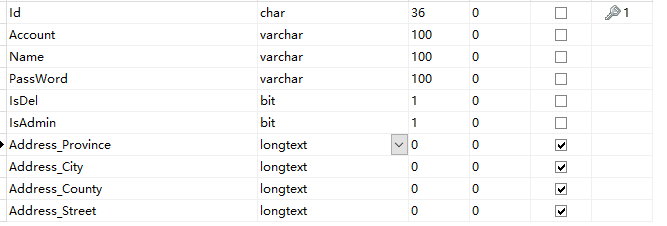
but It generates two tables
User && Address
User
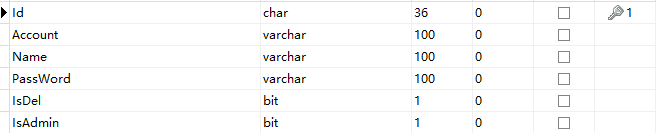
Address

hmy111
on 17 Nov 2019
Thank you for your reply,Sorry, I am a beginner, my English is not very good, the expression is not clear enough.
No problem.
Thank you for providing us with more information.
I tested your issue with the following code. Is works as expected, so I could not reproduce your issue:
```c#
using System.Diagnostics;
using System.Linq;
using Microsoft.EntityFrameworkCore;
using Microsoft.Extensions.Logging;
namespace IssueConsoleTemplate
{
public class User
{
public int Id { get; set; }
public string Account { get; set; }
public string Name { get; set; }
public Address Address { get; set; }
}
public class Address
{
    public string Province { get; set; }
    public string City { get; set; }
    public string County { get; set; }
    public string Street { get; set; }
}

public class Context : DbContext
{
    public DbSet<User> Users { get; set; }

    protected override void OnConfiguring(DbContextOptionsBuilder optionsBuilder)
    {
        optionsBuilder
            .UseMySql("server=127.0.0.1;port=3306;user=root;password=;database=Issue942")
            .UseLoggerFactory(LoggerFactory.Create(b => b
                .AddConsole()
                .AddFilter(level => level >= LogLevel.Information)))
            .EnableSensitiveDataLogging()
            .EnableDetailedErrors();
    }

    protected override void OnModelCreating(ModelBuilder modelBuilder)
    {
        modelBuilder.Entity<User>(entity =>
        {
            entity.HasKey(e => e.Id);
            entity.OwnsOne(e => e.Address);
        });
    }
}

internal class Program
{
    private static void Main()
    {
        using var context = new Context();

        context.Users.Add(new User
        {
            Account = "ACC-1234",
            Name = "John Doe",
            Address = new Address
            {
                Province = "Province",
                City = "City",
                County = "County",
                Street = "Street",
            }
        });

        context.SaveChanges();

        var users = context.Users.ToList();
        var lastUser = users.Last();

        Debug.Assert(lastUser.Address.City == "City");
    }
}
}
I ran the following command to create a migration:
dotnet ef migrations add Initial
It generated the following `Migration.Up()` code:
```c#
protected override void Up(MigrationBuilder migrationBuilder)
{
    migrationBuilder.CreateTable(
        name: "Users",
        columns: table => new
        {
            Id = table.Column<int>(nullable: false)
                .Annotation("MySql:ValueGenerationStrategy",
                    MySqlValueGenerationStrategy.IdentityColumn),
            Account = table.Column<string>(nullable: true),
            Name = table.Column<string>(nullable: true),
            Address_Province = table.Column<string>(nullable: true),
            Address_City = table.Column<string>(nullable: true),
            Address_County = table.Column<string>(nullable: true),
            Address_Street = table.Column<string>(nullable: true)
        },
        constraints: table =>
        {
            table.PrimaryKey("PK_Users", x => x.Id);
        });
}
I then ran the following command to apply the migration to the database:
dotnet ef database update
It created the following table:
CREATE TABLE `Users` (
    `Id` int NOT NULL AUTO_INCREMENT,
    `Account` longtext CHARACTER SET utf8mb4 NULL,
    `Name` longtext CHARACTER SET utf8mb4 NULL,
    `Address_Province` longtext CHARACTER SET utf8mb4 NULL,
    `Address_City` longtext CHARACTER SET utf8mb4 NULL,
    `Address_County` longtext CHARACTER SET utf8mb4 NULL,
    `Address_Street` longtext CHARACTER SET utf8mb4 NULL,
    CONSTRAINT `PK_Users` PRIMARY KEY (`Id`)
);
Finally I ran the project, which also executed successfully.
If you think your issue is a bug, please change my code so it reproduces your issue.
lauxjpn
on 17 Nov 2019
See your code, When I annotate the address class, it woks
But I want this address navigation property
~~~c#
public DbSet
// public DbSet Addresse { get; set; }
public DbSet
public DbSet
migrationBuilder.CreateTable(
name: "User",
columns: table => new
{
Id = table.Column
Account = table.Column
Name = table.Column
PassWord = table.Column
IsDel = table.Column
IsAdmin = table.Column
Address_Province = table.Column
Address_City = table.Column
Address_County = table.Column
Address_Street = table.Column
},
constraints: table =>
{
table.PrimaryKey("PK_User", x => x.Id);
});
~~~
hmy111
on 17 Nov 2019
I am not sure I understand what the important part in your example is.
Do you mean you want to use a Guid instead of an int for the Id property?
Or do you mean you want to use the public DbSet<Address> Addresse { get; set; } property on your DbContext?
lauxjpn
on 17 Nov 2019
I am referring to this:
https://docs.microsoft.com/en-us/ef/core/modeling/owned-entities
hmy111
on 17 Nov 2019
My example code does use an owned entity:
c#
protected override void OnModelCreating(ModelBuilder modelBuilder)
{
    modelBuilder.Entity<User>(entity =>
    {
        entity.HasKey(e => e.Id);
        entity.OwnsOne(e => e.Address); // <-- use owned entity
    });
}
lauxjpn
on 17 Nov 2019
I want to use the public DbSet
Addresse { get; set; } property on My DbContext.In previous versions. 2.2.6-rc2-final, It can do this
hmy111
on 17 Nov 2019
This is not possible and is by-design.
See Limitations in the official EF Core docs:
You cannot create a
DbSet<T>for an owned type
You will need to split up the table into two tables and define both as normal entities (non-owned) to use a DbSet<Address> on your DbContext.
lauxjpn
on 17 Nov 2019
Yes,I see. I realized my mistake,I went into a misunderstanding。Thank you very much for your guidance.
hmy111
on 17 Nov 2019
Related issues
 mason-chase
·
4Comments
mason-chase
·
4Comments
 cetubig
·
3Comments
cetubig
·
3Comments
 pjc89
·
3Comments
pjc89
·
3Comments
 hainguyenthanh
·
3Comments
hainguyenthanh
·
3Comments
 lebartha
·
3Comments
lebartha
·
3Comments
Most helpful comment
This is not possible and is by-design.
See Limitations in the official EF Core docs:
You will need to split up the table into two tables and define both as normal entities (non-owned) to use a
DbSet<Address>on yourDbContext.