Pomelo.entityframeworkcore.mysql: Releasing 3.0.0-rc1.final
Let's use this issue to track the progress for a first 3.0.0 preview final 3.0.0 rc1 release.
797 is in use for general updates on the 3.0.0 GA progress so far.
 lauxjpn
All 34 comments
Current test metrics:
MySQL | Total | Passed | Failed | Skipped
------|-------|--------|--------|--------
8.0.17 | 14104 | 13518 | 98 | 488
5.7.27 | 14097 | 13465 | 136 | 496
(And yes, I did quickly fix another test before posting the stats, just to get under 100 for MySQL 8.)
lauxjpn
on 28 Sep 2019
Microsoft should seriously keep v2 of asp.net core in the homepage instead of v3 which every package I try to install now doesn't support yet
 CaddyDz
on 30 Sep 2019
CaddyDz
on 30 Sep 2019
3.0.0 nightly builds are now available. Feed instructions are updated on README and nightly builds are available on Azure DevOps Feed
 caleblloyd
on 30 Sep 2019
caleblloyd
on 30 Sep 2019
As far as I can see, the only serious issue left blocking a preview final rc1 release is #844.
lauxjpn
on 2 Oct 2019
I would like to (pre)release the 3.0.0-preview13.0.0-rc1-final tomorrow, after the remaining open PRs have been merged.
@caleblloyd Am I assuming correctly, that I would just need to change the PreReleaseVersionLabel tag of the project's Versions.prop file and tag the merged commit accordingly to make the prerelease be published automatically to nuget?
lauxjpn
on 4 Oct 2019
I need to add the Nuget step for tags, working on that right now.
I think 3.0.0-rc1-final is appropriate. -previewX usually denotes it's tracking that version of EF Core Preview and that the API is still subject to change. Since it's tracking EF Core RTM rc seems appropriate as we are trying to vet out bugs and find a stable release.
Am I assuming correctly, that I would just need to change the PreReleaseVersionLabel tag of the project's Versions.prop file and tag the merged commit accordingly
Correct, for final preview/rc releases draft a release just like 3.0.0-<PreReleaseVersionLabel>-final on GitHub. For RTM releases use the semver like 3.0.0
caleblloyd
on 4 Oct 2019
@caleblloyd I created a release. What is the procedure to get it published on NuGet? While the CI for the last PR that I merged ran, it skipped the Nuget job (as expected).
And creating the release on GitHub did not trigger anything.
Do I have to directly push a commit to the pomelo:3.0.0-wip branch, together with the 3.0.0-rc1-final tag, to trigger the NuGet publication and then complete the release information in GitHub afterwards?
Or do we need to add a release pipeline in AZDO?
lauxjpn
on 6 Oct 2019
Looks like AZDO didn't build the tag, let me did for an option to enable that
caleblloyd
on 6 Oct 2019
Unrelated to the tag triggering issue:
Should I drop the -final suffix from the release title (not the release tag)?
lauxjpn
on 6 Oct 2019
It looks like the PR did pass CI successfully, while the actual merge did not. Seems non-deterministic then, because they are the same. Though I am not sure, if this would affect the tag triggering issue.
I will open another PR, just to investigate this CI issue.
lauxjpn
on 6 Oct 2019
Tag triggering issue was that tag trigggers need to be specified
If you don't specify any tag triggers, then by default, tags will not trigger pipelines.
Validating the Nuget push logic with 2.2.6 now and I'll port the azure-pipelines.yml logic over to 3.0.0-wip once it's working
Dropping -final from release name is fine, those can be edited after the fact too. It does need to be in the tag name for prereleases, however, as their is logic to ensure the tag name matches the package version/suffix to prevent erroneously pushing misversioned packages due to overlooking <VersionPrefix> or <PreReleaseVersionLabel> in Versions.props
caleblloyd
on 6 Oct 2019
Nuget tagging should be fixed on 3.0.0-wip
I added a Pack.BuildFailedOverride variable that you can set to true to override failures
You'll need the new azure-pipelines.yml in the release. To re-trigger the release delete the existing release/tag from GitHub and add it back
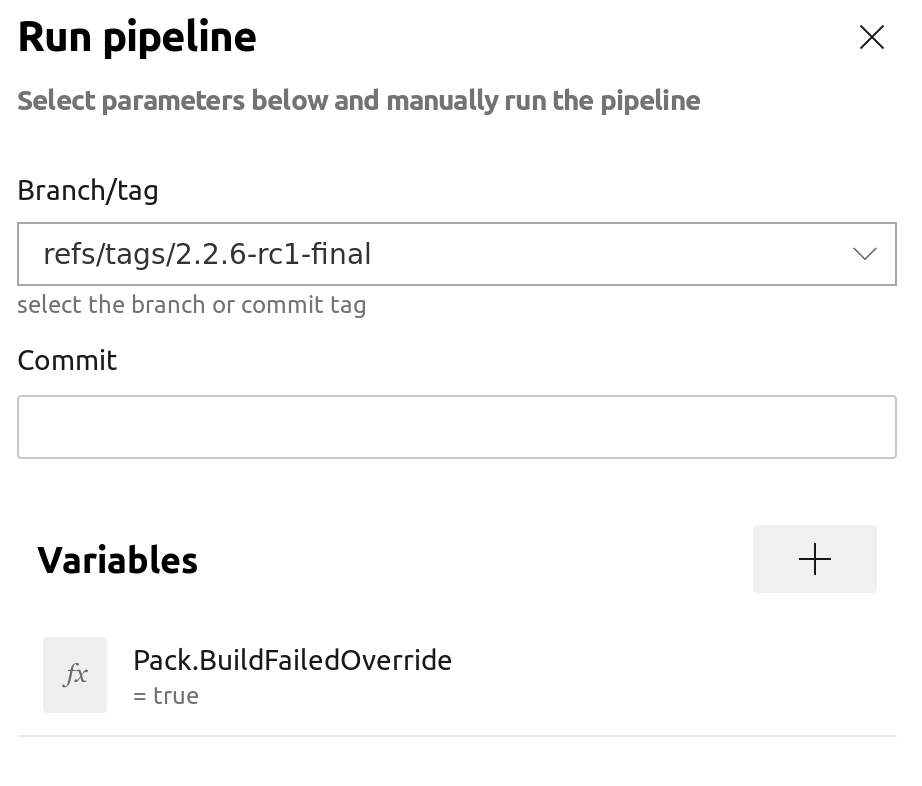
caleblloyd
on 6 Oct 2019
Is it just Windows tests that are non-deterministic?
caleblloyd
on 6 Oct 2019
Nuget tagging should be fixed on 3.0.0-wip
Nice work!
Is it just Windows tests that are non-deterministic?
Yes, I think this might be because the Chocolatey installed MySQL does not use a full my.ini, but generates a 4-liner on the fly.
I am tracking down the issue at the moment, that the 3rd mysql.exe command in a script block fails, which might have the same root cause.
lauxjpn
on 6 Oct 2019
I am starting to be able to reproduce these issues locally.
lauxjpn
on 6 Oct 2019
@lauxjpn :wave: How do I get this release working on my local ASP.NET Core 3.0.0 project?
It isn't available here: https://www.nuget.org/packages/Pomelo.EntityFrameworkCore.MySql
And I really don't want to have to build it myself, easiest way possible please.
 olfek
on 6 Oct 2019
olfek
on 6 Oct 2019
@caleblloyd Wow, this took a while. So the underlying issue is, that some test classe rely on tables outside of their own defined model.
Because we still don't load a SQL dump for Northwind to bootstrap the database (which is officially required as I recently inquired), tests might fail if they are not executed in an order, where the needed tables have not been created yet (as a side effect of other previously run tests).
For example MappingQueryMySqlTest uses MappingQueryMySqlFixture instead of NorthwindQueryMySqlFixture, but relies on the Customers table, which is not defined in the MappingQueryMySqlFixture model, but in the NorthwindQueryMySqlFixture model.
lauxjpn
on 6 Oct 2019
@olfek 3.0.0-rc1-final will definitely be published to NuGet today. Stay tuned.
lauxjpn
on 6 Oct 2019
Wooo! :man_dancing:
olfek
on 6 Oct 2019
@lauxjpn Thank you so much, I appreciate the effort you and others put in. :heart:
olfek
on 6 Oct 2019
@lauxjpn Thanks for the update Laurents! Any idea what timespan we are talking about with "today"? Different timezones play a role here, haha.
 OrhanTozan
on 6 Oct 2019
OrhanTozan
on 6 Oct 2019
@caleblloyd I will deactivate test parallelism for now and force the dependent tests to run after some general test classes as a quick and dirty workaround for now, until we get around to migrate the Northwind database from SQL Server to a MySQL dump.
I might miss some classes though, so if some tests in the future randomly fail because of missing or empty tables, they need to be decorated with an order attribute as well.
lauxjpn
on 6 Oct 2019
@NahroTo I think < 4 hours is a safe bet.
lauxjpn
on 6 Oct 2019
Looks like Arcade actually generates the package as 3.0.0-rc1.final with a dot between "rc1" and "final" instead of a dash, so the tag needs to match that
caleblloyd
on 6 Oct 2019
@caleblloyd Here is the corresponding part of the arcade versioning documentation, that confirms the new versioning schema:
Build kind | Pre-release labels | Package Version example
-- | -- | --
Local developer build default | "dev" | "1.2.3-dev"
PR validation build | "ci" | "1.2.3-ci"
Daily official build | PreReleaseVersionLabel.SHORT_DATE.REVISION | "1.2.3-preview1.12345.1"
Final pre-release official build | PreReleaseVersionLabel."final" | "1.2.3-beta.final"
Release official build | "" | "1.2.3"
It is in line with SemVer2 and its pre-release specs:
<valid semver> ::= <version core>
        | <version core> "-" <pre-release>
        | <version core> "+" <build>
        | <version core> "-" <pre-release> "+" <build>

<pre-release> ::= <dot-separated pre-release identifiers>

<dot-separated pre-release identifiers> ::= <pre-release identifier>
        | <pre-release identifier> "." <dot-separated pre-release identifiers>
It should be noted, that it is possible to fallback on SemVer1 according to the arcade docs:
The repository opts into SemVer1 fallback by setting SemanticVersioningV1 property to true.
Examples of SemVer1 package versions:
"1.2.3-dev", "1.2.3-ci", "1.2.3-beta-12345-01", "1.2.3-beta-final", "1.2.3".
But moving forward, using SemVer2 seems the way to go here.
lauxjpn
on 7 Oct 2019
Special thanks to
- @bgrainger for a couple of quick fixes and obscure underlying MySQL bug discoveries and workarounds for MySqlConnector
- @caleblloyd for upgrading the whole CI process to AZDO pipelines and arcade
lauxjpn
on 7 Oct 2019
Was migration meant to be working for this release?
I am getting this:
Add-Migration : The term 'Add-Migration' is not recognized as the name of a cmdlet, function, script file, or operable program. Check the spelling of the name, or if a path was included, verify that the path is correct and try again.
Am I missing something?
 LeandroCarneiro
on 7 Oct 2019
LeandroCarneiro
on 7 Oct 2019
Hi @LeandroCarneiro, try this:
Install tools for EF 3: dotnet tool install --global dotnet-ef
Use command: dotnet ef migrations add MIGRATION_NAME
Be sure that dotnet SDK 3 was installed in you system.
 neumartin
on 7 Oct 2019
neumartin
on 7 Oct 2019
Hi @neumartin I installed the EF 3, but when I am trying to run:
dotnet ef migrations add CreateAgain(my_migration_name)
Then I am getting this as result:
No project was found. Change the current working directory or use the --project option.
Any idea?
Note: I am using Pkg Manager to run the cmds.
LeandroCarneiro
on 7 Oct 2019
Try to run the command in the same folder where dbcontext or migrations exists.
neumartin
on 7 Oct 2019
Worked when I run the cmd through prompt cmd.
dotnet ef migrations add CreateAgain -c MySqlContext
Thanks @neumartin
LeandroCarneiro
on 7 Oct 2019
It is having a few problems with foreign keys
I was trying to use microsoft's identity system.
Cannot change column 'RoleId': used in a foreign key constraint 'fk_aspnetroleclaims_aspnetroles_roleid'
But other ways it works after a few tweeks of sizes and other problems.
 killerfrienddk
on 12 Oct 2019
killerfrienddk
on 12 Oct 2019
@killerfrienddk Please open a new issue for each problem you encountered, if you think these are bugs or issues that need to be addressed.
Related to the ASP.NET Identity System, we currently had the following reported issues so far:
869, #865 , #863
lauxjpn
on 12 Oct 2019
Related issues
 findmoon
·
3Comments
findmoon
·
3Comments
 lebartha
·
3Comments
lebartha
·
3Comments
 Toemsel
·
3Comments
Toemsel
·
3Comments
 SharmaHarsh7
·
4Comments
SharmaHarsh7
·
4Comments
 zuosc
·
3Comments
zuosc
·
3Comments
Most helpful comment
Current test metrics:
MySQL | Total | Passed | Failed | Skipped
------|-------|--------|--------|--------
8.0.17 | 14104 | 13518 | 98 | 488
5.7.27 | 14097 | 13465 | 136 | 496
(And yes, I did quickly fix another test before posting the stats, just to get under 100 for MySQL 8.)