when i added a datetime option and i want to add after it a second datetime option but on another day
i have to click on "Zeit entfernen" (why do i have to do this to just select another day?) but because "Bereich auswählen" is now selected i have also a range on the days which is hard to understand if you only want to select one day (like you did in the step before) now you have to do some double clicking on day-options to switch the day.
most of (our) user will use it with time, can we make this case somehow default. now we need way more click to achive this and it is a complex workflow to add multiple options.
 kinimodmeyer
All 20 comments
First of all, thanks for the feedback. It's valuable.
when i added a datetime option and i want to add after it a second datetime option but on another day
Ah yes, I understand. I didn't recognize this user expectation, when adding a new datetime option on another day. This is a caveat. So you say, it is better to always start over with the day selection and without predefined time?
 dartcafe
on 27 Mar 2021
dartcafe
on 27 Mar 2021
seems like we have several "issues" here.
the design problem is that the user clicks "Bereich auswählen" on the time-slot only because he want to add a duration.
but with this click he now also automatically create a "day-range".
what will happen if we:
- rename "Bereich auswählen" on the time slot to e.g. "Uhrzeit-Bereich auswählen" and not "influence" the other option.
- that means if in the predefined datefield the start-date and the end-date is the same day then "Bereich auswählen" (could be renamed too) is not pre selected and we display a simple date picker (but without loosing the time option, to switch between time and date see https://mengxiong10.github.io/vue2-datepicker/index.html#ControlTimePanel, this link we should always have in the corner)
- if he now clicks on "Bereich auswählen" we show daterange picker (but this basically not change the date which is in the inputfield)
- activating the option that on a click on calendar icon the wohle input will be cleared.
kinimodmeyer
on 27 Mar 2021
regarding your first post:
but because "Bereich auswählen" is now selected i have also a range on the days which is hard to understand
You don't have to. Just select one day and switch over to the time panel. Actually this is not recognizable, when selecting just one day, because the input field changes only, if you switch to the time panel. I will check this, but this carries some complexity, with catching events (if it is possibe) and manipulating the date options. The current implementation alone took several days.
But before we talk in solutions, we should be clear what the real issue is.
Is it the button captures, the input field, or something else.
dartcafe
on 27 Mar 2021
the first issue is that i have to remove the time to come to the day picker.
here we could make a switch-view instead of using the remove time button (see existing https://mengxiong10.github.io/vue2-datepicker/index.html#ControlTimePanel)
the seond issue is that when i´m back on the day picker i have now a day range picker and not like before the single month day picker. for me the day range picker works correctly, seems legit that the input only get updated on the second click which means a range is complete. but actually i not expect a day-range here.
maybe the easiest less confusing would be completly remove "Bereich auswählen" and always offer ranges.
kinimodmeyer
on 27 Mar 2021
Hi Devs,
Great improvement and after a few try and errors it is understandable and therefore usable. Although I agree with some of the points mentioned above (like it is a bit confusing which range I picked if there are two Date pickers) I still do not understand why adding this when a main drawback ob the whole app is that you cannot pick multiple days at once as individual days.
But now I see that you are willing to go different ways and still choose to improve the app:
Let me add one idea. "The quick picker"
1, Add a new checkbox called "Quick Pick" days only (or with time there are many possibilities)
2, Activate checkbox "Quick Pick"
3, A new Button called "Done" appears
4, If you select a day automatically add day to Picks and open Datepicker again (Like "Apply" and open Datenpicker is done automatically).
5, Repeat step 4 until you picked all days you want to add
6, Select Done Button - Date picker closes.
This would add a functionality similar to multiple days (like moodle) and at the same time does not interfere with your chosen framework (please correct me if that is wrong)
Please give that a thought cause not having this functionality is the main reason I do not use polls at all.
Thanks for reading.
 florom
on 27 Mar 2021
florom
on 27 Mar 2021
@kinimodmeyer I marked the proposal of a calendar grid as off topic, because it could lead the discussion into a wrong direction. But feel free to open a new issue for this, although this will not land very soon in this app.
dartcafe
on 27 Mar 2021
@florom I tried some of your suggestions before and it ended in a hell of buttons and checkboxes. Possibly I went a few steps too far. But here also, it is easier to come from the real issue, than from a solution, which seems to be plausible for your kind of usage of the app.
dartcafe
on 27 Mar 2021
What I understood so far:
- As a poll creator I am confused, that I have to remove the time selection, if I want to add another day with the same time selection and it seems, that I have to select a day span (which I do not want).
- As a poll creator I am confused by the term 'remove time', when I want to change the day of the selection, I want to add.
Did I get it right?
dartcafe
on 27 Mar 2021
@florom
- As a poll creator, I want to have a different datepicker for only day selections (without time selection), because this more straight forward and understandable.
dartcafe
on 27 Mar 2021
Came here to echo that the date picker and especially the "remove time" button when trying to change the date to add more options makes quickly adding them 4X more cumbersome. @dartcafe stated it well.
 stevesanda
on 29 Mar 2021
stevesanda
on 29 Mar 2021
Hi @dartcafe ,
[...] I tried some of your suggestions before and it [...]
That is a pity. What I would want is as simple.
- Add days only
- One Click One day added
- Repeat as long as all days added (probably use at one time another click zu change month from datepicker)
I hope that clarifies it a but I think there are issues wanting ecaxlty that.
Thank you for listening.
florom
on 29 Mar 2021
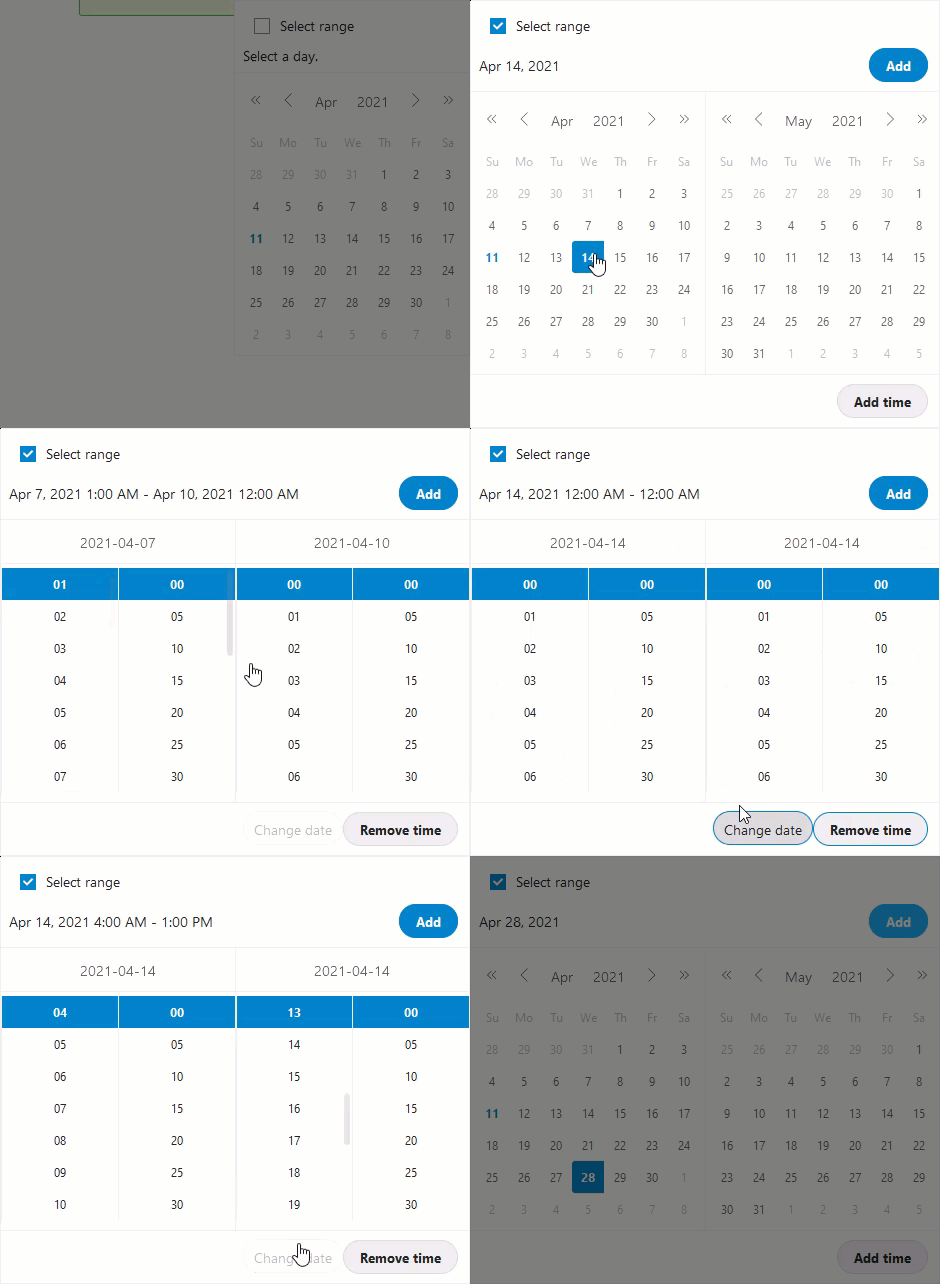
So this was a heavy thing, because the date picker has some limitations.
Current solution:
- display the current selection inside the date picker
- option to add a time information
- option to remove the time (select only one day or a day range)
- switch between date and time panel by keeping the information
- changed button design (they were to difficult to identify)
- keep picker open after adding an option
Example
dartcafe
on 11 Apr 2021
@dartcafe thanks for your effort here, this looks promising!
maybe one question, when the overlay stays open after the blue click on "Add" will it hide the new added row in the list?
i guess it is good for feedback to the user when he see what he added. (or do you open the modal left from input now?)
(a better feedback i can give after a release / hands on)
kinimodmeyer
on 18 Apr 2021
It is hidden, but I can't find a better position, expecially with mobile views. I think, we need a different feedback component (even for some other actions) for signaling successful operations. Different from the toasts.
dartcafe
on 18 Apr 2021
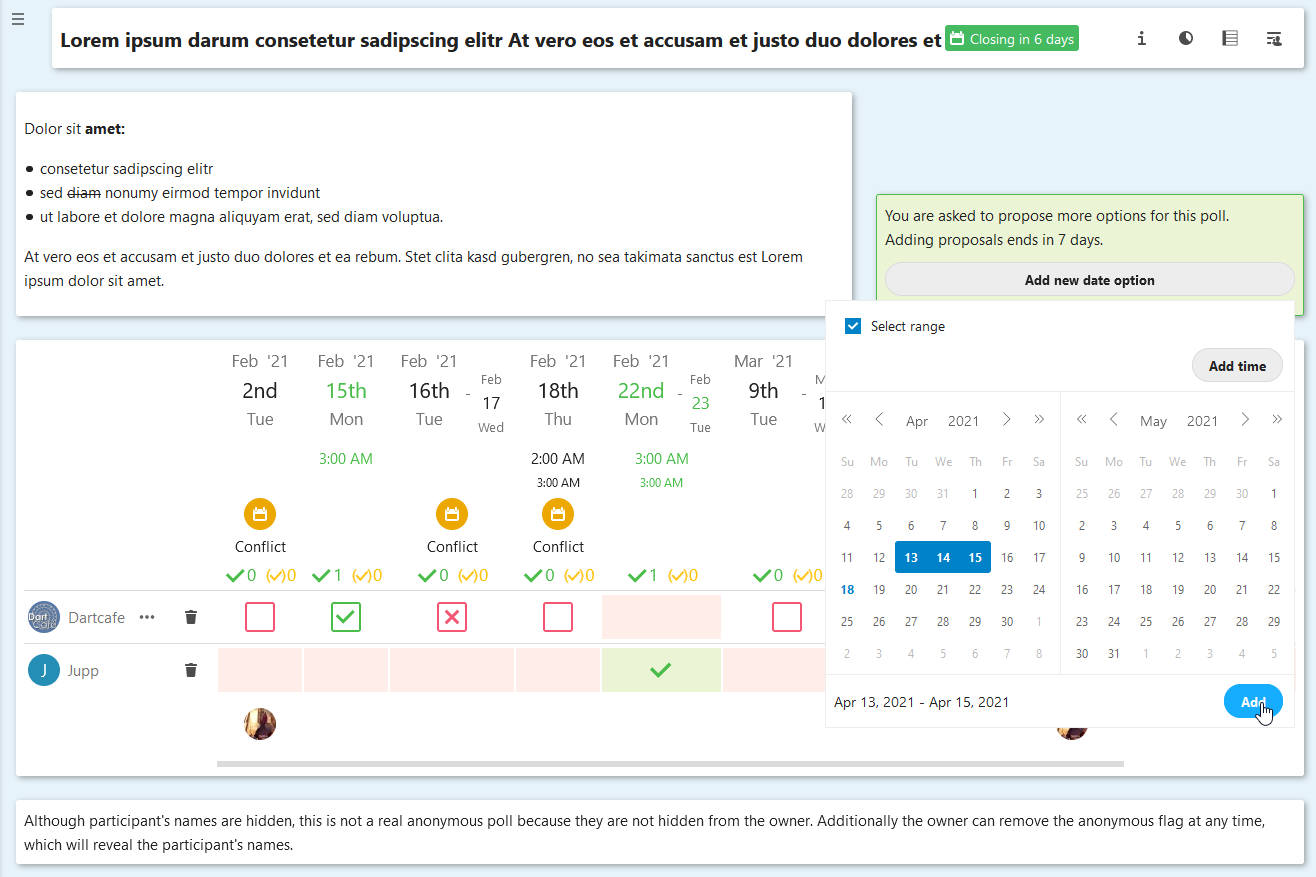
Example for the user contributed proposals
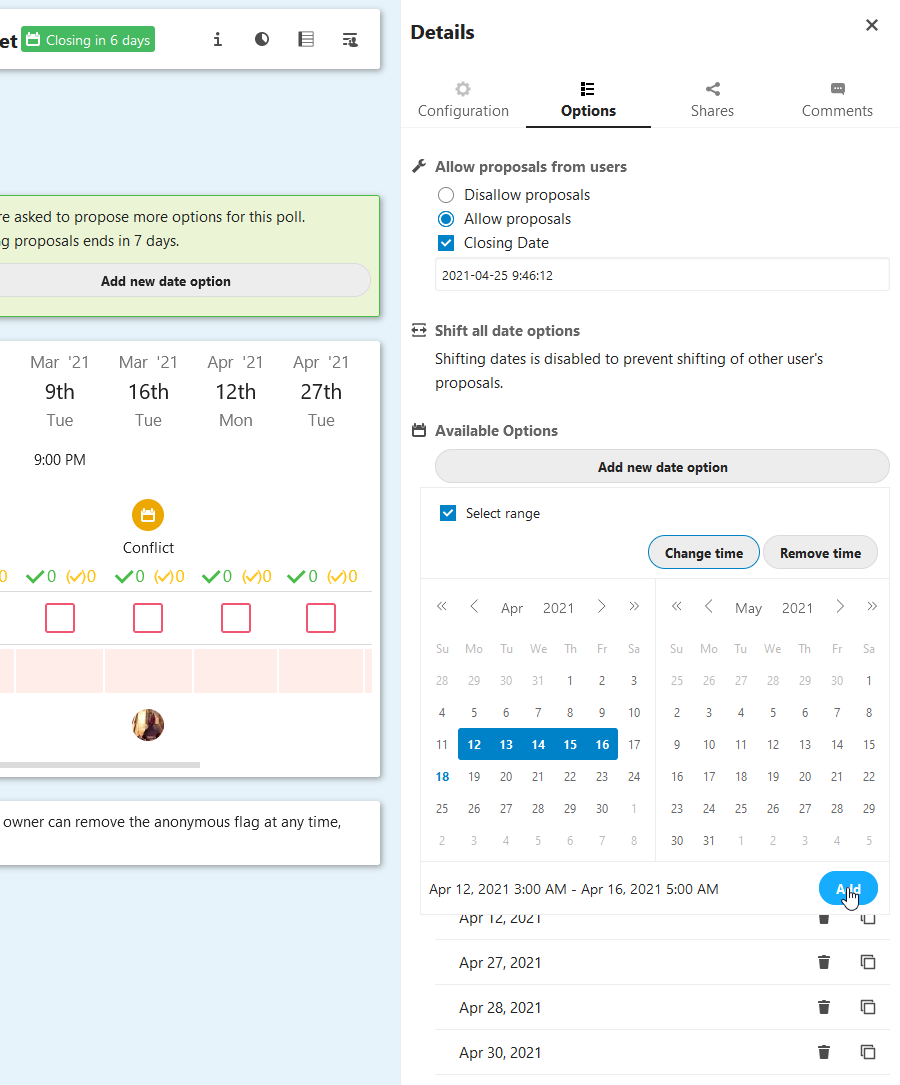
Example for the sidebar (owner's view)
dartcafe
on 18 Apr 2021
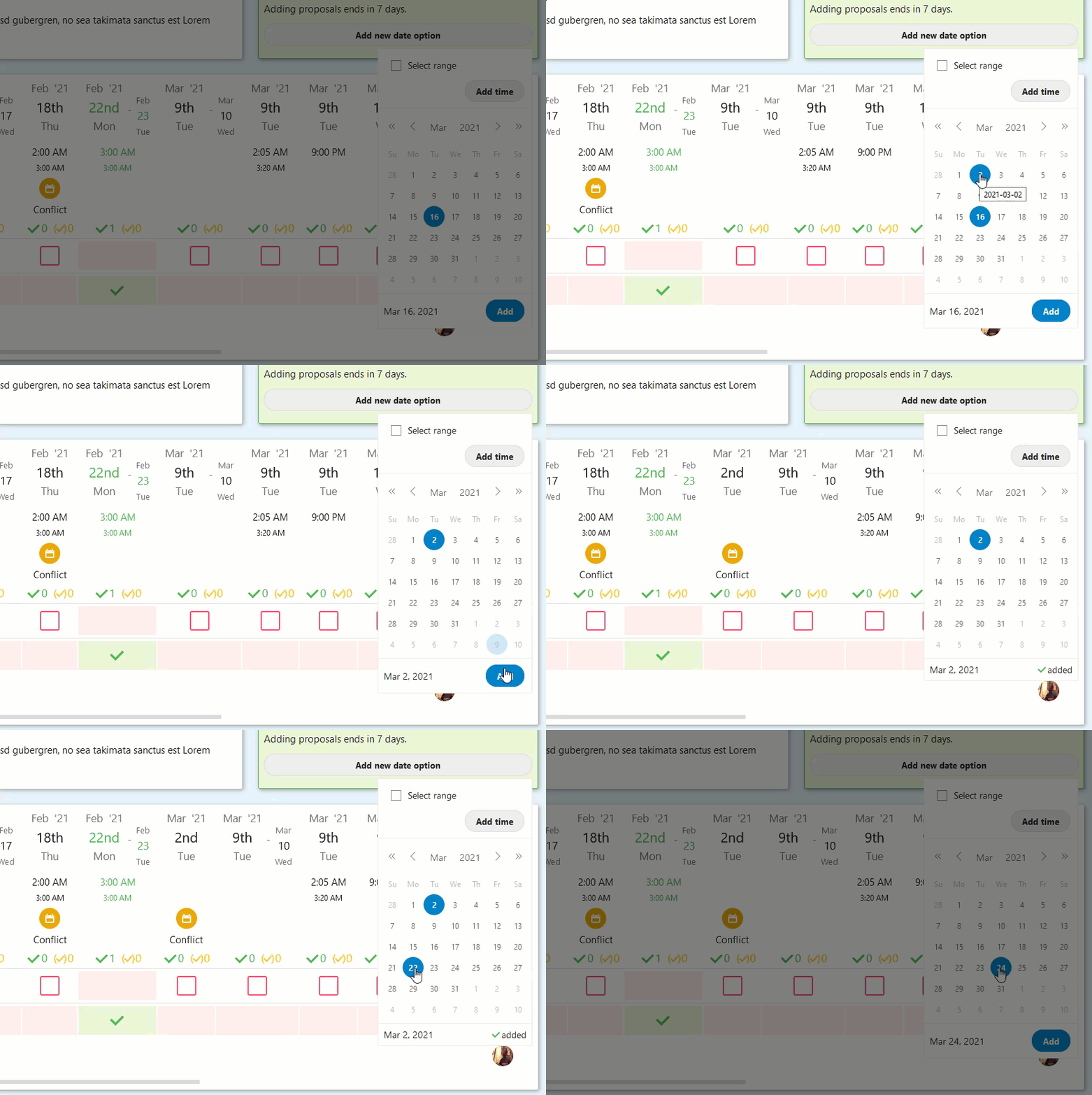
A quick proposal
dartcafe
on 18 Apr 2021
hi @dartcafe
"A quick proposal"
That is good solution
florom
on 18 Apr 2021
I finished the pr. Because of the translations the string 'added' could lead to design issues. So the text got moved to a popover. Additionally toast messages got added as well as for error messages, which were missing.
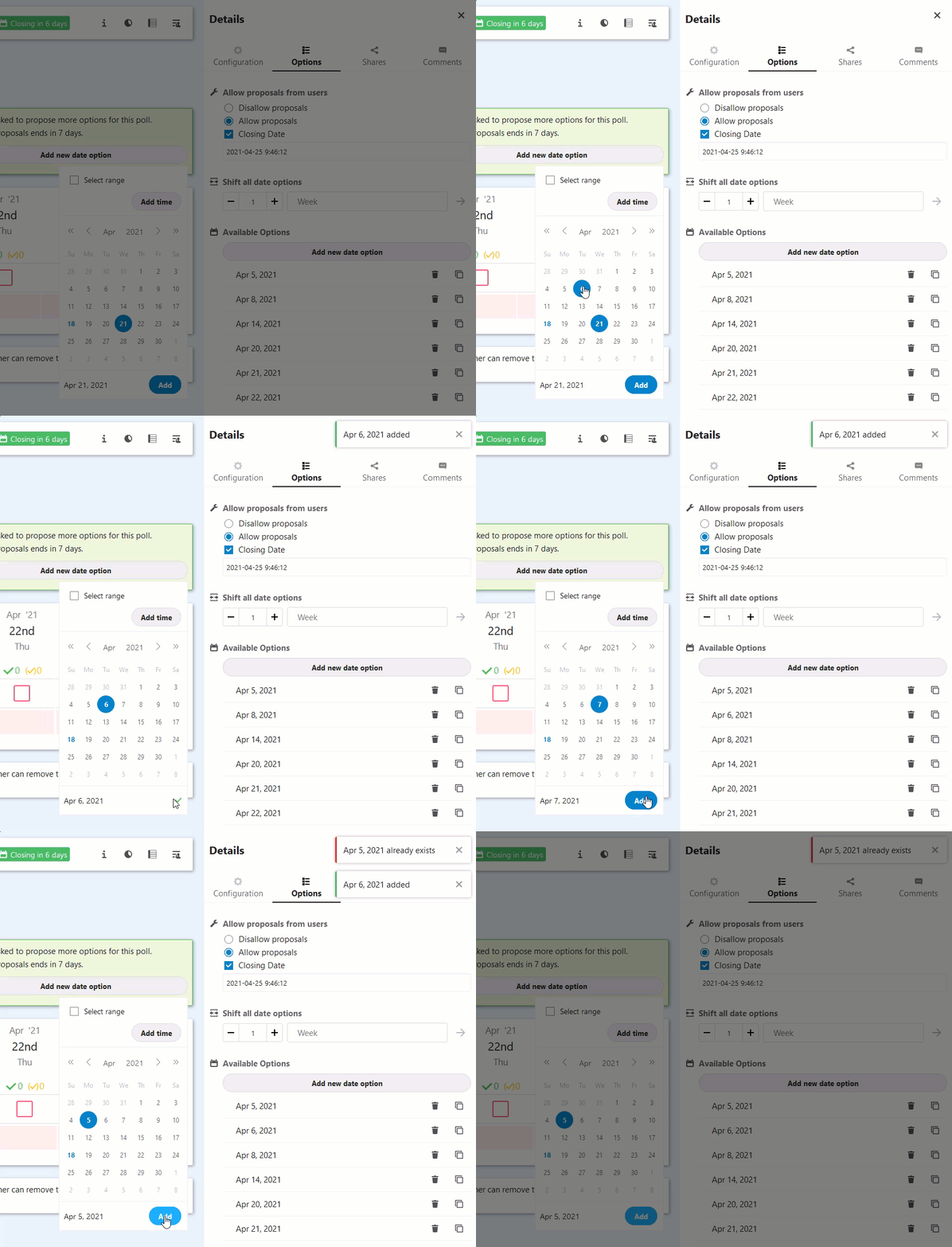
dartcafe
on 18 Apr 2021
Hi @dartcafe ,
I installed polls 1.8.3 now in nextcloud but unfortunatly these updates are not included. I was really looking forward to it.
Are there any issues left?
Thanks.
florom
on 27 Apr 2021
This issue is targeted for the 2.0 release. 1.8.3 is just a bug fix release
dartcafe
on 27 Apr 2021
Related issues
 CoreyBurger
·
3Comments
CoreyBurger
·
3Comments
 Dubidubiduu
·
5Comments
Dubidubiduu
·
5Comments
 hanzei
·
6Comments
hanzei
·
6Comments
 xeiss
·
4Comments
dartcafe
·
4Comments
xeiss
·
4Comments
dartcafe
·
4Comments
Most helpful comment
What I understood so far:
Did I get it right?