Polls: Doesn't work together with AppOrder app
What is going wrong?
When using the AppOrder app in NextCloud to change the order of the main app toolbar items the icons are still in default order when selecting the Polls App.
To Reproduce
Steps to reproduce the behavior:
- Install nextcloud docker image
- Install Polls app in NextCloud
- Install AppOrder app in NextCloud
- Change the default order of apps
- See that the app order changes on most pages (e.g.
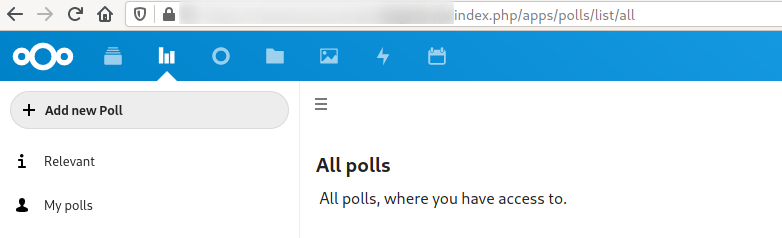
apps/files) - See that the app order is still default oder on the polls page (e.g.
apps/polls/list/all)
Expected behavior
The settings configured in AppOrder should be used on the Polls page.
Screenshots
See a Video of the issue: https://youtu.be/hd1uhKGgNwo
Information about your polls installation
Polls version? (see apps page)
1.3.0
Fresh installation or update from a prior version (from which one)?
Fresh install
How did you install this version?(Appstore or describe installation)
Appstore
Information about your Instance of Nextcloud/ownCloud
Nextcloud or ownCloud?
NextCloud
Nextcloud/ownCloud version: (see Nextcloud admin page)
18
 normen
All 24 comments
@juliushaertl Any idea, why this happens?
 dartcafe
on 8 Apr 2020
dartcafe
on 8 Apr 2020
Have the same issue :/ I installed nc normally (without docker).
 Lockorocko
on 15 Jun 2020
Lockorocko
on 15 Jun 2020
I think that is an apporder issue where we use the href of the navigation item and that somehow interferes with the subroute /list/all, but I haven't looked into it in detail yet. Is there any error in the browser console when opening the polls page?
 juliushaertl
on 15 Jun 2020
juliushaertl
on 15 Jun 2020
My console displays this error:

Lockorocko
on 15 Jun 2020
I have the same issue.
Console shows these:
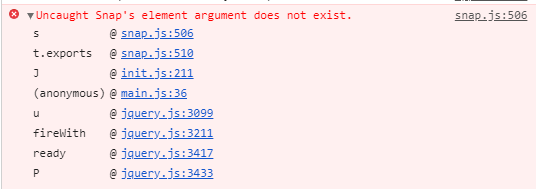
Its a "non docker" installation of nextcloud.
Polls v1.4.3 on NC v18.0.7.
Several (also 3rd party) nextcloud-apps running.
Only polls has this issue.
Would be great if someone can fix it :)
 Phil1988
on 24 Jul 2020
Phil1988
on 24 Jul 2020
I'm running NC19 with newest version of both App Order and Polls.
The problem still exists. And yes, seems like it only happens with Polls.
Please someone...fix this!
 etcy
on 7 Aug 2020
etcy
on 7 Aug 2020
This issue is marked as stale, because it had no activity in the last 30 days. It will be closed in 5 days.
![github-actions[bot] picture](https://avatars.githubusercontent.com/in/15368?v=4&s=40) github-actions[bot]
on 7 Sep 2020
github-actions[bot]
on 7 Sep 2020
Still not working with NC 18.0.9 (snap) and NC 19.0.2
 philipreimer
on 7 Sep 2020
philipreimer
on 7 Sep 2020
So I actually cannot reproduce this, having a custom order works fine with latest master
juliushaertl
on 7 Sep 2020
So might it fix it, if we uninstall polls and install it back again after that?
I cant test it right now but I will report back in a few days.
Last time I tested it (like 14 days ago) it didnt work.
Phil1988
on 7 Sep 2020
I have disabled and removed Polls. Then re-installed it - latest version 1.4.3 - into NC Snap 18.0.9 RC1 Build:2020-09-06T23:54:01+00:00 5056261850e1dfd38d3d3b24bb7b6d285f957007 with latest App Order version 0.11.0.
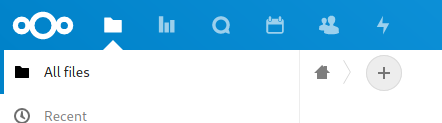
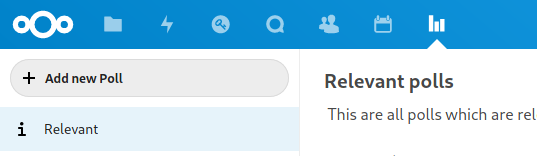
As you can see from the screenshots below navigating to Polls app does completely disable the App Order settings:
- apps are completely out of order
- app "Keyweb" (the third app icon) is visible, although it has been deactivated in App Order settings
I get the following exception in the browser console:
Uncaught Snap's element argument does not exist. snap.js:506:20
    s snap.js:506
    exports snap.js:510
    J init.js:211
    <anonym> main.js:36
    jQuery 7
    Webpack 6
Does it work if you change the order in the apporder settings to something different and back?
juliushaertl
on 7 Sep 2020
Nope
philipreimer
on 7 Sep 2020
Any chance for a test account where this issue is reproducible? Feel free to mail credentials to the address in my github profile.
juliushaertl
on 8 Sep 2020
I can reproduce this and created an account for you.
dartcafe
on 8 Sep 2020
Funny. I cannot reproduce this behavior on another instance with NC20 and with the current dev version of polls.
dartcafe
on 8 Sep 2020
Well my NC was on 18.0.5.
I deactivated and deleted polls and reinstalled it (v1.4.3).
Same Problem
I updated NC to 18.0.9 an did the same as above with the same result.
I did update NC to 19.0.3 an did the same as above with the same result.
Phil1988
on 11 Sep 2020
Might be the diff between the latest polls release and master then? I didn't test the release yet to be honest.
juliushaertl
on 11 Sep 2020
@juliushaertl Maybe, but I have no explanation. Needs more observation.
dartcafe
on 17 Sep 2020
After updating to 1.5.4 the icons behave as expected, when defining the app order. But I have still no explanation.
NC 19.0.3 with AppOrder 0.11.0 and Polls 1.5.4.
Someone can confirm?
dartcafe
on 10 Oct 2020
Yes, it seems to work, same combo of NC 19.0.3, AO 0.11.0 and Polls 1.5.4
normen
on 11 Oct 2020
So, I think magic happend.
dartcafe
on 11 Oct 2020
I can also confirm its working since updating polls.
NC v19.0.3 and Polls v1.5.4 works now.
Phil1988
on 11 Oct 2020
With NC 19.0.4, AppOrder 0.11.0 and Polls 1.5.4 the app order is also working as expected now.
philipreimer
on 12 Oct 2020
Related issues
 CoreyBurger
·
3Comments
CoreyBurger
·
3Comments
 Dubidubiduu
·
5Comments
Dubidubiduu
·
5Comments
 brtptrs
·
4Comments
brtptrs
·
4Comments
 hanzei
·
6Comments
dartcafe
·
4Comments
hanzei
·
6Comments
dartcafe
·
4Comments