Polls: Can't save a TXT poll: "Click on cells to turn them green"
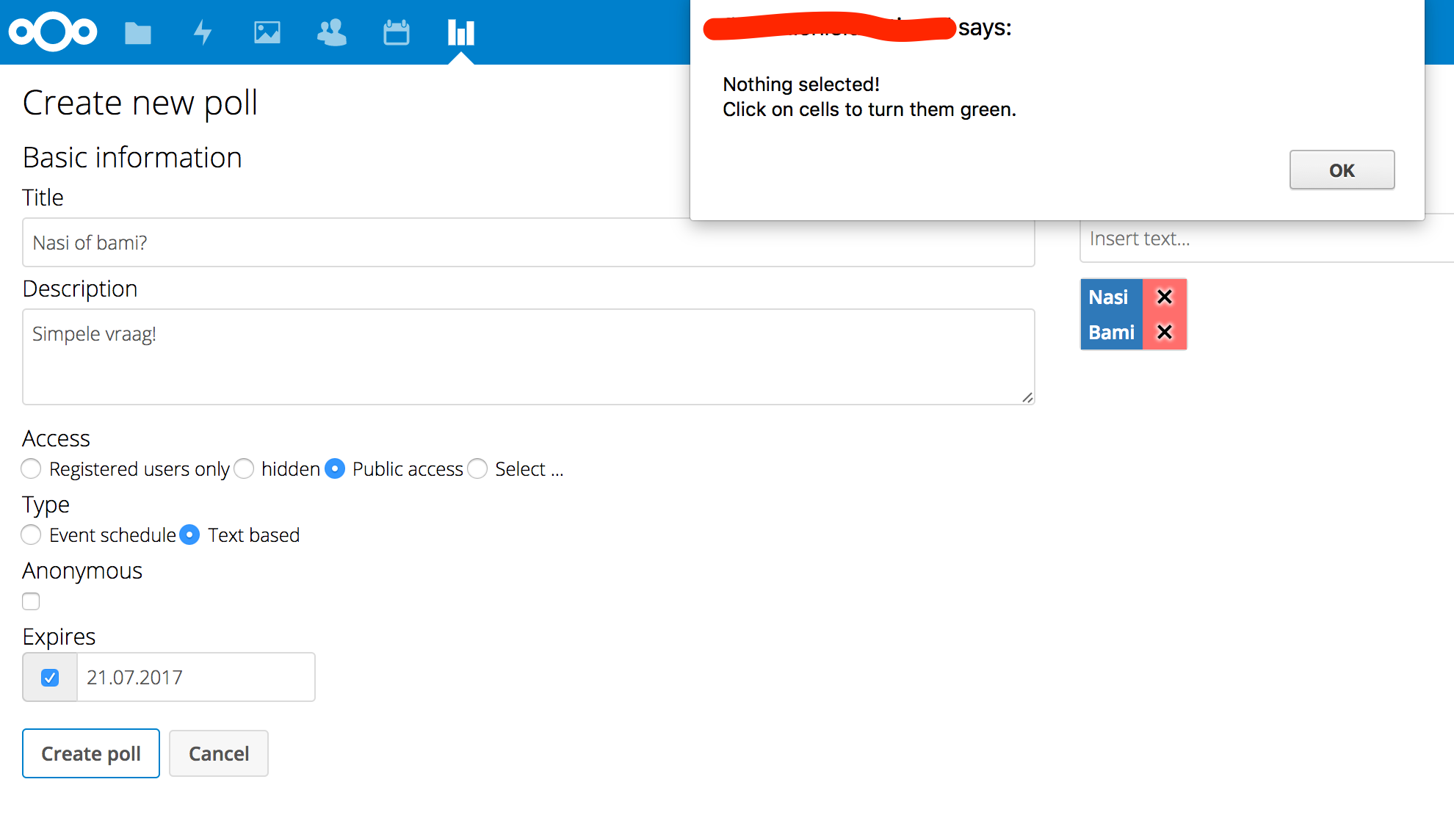
If I try to add a public text poll, I get the following message:
Nothing selected!
Click on cells to turn them green
 pmd2016
All 38 comments
The alert exactly tells you what to do: In order to activate the selections you have to click on the red cells containing the X. Then it will work.
 joergmschulz
on 18 Jul 2017
joergmschulz
on 18 Jul 2017
Ah. I see. It's not that obvious what you need to do IMHO... 😉
pmd2016
on 18 Jul 2017
Can we close this or should there be a description or anything in the UI so it's clear what to do?
 v1r0x
on 18 Jul 2017
v1r0x
on 18 Jul 2017
I had the same "problem". A description would be nice!
 q00d0
on 18 Jul 2017
q00d0
on 18 Jul 2017
Ok, as you wish 😉 Any suggestions?
v1r0x
on 19 Jul 2017
The way I interpret the 'insert text' screen is as answer options to the poll. It is not very clear that you have to answer the poll yourself before you can save the poll. It would be great if you can just setup a poll and let others answer without the need to answer the question yourself first. Does that make sense?
pmd2016
on 19 Jul 2017
You don't have to answer the questions, it's just about selecting the available questions you want in your poll. Only entries with a green checkmark will be in the poll.
v1r0x
on 19 Jul 2017
Maybe radio buttons fix this - "active" and "inactive" or something like this. With radio buttons it's obvious.
q00d0
on 19 Jul 2017
IMHO this problem especially occurs, if you haven't already created a date-poll with this app, so...
a little bit more clear statement as in https://github.com/v1r0x/polls/issues/131#issuecomment-316059909 would definitely be a good start.
also activating the lines by default could be a good and easy solution.
if you've done a mistake, you start thinking about _"how can i get rid of it"_ anyway. - and if you've already created a date-poll, the solution will be pretty obvious (with the same UI).if you really want to change the UI, maybe something like a trashcan for deactivating/deleting would make it more clear...
or better, similar to https://github.com/v1r0x/polls/issues/131#issuecomment-316302033, the important thing is to have both options available to be more self-explaining _(if people have/see only one option, they usually don't think about it, any function behind it or another option.)_:
wether it is, the "X" and the "check mark" side by side and the selected gets colored, both icons with radio buttons or radio buttons with text, is secondary.
 DJCrashdummy
on 20 Jul 2017
DJCrashdummy
on 20 Jul 2017
What does the red X even do? What's the purpose of putting in poll options that are X'ed out?
 pirate
on 10 Sep 2017
pirate
on 10 Sep 2017
It is the default behavior. The red x signals: this option is not offered to the participants.
If you klick on it, it turns to a green check sign and the option will be added to the poll.
Not really intuitive and what a user expects. I think this is gonna be under investigation.
 dartcafe
on 13 Sep 2017
dartcafe
on 13 Sep 2017
Closing this because of #160
dartcafe
on 13 Sep 2017
@dartcafe i'm not sure, if it is a good idea to close an issue with a longer message queue and collected ideas, instead of the freshly created duplicate (although or especially when it is not an exact duplicate).
DJCrashdummy
on 13 Sep 2017
Apologizes. Thought it was easier to start with the fresh one. Didn't want to bother someone. Maybe my fingers have been too fast...
dartcafe
on 13 Sep 2017
I too, don't understand this option.
When I take the time to add an item, it should be immediately available to the poll. The only option should be to remove it (or eventually change the order of the items, which is not possible now).
What's the point of creating an item and then don't use it? I don't get it.
 AceSlash
on 15 Sep 2017
AceSlash
on 15 Sep 2017
when you start creating complex polls with multiple dates and multiple hours, you'll see why a default-X has been a good idea.
As this seems to be the minority of polls, I would like to back the proposition to always add new options as green even when multiple hours are given.
joergmschulz
on 15 Sep 2017
@dartcafe np, no harm done! :wink:
@AceSlash yes... the handling, especially of text-polls, is not ideal for know. already suggested some possible solutions https://github.com/nextcloud/polls/issues/131#issuecomment-316604006, where the second and fourth point are my favorites, but somehow also all 4 solutions together can be applied.
and btw @dartcafe is doing an awesome big redesign at the moment! - but i have no idea for now, if this is also addressed in some way...
... eventually change the order of the items, which is not possible now.
this would be a new feature request and maybe worth a new issue.
DJCrashdummy
on 15 Sep 2017
@joergmschulz this issue is (mainly) about text-polls, and in this case i'm also definitely for activating new options by default. for date-polls it is debatable IMHO... but it seems to also be an issue there #160. :-/
DJCrashdummy
on 15 Sep 2017
I think the red 'x' signalizes deleting the option. Maybe a '?' instead of the x and no background. Additionally a heading or desc would be useful.
I'd prefer the current (opt-in) solution, but re-think the UI/UX.
v1r0x
on 15 Sep 2017
At least this way of creating the polls will be a problem on mobile devices. Maybe, we should redesign it as well.
dartcafe
on 16 Sep 2017
i think the best solution (without a big redesign of the UI) for text-polls(!) would be activating new options by default and have both possible statuses visible all the time, since it doesn't need that much space.
and that can be designed with radio buttons and the 2 existing icons or just the 2 icons and the not applied one is kind of grayed out.
DJCrashdummy
on 16 Sep 2017
Will be fixed when recreating the edit/create page.
dartcafe
on 14 Dec 2017
Sorry to weigh in on this, but I got here because of the error message. I was thinking about deactivating the Polls app assuming it didn't work, but I decided to search the error instead.
Now I'm no degree carrying interface psychologist, but "Affordances" for my particular mind would dictate that after I added items, that they were _added_. Therefore the red "X" icon was to remove them. Why would I need to approve of something I already _added_? It's like putting a push plate on a door that you pull to open.
The error message was too generic for me to know what it meant. Nothing selected! Click on cells to turn them green. should be No options confirmed yet. Click red X icons to confirm items you added..
 WNYmathGuy
on 7 Mar 2018
WNYmathGuy
on 7 Mar 2018
Also came here because I thought it didn't work. Looking forward to a default of adding items.
 torantal
on 11 Mar 2018
torantal
on 11 Mar 2018
I completely changed the create page, so that the default date picker of nextcloud is used and new poll options are simply added to a list of options.
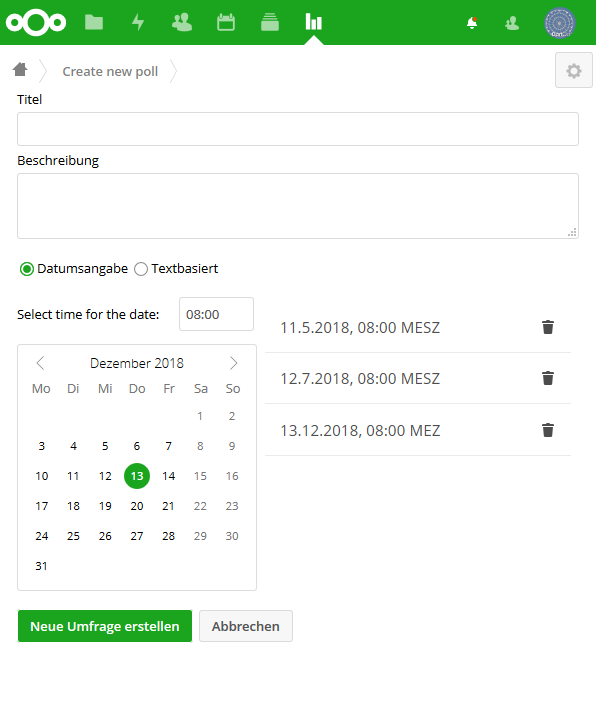
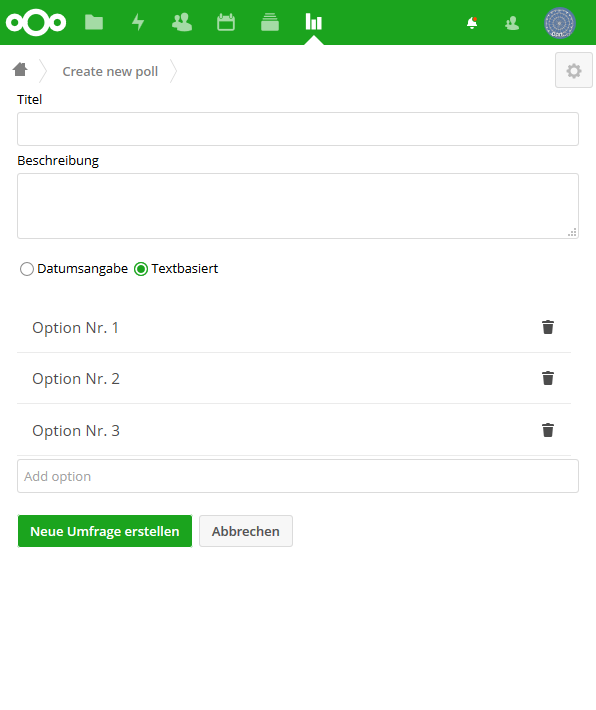
So there is no more matrix with time and date selections and options can be removed with a single click on the trash bin icon.
dartcafe
on 29 Apr 2018
well... for a date-poll (after getting used to it) i liked the martrix because it provides a kind of an easy overview, but this issue is about text-polls and for them this looks like a huge improvement! :+1:
not to mention using the default date-picker of NC is also a big improvement regarding design and UX.
btw: is the dates-list sorted by date & time or just one after another when added? - and is the same sorting also shown to participants and not just for creating/editing?
additional: are also text-poll options shown one after another or sorted alphabetically (which will make much less sense than sorting by date&time for date-polls)...?
instead at least for text-polls a possibility to manual sort the options may be the icing on the cake.
DJCrashdummy
on 29 Apr 2018
Dates are ordered by date and time and of course the presentation to the user is ordered too. Same as the current behavior.
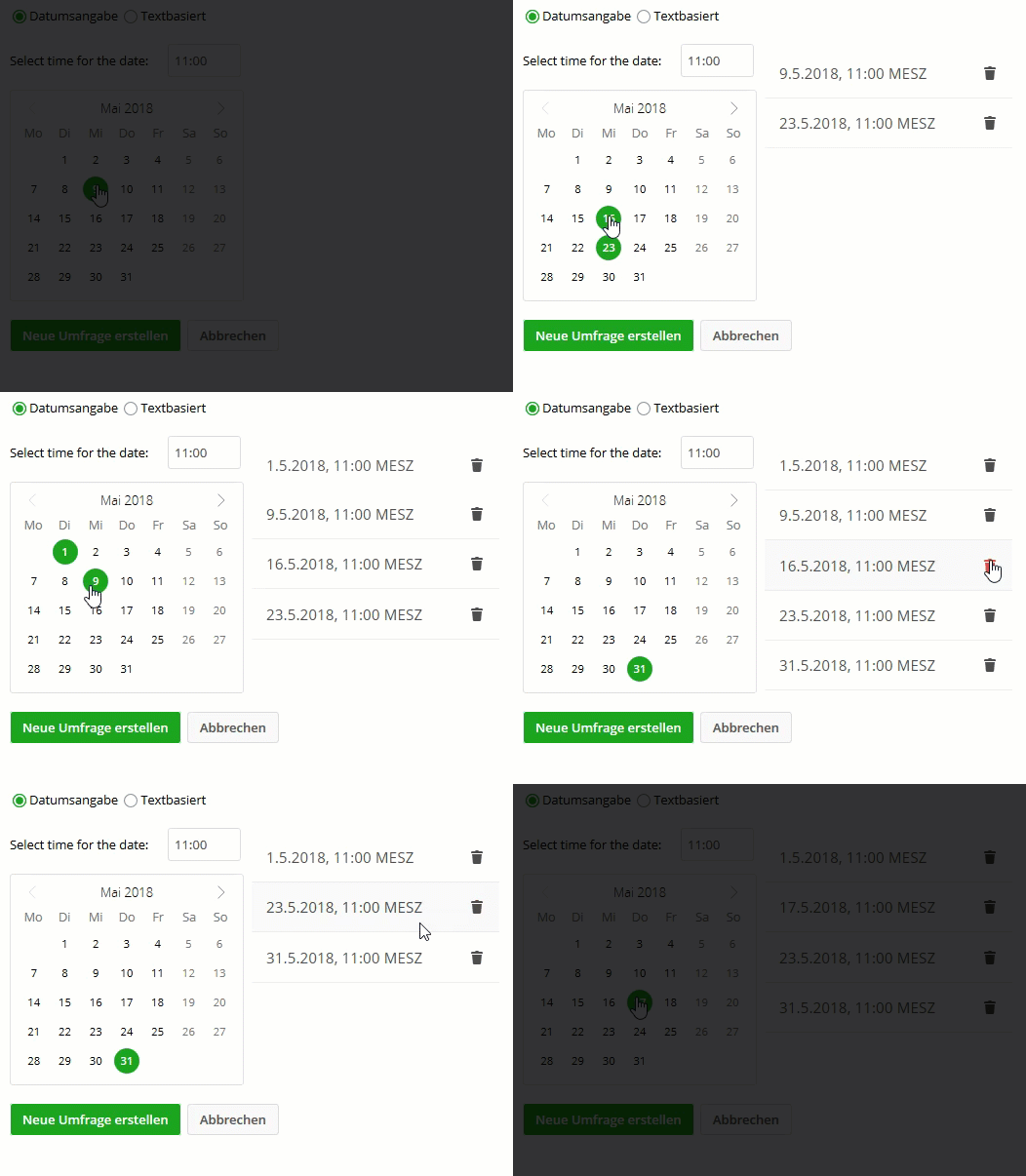
The matrix has the disadvantadge, that date polls without time or with a time range are not possible.
The text list is just by ordered by adding time. The last added option is put on the last position. Perhaps, we can make it orderable by drag and drop. But not at the moment.
dartcafe
on 30 Apr 2018
@dartcafe well... because i mentioned one interesting feature of the matrix it doesn't mean it has no disadvantages. :wink:
to make it clear: i'm completely fine with this for date- & text-polls... over all it is definitely an improvement! :clap: and as already mentioned, the manual sorting would just be the icing on the cake, since you can already achieve the same result with a little bit more thinking (except for date-polls... but i'm not sure if manual sorting there makes sense anyway).
DJCrashdummy
on 30 Apr 2018
Sorting could be a helpful feature, if the order of the options is essential to the creator. But this will not be done in this PR. I am done with the refactoring. Now UX and some improvemnts are coming up. I want to finish the first step of recreating the edit/create page and merge #315.
dartcafe
on 30 Apr 2018
Selecting dates and text options was changed. No more red crosses and green checkmarks... #302
dartcafe
on 18 Jun 2018
I am looking forward for the update, i found this one while wondering what that ominous "green field" should be. The red cross does obviously (for me) mean: Delete this option.
Thanks for keep working on that one!
 natrius
on 10 Jul 2018
natrius
on 10 Jul 2018
Joining Natrius, on the update wait! Your software is just so great for shared planning, a must have for us! Thanks!
 valkalon
on 5 Sep 2018
valkalon
on 5 Sep 2018
Hi, i want to use polls with nextcloud 14.0.1, but nothing works really. So i have to set a green raw for date options, but i can not set it.
 AndyLicht
on 11 Oct 2018
AndyLicht
on 11 Oct 2018
@AndyLicht i'm not really sure what you are talking about, but anyway this issue is mainly about TEXT polls, its design and already closed resp. solved.
for a new problem/bug please open a new issue!
DJCrashdummy
on 11 Oct 2018
I completely changed the create page, so that the default date picker of nextcloud is used and new poll options are simply added to a list of options.
So there is no more matrix with time and date selections and options can be removed with a single click on the trash bin icon.
Sorry if this is somehow obvious, but which version is this displayed design now in? I'm running 0.8.3 and it's still the old behavioiur.
torantal
on 10 Dec 2018
Seems like it is in version 0.9 and according to https://github.com/nextcloud/polls/releases/ you can install 0.9 manually and try it. But it should not be to far away, as there is 0.9.1RC2 already there.
Someone has a short explanation how to install it, in case i want to try?
natrius
on 10 Dec 2018
Someone has a short explanation how to install it, in case i want to try?
Should be possible to download the 0.9 release as zip and extract it in your NC instance into apps/polls.
It's my fault, that there is no 0.9 release available in the NC store...I'm working on a solution to release it ASAP. Sorry for that.
v1r0x
on 10 Dec 2018
Oh, sweet. Thanks for the explanation and in that case i will just wait for the new version. Don't worry, can happen. :)
natrius
on 10 Dec 2018
Related issues
 khayman123
·
3Comments
khayman123
·
3Comments
 johnnydvc
·
6Comments
johnnydvc
·
6Comments
 BurtGummer
·
3Comments
BurtGummer
·
3Comments
 jacotec
·
3Comments
jacotec
·
3Comments
 Dubidubiduu
·
5Comments
Dubidubiduu
·
5Comments
Most helpful comment
IMHO this problem especially occurs, if you haven't already created a date-poll with this app, so...
a little bit more clear statement as in https://github.com/v1r0x/polls/issues/131#issuecomment-316059909 would definitely be a good start.
also activating the lines by default could be a good and easy solution.
if you've done a mistake, you start thinking about _"how can i get rid of it"_ anyway. - and if you've already created a date-poll, the solution will be pretty obvious (with the same UI).
if you really want to change the UI, maybe something like a trashcan for deactivating/deleting would make it more clear...
or better, similar to https://github.com/v1r0x/polls/issues/131#issuecomment-316302033, the important thing is to have both options available to be more self-explaining _(if people have/see only one option, they usually don't think about it, any function behind it or another option.)_:
wether it is, the "X" and the "check mark" side by side and the selected gets colored, both icons with radio buttons or radio buttons with text, is secondary.