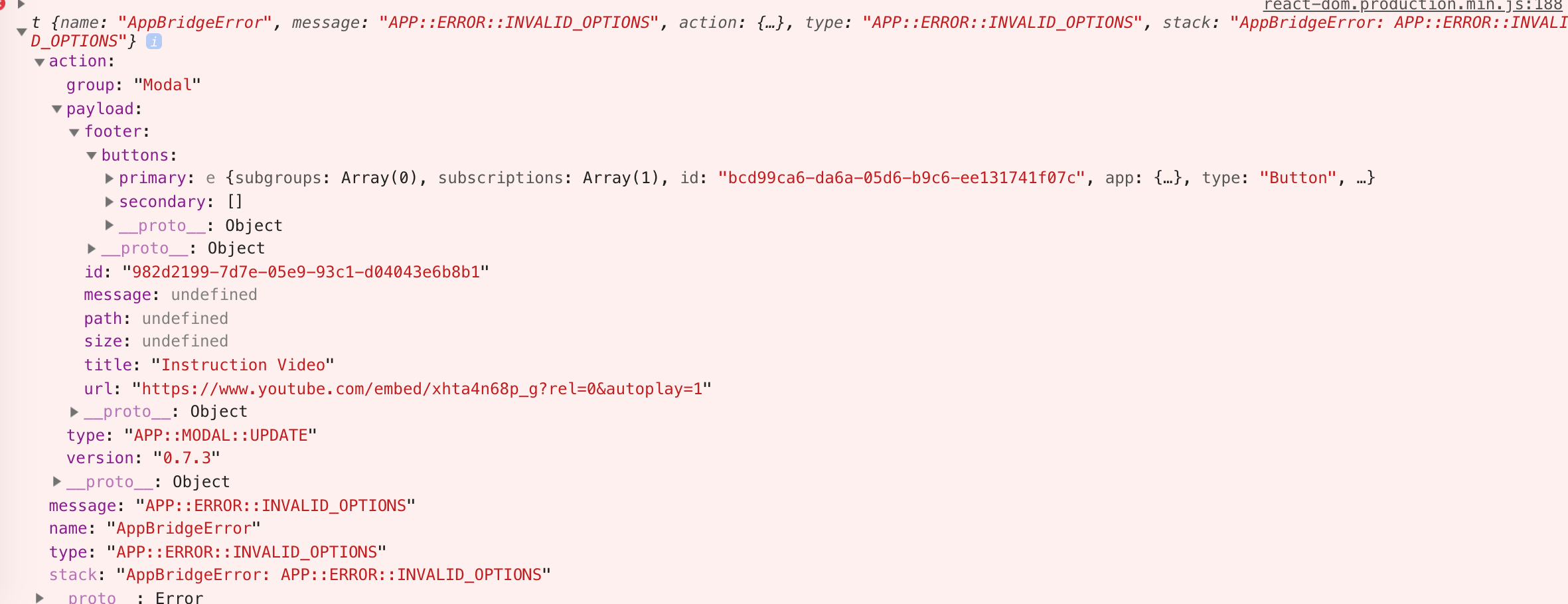
I upgrade to Polaris 3x, and added apiKey to AppProvider But Modal not work and show this error!!!
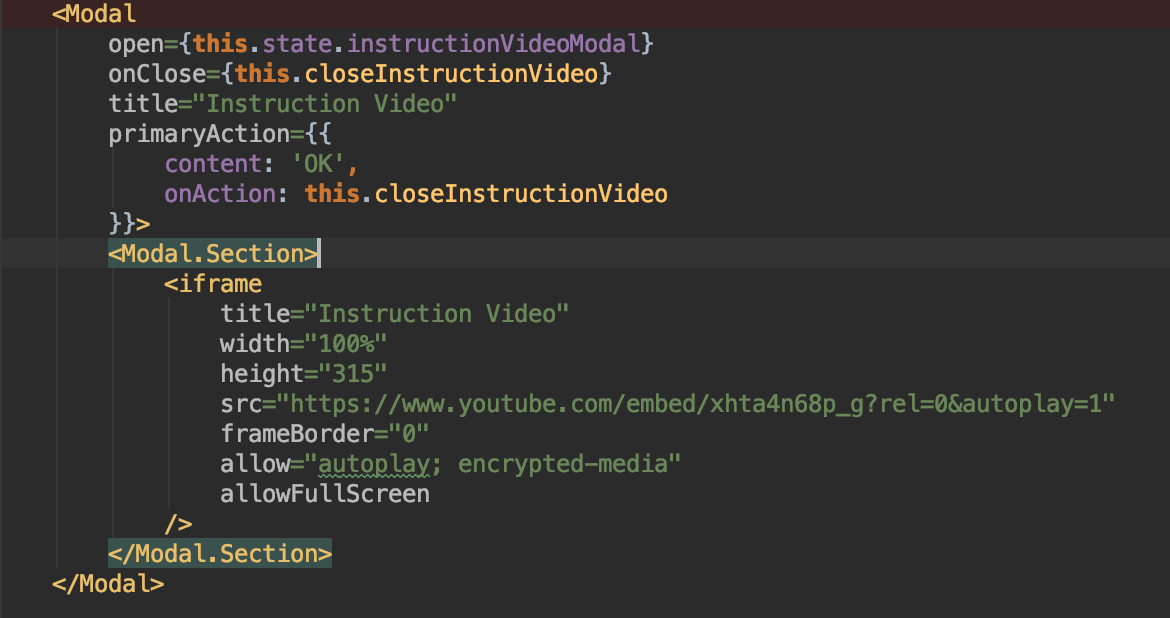

1.
1.
1.
The best way to get your bug fixed is to provide a reduced test case. This CodeSandbox template is a great starting point.
Hey @fchienvuhoang. Thanks for opening the issue. The modal component does not support passing JSX children when using it through App Bridge.
Instead you will want to point the modal at your iframe source directly with something like:
<Modal
open={this.state.instructionalVideoModal}
onClose={this.closeInstructionVideo}
title="Instruction Video"
primaryAction={{
content: 'Done',
onAction: this.closeInstructionVideo,
}}
src="https://www.youtube.com/embed/xhta4n68p_g?rel=0&autoplay=1"
/>
The modal component does not support passing JSX children when using it through App Bridge.
Hello, @dfmcphee!
Does the team plan to implement render of child components inside Modal? Current behavior makes Modal useless in most cases for me personally.
@dfmcphee thank you, I will try it!
Hi @dfmcphee, may be not a
<Modal
open={true}
onClose={this.handleChange}
title="Reach more shoppers with Instagram product tags"
primaryAction={{
content: 'Add Instagram',
onAction: this.handleChange,
}}
secondaryActions={[
{
content: 'Learn more',
onAction: this.handleChange,
},
]}
>
<Modal.Section>
<TextContainer>
<p>
Use Instagram posts to share your products with millions of
people. Let shoppers buy from your store without leaving
Instagram.
</p>
</TextContainer>
</Modal.Section>
</Modal>
Hi @dfmcphee,
I tried the code you provided with the same props (I just changed open and onClose props)
And in embedded app I get this error:

I dont know if this is relevant but the issue is also present in the 3.0.0 version of the library, just copy-pasted the examples from the doc, same AppBridgeError occurs.
Hi @rmtngh and @mrdja026, the modal component currently still does not accept children when used in an embedded app. Happy to help you debug the AppBridge error if you post a code sample of how you're using the modal. This, albeit pretty unclear, error means the modal has props set that it cannot accept.
Hi @chloerice,
As I mentioned in my comment I'm trying the sample code suggested by @dfmcphee a few comments above, and there are no children.
I tried this too (removed actions):
<Modal
open={this.state.testModalOpen}
onClose={()=>this.setState({testModalOpen:false})}
title="Instruction Video"
src="https://www.youtube.com/embed/xhta4n68p_g?rel=0&autoplay=1"
/>
** Even if it was passed some wrong props, wouldn't it be better to just ignore them instead of breaking? currently the whole page that the modal is rendered in is breaking in an embedded app.
Hi @chloerice, i was not trying to render children inside of modal, i used code provided from https://polaris.shopify.com/components/overlays/modal (pure copy paste), the error made me think that some of the required params for AppProvider(hmac, timestamp, etc) was not passing as it should so i was confused, ended up recreating modal from Polaris component docs and applying the same styles you guys did
Same here (same error as @rmtngh got), modal doesn't work, even without passing in children it doesn't work in an embedded app (in shopify admin).
Please advise on what to do. Should I use polaris 2.x.x (this is the second big issues for me which makes this framework look somewhat not ready) or should I use some other framework. I was under impression that polaris + shopify was supposed to be a smooth integration but facing issues with Modal and ResourcePicker which are blocking me big times.
Ok, so to make it work I had to add message and size parameters
We're also experiencing this issue with a copy paste from the polaris documentation using "@shopify/polaris": "^3.2.1",
Why do the documentation examples here show a child prop if the Modal does not accept child props.
class ModalExample extends React.Component {
state = {
active: true,
};
render() {
const {active} = this.state;
return (
<div style={{height: '500px'}}>
<Button onClick={this.handleChange}>Open</Button>
<Modal
open={active}
onClose={this.handleChange}
title="Reach more shoppers with Instagram product tags"
primaryAction={{
content: 'Add Instagram',
onAction: this.handleChange,
}}
secondaryActions={[
{
content: 'Learn more',
onAction: this.handleChange,
},
]}
>
<Modal.Section>
<TextContainer>
<p>
Use Instagram posts to share your products with millions of
people. Let shoppers buy from your store without leaving
Instagram.
</p>
</TextContainer>
</Modal.Section>
</Modal>
</div>
);
}
handleChange = () => {
this.setState(({active}) => ({active: !active}));
};
}
UPDATE: Apparently the typings indicate child props are only available for stand alone apps. Why can't we create custom modal children for an embedded app as well? As soon as AppBridge is configured with and api_key the modal breaks.
At the very least this should be made clearer in the documentation
I've been using the following without issue:
`
onClose={() => this.setState({modalActive: false})}
title={"Adjust Points for " + customer.name}
src={'/admin/customers/adjust-points/' + customer.cust_id}
/>
`
A few concerns I have is without the src property and the fact that Modal does not accept child components means you have to use an iframe when using a modal in an embedded app. Ok thats cool because it made sense to me, but where it makes sense to use the **loading** property I cant because loading={true} is for stand-alone apps.
"@shopify/app-bridge": "^1.0.3",
"@shopify/polaris": "^3.4.0",
I tested modal in Polaris 3.10.0 and it worked, i should close this issue!
Most helpful comment
Hi @dfmcphee,

I tried the code you provided with the same props (I just changed open and onClose props)
And in embedded app I get this error: