Poetry: Poetry remove doesn't remove but instead performs install
"poetry remove ..." doesn't remove but instead performs an install
Environment
- MacOS Mojave (10.14.4)
- Poetry 0.12.15
- poetry run pip -V (pip 19.1.1)
- pyproject.toml
I am new to Poetry. After adding a couple of packages - matplotlib, scikit-learn, they were not being recognised inside jupyter notebooks. So, I tried to remove them and add. However, I noticed that running the command below
poetry remove scipy
Would result into
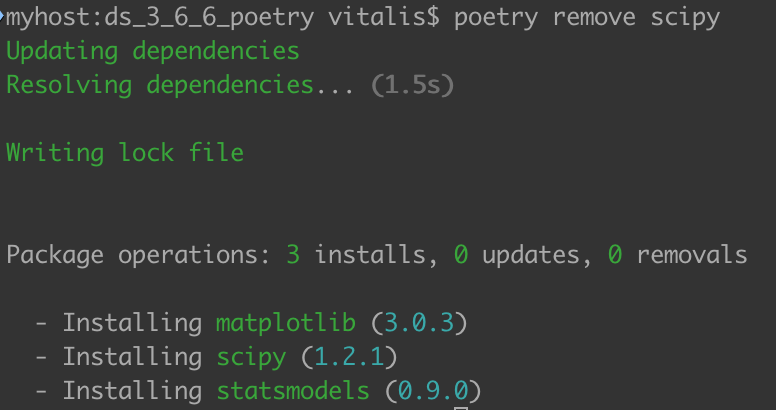
Why would remove perform an install?
 vitasiku
All 7 comments
After adding a couple of packages - matplotlib, scikit-learn, they were not being recognised inside jupyter notebooks
I assume you did that, but just in case, you would need to restart the jupyter kernel and/or deactivate/reactivate the virtualenv.
Why would remove perform an install?
If I've understood this correctly, whenever you add or remove a package, poetry tries to re-resolve the dependencies of the packages declared in pyproject.toml. This means that in some cases you might get installations even when you remove packages. For example:
- Package A depends on package D and demands that the version of D is greater than 2 but lower than 3.
- Package B also depends on package D and demands that the version of D version is greater than 2.
- The available package D versions are 2.1, 2.2, 2.3, 3.1, 3.2, 4.1
Poetry will resolve this and install package D using the higher version 2 available (i.e. 2.3). If you remove package A though, poetry will resolve the dependencies again, uninstall version 2.3 of the D package and install version 4.1 instead.
In your case, even though you remove scipy as a direct dependency, it might still get pulled as a dependency of a different package.
 pmav99
on 14 May 2019
pmav99
on 14 May 2019
@pmav99 That makes sense and would explain the behavior. That being said, it's completely counter-intuitive and would make me throw my hands up in despair if it happened to me.
 denizdogan
on 14 May 2019
denizdogan
on 14 May 2019
What is the expected result?
To remove scipy and those depends on it then remove them in the pyproject.toml?
Or remove them then rewrite pyproject.toml by filling with dependencies installed in venv?
 drunkwcodes
on 15 May 2019
drunkwcodes
on 15 May 2019
I appreciate the feedback from @pmav99 and @denizdogan for reechoing out my sentiment.
As shown in the above screenshot, in fact, a remove of scipy reinstalls scipy(again - though it may be a different version). Even, the summary of package operations mentions: _0 removals_. This is counter-intuitive as pointed by @denizdogan. In fact, I had to perform remove on another package just to check if I had mistakenly seen that behaviour.
@pmav99 provides a great explanation for this which I appreciate.
However, could the dependency resolution be done implicitly? I'm not sure if making it explicit provides any benefit.
vitasiku
on 15 May 2019
Is it better to do something like pip uninstall and auto rewrite pyproject.toml with pip freeze?
drunkwcodes
on 15 May 2019
This issue has been automatically marked as stale because it has not had recent activity. It will be closed if no further activity occurs. Thank you for your contributions.
![stale[bot] picture](https://avatars3.githubusercontent.com/in/1724?v=4&s=40) stale[bot]
on 13 Nov 2019
stale[bot]
on 13 Nov 2019
Any news on this matter?
denizdogan
on 13 Nov 2019
Related issues
 jeremy886
·
3Comments
jeremy886
·
3Comments
 etijskens
·
3Comments
etijskens
·
3Comments
 kierun
·
3Comments
kierun
·
3Comments
 alexlatchford
·
3Comments
alexlatchford
·
3Comments
 jackemuk
·
3Comments
jackemuk
·
3Comments
Most helpful comment
I assume you did that, but just in case, you would need to restart the jupyter kernel and/or deactivate/reactivate the virtualenv.
If I've understood this correctly, whenever you add or remove a package, poetry tries to re-resolve the dependencies of the packages declared in
pyproject.toml. This means that in some cases you might get installations even when you remove packages. For example:Poetry will resolve this and install package D using the higher version 2 available (i.e. 2.3). If you remove package A though, poetry will resolve the dependencies again, uninstall version 2.3 of the D package and install version 4.1 instead.
In your case, even though you remove scipy as a direct dependency, it might still get pulled as a dependency of a different package.