Pods: Error Memory size exhausted with only Pods plugin activated
I have used Pods plugin with the site http://www.montichiari.info and some days ago, after months where all was ok, i have this error:
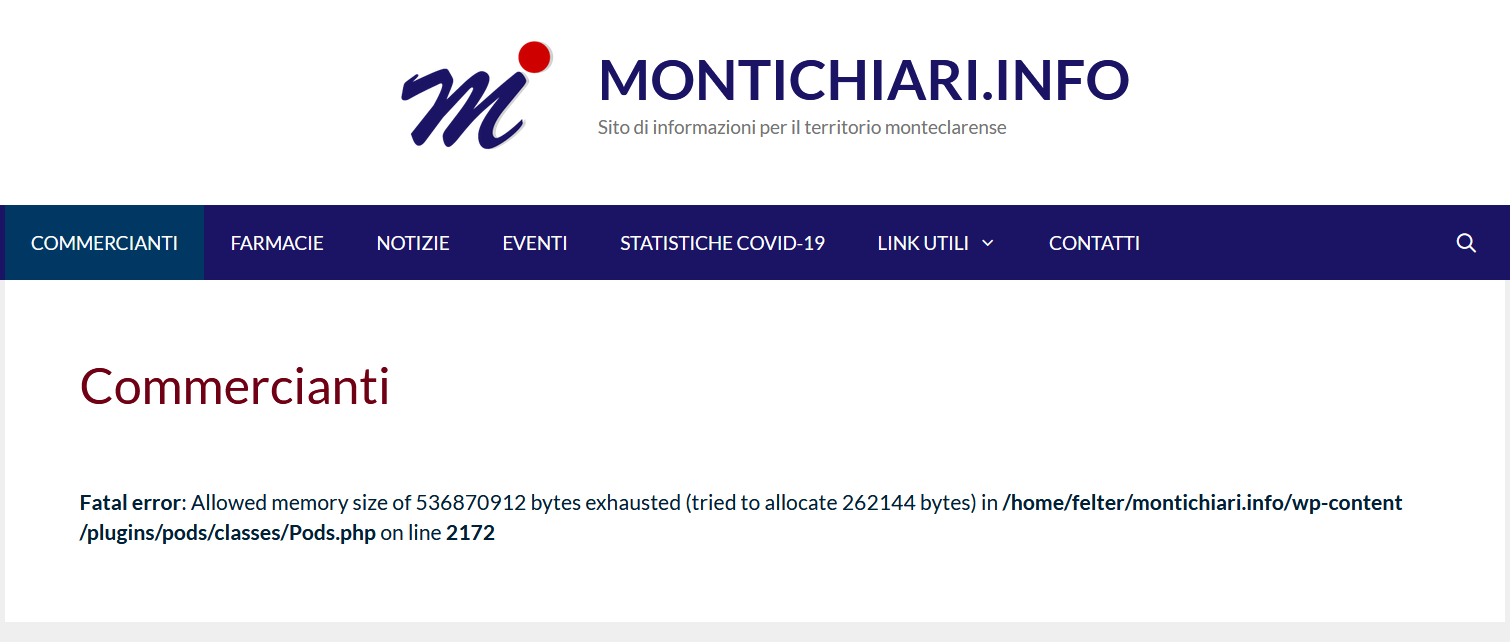
Fatal error: Allowed memory size of 536870912 bytes exhausted (tried to allocate 262144 bytes) in /home/felter/montichiari.info/wp-content/plugins/pods/classes/Pods.php on line 2172.
I have changed memory size limit until 512Mb, i have activated Pods alternative cache plugin and i have used Health Check & Troubleshooting but the error persist also with only the Pods plugin active and the standard theme.
Steps to reproduce the behavior:
- Go to http://www.montichiari.info
- Click on "commercianti"
- See error at the bottom (i have activated wordpress Debug for see the error)
The content of the page "commercianti" is some text and this shortcode:
[pods name="attivita" limit="-1" template="Block" ]
Screenshots
frontend
Backend when i try to modify that page

Pods Version
Versione 2.7.21
WordPress Environment
`
wp-core
version: 5.4.2
site_language: it_IT
user_language: it_IT
permalink: /%postname%/
https_status: false
user_registration: 0
default_comment_status: open
multisite: false
user_count: 1
dotorg_communication: true
wp-paths-sizes
wordpress_path: /home/felter/montichiari.info
wordpress_size: 206,97 MB (217026731 bytes)
uploads_path: /home/felter/montichiari.info/wp-content/uploads
uploads_size: 117,28 MB (122973500 bytes)
themes_path: /home/felter/montichiari.info/wp-content/themes
themes_size: 6,91 MB (7250556 bytes)
plugins_path: /home/felter/montichiari.info/wp-content/plugins
plugins_size: 87,96 MB (92233444 bytes)
database_size: 13,83 MB (14499840 bytes)
total_size: 432,95 MB (453984071 bytes)
wp-active-theme
name: Montichiari.info (felter_2020)
version: 0.1
author: Roberto Felter
author_website: http://felter.it
parent_theme: GeneratePress (generatepress)
theme_features: automatic-feed-links, post-thumbnails, post-formats, woocommerce, title-tag, html5, customize-selective-refresh-widgets, align-wide, responsive-embeds, custom-logo, menus, editor-style, widgets
theme_path: /home/felter/montichiari.info/wp-content/themes/felter_2020
wp-parent-theme
name: GeneratePress (generatepress)
version: 2.4.2
author: Tom Usborne
author_website: https://tomusborne.com
theme_path: /home/felter/montichiari.info/wp-content/themes/generatepress
wp-themes-inactive (4)
Twenty Nineteen: version: 1.6, author: Team di WordPress
Twenty Seventeen: version: 2.3, author: il team di WordPress
Twenty Sixteen: version: 2.1, author: il team di WordPress
Twenty Twenty: version: 1.4, author: Team di WordPress
wp-mu-plugins (1)
Health Check Troubleshooting Mode: author: (undefined), version: 1.7.1
wp-plugins-active (14)
Akismet Anti-Spam: version: 4.1.6, author: Automattic
Ditty News Ticker: version: 2.2.17, author: Metaphor Creations
DreamHost Panel Login: version: 1.0.0, author: DreamHost, danielbachhuber
Google Tag Manager for Wordpress: version: 1.11.4, author: Thomas Geiger
GP Premium: version: 1.10.0, author: Tom Usborne
Health Check & Troubleshooting: version: 1.4.4, author: The WordPress.org community
Jetpack by WordPress.com: version: 8.7.1, author: Automattic
Pods - Custom Content Types and Fields: version: 2.7.21, author: Pods Framework Team
Widget Context: version: 1.3.2, author: Kaspars Dambis
Wordfence Security: version: 7.4.9, author: Wordfence
WP Extended Search: version: 1.3.1, author: 5um17
WP GDPR Compliance: version: 1.5.4, author: Van Ons
WP Responsive Recent Post Slider/Carousel: version: 2.3.3, author: WP OnlineSupport
Yoast SEO: version: 14.6.1, author: Team Yoast
wp-plugins-inactive (11)
Customizer Export/Import: version: 0.9.2, author: The Beaver Builder Team
Duplicator: version: 1.3.36, author: Snap Creek
Easy Theme and Plugin Upgrades: version: 2.0.1, author: Chris Jean
Google Analytics for WordPress by MonsterInsights: version: 7.11.0, author: MonsterInsights
Hello Dolly: version: 1.7.2, author: Matt Mullenweg
Maintenance: version: 3.90, author: WP Maintenance
Pods Alternative Cache: version: 2.1.0, author: Pods Framework Team
Search & Filter: version: 1.2.12, author: Designs & Code
WordPress Importer: version: 0.7, author: wordpressdotorg
WP Custom Fields Search: version: 1.2.31, author: Don Benjamin
WP Smart Import: version: 1.0.1, author: Xylus Themes
wp-media
image_editor: WP_Image_Editor_Imagick
imagick_module_version: 1687
imagemagick_version: ImageMagick 6.9.7-4 Q16 x86_64 20170114 http://www.imagemagick.org
imagick_limits:
imagick::RESOURCETYPE_AREA: 62 GB
imagick::RESOURCETYPE_DISK: 1.844674407371E+19
imagick::RESOURCETYPE_FILE: 6144
imagick::RESOURCETYPE_MAP: 62 GB
imagick::RESOURCETYPE_MEMORY: 31 GB
imagick::RESOURCETYPE_THREAD: 1
gd_version: bundled (2.1.0 compatible)
ghostscript_version: 9.26
wp-server
server_architecture: Linux 4.14.117-grsec-grsec+ x86_64
httpd_software: Apache
php_version: 7.4.3 64bit
php_sapi: cgi-fcgi
max_input_variables: 1000
time_limit: 120
memory_limit: 512M
max_input_time: -1
upload_max_size: 512M
php_post_max_size: 512M
curl_version: 7.58.0 OpenSSL/1.1.1
suhosin: false
imagick_availability: true
server-headers:
date: Sun, 02 Aug 2020 09:25:14 GMT
server: Apache
expires: Wed, 11 Jan 1984 05:00:00 GMT
cache-control: no-cache, must-revalidate, max-age=0
x-ua-compatible: IE=edge
link: http://www.montichiari.info/wp-json/; rel="https://api.w.org/", http://www.montichiari.info/; rel=shortlink
upgrade: h2
vary: Accept-Encoding,User-Agent
content-encoding: gzip
content-type: text/html; charset=UTF-8
htaccess_extra_rules: true
wp-database
extension: mysqli
server_version: 5.7.28-log
client_version: mysqlnd 7.4.3
wp-constants
WP_HOME: undefined
WP_SITEURL: undefined
WP_CONTENT_DIR: /home/felter/montichiari.info/wp-content
WP_PLUGIN_DIR: /home/felter/montichiari.info/wp-content/plugins
WP_MAX_MEMORY_LIMIT: 256M
WP_DEBUG: true
WP_DEBUG_DISPLAY: true
WP_DEBUG_LOG: false
SCRIPT_DEBUG: false
WP_CACHE: false
CONCATENATE_SCRIPTS: undefined
COMPRESS_SCRIPTS: undefined
COMPRESS_CSS: undefined
WP_LOCAL_DEV: undefined
wp-filesystem
wordpress: writable
wp-content: writable
uploads: writable
plugins: writable
themes: writable
mu-plugins: writable
jetpack
site_id: 174048906
ssl_cert: No
time_diff: undefined
version_option: 8.7.1:1594801407
old_version: 8.7:1594214481
public: Public
master_user: #1 montichiari_fyoebj ([email protected])
current_user: #1 montichiari_fyoebj ([email protected])
tokens_set: Blog User
blog_token: StM%X0qC1vlDeol&X5lVsVK#^1&@Y0GY
user_token: zhz2t(U71%5SIlSPgv546#$yKAjIdO9H
version: 8.7.1
jp_plugin_dir: /home/felter/montichiari.info/wp-content/plugins/jetpack/
plan: free
HTTP_HOST: www.montichiari.info
SERVER_PORT: 80
REMOTE_ADDR: 79.49.152.95
protect_header: {"trusted_header":"REMOTE_ADDR","segments":1,"reverse":false}
full_sync: {"started":"Sun, 02 Aug 2020 09:22:31 +0000","finished":"Sun, 02 Aug 2020 09:22:42 +0000","progress":{"options":{"finished":true},"functions":{"finished":true},"constants":{"finished":true},"users":{"total":"1","sent":1,"finished":true,"last_sent":"1"}},"config":{"options":true,"functions":true,"constants":true,"users":[1]}}
sync_size: undefined
sync_lag: 0 seconds
full_sync_size: undefined
full_sync_lag: 0 seconds
idc_urls: {"home":"http://www.montichiari.info","siteurl":"http://www.montichiari.info","WP_HOME":"","WP_SITEURL":""}
idc_error_option: false
idc_optin: true
cxn_tests: All Pass.
pods
pods-server-software: Apache
pods-user-agent: Mozilla/5.0 (Windows NT 10.0; Win64; x64; rv:79.0) Gecko/20100101 Firefox/79.0
pods-session-save-path: /tmp
pods-session-save-path-exists: Sì
pods-session-save-path-writable: Sì
pods-session-max-lifetime: 1440
pods-opcode-cache-apc: No
pods-opcode-cache-memcached: No
pods-opcode-cache-opcache: Sì
pods-opcode-cache-redis: No
pods-object-cache-apc: No
pods-object-cache-apcu: No
pods-object-cache-memcache: No
pods-object-cache-memcached: No
pods-object-cache-redis: No
pods-memory-current-usage: 72,436M
pods-memory-current-usage-real: 8,000M
pods-network-wide: No
pods-install-location: /home/felter/montichiari.info/wp-content/plugins/pods/
pods-developer: No
pods-tableless-mode: No
pods-light-mode: No
pods-strict: Sì
pods-allow-deprecated: No
pods-api-cache: Sì
pods-shortcode-allow-evaluate-tags: No
`
jsonexport-montichiariinfo.txt
Pods Package Export (helpful!)
jsonexport-montichiariinfo.txt
Additional context
With Pods plugin actived, when i try to modify at the backend the page "commercianti" i have the same error.
Possible Workaround
no workaround found.
 rfelter
All 10 comments
Issue-Label Bot is automatically applying the label Type: Bug to this issue, with a confidence of 0.77. Please mark this comment with :thumbsup: or :thumbsdown: to give our bot feedback!
Links: app homepage, dashboard and code for this bot.
![issue-label-bot[bot] picture](https://avatars.githubusercontent.com/in/27079?v=4&s=40) issue-label-bot[bot]
on 2 Aug 2020
issue-label-bot[bot]
on 2 Aug 2020
I'm getting the same error in my blog. I have 2 pods - _Books_ and _Reviews_ - linked with "many to many" bidirectional field: 1 _Book_ has many _Reviews_. And 1 _Review_ has 1 _Book_. Auto template pods (with "replace" mode and filtering _the_content_) is breaking my blog. Xdebug reports errors at the same line code and another one:
`Fatal error: Allowed memory size of 1073741824 bytes exhausted (tried to allocate 262144 bytes) in C:\xampp\htdocs\mysite.com\wp-content\plugins\pods\classes\Pods.php on line 2172
Fatal error: Allowed memory size of 1073741824 bytes exhausted (tried to allocate 262144 bytes) in C:\xampp\htdocs\mysite.com\wp-includes\formatting.php on line 4845`
Please, let me know if I can help you resolve this.
 jesuserro
on 5 Aug 2020
jesuserro
on 5 Aug 2020
Looking into this, thanks for your patience. I've been laser focused on Pods 2.8 and did not notice this bug fly past me! @JoryHogeveen and I will get into this to see what's going on.
 sc0ttkclark
on 7 Aug 2020
sc0ttkclark
on 7 Aug 2020
Do either of you have a staging or dev environment you could temporarily share access (privately) with us to dig into this? Jory has done some initial review of this but has been unsuccessful in reproducing the error. If you want to share, send to [email protected] or join our Slack and send it to me at sc0ttkclark
sc0ttkclark
on 7 Aug 2020
I have a dev environment in localhost reproducing this error (Xampp server on localhost) Maybe we can share it but I don't know how. I also can send you a copy of my database and my Pods settings. I'm available for Skype/Slack videoconference if necessary (sharing screen or whatever) Please, let me know how I can help you 🙂
jesuserro
on 7 Aug 2020
@sc0ttkclark you have my staging site access on Slack :)
rfelter
on 9 Aug 2020
@rfelter @jesuserro
I've created a patch that should fix this issue: #5805
It would be great if you could test it and confirm it works!
Cheers, Jory
 JoryHogeveen
on 11 Aug 2020
JoryHogeveen
on 11 Aug 2020
Hi,
tested your changes. Website works fine now. I don't have this issue anymore.
Thanks.
 hansmans08
on 11 Aug 2020
hansmans08
on 11 Aug 2020
Hi, @JoryHogeveen! Tested your changes on my side (#5805) It's working fine now! 🙂👍🏻👏🏻👏🏻👏🏻 Thank you for your effort, keep up the good work! ✅
jesuserro
on 11 Aug 2020
@JoryHogeveen Tested. It's working. Thanks a lot. Great work.
rfelter
on 13 Aug 2020
Related issues
 HmCody
·
6Comments
HmCody
·
6Comments
 demitri
·
3Comments
JoryHogeveen
·
3Comments
demitri
·
3Comments
JoryHogeveen
·
3Comments
 tuanmh
·
5Comments
tuanmh
·
5Comments
 benfavre
·
3Comments
benfavre
·
3Comments
Most helpful comment
@rfelter @jesuserro
I've created a patch that should fix this issue: #5805
It would be great if you could test it and confirm it works!
Cheers, Jory